1. Chigadzirwa Pamusoroview
The SINGCALL Wireless Caregiver Calling System Mobile Watch Receiver (Model 6100) is designed to work with compatible call buttons/pagers to create a simple and efficient calling system. This receiver is ideal for various environments such as hospitals, care facilities, restaurants, and homes, enabling quick and discreet communication between individuals needing assistance and caregivers or service staff. Please note: This product is a wireless watch receiver only; call buttons/pagers are not included and must be purchased separately to form a complete system.
Key Features
- Mobile pager receiver with lanyard for convenient wearing around the neck.
- Integrated calendar, clock, and alarm clock functions.
- Rechargeable battery with extended standby time (2-3 days).
- Fast delete function to remove individual or all registered numbers with a single key.
- Encryption function to prevent accidental loss of information.
- Supports downloading registration information via software for easier setup.


2. Setup uye Pairing
The SINGCALL 6100 receiver requires pairing with compatible SINGCALL call buttons/pagers to function as a complete calling system. The receiver can store up to 500 call numbers. Registration information can be managed via dedicated software, simplifying the setup process.
Kubatanidzwa kweSystem
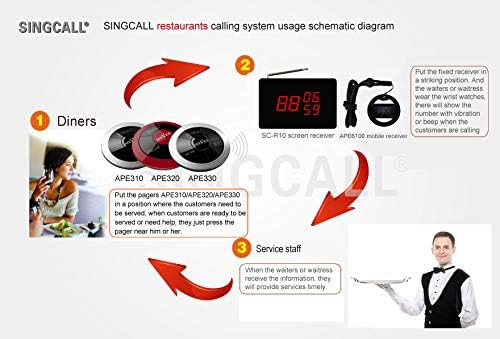
To set up your system, position the call buttons in areas where assistance may be needed. When a button is pressed, the receiver will display the corresponding number and provide an alert (vibration/sound).

Video Demonstration: Receiver and Button Interaction
Video 2.1: This video demonstrates the interaction between the SINGCALL 6100 receiver and call buttons. It shows how pressing a call button triggers an alert on the receiver, displaying the corresponding call number.
3. Operating Instructions
Kutambira Macalls
When a paired call button is pressed, the receiver will alert the user through vibration and/or sound, and the corresponding call number will be displayed on the screen. This allows for immediate identification of the location or individual requiring assistance.
Managing Call Records
The receiver features a 'Fast Delete Function' which allows you to quickly clear call records. You can choose to delete a single registered number or all registered numbers with a simple operation, ensuring privacy and efficient management of alerts.
Time and Alarm Functions
The device includes a built-in calendar, clock, and alarm clock function, providing additional utility beyond its primary calling system role. Ensure the time is set correctly for optimal use of these features.


4. Kuchengeta
- Kuchenesa: Wipe the receiver with a soft, dry cloth. Do not use abrasive cleaners or solvents.
- Kuchaja: Recharge the battery regularly to ensure optimal performance and standby time. Avoid overcharging or completely draining the battery for extended periods.
- Kuchengeta: Store the device in a cool, dry place away from direct sunlight and extreme temperatures when not in use for long periods.
- Kuramba Mvura: Mudziyo uyu haupindi mvura. Dzivisa kusviba nemvura kana hunyoro hwakawanda.
5. Kugadzirisa matambudziko
- Receiver not responding to calls: Ensure the receiver is charged and powered on. Verify that the call buttons are functioning and properly paired with the receiver. Check for any obstructions or excessive distance between the button and receiver.
- Ratidza nyaya: If the display is dim or unresponsive, recharge the battery. If the issue persists, contact customer support.
- Information loss: The receiver has an encryption function to prevent accidental data loss. If you experience unexpected data loss, ensure proper operation and consider re-registering call numbers if necessary.
- Upfupi bhatiri hupenyu: Ensure the device is fully charged. Battery life can vary based on usage and environmental factors. If battery life significantly degrades, it may indicate the need for battery replacement.
6. Zvinotsanangurwa
| Attribute | Detail |
|---|---|
| Brand | SINGCALL |
| Model Number | 6100 |
| Mugadziri | EASTWAY INTERNATIONAL (HK) LIMITED |
| Item Weight | 3.52 ounces |
| Product Dimensions | 2.36 x 2.36 x 0.79 inches |
| Material Type | ABS |
| Zuva Rokutanga Kuwanikwa | Ndira 10, 2021 |
7. Warranty uye Tsigiro
For warranty information, technical support, or any inquiries regarding your SINGCALL Wireless Caregiver Calling System Receiver, please contact SINGCALL customer service directly. You can find more information and contact details on the official SINGCALL store page.
Visit the SINGCALL Store kune zvimwe zvigadzirwa uye zviwanikwa zvekutsigira.


