1. Nhanganyaya
This manual provides detailed instructions for the setup, operation, maintenance, and troubleshooting of your Hannspree HO275PTB LED-Monitor. Please read this manual thoroughly before using the product to ensure proper and safe operation.
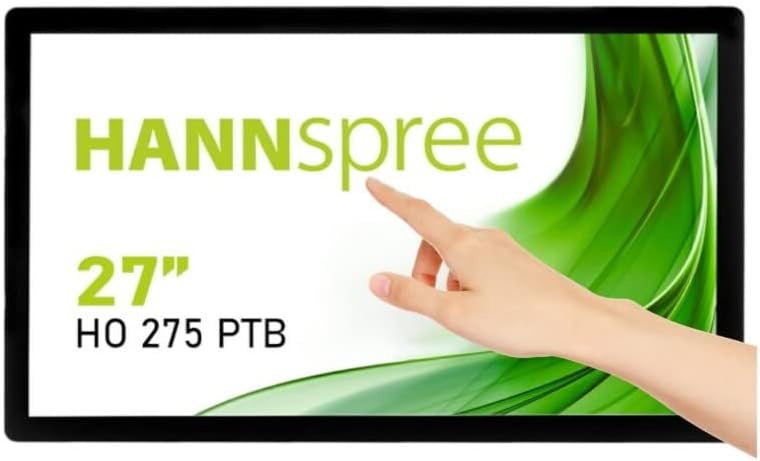
Mufananidzo 1.1: Mberi view of the Hannspree HO275PTB LED-Monitor, showcasing its 27-inch display and touch functionality.
2. Setup
2.1 Kusunungura
Nyatsobvisa zvese zvikamu kubva pakurongedza. Ita shuwa kuti zvinhu zvese zvakanyorwa pazasi zviripo:
- Hannspree HO275PTB LED-Monitor
- Power Cable
- HDMI Cable (inogona kusiyana nenzvimbo)
- USB Cable (for touch functionality)
- Mushandisi Chinyorwa (gwaro iri)
2.2 Kuiswa Kwenyama
The monitor can be placed on a flat surface or mounted using a VESA-compatible mount (not included).

Mufananidzo 2.1: Side profile of the monitor, illustrating its slim design.

Mufananidzo 2.2: Kumashure view of the monitor, highlighting the VESA mounting holes for wall or arm installation.
2.3 Kubatanidza Cables
Connect the necessary cables to the corresponding ports on the back of the monitor. Ensure all connections are secure.
- Power Connection: Batanidza tambo yemagetsi kune yekuisa simba remonitor uye ipapo kune chinobuda magetsi.
- Vhidhiyo yekubatanidza: Connect an HDMI or DisplayPort cable from your computer's video output to the corresponding input on the monitor.
- USB Connection (for Touch): Connect the USB cable from your computer to the USB upstream port on the monitor to enable touch functionality.
- Audio Kubatanidza: If using external speakers or headphones, connect them to the audio output port.

Mufananidzo 2.3: Detailed view of the monitor's connectivity ports, including power, USB, HDMI, and DisplayPort.
3. Kushandisa Monitor
3.1 Simba On/Kudzima
Dzvanya bhatani rekubatidza riri pamonitor kuti uribatidze kana kudzima. Chiedza chekuratidza simba chichavheneka kana monitor yabatidzwa.
3.2 Sarudzo yekupinda
The monitor automatically detects the active video input. If multiple sources are connected, you may need to manually select the input using the monitor's on-screen display (OSD) menu.
3.3 Pa-Screen Display (OSD) Menyu
Access the OSD menu to adjust various display settings such as brightness, contrast, color temperature, and aspect ratio. Refer to the quick start guide for specific button functions.
3.4 Bata Basa
The Hannspree HO275PTB features multi-touch capability. Ensure the USB cable is connected to your computer for this feature to work. Drivers may be required for certain operating systems.
4. Kuchengeta
4.1 Kuchenesa Monitor
Kuti uchenese chidzitiro chemonitor, pukuta zvinyoro nyoro nejira rakapfava, risina jira. Nokuda kwemavara akasindimara, dampsn jira racho zvishoma nemvura kana isina-abrasive screen cleaner. Usafire mvura yakananga pachiratidziri.
Zvemonitori casing, use a soft, dry cloth. Avoid using strong detergents or abrasive cleaners.
4.2 Kuchengeta
When storing the monitor for an extended period, disconnect all cables and place it in its original packaging or a protective cover to prevent dust accumulation and damage.
5. Kugadzirisa matambudziko
Kana ukasangana nematambudziko nemonitor yako, tarisa kune anotevera akajairika matambudziko uye mhinduro:
| Dambudziko | Zvinogona Kukonzera | Solution |
|---|---|---|
| Hapana Simba | Power cable haina kubatanidzwa kana nyaya yekubuda kwemagetsi. | Ensure power cable is securely connected to both the monitor and a working power outlet. |
| Hapana Chiratidzo | Waya yevhidhiyo haina kubatana kana kuti yakasarudzwa zvisina kunaka. | Check video cable connections (HDMI/DisplayPort). Select the correct input source via the OSD menu. |
| Display is Blurry/Distorted | Incorrect resolution or refresh rate. | Set your computer's display resolution to 1920x1080 and refresh rate to 60Hz. |
| Bata Basa Risiri Kushanda | USB cable not connected or driver issue. | Ensure the USB upstream cable is connected. Install or update touch screen drivers for your operating system. |
6. Zvinotsanangurwa
Below are the technical specifications for the Hannspree HO275PTB LED-Monitor:
- Muenzaniso: HO275PTB
- Kukura Kwesikirini: 27 inches
- Resolution: FHD 1080p (1920 x 1080 pixels)
- Aspect ratio: 16:9
- Screen Surface: Flat
- Mugadziri: HANNSPREE
- Zviyero zvechigadzirwa: 1.85 x 21.61 x 15.24 inches (4.7 x 54.9 x 38.7 cm)
- Chinhu Weight: 19.36 makirogiramu (8.78 kg)
- Voltage: 220V
- Refresh Rate: 60 Hz
- Kirasi Yekuita Nesimba (SDR): D
- Power Consumption (SDR): 16.8 W

Figure 6.1: Energy label for the Hannspree HO275PTB, indicating its energy efficiency class and consumption.
Kuti uwane ruzivo rwakadzama nezvechigadzirwa uye ruzivo rwekushandisa simba zvakanaka, ndapota tarisai database yepamutemo yeEPREL:
7. Warranty uye Tsigiro
7.1 Ruzivo rweWaranti
The Hannspree HO275PTB LED-Monitor comes with a minimum guaranteed product support period of 8 years and a general warranty period of 3 years zvinopihwa nemutengesi.
7.2 Mutengi Tsigiro
For technical assistance, warranty claims, or general inquiries, please contact Hannspree customer support:
- Websaiti: www.havadei.com
- Email: service@eu.hannspree.com
- Runhare: +49 (0) 21 59 / 81 45 7 - 0


