1. Nhanganyaya
Welcome to the user manual for your new boAt Airdopes 621 Truly Wireless Earbuds. This guide provides detailed instructions on how to set up, operate, maintain, and troubleshoot your earbuds to ensure you get the best possible audio experience. The Airdopes 621 offers an impressive 150 hours of playback with its charging case, ASAP Charge technology for quick power-ups, and IPX7 water resistance for durability.
2. Chii chiri muBhokisi
- 1 x boAt Airdopes 621 TWS Earbuds
- 1 x Kuchaja Nyaya
- 1 x USB Type-C yekuchaja Cable
- 2 x Additional Earbud Tips (pairs)
- 1 x Chinyorwa cheMushandisi
3. Chigadzirwa Pamusoroview
The boAt Airdopes 621 earbuds are designed for comfort and secure fit, featuring a never-drop design. The charging case includes a digital battery indicator for convenient power monitoring.

The boAt Airdopes 621 earbuds, showcasing their sleek black design and in-ear fit.

The charging case features a clear digital display indicating the battery level.

The earbuds are shown alongside their open charging case, ready for use.
Controls
The Airdopes 621 features smooth touch controls for easy management of music playback, calls, and voice assistant activation.
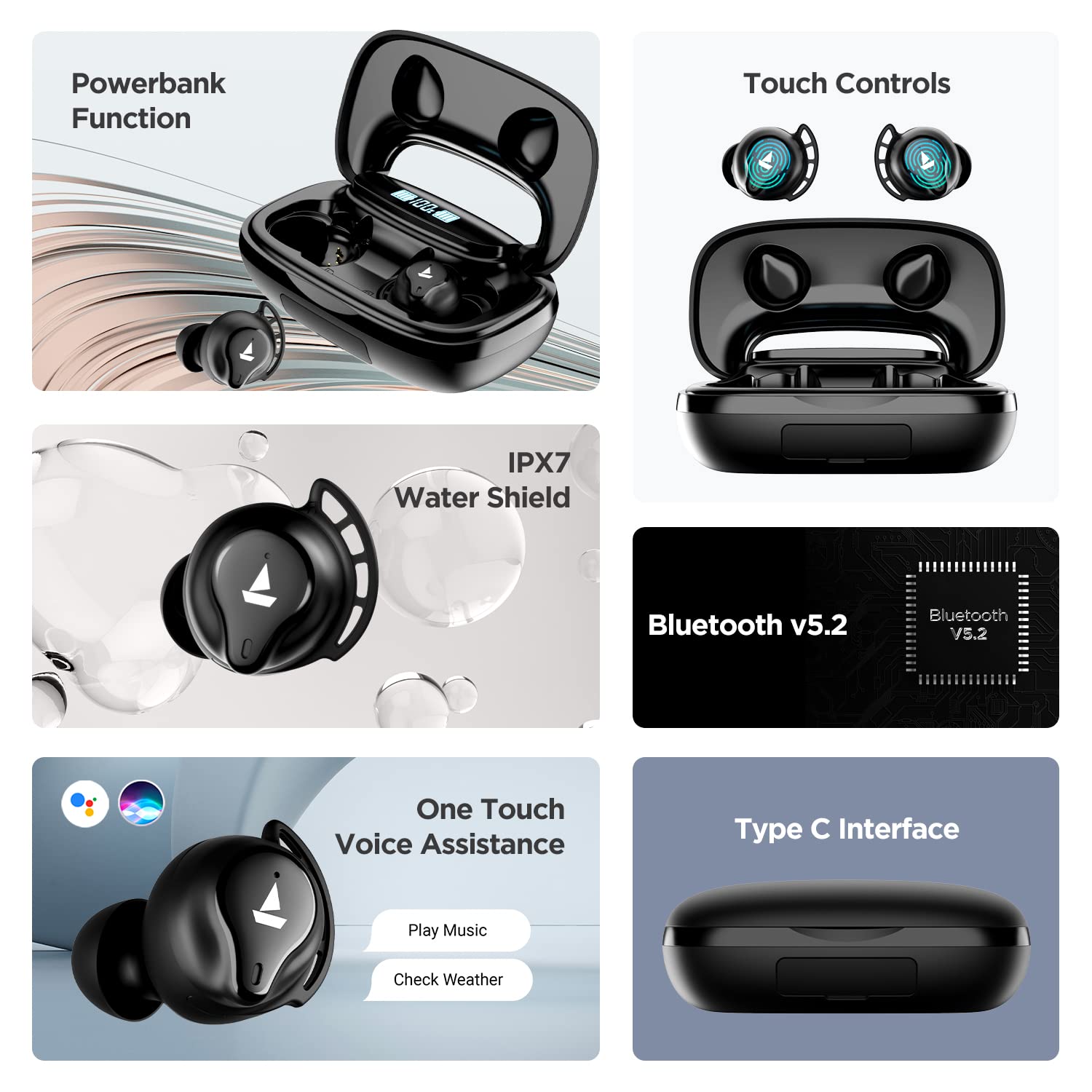
A visual summary of key features including power bank function, touch controls, IPX7 water resistance, Bluetooth v5.2, voice assistance, and Type-C interface.
4. Setup
4.1 Kuchaja maEarbuds uye Case
Before first use, fully charge the Airdopes 621. Place both earbuds into the charging case. Connect the Type-C charging cable to the case and a power source. The digital indicator on the case will show the charging status.
The ASAP Charge technology provides up to 60 minutes of playback with just 5 minutes of charging.

Illustration of the ASAP Charge feature, highlighting 5 minutes of charge for 60 minutes of playtime.
4.2 Simba Bank Basa
The 2600mAh capacity of the charging case allows it to function as a power bank, providing emergency power to other devices via its USB-A output port (cable not included).
4.3 Kubatanidza neChishandiso Chako
- Open the lid of the charging case. The earbuds will power on automatically due to IWP (Insta Wake N' Pair) Technology.
- Iva nechokwadi chekuti Bluetooth yakabatidzwa pamudziyo wako (smartphone, tablet, nezvimwewo).
- Tsvaga "Airdopes 621" in the list of available Bluetooth devices.
- Select "Airdopes 621" to connect. Once connected, you will hear an audio prompt.
The earbuds will automatically connect to the last paired device when taken out of the case, provided Bluetooth is active on the device.

Visual representation of the IWP Technology, showing the earbuds automatically appearing for connection when the case is opened.
5. Operating Instructions
5.1 Simba On/Kudzima
- Power On: Open the charging case lid. The earbuds will power on automatically.
- Power Off: Isa maearbuds kumashure muchesi yekuchaja wovhara chivharo. Vanozodzima otomatiki.
5.2 Kuridza Mumhanzi
- Tamba/Kumbomira: Top kamwe chete kana earbud.
- Next Track: Tokonya earbud yekurudyi kaviri.
- Previous Track: Tokonya earbud yekuruboshwe kaviri.
5.3 Call Management
- Pindura/Pedzisa Kufona: Top kamwe chete kana earbud.
- Ramba Kufona: Dzvanya uye bata chero earbud kwemasekonzi maviri.
5.4 Izwi Mubatsiri
- Shandisa Voice Assistant (Siri/Google Assistant): Tokonya katatu chero earbud.
6. Kuchengeta
- Kuchenesa: Gara uchichenesa maearbuds nebhokisi rekuchaja nejira rakapfava, rakaoma. Usashandise makemikari akaomarara kana zvinhu zvinokwesha.
- Kuramba Mvura: The Airdopes 621 are IPX7 rated, meaning they are protected against immersion in water up to 1 meter for 30 minutes. Do not intentionally submerge them or use them for swimming. Ensure the charging port is dry before charging.
- Kuchengeta: Chengetedza maearbuds mukesi yavo yekuchaja kana isiri kushandiswa kuadzivirira uye kuti agare aine chaji. Dzivisa tembiricha yakanyanyisa.
7. Kugadzirisa matambudziko
- Ma-earbud haasi kubatana/kuwiriraniswa:
- Ita shuwa kuti ese maearbud akachajwa.
- Dzima Bluetooth pamudziyo wako, wobva waibatidza zvakare.
- Forget "Airdopes 621" from your device's Bluetooth settings and try pairing again.
- Place both earbuds back in the case, close the lid, wait a few seconds, then open the lid to re-initiate pairing.
- Imwe chete earbud inoshanda:
- Ita shuwa kuti ese maearbud akachajwa.
- Place both earbuds back in the charging case, close the lid, and then open it again. This often re-syncs them.
- If the issue persists, try resetting the earbuds (refer to the full product manual for specific reset instructions if available, as this varies by model).
- Kesi yekuchaja isingabhadharisi:
- Tarisa tambo yekuchaja neadapta. Edza imwe tambo kana sosi yemagetsi yakasiyana.
- Ensure the Type-C cable is fully inserted into the charging port.
- Ruzha rwakashata kana kuti kusashanda zvakanaka:
- Ensure the earbuds are within the Bluetooth range (up to 10 meters) of your device.
- Deredza kukanganiswa nekubva pane zvimwe zvishandiso zvisina waya kana nzvimbo dzakasimba dzemagetsi.
- Clean the earbud tips and speaker mesh to ensure no debris is blocking the sound.
- Ensure the earbud tips fit snugly in your ears for optimal sound quality.
8. Zvinotsanangurwa
| Feature | Tsanangudzo |
|---|---|
| Model Name | Airdopes 621 |
| Kubatana Technology | Bluetooth |
| Wireless Communication Technology | Chokwadi Wireless |
| Bluetooth Version | 5.2 |
| Bluetooth Range | 10 Mamita |
| Playback Time (per charge) | Kusvikira kuMaawa mashanu |
| Yese Yekutamba Nguva (nekesi) | Kusvikira kuMaawa mashanu |
| ASAP Charge | 5 Mins Charge = 60 Mins Playtime |
| Kuchaja Port | Type-C |
| Mvura Resistance Level | IPX7 |
| Audio Driver Size | Mamirimita gumi |
| Kudzora Nzira | Bata |
| Voice Assistant Support | Siri, Google Mubatsiri |
| Case Battery Capacity | 2600mAh (functions as Powerbank) |
| Item Weight | 106 magiramu |
| Product Dimensions | 8.9 x 5.3 x 3.2 cm |
9. Warranty & Tsigiro
Your boAt Airdopes 621 comes with a 1-year mugadziri waranti from the date of purchase. This warranty covers manufacturing defects. Please retain your purchase receipt for warranty claims.
For further assistance, technical support, or warranty claims, please visit the official boAt website or contact their customer service. You can find more information and support resources on the boAt Store on Amazon.


