Nhanganyaya
Ndatenda nekutengaasing the Bytech True Wireless Bluetooth Boost Link True Speaker. This manual provides essential information for setting up, operating, and maintaining your new speakers. Please read this manual thoroughly before use to ensure proper operation and to maximize your listening experience. These speakers feature True Wireless Stereo (TWS) functionality, Bluetooth connectivity, FM Radio, and Bass Boost for rich audio.
Safety Information
- Do not expose the speakers to extreme temperatures, humidity, or direct sunlight.
- Dzivisa kudonhedza kana kuisa maspika panjodzi dzakasimba.
- Do not disassemble, repair, or modify the speakers yourself. Refer all servicing to qualified personnel.
- Keep the speakers away from water and other liquids.
- Shandisa chete tambo yekuchaja yakatarwa uye adapta yemagetsi.
- Clean the speakers with a soft, dry cloth. Do not use abrasive cleaners or solvents.
- Listen at moderate volume levels to avoid hearing damage.
Package Zviri mukati

Image: The Bytech Boost Link True Wireless Speakers shown in their retail packaging, highlighting the two speakers and the Bluetooth connectivity feature.
Ndokumbira utarise kuti zvinhu zvese zviripo uye mune zvakanaka:
- 2 x Bytech Boost Link True Wireless Speakers
- 1 x Cable yekuchaja (USB)
- 1 x Chinyorwa cheMushandisi (gwaro iri)
Product Overview

Mufananidzo: Iri pedyo-mberi view of the two Bytech Boost Link True Wireless Speakers, showing the speaker grilles and control buttons at the bottom.
Ziva zvinhu zvemutauri uye zvinodzora:
- Mutauri Grille: Protects the speaker driver.
- Mabhatani ekudzora:
- Bhatani reSimba: Power On/Off, Play/Pause.
- Bhatani reModhi: Switch between Bluetooth, FM Radio, etc.
- Previous Track/Volume Down Bhatani: Kudzvanya kupfupi kweyapfuura track, dzvanya kwenguva refu kuti vhoriyamu idzike.
- Next Track/Volume Up Button: Kudzvanya kupfupi kune inotevera track, dzvanya kwenguva refu kuti volume up.
- Kuchaja Port: Yekubatanidza USB yekuchaja tambo.
- Chiratidzo che LED: Shows power status, charging status, and pairing status.
Gadzirira
Kuchaja Vatauri
Before first use, fully charge both speakers. Connect the supplied USB charging cable to the charging port on each speaker and plug the other end into a USB power adapter (not included) or a computer's USB port. The LED indicator will show charging status and turn off or change color when fully charged.
Kubatidza/Kudzima
- Kubatidza: Press and hold the Power button on each speaker until the LED indicator lights up and you hear a power-on prompt.
- Kudzima: Press and hold the Power button on each speaker until the LED indicator turns off and you hear a power-off prompt.
Operating Instruction
Bluetooth Pairing (Single Speaker Mode)
- Iva nechokwadi chekuti spika yakabatidzwa uye iri muBluetooth pairing mode (LED indicator ichapenya).
- Pamudziyo wako (smartphone, piritsi, laptop), shandisa Bluetooth uye tsvaga zvishandiso zviripo.
- Select "BYTECH BOOST LINK" (or similar name) from the list.
- Kana yabatanidzwa, chiratidzo che LED chinomira kupenya uye chinoramba chakasimba, uye uchanzwa ruzha rwekusimbisa.
True Wireless Stereo (TWS) Pairing (Two Speakers)
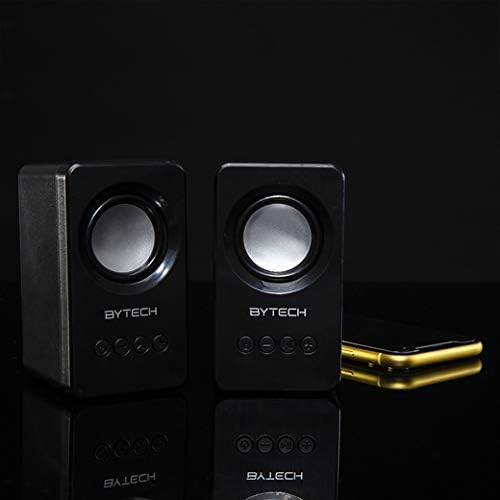
Image: The two Bytech Boost Link True Wireless Speakers positioned next to a smartphone, symbolizing their ability to connect wirelessly to each other and a device for stereo sound.
For a true stereo sound experience, you can pair both speakers together:
- Power on both Bytech Boost Link speakers. Do not connect them to your Bluetooth device yet.
- The speakers will automatically attempt to pair with each other. You will hear a confirmation sound when they are successfully linked for TWS. One speaker will become the master (left channel) and the other the slave (right channel).
- Once TWS paired, the master speaker will enter Bluetooth pairing mode (LED flashing).
- On your device, enable Bluetooth and search for "BYTECH BOOST LINK". Connect to this single entry.
- Maspika ese ari maviri acharidza odhiyo mu stereo.
- Cherechedza: If the speakers do not automatically pair, try double-pressing the Mode button on one of the speakers to initiate TWS pairing.
FM Radio Operation
- Power on the speaker(s).
- Press the Mode button repeatedly until you hear the FM radio prompt.
- Kuti uongorore otomatiki uye uchengetedze zviteshi, tinya wobata bhatani rekuti Tamba/Misa bhatani. Sipika ichaskena uye ichachengeta zviteshi zveFM zviripo.
- Shandisa iyo Previous Track uye Next Track mabhatani ekufambisa pakati pezviteshi zvakachengetwa.
Kutamba Odhiyo uye Kudzora Vhoriyamu
- Tamba/Kumbomira: Muchidimbu dzvanya bhatani reSimba.
- Next Track: Short press the Next Track/Volume Up button.
- Previous Track: Short press the Previous Track/Volume Down button.
- Vhoriyamu Kumusoro: Long press the Next Track/Volume Up button.
- Vhoriyamu Pasi: Long press the Previous Track/Volume Down button.
Maintenance
- Kuchenesa: Use a soft, dry, lint-free cloth to clean the surface of the speakers. Do not use liquid cleaners, aerosols, or solvents.
- Kuchengeta: Kana usingashandiswe kwenguva yakareba, chengeta masipika munzvimbo inotonhorera, yakaoma kure nezuva rakananga uye tembiricha yakanyanya.
- Battery Care: To prolong battery life, avoid fully discharging the battery frequently. Charge the speakers regularly, even if not in use.
Kugadzirisa matambudziko
| Dambudziko | Zvinogona Kukonzera | Solution |
|---|---|---|
| Mutauri haabati simba. | Bhatiri rakaderera. | Chaja mukurukuri zvizere. |
| Haikwanise kubatanidza kuburikidza neBluetooth. | Chipika hachisi mumodhi yekubatirana; Bluetooth yemudziyo yadzimwa; Kure zvakanyanya nemudziyo. | Ensure speaker LED is flashing; Turn on Bluetooth on your device; Move speaker closer to device (within 10 meters). |
| Hapana ruzha. | Volume too low; Speaker not connected; Incorrect mode. | Increase volume on speaker and device; Re-pair Bluetooth; Ensure correct mode (Bluetooth/FM). |
| TWS pairing inotadza. | Speakers already connected to a device; Speakers too far apart. | Disconnect speakers from any device; Power off and on both speakers, then try TWS pairing again; Ensure speakers are close to each other. |
| Kusagamuchirwa zvakanaka kweredhiyo yeFM. | Chiratidzo chisina kusimba; Kupindira. | Relocate the speaker to an area with better reception; Extend the charging cable (can act as an antenna). |
Zvinotsanangurwa
- Muenzaniso: BY-AU-BS-152-BK
- Brand: Bytech
- Kubatana Technology: Wireless (Bluetooth)
- Audio Output Mode: Surround
- Rudzi rweMutauriri: Surround Sound
- Special Features: Wireless Bluetooth, Bass Boost, FM Radio, True Wireless Stereo (TWS)
- Zvinokurudzirwa Zvishandiso: ZveMumhanzi Players
- Zvishandiso Zvinoenderana: Laptop, Tablet, Smartphone
- Anodzora Mhando: Mabhatani ari pamudziyo
- Package Dimensions: 20.7 x 16 x 9 cm
- Kurema 560 g
Warranty uye Support
Bytech products are designed and manufactured to the highest quality standards. For information regarding warranty coverage, technical support, or service inquiries, please refer to the warranty card included with your purchase or visit the official Bytech website. Ndapota chengetedza humbowo hwako hwekutenga kwezvichemo zvewaranti.
For further assistance, please contact Bytech customer support.


