Product Overview
The Hoco ES41 TWS (True Wireless Stereo) Bluetooth Headset provides a wireless audio experience with clear sound. This manual will guide you through the setup, operation, and maintenance of your ES41 headset.
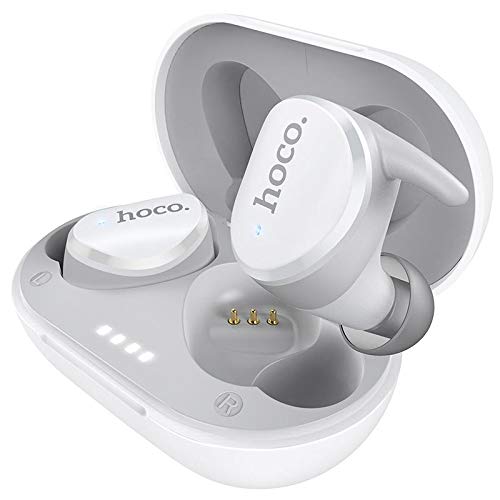
Image: The Hoco ES41 TWS Bluetooth Wireless Headset, showing both earbuds and the charging case in white.
Package Zviri mukati
Ndokumbira utarise pasuru yezvinhu zvinotevera:
- Hoco ES41 TWS Wireless Earbuds (Left and Right)
- Wireless Charging Case
- USB Kuchaja Cable (Micro USB)
- User Manual

Mufananidzo: Mberi uye kumashure view of the Hoco ES41 retail packaging, displaying the product and key features.
Gadzirira
1. Kuchaja Mahedhifoni neKesi
Usati watanga kushandisa, chajisa kesi yekuchaja nemaearbud.
- Connect the provided USB charging cable to the charging port on the case and to a USB power source.
- The indicator lights on the charging case will illuminate to show charging status.
- Place the earbuds into the charging case. Ensure they are correctly seated; the earbuds will begin charging automatically.
- Charging time for the headset is approximately 1 hour. The charging case takes approximately 2.5 hours to fully charge.

Image: The Hoco ES41 earbuds placed inside the open charging case, showing the LED indicator lights for battery status.
2. Kubatanidza neBluetooth Device
The ES41 headset uses Bluetooth 5.0 for a stable connection.
- Kutanga Kubatanidza:
- Vhura kesi yekuchaja. Maearbuds anozobatidza otomatiki uye opinda papairing mode.
- Pamudziyo wako (smartphone, piritsi, nezvimwewo), shandisa Bluetooth.
- Tsvaga Bluetooth devices and select "Hoco ES41" from the list.
- Kana wangobatanidzwa, uchanzwa ruzha rwekusimbisa, uye mwenje wechiratidzo chema earbuds uchachinja.
- Kubatanidzazve:
- Mushure mekusanganisa kekutanga, maearbud anozobatana otomatiki kune mudziyo wekupedzisira wakabatana kana abviswa mubhokisi rekuchaja uye Bluetooth inobatidzwa pamudziyo.
Operating Instruction
Simba On/Kudzima
- Power On: Open the charging case, or long-press the touch area on both earbuds for approximately 3 seconds.
- Power Off: Place the earbuds back into the charging case and close the lid, or long-press the touch area on both earbuds for approximately 5 seconds.
Music Playback
- Tamba/Kumbomira: Dzvanya nzvimbo yekubata pane chero earbud kamwe chete.
- Next Track: Tokonya kaviri nzvimbo yekubata pane earbud yekurudyi.
- Previous Track: Tokonya kaviri nzvimbo yekubata iri kuruboshwe rwenzeve.
Fonera Management
- Pindura/Pedzisa Kufona: Dzvanya nzvimbo yekubata pane chero earbud kamwe chete.
- Ramba Kufona: Dzvanya nzvimbo yekubata pane chero earbud kwenguva refu kwemasekonzi maviri.
Voice Assistant
- Shandisa Izwi Mubatsiri: Dzvanya katatu nzvimbo yekubata pane chero earbud.
Maintenance
- Kuchenesa: Shandisa jira rakapfava, rakaoma kuchenesa maearbuds nebhokisi rekuchaja. Usashandise makemikari akaomarara kana zvinhu zvinokwesha.
- Kuchengeta: Kana isiri kushandiswa, chengeta maearbuds mukesi yavo yekuchaja kuti uzvidzivirire uye ugare wakachajwa. Chengetedza munzvimbo inotonhorera, yakaoma kure nechiedza chezuva uye tembiricha yakanyanyisa.
- Kuramba Mvura: Maearbuds haapindire mvura. Dzivisa kusangana nemvura, dikita, kana hunyoro hwepamusoro.
Kugadzirisa matambudziko
- Maearbuds asingabatanidzwe neimwe:
Place both earbuds back into the charging case, close the lid, then open it again. This should reset their connection.
- Maearbuds haasi kubatana kune mudziyo:
Ensure Bluetooth is enabled on your device. Forget "Hoco ES41" from your device's Bluetooth settings and attempt to pair again.
- Hapana ruzha kubva kune imwe earbud:
Check if both earbuds are charged. Try placing them back in the case and taking them out again. If the issue persists, try resetting the earbuds (refer to the full manual if available for specific reset instructions).
- Kuchaja nyaya:
Ensure the charging cable is securely connected and the power source is active. Clean the charging contacts on both the earbuds and the case with a dry cotton swab.
Zvinotsanangurwa
| Feature | Tsanangudzo |
|---|---|
| Model Name | ES41 |
| Bluetooth Version | 5.0 |
| Bluetooth Chip | JL6936D |
| Kuchaja Case Battery Capacity | 400mAh |
| Single Headset Battery Capacity | 40mAh |
| Nguva Yekutaura/Mumhanzi | 5 maawa |
| Standby Time | 200 maawa |
| Headset Kuchaja Nguva | 1 awa |
| Kuchaja Nyaya yekuchaja Nguva | 2.5 maawa |
| Total Weight | 37g |
| Kurema kweHeadset Imwe Chete | 4g |
| Kudzora Nzira | Bata |
| Kubatana Technology | Wireless |
| Mahedhifoni Form Factor | Munzeve |
| Material | Plastiki |
| Inowirirana Devices | Maserura |
Warranty uye Support
For warranty information and technical support, please refer to the documentation provided with your purchase or contact HOCO customer service. Keep your proof of purchase for warranty claims.


