1. Nhanganyaya
The ASRock B450 PRO4 R2.0 is an ATX AMD motherboard designed to support AMD AM4 Socket Ryzen™ 2000, 3000, 4000 G-Series, 5000, and 5000 G-Series Desktop Processors. This motherboard offers robust features for building a reliable and high-performance system.
Zvinokosha:
- Supports DDR4 3200+ (OC) memory.
- Equipped with 2 PCIe 3.0 x16 slots and 4 PCIe 2.0 x1 slots.
- Supports AMD Quad CrossFireX™ for multi-GPU configurations.
- Multiple graphics output options: HDMI, Display Port, and D-Sub.
- Features 7.1 CH HD Audio (Realtek ALC892/897 Audio Codec).
- Storage includes 6 SATA3 ports, 1 Ultra M.2 (PCIe Gen3 x4), and 1 M.2 (PCIe Gen3 x2 & SATA3).
- Connectivity options include 2 USB 3.2 Gen2 (Rear Type A+C) and 6 USB 3.2 Gen1 (2 Front, 4 Rear).
- Integrated Realtek Gigabit LAN for stable network connectivity.

Figure 1: ASRock B450 PRO4 R2.0 Motherboard Retail Box (Front View)

Figure 2: ASRock B450 PRO4 R2.0 Motherboard Retail Box (Rear View highlighting features)
2. Package Zviri mukati
Wona kuti zvinhu zvese zviripo mubhodhi rako repakeji:
- ASRock B450 PRO4 R2.0 Motherboard
- Quick Installation Guide
- Tsigira CD
- I/O Panel Shield
- 2 x SATA Data Cables
- M.2 Socket Screws (for SSD installation)
3. Setup uye Kuiswa
Before beginning installation, ensure your workspace is clean and static-free. Always handle the motherboard by its edges to avoid damaging components.
3.1 CPU Kuiswa
Carefully open the CPU socket lever. Align the triangular mark on your AMD AM4 processor with the corresponding mark on the socket. Gently place the CPU into the socket without forcing it. Once seated, close the lever to secure the CPU.
3.2 RAM Kuiswa
This motherboard supports DDR4 memory. Open the clips on both ends of the DIMM slots. Align the notch on the RAM module with the key in the DIMM slot. Press down firmly on both ends of the RAM module until the clips snap into place. For optimal performance, install memory modules in a dual-channel configuration as recommended in the Quick Installation Guide.
3.3 Storage Installation
Motherboard inopa nzira dzakawanda dzekuchengetedza:
- SATA Drives: Connect your SATA hard drives or SSDs to the 6 SATA3 ports using SATA data cables.
- MaSSD eM.2: The motherboard features one Ultra M.2 slot (PCIe Gen3 x4) and one M.2 slot (PCIe Gen3 x2 & SATA3). Insert your M.2 SSD into the appropriate slot and secure it with the provided M.2 screw.
3.4 Graphics Kadhi Kuiswa
Insert your graphics card into one of the PCIe 3.0 x16 slots. Ensure it is firmly seated and secure it with the case's retention mechanism. Connect any necessary PCIe power cables from your power supply to the graphics card.
3.5 Simba rekubatanidza
Connect the 24-pin ATX power connector from your power supply to the motherboard. Also, connect the 8-pin CPU power connector (ATX 12V) located near the CPU socket.

Figure 3: ASRock B450 PRO4 R2.0 Motherboard (Top View with components)

Figure 4: ASRock B450 PRO4 R2.0 Motherboard (Angled View)
4. Operating Instructions
4.1 BIOS Setup
Upon first boot, press the 'Del' or 'F2' key during startup to enter the BIOS setup utility. Here you can configure system settings, boot order, and monitor hardware status. Refer to the Quick Installation Guide for detailed BIOS navigation and options.
4.2 Operating System Kuiswa
Insert your operating system installation media (USB drive or DVD) and set it as the primary boot device in the BIOS. Follow the on-screen prompts to install your preferred operating system. After installation, install the necessary drivers from the provided Support CD or ASRock's official website for full hardware functionality.
5. Kuchengeta
Regular maintenance ensures the longevity and optimal performance of your motherboard:
- Kubvisa Dust: Nguva nenguva geza guruva kubva pabhodhi reamai uye mafeni mafeni uchishandisa mweya wakamanikidzwa. Ita shuwa kuti sisitimu yadzimwa uye yakavhurwa isati yachenesa.
- BIOS Updates: Check ASRock's official website for the latest BIOS updates. Updating the BIOS can improve compatibility, stability, and performance. Follow the update instructions carefully.
- Cable Management: Ensure all cables are neatly routed and secured to promote better airflow and prevent interference.
6. Kugadzirisa matambudziko
Kana ukasangana nematambudziko, edza matanho ekutanga ekugadzirisa matambudziko:
- Hapana Simba: Tarisa zvese zvakabatana nemagetsi (24-pin ATX, 8-pin CPU, GPU power). Iva nechokwadi chekuti magetsi avhurwa.
- Hapana Chiratidziro: Verify that your monitor is connected to the correct graphics output (either motherboard or discrete GPU). Reseat the graphics card and RAM modules.
- Kusagadzikana kweSystem: Check RAM seating. Ensure CPU cooler is properly installed. Update BIOS and drivers.
- Chikamu Hachina Kuonekwa: Verify that the component (e.g., M.2 SSD, SATA drive) is correctly installed and connected. Check BIOS settings to ensure it is enabled.
7. Zvinotsanangurwa
| Feature | Tsanangudzo |
|---|---|
| Brand | ASRock |
| Series | B450 PRO4 R2.0 |
| Item Model Number | B450 PRO4 R2.0 |
| CPU Socket | Socket AM4 |
| Inowirirana processors | AMD AM4 Socket Ryzen™ 2000, 3000, 4000 G-Series, 5000 and 5000 G-Series Desktop Processors |
| Chipset Type | AMD B450 |
| RAM Memory Technology | DDR4 |
| Memory Speed | 3200+ (OC) MHz |
| Max Memory Capacity | 128 GB (based on typical 4-slot configuration) |
| PCIe Slots | 2 x PCIe 3.0 x16, 4 x PCIe 2.0 x1 |
| Graphics Output | HDMI, Display Port, D-Sub |
| Audio Codec | Realtek ALC892/897 Audio Codec (7.1 CH HD Audio) |
| SATA Ports | 6 x SATA3 |
| M.2 Slots | 1 x Ultra M.2 (PCIe Gen3 x4), 1 x M.2 (PCIe Gen3 x2 & SATA3) |
| USB 3.2 Gen2 (Rear) | 2 (Type A+C) |
| USB 3.2 Gen1 (Rear) | 4 |
| USB 3.2 Gen1 (Front) | 2 |
| LAN | Realtek Gigabit LAN |
| Fomu Factor | ATX |
| Product Dimensions | 1.1 x 9.7 x 6.5 inches |
| Item Weight | 2.6 makirogiramu |
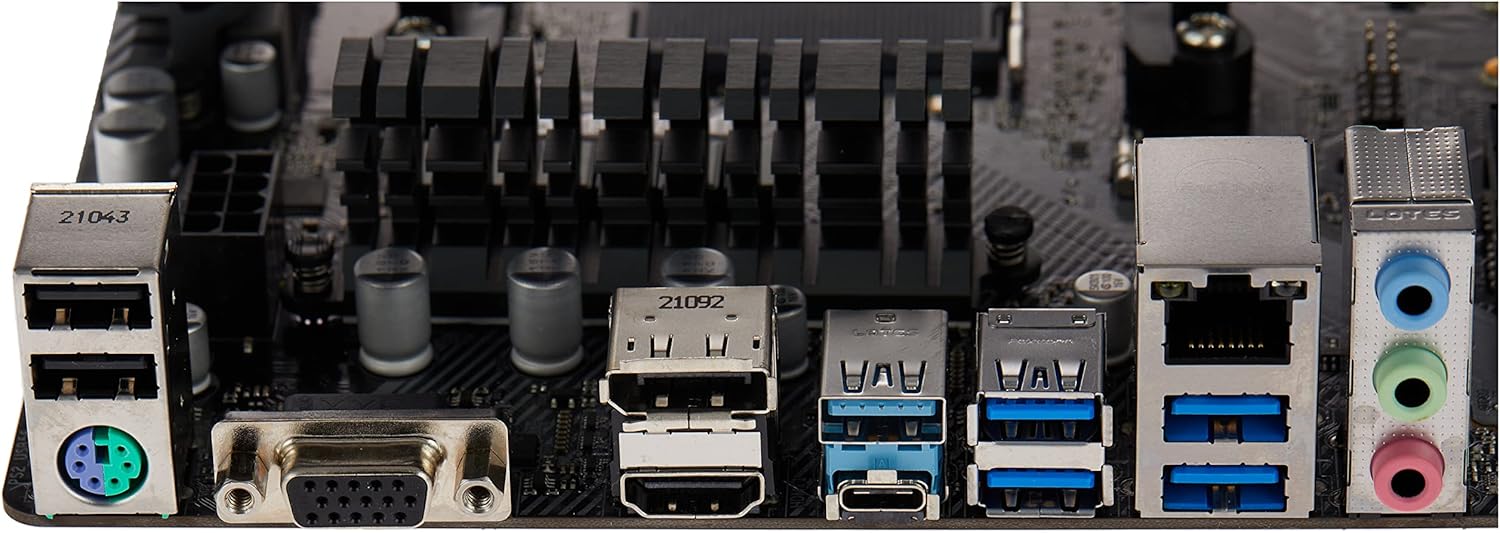
Figure 5: ASRock B450 PRO4 R2.0 Motherboard Rear I/O Ports

Figure 6: ASRock B450 PRO4 R2.0 Motherboard Dimensions
8. Warranty uye Tsigiro
For warranty information and technical support, please refer to the documentation included in your product package or visit the official ASRock website. Chengetedza humbowo hwako hwekutenga kune warranty claim.


