1. Nhanganyaya
Ndatenda nekutengaasing the Blackstar ID:Core Stereo 10 Sugar Skull V2 Limited Edition amplifier. This 10-watt (2x5W) stereo combo amplifier is designed to provide a versatile and high-quality sound experience for electric guitarists. It features Blackstar's patented ISF (Infinite Shape Feature) control, a range of voices, and built-in effects, making it ideal for practice, recording, and small performances. This manual provides essential information for safe and effective use of your amplifier.
2. Yakakosha Mirayiridzo Yekuchengetedza
- Verenga Mirairo: Verenga mirairo yese yekuchengetedza uye yekushandisa usati washandisa chigadzirwa ichi.
- Chengetedza Mirairo: Chengeta mirairo iyi kuti ugozoishandisa mune ramangwana.
- Teerera Nyevero: Tevera nyevero dzese pachigadzirwa uye mumirairo yekushandisa.
- Mvura uye Unyoro: Usashandise mudziyo uyu pedyo nemvura.
- Kuchenesa: Chenesa chete nemucheka wakaoma.
- Kufefetedza Usavhare chero mazaru emhepo. Isa maererano nemirairo yemugadziri.
- Kupisa: Usaise padhuze nechero zvitubu zvekupisa zvakaita semaradiator, marejita ekupisa, zvitofu, kana zvimwe midziyo (kusanganisira amplifiers) zvinoburitsa kupisa.
- Power Cord Protection: Chengetedza tambo yemagetsi kubva pakufambiswa kana kudzvanywa, kunyanya pamapulagi, midziyo yekurerutsira, nenzvimbo yavanobuda kubva mumidziyo.
- Bvisa plug panguva yemadutu: Bvisa mudziyo uyu panguva yemadutu emheni kana kuti usina kushandiswa kwenguva yakareba.
- Sevhisi: Tumira masevhisi ese kuvashandi vanokwanisa. Kushumira kunodiwa kana mudziyo wakuvadzwa neimwe nzira, senge tambo yemagetsi-yekugovera kana plug yakuvadzwa, mvura yadeuka kana zvinhu zvawira mumidziyo, iyo midziyo yave ichinaya mvura kana hunyoro, haishande zvakajairika. , kana kuti yadonha.
3. Package Zviri mukati
Ndokumbira utarise bhokisi rezvinhu zvinotevera:
- Blackstar ID:Core Stereo 10 Sugar Skull V2 Limited Edition Amplifier
- Power Supply Unit
- USB Cable
- Mushandisi Chinyorwa (gwaro iri)
4. Zvinodzora uye Zvimiro
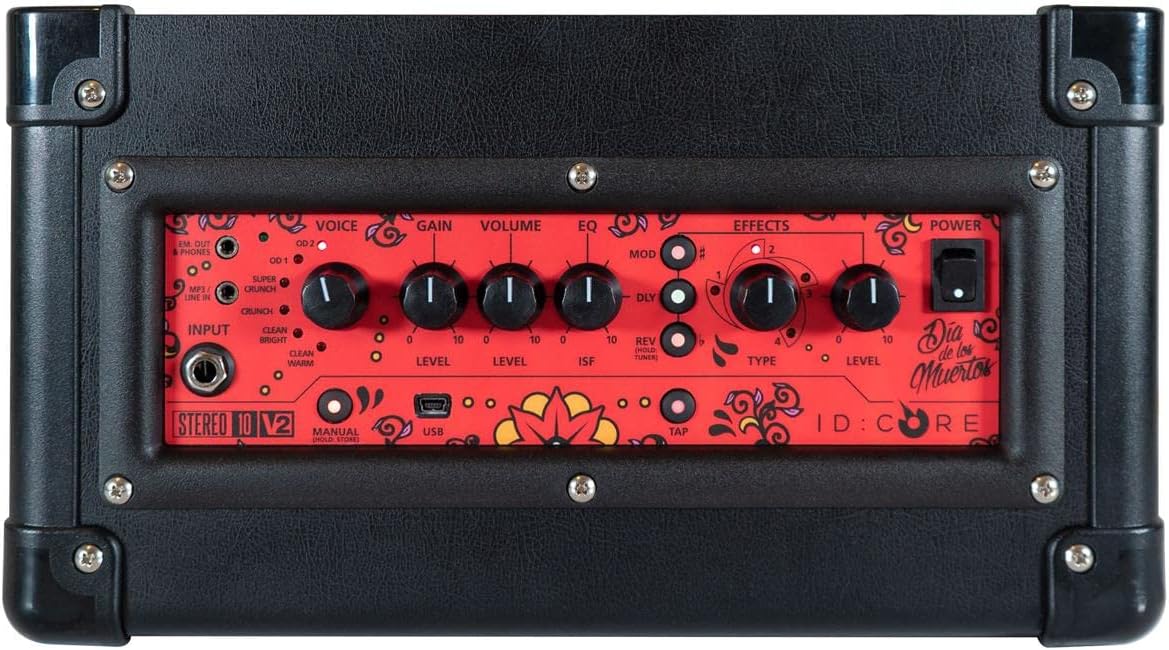
Mufananidzo: Pamusoro view ye amplifier's control panel, showing all knobs, buttons, and input/output jacks.
Front Panel Controls:
- Input: 6.35mm (1/4") jack for connecting your guitar.
- Izwi: Rotary switch to select one of six Blackstar voices: Clean Warm, Clean Bright, Crunch, Super Crunch, OD 1, OD 2.
- Gain: Inodzora huwandu hwekutyaira zvakanyanya kana kukanganisa.
- Vhoriyamu: Inogadzirisa huwandu hwese hwezvinobuda amplifier.
- EQ: Toni control.
- ISF (Chimiro Chisingaperi): Patented control that shifts the tone stack response between a USA-style (counter-clockwise) and a UK-style (clockwise) amplifier.
- Mod (Modulation): Rotary switch to select and adjust the level of modulation effects (Chorus, Flanger, Phaser, Tremolo).
- Dly (Delay): Rotary switch to select and adjust the level of delay effects (Linear, Analogue, Tape, Multi).
- Rev (Reverb): Rotary switch to select and adjust the level of reverb effects (Room, Hall, Spring, Plate).
- Type: Selects the specific effect type within the Mod, Dly, or Rev categories.
- Level: Adjusts the overall level of the selected effect.
- Top: Button to set the tempo for time-based effects (Delay, Tremolo).
- Simba: Swichi yeOn/Off ye amplifier.
- USB: USB-B port for connecting to a computer for recording and using Blackstar's Architect software.
- Em. Out / Phones: 6.35mm (1/4") jack for headphones or direct recording output with speaker emulation.
- MP3 / Line In: 3.5mm (1/8") stereo jack for connecting external audio devices like MP3 players or phones.

Mufananidzo: Mberi view of the Blackstar ID:Core Stereo 10 amplifier, showcasing the unique Sugar Skull V2 design on the speaker grille.
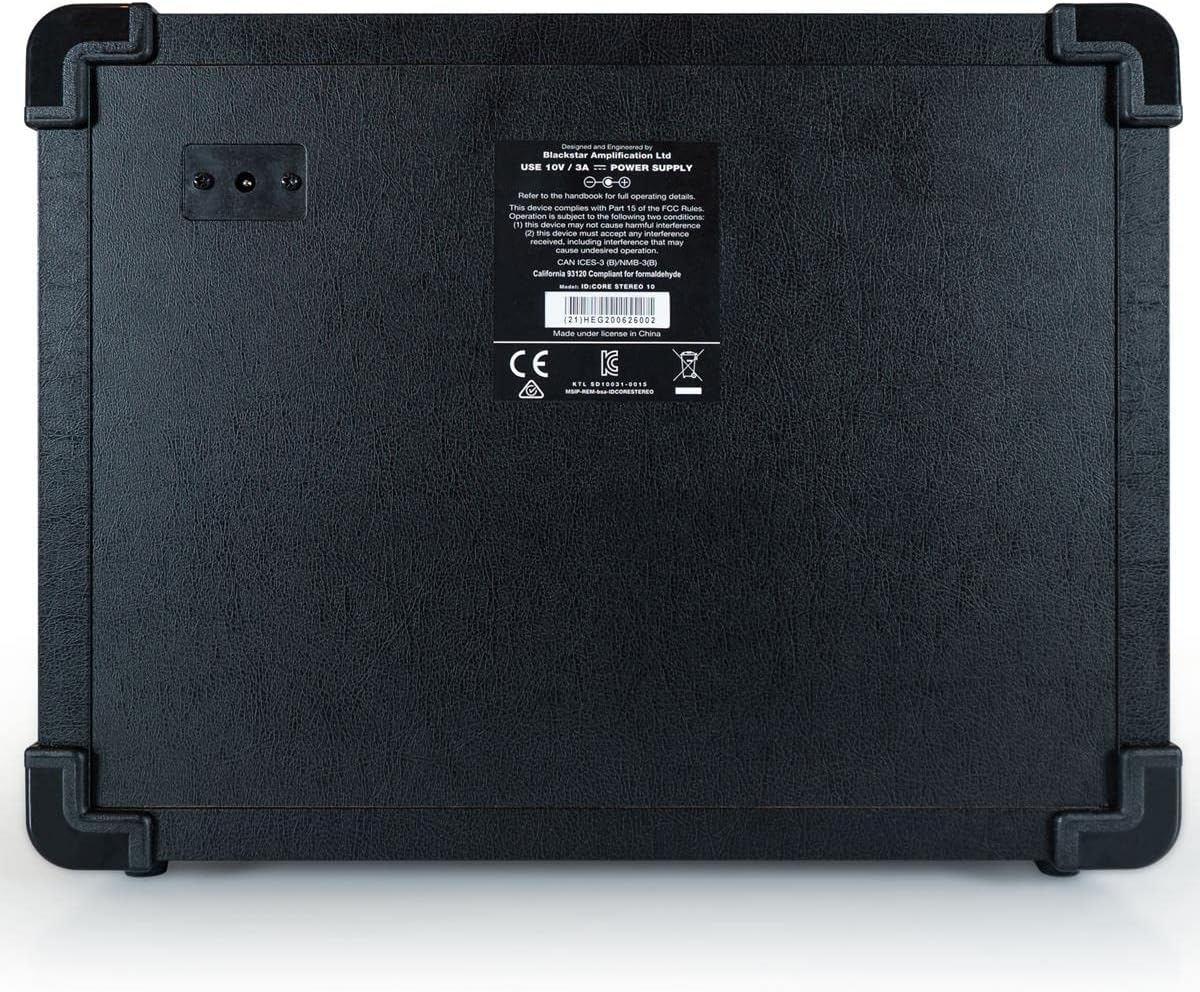
Mufananidzo: Rear view of the Blackstar ID:Core Stereo 10 amplifier, displaying the product information label and power input.
5. Setup
- Kuburitsa: Ngwarira kubvisa iyo amplifier and all accessories from the packaging. Retain the packaging for future transport or storage.
- Kuiswa: Place the amplifier panzvimbo yakatsiga, yakati sandara. Iva nechokwadi chekuti mhepo inofema yakakwana yakatenderedza mudziyo. Dzivisa kuuisa pedyo nekupisa kana kuti pazuva rakananga.
- Power Connection: Connect the supplied power supply unit to the DC input jack on the rear of the amplifier. Plug the power supply into a suitable mains outlet. Ensure the amplifier's power switch is in the OFF position before connecting.
- Kubatana kweGitare: Batanidza gitare rako remagetsi ku Input jack on the front panel using a standard 6.35mm (1/4") instrument cable.
- External Audio (Optional): To play along with music, connect an MP3 player, phone, or other audio source to the MP3 / Mutsetse In jack using a 3.5mm stereo cable.
- Kubatanidza USB (Zvichida): For recording or using the Blackstar Architect software, connect the amplifier to your computer using the supplied USB cable.
6. Operating Instructions
- Power On: Ensure all connections are secure, then switch the Simba button to the ON position. The power indicator light will illuminate.
- Seta Vhoriyamu: Tanga ne Volume knob at a low setting to avoid sudden loud sounds.
- Sarudza Izwi: Rotate the Voice switch to choose your desired amplifier type (e.g., Clean Warm, Crunch, OD 1).
- Gadzirisa Gain: Shandisa iyo Gain knob to control the amount of drive. Lower settings provide cleaner tones, while higher settings introduce more distortion.
- Shape Tone with EQ and ISF: Gadzirisa iyo EQ knob for general tone shaping. Experiment with the ISF control to blend between American (tight low-end, aggressive mids) and British (woodier, less aggressive) amplifier characteristics.
- Shandisa maEffects:
- Select a modulation, delay, or reverb effect using the Mod, Dly, kana Rev rotary switches.
- Shandisa iyo Type knob to select a specific effect within that category (e.g., Chorus, Flanger for Mod).
- Adjust the effect's intensity with the Level knob.
- For time-based effects (Delay, Tremolo), press the Tap button repeatedly at your desired tempo to synchronize the effect.
- Headphone/Recording Output: Batanidza mahedhifoni kune iyo Em. Out / Phones jack for silent practice. This output also provides a speaker-emulated signal for direct recording.
- USB Audio: When connected to a computer via USB, the amplifier acts as an audio interface, allowing you to record your guitar directly into a DAW or use the Blackstar Architect software for deeper editing and patch management.
- Power Off: When finished, turn the Volume down, then switch the Simba bhatani kune OFF chinzvimbo.
7. Kuchengeta
- Kuchenesa: Clean the amplifier's exterior with a soft, dry cloth. Do not use abrasive cleaners, solvents, or waxes.
- Kuchengeta: Kana isiri kushandiswa kwenguva yakareba, chengetedza amplifier in a dry, cool place, away from direct sunlight and extreme temperatures.
- Kufefetedza Ensure that the ventilation openings are always clear to prevent overheating.
- Cable Care: Always handle power and instrument cables carefully. Avoid bending or kinking them sharply.
8. Kugadzirisa matambudziko
| Dambudziko | Zvinogona Kukonzera | Solution |
|---|---|---|
| Hapana inzwi kubva amplifier |
|
|
| Ruzha rwakashata / Ruzha rwuri kurira |
|
|
| Mhedzisiro isiri kushanda |
|
|
9. Zvinotsanangurwa
- Muenzaniso: IDCORE10 V3
- Output Wattage: 10 Watts (2 x 5W Stereo)
- Vatauri: 2 x 3" Blackstar Speakers
- Manzwi: 6 (Yakachena Inodziya, Yakachena Yakajeka, Yakapwanyika, Yakapwanyika Zvakanyanya, OD 1, OD 2)
- Mhedzisiro: Modulation (Chorus, Flanger, Phaser, Tremolo), Delay (Linear, Analogue, Tape, Multi), Reverb (Room, Hall, Spring, Plate)
- Zvinodzora: Voice, Gain, Volume, EQ, ISF, Mod, Dly, Rev, Type, Level, Tap, Power
- Zvinopinza Guitar Input (6.35mm jack), MP3/Line In (3.5mm stereo jack), USB-B
- Zvinobuda: Emulated Out/Headphones (6.35mm jack)
- Kunobva Simba: Corded Electric
- Zvishandiso Zvinoenderana: Magitare
- Chinhu Weight: 10 makirogiramu (4.54 kg)
- Zviyero zvechigadzirwa: 16 x 18 x 14 inches (40.6 x 45.7 x 35.6 cm)
- ASIN: B08Z88WN8T
10. Warranty uye Tsigiro
Blackstar Amplification products are designed and manufactured to the highest standards. For detailed warranty information specific to your region and product, please refer to the warranty card included with your purchase or visit the official Blackstar Ampliification website. For technical support or service inquiries, please contact your authorized Blackstar dealer or Blackstar customer support directly.
Zvekushandisa Pamhepo:
- Blackstar AmpOfficial lification Websaiti: www.blackstaramps.com
- Blackstar Architect Software: www.blackstaramps.com/architect


