1. Nhanganyaya
The Magewell Ultra Encode SDI (Model 53050) is a versatile live stream encoder designed for professional AV applications. It supports high-quality H.264, H.265 (HEVC), and NDI|HX encoding, along with multiple streaming protocols. This manual provides detailed instructions for setting up, operating, maintaining, and troubleshooting your Ultra Encode SDI device.
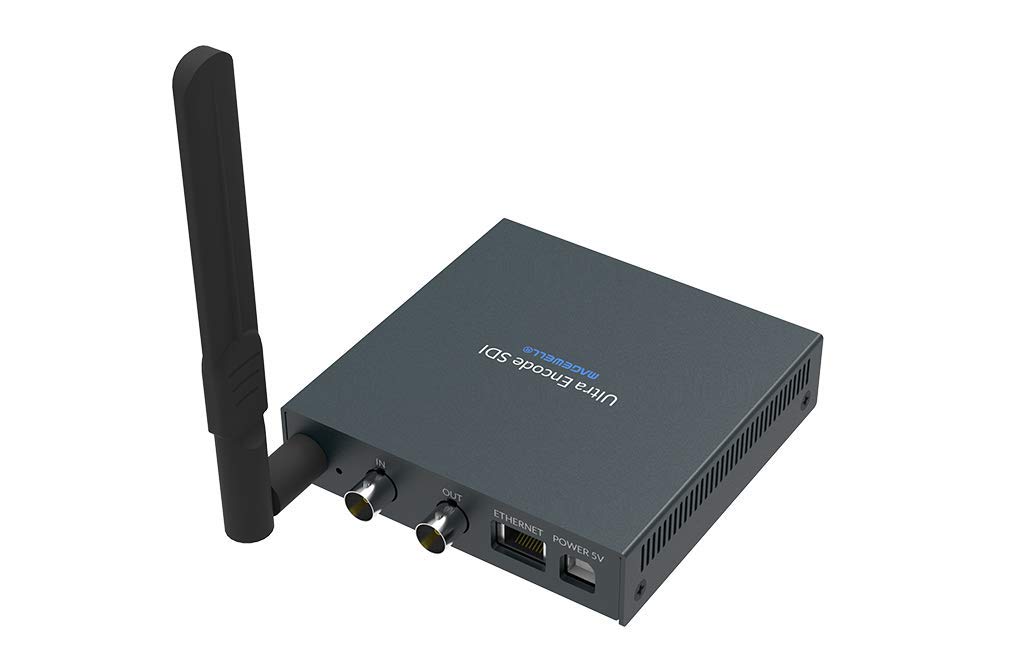
Figure 1.1: Magewell Ultra Encode SDI (Model 53050) device.
2. Package Zviri mukati
Please verify that all items listed below are included in your package. If any items are missing or damaged, contact your vendor or Magewell support.
- Magewell Ultra Encode SDI (Model 53050) Unit
- Power Adapter (with regional plugs)
- USB 2.0 Type B cable
- Wi-Fi kanyanga
- T-bracket
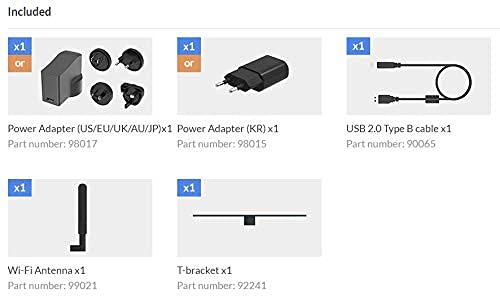
Figure 2.1: Included accessories with the Ultra Encode SDI.
3. Chigadzirwa Pamusoroview
The Ultra Encode SDI features various ports and indicators for connectivity and status monitoring. Familiarize yourself with these components before setup.
3.1 Front/Side Panel

Figure 3.1: Front/Side panel with audio ports, status LEDs, and USB port.
- ZVINOGONESESA: 3.5mm odhiyo kubuda.
- ZVINOKOSHA IN: 3.5mm audio input.
- PWR LED: Simba chiratidzo.
- MU LED: Input signal status.
- LIVE LED: Streaming status.
- ETH LED: Ethernet connection status.
- Wi-Fi LED: Wi-Fi yekubatanidza mamiriro.
- ZVOKUITA: USB port for optional accessories or configuration.
3.2 Rear Panel

Figure 3.2: Rear panel with video, network, and power connections.
- IN (SDI): SDI/3G video input.
- OUT (SDI): SDI/3G loop-through output.
- ETHERNET: RJ45 port for wired network connection.
- POWER 5V: Simba rekuisa chiteshi.
3.3 Chiratidzo chePort

Figure 3.3: Comprehensive port and indicator diagram.
4. Setup
Follow these steps to set up your Magewell Ultra Encode SDI device.
4.1 Kubatana Kwemuviri
- Batanidza Simba: Plug the provided power adapter into the SIMBA 5V port on the rear panel and then into a power outlet. The PWR LED on the front panel should illuminate.
- Connect Video Input: Connect your SDI/3G video source to the IN (SDI) port on the rear panel. If you need to loop the signal through, connect a cable from the OUT (SDI) port to your monitoring device.
- Batanidza Audio (Sarudzo): If using analog audio, connect your audio source to the LINE IN port and your audio monitoring device to the ZVINOKOSHA port.
- Batanidza Network:
- Wired: Connect an Ethernet cable from your network router or switch to the Ethernet port on the rear panel. The ETH LED inofanira kupenya.
- Wireless: Screw the provided Wi-Fi antenna onto the antenna socket. You will configure the Wi-Fi connection via the web interface. The Wi-Fi LED will indicate connection status.
4.2 Kugadzika Kwekutanga (Web Inowanikwa)
The Ultra Encode SDI is configured via a web-yakavakirwa painterface. Kuti uishandise:
- Ensure your computer is on the same network as the Ultra Encode SDI.
- Use a network scanning tool or check your router's connected devices list to find the IP address of the Ultra Encode SDI. Alternatively, some devices may have a default IP or a discovery tool.
- Vhura a web browser and enter the device's IP address in the address bar.
- Log in using the default credentials (refer to the device's quick start guide or Magewell documentation for default username and password).
- Kubva ku web interface, you can configure network settings (including Wi-Fi), video/audio input parameters, encoding settings, and streaming destinations.
5. Operating Instructions
The Ultra Encode SDI offers flexible encoding and streaming capabilities.
5.1 Encoding Settings
- The device supports H.264 and H.265 (HEVC) video encoding. Select the desired codec and adjust parameters such as bitrate (up to 16Mbps), resolution, and frame rate via the web interface.
- Audio encoding options are also available for optimal quality and compatibility.
5.2 Streaming Protocols
The Ultra Encode SDI supports various streaming protocols:
- RTMP/RTMPS: Commonly used for live streaming to platforms like YouTube, Facebook, and Twitch. Configure the server URL and stream key in the web interface.
- HLS: HTTP Live Streaming for adaptive bitrate delivery.
- SRT: Secure Reliable Transport protocol for low-latency, high-quality video transport over unreliable networks.
- NDI|HX: NewTek's NDI|HX encoding for IP production workflows. Enable and configure NDI|HX output in the web interface.
5.3 Configurable Presets
The device includes configurable presets for easy streaming to popular platforms:
- Access the presets section in the web interface.
- Select a platform (e.g., Facebook, Twitch, YouTube) and enter your stream key or login details as prompted.
- Activate the preset to begin streaming.
6. Kuchengeta
Proper maintenance ensures the longevity and optimal performance of your Ultra Encode SDI.
- Kuchenesa: Shandisa jira rakapfava, rakaoma kuchenesa kunze kwechishandiso. Dzivisa zvinhu zvinochenesa mvura kana zvinhu zvinokwesha.
- Kufefetedza Ensure the device is placed in a well-ventilated area to prevent overheating. Do not block ventilation openings.
- Firmware Dzokorora: Periodically check the Magewell official website for firmware updates. Updating the firmware can provide new features, performance improvements, and bug fixes. Follow the instructions provided by Magewell for safe firmware updates.
- Kuchengeta: Kana usingashandiswe kwenguva yakareba, chengeta mudziyo wacho munzvimbo inotonhorera, yakaoma pasina chiedza chezuva uye tembiricha yakanyanyisa.
7. Kugadzirisa matambudziko
Ichi chikamu chinotarisa zvinowanzoitika zvaungasangana nazvo.
- Hapana Simba:
- Ita shuwa kuti iyo adapta yemagetsi yakabatana zvakachengeteka kune mudziyo uye inoshanda simba rekubuda.
- Verify the power adapter is the correct one supplied with the device.
- No Video Input:
- Check the SDI cable connection between the source and the device's IN (SDI) port.
- Confirm the video source is active and outputting a compatible SDI signal.
- Check the IN Chimiro che LED.
- Hapana Network Connection:
- For wired connection, ensure the Ethernet cable is properly connected and the ETH LED is active.
- For Wi-Fi, ensure the antenna is attached, and Wi-Fi settings are correctly configured in the web interface. Check the Wi-Fi Akatungamirira.
- Verify your network router is functioning correctly.
- Hatikwanisi Kupinda Web Interface:
- Ensure your computer is on the same network as the encoder.
- Verify the IP address of the encoder.
- Edza kudzima cache yebrowser yako kana kushandisa imwe browser.
- Streaming Issues (Buffering, Disconnections):
- Check your internet connection speed and stability.
- Reduce the encoding bitrate in the web interface if your network bandwidth is limited.
- Verify streaming server URL and stream key are correct.
- Check the LIVE Chimiro che LED.
For further assistance, refer to the Magewell support websaiti kana kubata timu yavo yekutsigira tekinoroji.
8. Zvinotsanangurwa
| Feature | Tsanangudzo |
|---|---|
| Brand | Magewell |
| Model | 53050 |
| Product Dimensions | 10.5 x 10.6 x 2.5 cm |
| Item Weight | 596 g (0.6 Kilogiramu) |
| Vhidhiyo Input | SDI/3G Input |
| Video Output | SDI/3G Loop |
| Audio Input | Line-In (3.5mm) |
| Audio Output | Line-Out (3.5mm) |
| Encoding Formats | H.264, H.265 (HEVC), NDI|HX |
| Max Bitrate | Kusvikira ku16Mbps |
| Kutenderera Protocols | RTMP, RTMPS, HLS, SRT |
| Network Kubatana | Ethernet (RJ45), Wi-Fi (802.11ac) |
| Magetsi | 12 Volts (DC) |
| Inowirirana Devices | Laptop (for configuration) |
| Special Features | Wireless connectivity, Configurable presets for streaming platforms |
9. Warranty uye Tsigiro
For information regarding product warranty, technical support, and service, please refer to the official Magewell website or contact your authorized Magewell dealer. Keep your purchase receipt as proof of purchase for warranty claims.
Magewell Official Websaiti: www.magewell.com


