1. Nhanganyaya
Thank you for choosing the hoco. ES55 Songful TWS Wireless Headset. This manual provides detailed instructions on how to set up, operate, and maintain your new wireless earbuds. Please read this manual carefully before use to ensure optimal performance and longevity of your device.
2. Package Zviri mukati
Ita shuwa kuti zvinhu zvese zviripo mupakeji yako:
- hoco. ES55 Songful TWS Wireless Headset (Left and Right Earbuds)
- Kuchaja Case
- Chaja Cable
- Ear Cushions (hukuru hwakasiyana)
- Mushandisi Chinyorwa (gwaro iri)
3. Chigadzirwa Pamusoroview
Familiarize yourself with the components of your hoco. ES55 Songful headset.
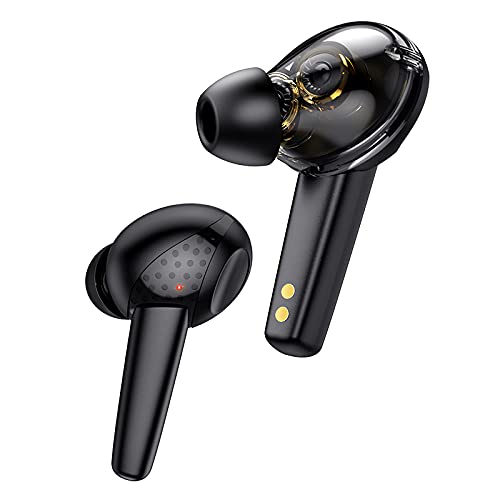
Mufananidzo 3.1: The hoco. ES55 Songful TWS Wireless Headset earbuds. These are in-ear style earbuds, black in color, with a transparent section revealing internal components and gold charging contacts at the base of the stem.
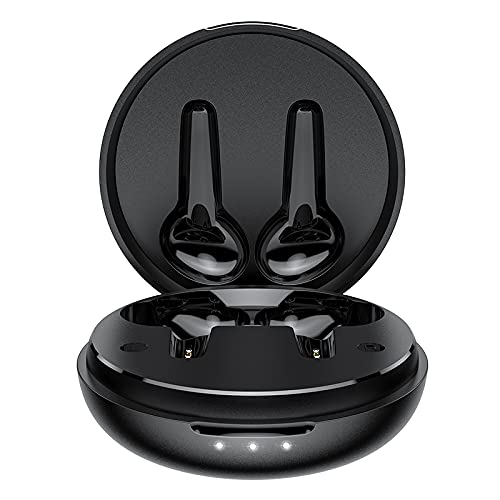
Mufananidzo 3.2: The hoco. ES55 Songful charging case shown open, revealing the molded slots for the left and right earbuds. The case is black and circular, with three LED indicator lights on the front edge.
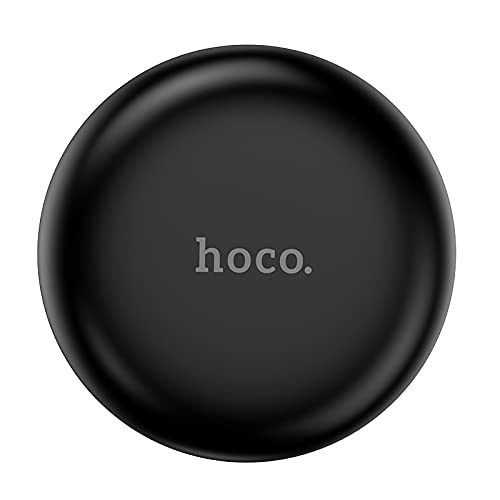
Mufananidzo 3.3: The hoco. ES55 Songful charging case shown closed. It is a compact, circular black case with the "hoco." logo subtly embossed on the top surface.
4. Kuchaja Headset
Usati washandisa kekutanga, chaja zvese zviri munzeve nebhokisi rekuchaja.
- Kuchaja Nyaya: Connect the provided charging cable to the charging port on the case and to a USB power source (e.g., computer, wall adapter). The LED indicators on the case will illuminate to show charging status. A full charge for the case takes approximately 1.5 hours.
- Kuchaja maEarbuds: Place the earbuds into their respective slots in the charging case. Ensure the charging contacts align. The earbuds will automatically begin charging. A full charge for the earbuds takes approximately 1 hour.
The charging case has a battery capacity of 400mAh, and each headset has a 35mAh battery. A full charge provides approximately 4 hours of talk/music time and up to 200 hours of standby time.
5. Kubatanidza neChishandiso
Follow these steps to pair your hoco. ES55 Songful headset with your Bluetooth-enabled device:
- Kutanga Kubatanidza:
- Ita shuwa kuti kesi yekuchaja yachajwa uye maearbuds ari mukati.
- Vhura bhokisi rekuchaja. Ma earbuds anopinda otomatiki mu pairing mode, zvichiratidzwa nechiedza che LED chinopenya pane imwe kana ma earbuds ese ari maviri.
- Pafoni yako (smartphone, tablet, nezvimwewo), enda kuBluetooth settings wobva wabatidza Bluetooth.
- Tsvaga available devices. You should see "hoco. ES55 Songful" or a similar name appear in the list.
- Select "hoco. ES55 Songful" to connect. Once connected, a voice prompt will confirm successful pairing, and the earbud LED lights will stop flashing.
- Kubatanidzazve: Once paired, the earbuds will automatically connect to the last paired device when taken out of the charging case and Bluetooth is enabled on your device.
- Kushandisa Earbud Imwechete: Either earbud can be used independently. Simply take one earbud out of the case, and it will enter pairing mode or connect to the last paired device.
The headset uses Bluetooth v5.1 technology for stable and efficient wireless communication.
6. Kushandisa Headset
The hoco. ES55 Songful headset features intuitive controls for managing calls and music.
- Ridza/Misa Mimhanzi: Tap the touch sensor on either earbud once.
- Next Track: Double-tap the touch sensor on the right earbud.
- Previous Track: Double-tap the touch sensor on the left earbud.
- Pindura/Pedzisa Kufona: Tap the touch sensor on either earbud once during an incoming call.
- Ramba Kufona: Press and hold the touch sensor on either earbud for 2 seconds during an incoming call.
- Shandisa Izwi Mubatsiri: Triple-tap the touch sensor on either earbud to activate your device's voice assistant (e.g., Siri, Google Assistant).
- Gaming Mode (Low Latency): The headset supports a low-latency "BEAST Mode" for gaming. Refer to your device's settings or specific app instructions for activation, if applicable.
The headset is equipped with ENx Tech enabled quad microphones for clear voice calls, reducing background noise.
7. Kuchengeta uye Kuchengeta
To ensure the longevity and optimal performance of your headset, follow these maintenance guidelines:
- Chengeta maearbud nebhokisi rekuchaja zvakachena uye zvakaoma. Shandisa jira rakapfava, rakaoma kuzvipukuta.
- Dzivisa kuisa mudziyo pakupisa kwakanyanya, hunyoro, kana zvinhu zvinoparadza.
- Do not disassemble or attempt to repair the device yourself. This will void the warranty.
- Chengetedza maearbuds mukesi yekuchaja kana isiri kushandiswa kuadzivirira uye kuti agare aine chaji.
- The earbuds are water-resistant and sweatproof, but not waterproof. Avoid submerging them in water.
8. Zvinotsanangurwa
| Feature | Detail |
|---|---|
| Model Name | Songful |
| Bluetooth Version | v5.1 |
| Bluetooth Chip | JL AC6973 |
| Earbud Bhatiri Kugona | 35mAh (imwe neimwe) |
| Kuchaja Case Battery Capacity | 400mAh |
| Nguva yekuchaja Earbud | Approx. 1 awa |
| Nyaya yekuchaja Nguva | Approx. 1.5 maawa |
| Nguva yeKutaura / Mimhanzi | Approx. 4 maawa |
| Standby Time | Approx. 200 maawa |
| Mutyairi Type | Dual Moving Coil, 6mm Dynamic Driver |
| Wireless Range | Kusvika kumamita gumi (10 tsoka) |
| Kuramba Mvura | Water Resistant, Sweatproof |
| Kudzora Nzira | Bata, Izwi |
| Kurema | 35 gramu (zvese) |
| Dimensions | 5 x 2 x 7 cm |
9. Kugadzirisa matambudziko
If you encounter issues with your hoco. ES55 Songful headset, refer to the following common solutions:
- Maearbuds asingabatanidzwe nemudziyo:
- Ita shuwa kuti ese maearbud akachajwa.
- Dzima uye vhura Bluetooth pane chako kifaa.
- Forget "hoco. ES55 Songful" from your device's Bluetooth list and attempt to pair again.
- Isa maearbuds kumashure mukesi, vhara chivharo, mirira mashoma mashoma, wozovhura kuti upinde zvakare pairing mode.
- Imwe chete earbud inoshanda:
- Ita shuwa kuti ese maearbud akachajwa.
- Place both earbuds back into the charging case, close the lid, and then take them out together.
- Edza kuseta zvakare maearbuds (tarisa kune yemugadziri website for specific reset instructions if not covered here).
- Hapana ruzha kana vhoriyamu yakaderera:
- Tarisa huwandu hwevhoriyamu pane zvese mudziyo wako uye munzeve.
- Ita shuwa kuti maearbuds akabatana nemazvo kumudziyo wako.
- Chenesa chero tsvina kubva munzeve dzemutauri mesh.
- Kuchaja nyaya:
- Ita shuwa kuti tambo yekuchaja yakabatana zvakachengeteka kune ese ari maviri kesi uye sosi yemagetsi.
- Tarisa kuti sosi yemagetsi inoshanda here.
- Chenesa macontacts ekuchaja pamaearbuds uye mukati mekesi.
10. Safety Information
Ndokumbira utarise matanho ekuchengetedza anotevera:
- Usashandise maearbuds akawandisa zvakanyanya kwenguva yakareba kudzivirira kukuvara kwekunzwa.
- Be aware of your surroundings when using earbuds, especially in traffic or other potentially hazardous situations.
- Chengetedza mudziyo kure nevana uye mhuka dzinovaraidza.
- Rasa mudziyo uye bhatiri rayo zvine hungwaru maererano nemitemo yenzvimbo.
11. Warranty uye Tsigiro
Your hoco. ES55 Songful TWS Wireless Headset comes with a manufacturer's warranty. For detailed information regarding warranty coverage, terms, and conditions, please refer to the warranty policy provided at the time of purchase or visit the official HOCO website.
For technical support, troubleshooting assistance beyond this manual, or warranty claims, please contact HOCO customer service through their official channels.
Cherechedza: Proof of purchase may be required for warranty services.


