1. Nhanganyaya
Thank you for choosing WENKEY True Wireless Earbuds. This manual provides essential information for setting up, operating, and maintaining your earbuds to ensure optimal performance and longevity. Please read this manual thoroughly before use.
Chii chiri muBhokisi
- WENKEY True Wireless Earbuds (L/R)
- Kuchaja Case
- USB Kuchaja Cable
- Multiple Sizes of Eartips (XS, S, M, L, XL)
- Mushandisi Chinyorwa (gwaro iri)
- Quick Start Guide
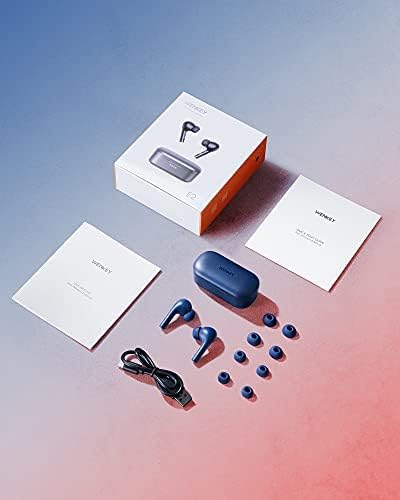
Image: The WENKEY E2 earbuds, charging case, USB cable, and multiple sizes of silicone ear tips, along with the user manual and quick start guide, as packaged in the product box.
2. Setup
Kuchaja maEarbuds uye Case
Before first use, fully charge both the earbuds and the charging case. Connect the provided USB cable to the charging port on the case and a power source. The LED indicators on the case will show the charging status.

Image: The WENKEY E2 earbuds resting in their open charging case, ready for charging or use. The case features LED indicators on the front.

Mufananidzo: Yakadzama view of the charging case's LED indicators, illustrating how the number of lit LEDs corresponds to the remaining battery charge (e.g., one light for 0-25%, four lights for 76-100%).
Kubatana neMuchina Wako
- Vhura kesi yekuchaja. Maearbuds anozobatidza otomatiki uye opinda papairing mode.
- Pafoni yako, tablet, kana laptop, vhura Bluetooth.
- Tsvaga "WENKEY E2" in the list of available Bluetooth devices.
- Select "WENKEY E2" to connect. Once connected, you will hear a confirmation tone.
Image: The WENKEY E2 charging case, open and ready for connection, positioned next to a smartphone screen that shows a successful Bluetooth pairing with the
Related Documents - E2
 |
WENKEY E2 Yechokwadi Wireless Earbuds Quick Start Guide Nhungamiro yakapfupika yekumisikidza uye kushandisa WENKEY E2 Yechokwadi Wireless Earbuds, inosanganisira pairing, kukwana, uye zvinodzora. |
 |
WENKEY E2 Yechokwadi Wireless Earbuds Mushandisi Manual Chinyorwa chemushandisi cheWENKEY E2 Yechokwadi Wireless Earbuds, inotsanangura zvakatemwa, kuseta, zvinodzora, kugadzirisa dambudziko, uye ruzivo rwewaranti. |
 |
WENKEY E2 Wireless Earbuds User Manual Chinyorwa chemushandisi cheWENKEY E2 isina waya mahedhifoni, inovhara kuseta, kushanda, kugadzirisa matambudziko, uye zvakatemwa. |
 |
Baseus Bowie E2 Yechokwadi Wireless Earphones Mushandisi Manual Yakakwana mushandisi Chinyorwa cheBaseus Bowie E2 Yechokwadi Wireless Nzeve, inotsanangura kuseta, mashandiro, maficha eapp, kugadzirisa matambudziko, kutsanangurwa kwechigadzirwa, uye mirairo yekuchengetedza. |