1. Nhanganyaya
Welcome to the user manual for the JB Systems PPC-081 Adjustable Height Column Sound System. This versatile PA system is designed for various audio applications, featuring an 8-inch woofer for deep bass, a built-in media player, and Bluetooth connectivity. Its modular design allows for three different height configurations, making it adaptable to your specific needs. Please read this manual thoroughly before operating the device to ensure proper use and to prevent damage.
2. Safety Information
Always observe the following basic safety precautions when using this product:
- Verenga mirayiridzo yose zvakanyatsonaka usati washandisa.
- Chengeta bhuku rino kuti ugozorishandisa mune ramangwana.
- Usaise mudziyo wacho pamvura kana hunyoro kudzivirira moto kana kuvhundutswa nemagetsi.
- Ita shuwa kuti magetsi anoenderana nevoltagzvinodiwa zvakataurwa payuniti.
- Usavhura casing. Iko hakuna zvikamu zvinoshandisika mushandisi mukati. Tumira masevhisi ese kuvashandi vanokwanisa.
- Isa chinhu chacho panzvimbo yakatsiga, yakati sandara kudzivirira kudonha.
- Avoid blocking ventilation openings. Ensure adequate airflow around the unit.
- Bvisa tambo yemagetsi panguva yemheni kana kuti kana isingashandiswi kwenguva yakareba.
- Usaise zvinhu zvakazara nezvinwiwa, zvakaita semavhasi, pamidziyo.
- Chengeta mudziyo uyu kure nezvinhu zvinopisa zvakaita sema radiator, ma heat registers, mastove, kana zvimwe zvinhu (kusanganisira amplifiers) zvinoburitsa kupisa.
3. Package Zviri mukati
The JB Systems PPC-081 package includes the following components:
- 1 x Main Subwoofer Unit (with integrated amplifier and media player)
- 2 x Modular Column Speaker Segments
- 1 x Top Column Speaker Segment
- 1 x Power Cable (IEC)
- Microphone Cables (if included in specific bundle)
- 1 x Stereo Mini Jack Cable
- User Manual
4. Chigadzirwa Pamusoroview
The PPC-081 system is comprised of a main subwoofer unit and modular column speaker segments, designed for flexible setup and powerful sound delivery.
4.1 Chiyuniti Chikuru (Subwoofer)

The main unit houses the 8-inch woofer, amplifier, and control panel, forming the base of the system.
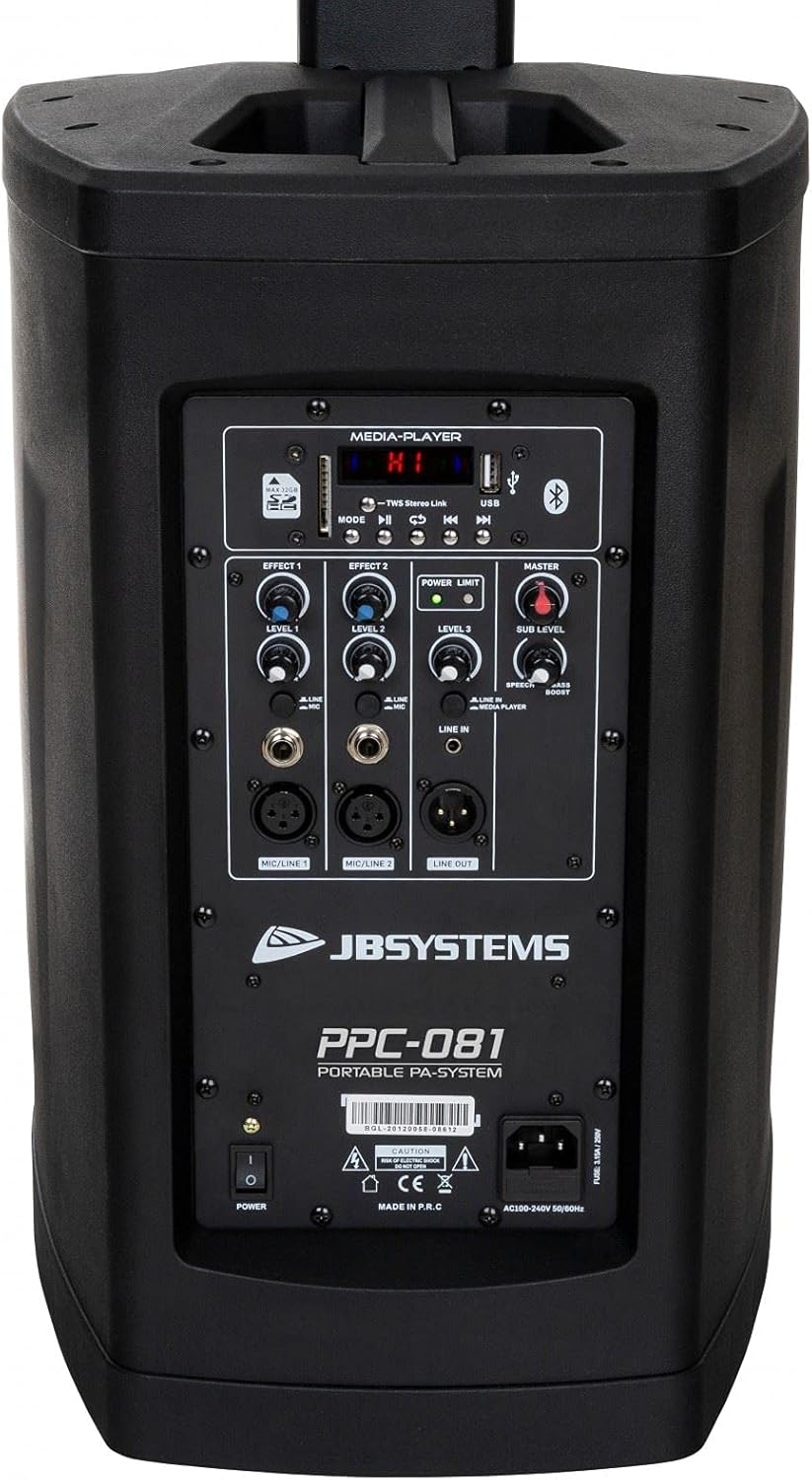
Rear view of the main unit, showing the control panel and power input.
4.2 Column Speaker Segments
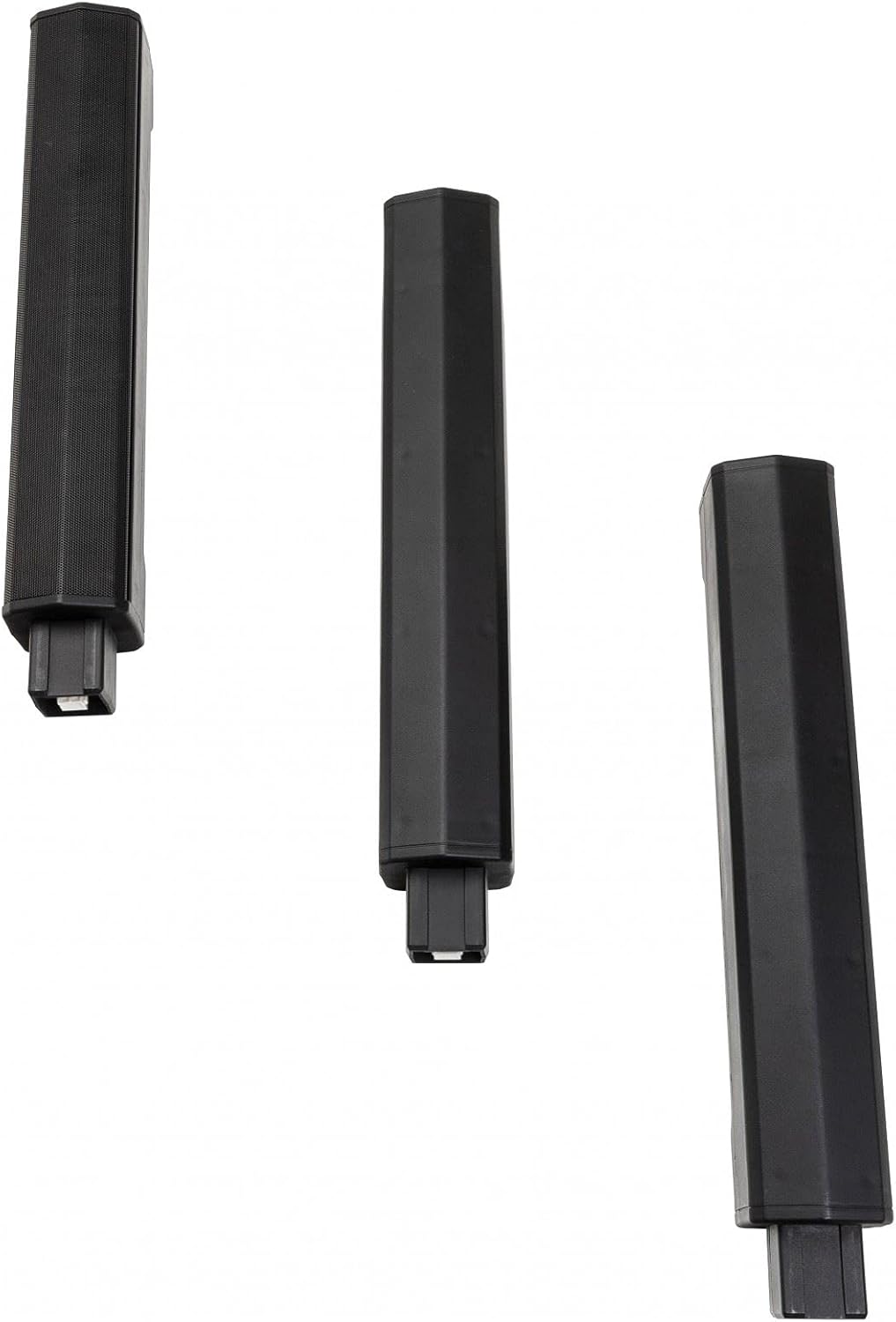
The system includes multiple modular column speaker segments that can be stacked to achieve different heights.
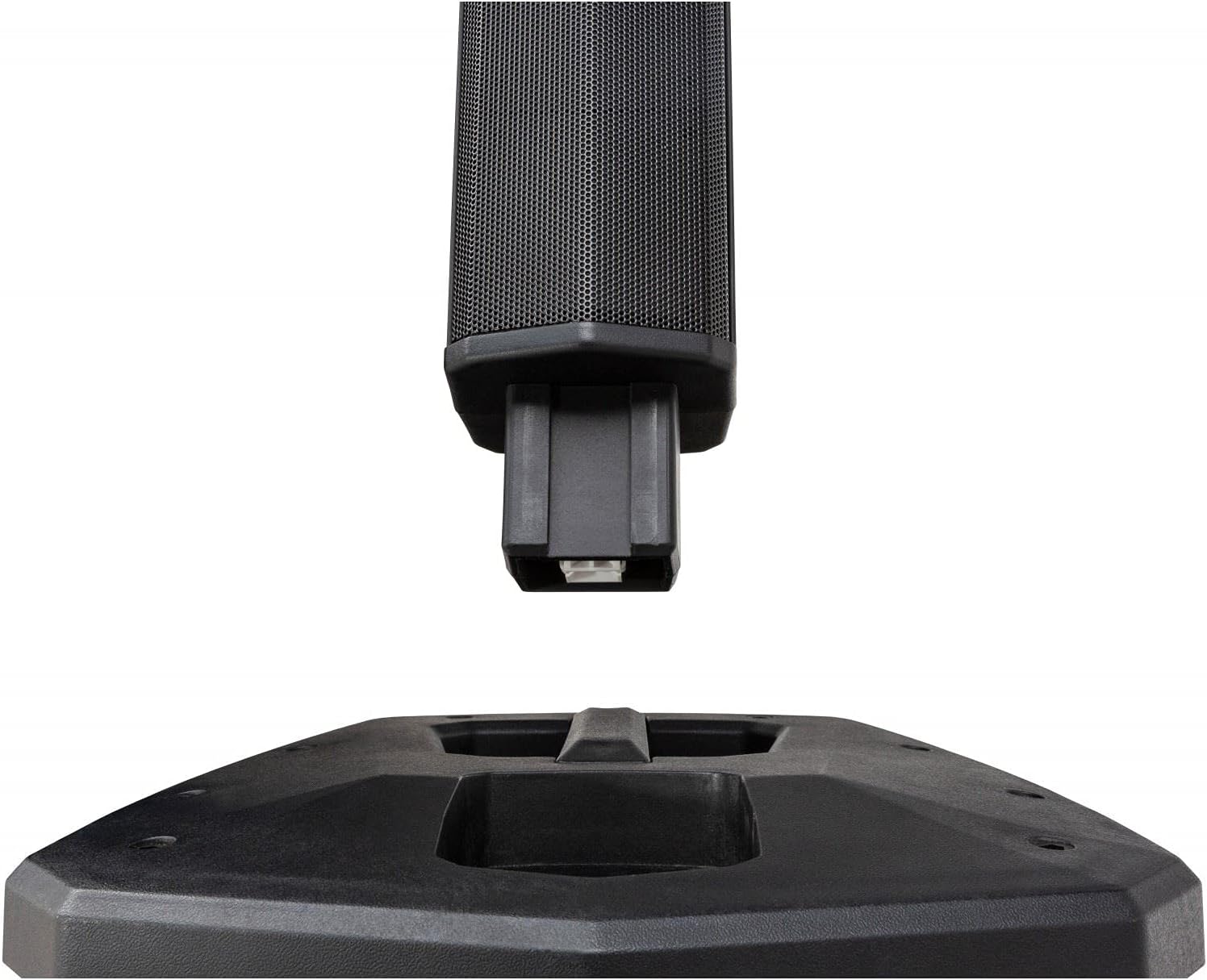
Detail of the connection point for the column speaker segments, ensuring secure assembly.
4.3 Control Panel

Close-up of the control panel, featuring inputs, level controls, and media player interface.
The control panel provides access to all system functions:
- Media Player: Supports USB and SD-HC cards (up to 32GB) for MP3, WAV, WMA, APE, and FLAC playback. Includes Bluetooth connectivity for wireless audio streaming.
- Master Vhoriyamu: Overall volume control for the system.
- Sub Level: Independent bass level control for the 8-inch woofer.
- Microphone Inputs (MIC/LINE 1 & 2): Two combo XLR/Jack inputs with individual level controls and built-in sound effects. Can also be used as mono line inputs.
- Line Input (LINE IN): Stereo mini jack input for connecting external audio players.
- Line Out (LINE OUT): Balanced XLR output for connecting additional speakers or audio devices.
- Effect Controls: Adjustments for built-in audio effects.
- Power Limit Indicator: LED indicator for system power status.
5. Setup
5.1 Gungano
The PPC-081 system offers modular assembly for adjustable height:
Step 1: Position the Main Unit
Place the main subwoofer unit on a stable, flat surface where you intend to use the system.
Step 2: Assemble Column Speakers
Choose your desired height configuration by stacking the modular column speaker segments:
- Low Height (920mm): Attach only the top column speaker segment directly to the main unit.
- Medium Height (1390mm): Attach one modular column segment, then the top column speaker segment.
- Maximum Height (1860mm): Attach both modular column segments, then the top column speaker segment.
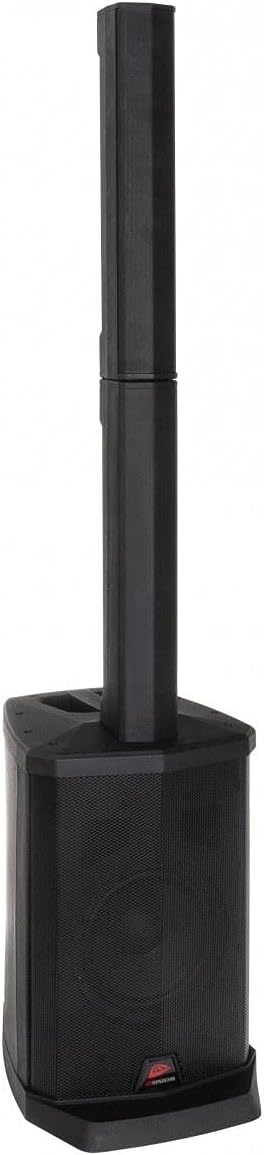
The system assembled with one column segment for a compact setup.

The system assembled with two column segments for medium height.
The system fully assembled with all column segments for maximum height.
Nhanho 3: Batanidza Simba
Connect the supplied power cable to the IEC power inlet on the rear of the main unit, then plug it into a suitable AC outlet (100-240V, 50/60Hz).
5.2 Kubatana
Maikorofoni Connections
Connect microphones to the MIC/LINE 1 or MIC/LINE 2 combo inputs using XLR or 1/4" Jack cables. Adjust individual level controls as needed.
Line Input Connections
For external audio sources like smartphones or laptops, use the stereo mini jack input (LINE IN). For other line-level devices, use the RCA inputs.
External Speaker Connection (Line Out)
To connect additional powered speakers or audio equipment, use the balanced XLR Line Out.
6. Operating Instructions
6.1 Kubatidza/Kudzima
Press the POWER switch on the rear panel to turn the unit ON or OFF. The Power Limit indicator will illuminate when the unit is on.
6.2 Media Player Operation
USB/SD-HC Playback
Insert a USB drive or SD-HC card (up to 32GB) containing MP3, WAV, WMA, APE, or FLAC files into the respective slot. The media player will automatically detect and begin playback. Use the media player controls (Play/Pause, Next, Previous, Mode) to navigate.
Bluetooth Kubatanidza
- Press the MODE button on the media player until 'Bluetooth' mode is selected.
- Pamudziyo wako une Bluetooth (smartphone, tablet), tsvaga michina iripo.
- Select 'PPC-081' from the list to pair. Once paired, you can stream audio wirelessly.
Bluetooth TWS (True Wireless Stereo): If you have two PPC-081 units, you can link them wirelessly for stereo sound. Refer to the specific TWS pairing instructions in the full manual (if available) or on the manufacturer's website.
6.3 Adjusting Levels
- Nhanho yaTenzi: Use the MASTER knob to control the overall output volume of the system.
- Sub Level: Adjust the SUB LEVEL knob to control the bass intensity from the 8-inch woofer.
- MIC/LINE Levels: Use the individual LEVEL knobs for MIC/LINE 1 and MIC/LINE 2 to adjust the volume of connected microphones or line-level devices.
6.4 Using Microphone Inputs
After connecting your microphone, adjust its individual level knob. Experiment with the built-in effect controls (EFFECT 1, EFFECT 2, EFFECT 3) to add reverb or other enhancements to the microphone signal.
7. Kuchengeta
- Kuchenesa: Pukuta chikwata nemucheka wakapfava, wakaoma. Usashandise abrasive cleaners kana solvents.
- Kuchengeta: When not in use, store the system in a cool, dry place, away from direct sunlight and extreme temperatures. If disassembling, ensure all components are stored safely.
- Kufefetedza Ensure that the ventilation openings are clear of dust and debris to prevent overheating.
8. Kugadzirisa matambudziko
If you encounter issues with your PPC-081 system, refer to the table below for common problems and solutions:
| Dambudziko | Zvinogona Kukonzera | Solution |
|---|---|---|
| Hapana simba | Tambo yemagetsi haina kubatana; Chidzimiso chemagetsi chakadzimwa; Nzvimbo yekubuditsa magetsi haisi kushanda. | Tarisa kubatana kwetambo yemagetsi; Iva nechokwadi chekuti switch yemagetsi yavhurwa; Edza nzira yekubuditsa magetsi uchishandisa chimwe chishandiso. |
| Hapana inzwi rinobuda | Master volume too low; Input level too low; Incorrect input selected; Speaker segments not properly connected. | Increase Master and input levels; Ensure correct input mode is selected; Re-check connections of column speakers to main unit. |
| Bluetooth haina kubatanidza | Unit not in Bluetooth mode; Device too far; Bluetooth already connected to another device. | Ensure unit is in Bluetooth mode; Move device closer; Disconnect from other devices and try again. |
| Inzwi rakakanganiswa | Input signal too high (clipping); Master volume too high; Damaged cable. | Reduce input level; Lower Master volume; Try a different cable. |
| Maikorofoni haisi kushanda | Microphone not connected; Microphone level too low; Faulty microphone. | Ensure microphone is securely connected; Increase MIC/LINE level; Test with a different microphone. |
If the problem persists after trying these solutions, please contact JB Systems customer support or your local dealer for assistance.
9. Zvinotsanangurwa
Detailed technical specifications for the JB Systems PPC-081:
| Feature | Tsanangudzo |
|---|---|
| Model Number | 011/8612 |
| Woofer Diameter | 8 inches |
| RMS Power per Channel | 100 Watts (8 Ohm) |
| Frequency Range | 45 Hz - 18000 Hz |
| Inotsigirwa Audio Formats | MP3, WAV, WMA, APE, FLAC |
| Input Connections | XLR, RCA, 1/4" Jack, USB, Bluetooth, IEC (Power) |
| Output Connections | XLR (Line Out) |
| Kushandisa Simba | 100W |
| Magetsi | AC 100 - 240V, 50/60Hz |
| Dimensions (Max Height) | 310 x 400 x 1860 mm (W x D x H) |
| Dimensions (Medium Height) | 310 x 400 x 1390 mm (W x D x H) |
| Dimensions (Low Height) | 310 x 400 x 920 mm (W x D x H) |
| Kurema | 13.8 kg |
| Wireless Technology | Bluetooth |
| Kudzora Nzira | Tactile |
| Color | Nhema |
10. Warranty & Tsigiro
This JB Systems PPC-081 product comes with a limited warranty. For detailed warranty terms and conditions, please refer to the documentation provided with your purchase or visit the official JB Systems website.
For technical support, service inquiries, or to find authorized service centers, please visit the official JB Systems website or contact your local dealer. Please have your product model number (PPC-081 / 011/8612) and purchase information ready when seeking support.


