Nhanganyaya
The Vieta Pro Note True Wireless Earphones are designed to provide a high-quality audio experience with advanced features. These earphones utilize Bluetooth 5.1 for stable wireless connectivity, offer Active Noise Cancellation (ANC) up to -30dB, and include an integrated microphone for clear communication. With IPX4 water resistance, they are suitable for various activities. The charging case extends the total battery life to up to 20 hours.
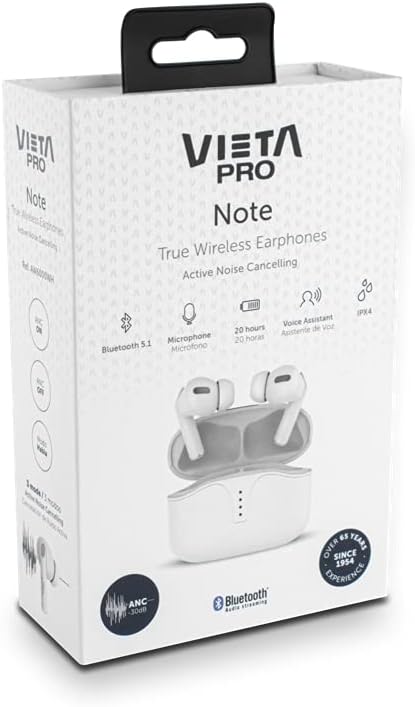
Image: Vieta Pro Note True Wireless Earphones in their retail packaging, highlighting key features like Bluetooth 5.1, microphone, 20 hours battery, Voice Assistant, and IPX4 rating.
Gadzirira
1. Kutanga Kuchaja
Before first use, fully charge the earphones and the charging case. Connect the provided USB Type-C cable to the charging port on the case and to a power source. The LED indicators on the case will show the charging status and remaining battery level.
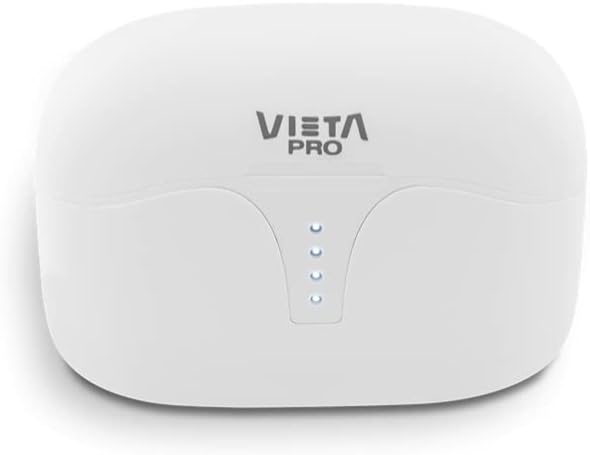
Mufananidzo: Pamusoro view of the Vieta Pro Note charging case, showing the four LED indicators that display battery status.
2. Kubatanidza neChishandiso
- Ita shuwa kuti mahedhifoni akachajwa uye aiswa mukati mekesi yekuchaja.
- Vhura chivharo chekuchaja. Maearphone anozopinda otomatiki pairing mode.
- Pane yako smartphone kana Bluetooth-inogonesa mudziyo, enda kune iyo Bluetooth marongero.
- Select "Vieta Pro Note" from the list of available devices.
- Once connected, a confirmation sound will play, and the earphones will be ready for use.
The Vieta Pro Note earphones feature Dual Master Technology, meaning both earbuds can function independently. You can use either the left or right earbud alone after initial pairing.
Image: The Vieta Pro Note True Wireless Earphones removed from their open charging case, ready for pairing or use.
Operating Instruction
1. Simba On / Off
- Power On: Open the charging case lid, or take the earphones out of the case. They will automatically power on and attempt to connect to the last paired device.
- Power Off: Isa maearphone kumashure muchesi yekuchaja wovhara chivharo. Vanodzima votanga kuchaja.
2. Kubata Kudzora
The Vieta Pro Note earphones feature a touch control panel on each earbud for various functions:

Mufananidzo: Kuvhara view of the left Vieta Pro Note earbud, showing the touch-sensitive area and microphone.
- Tamba/Kumbomira: Top kamwechete pane imwe earbud.
- Next Track: Tokonya kaviri pane earbud yekurudyi.
- Previous Track: Tokonya kaviri kuruboshwe rwenzeve.
- Vhoriyamu Kumusoro: Tokonya katatu pane earbud yekurudyi.
- Vhoriyamu Pasi: Tokonya katatu pane earbud yekuruboshwe.
- Pindura/Pedzisa Kufona: Top kamwechete pane imwe earbud.
- Ramba Kufona: Dzvanya uye bata chero earbud kwemasekonzi maviri.
- Shandisa Izwi Mubatsiri: Dzvanya uye bata chero earbud kwemasekonzi maviri.
3. Active Noise Cancellation (ANC) Modes
The earphones offer three noise cancellation modes:
- Active Noise Cancellation (ANC): Reduces ambient noise by up to -30dB, ideal for noisy environments.
- Talk Mode (Transparency Mode): Allows you to hear your surroundings and engage in conversations without removing the earphones.
- Deactivated: Turns off noise cancellation for a standard listening experience.
To switch between ANC modes, press and hold the touch panel on the ruboshwe earbud for approximately 2 seconds until you hear a voice prompt indicating the mode change.
Maintenance
1. Kuchenesa
- Garai kuchenesa maearbud nekesi yekuchaja nejira rakapfava, rakaoma, risina lint.
- Usashandise abrasive cleaners, solvents, kana aerosol sprays.
- Bvisa zvinyoro nyoro chero wakisi yenzeve kana marara kubva kumatipi enzeve uye mesh yemutauri uchishandisa bhurashi diki, rakapfava kana donje swab.
2. Kuchengeta
When not in use, store the earphones in their charging case to protect them from dust, damage, and to ensure they remain charged.
3. Kuramba Mvura (IPX4)
The Vieta Pro Note earphones are rated IPX4 for water resistance. This means they are resistant to splashing water from any direction. They are suitable for use during workouts or in light rain. However, they are kwete designed for submersion in water or exposure to pressurized water jets. Do not use them in a shower or while swimming.
Kugadzirisa matambudziko
- Hapana Inzwi: Ensure earphones are charged, connected to your device, and volume is turned up on both the earphones and your device.
- Haikwanise Kubatanidza: Make sure Bluetooth is enabled on your device and the earphones are in pairing mode. Try turning Bluetooth off and on again on your device. If issues persist, try resetting the earphones (refer to the full manual for specific reset instructions if available).
- Kubatana Kwenguva: Ensure there are no obstructions between the earphones and your device. Keep the device within the Bluetooth range (typically 10 meters/33 feet).
- Maearbuds haachaji: Check that the charging cable is securely connected and the charging case has power. Ensure the earbuds are correctly seated in the charging case.
Zvinotsanangurwa
| Model Number | AW6000WH |
| Brand | Vietnam Pro |
| Kubatana | Bluetooth 5.1 |
| Noise Cancellation | Active Noise Cancellation (-30dB) |
| Maikorofoni | Integrated |
| Kuramba Mvura | IPX4 |
| Earbud Battery Hupenyu | Kusvikira kumaawa makumi maviri nemashanu |
| Hupenyu Hwebhatiri Hwakazara (nekesi) | Kusvikira kumaawa makumi maviri nemashanu |
| Kuchaja Port | USB Type-C |
| Control Type | Kudzora Kubata, Kudzora Vhoriyamu |
| Fomu Factor | Munzeve |
| Material | Plastiki |
Warranty uye Support
For warranty information, technical support, or further assistance, please refer to the official Vieta Pro websaiti kana kubata dhipatimendi ravo rebasa revatengi. Chengetedza humbowo hwako hwekutenga kune warranty claim.


