1. Nhanganyaya
This manual provides essential information for the installation, operation, and maintenance of your SonicWall NSA 4700 Secure Upgrade Plus - Advanced Edition 2YR. Please read this manual thoroughly before using the device to ensure proper setup and optimal performance. The SonicWall NSA 4700 is a next-generation firewall designed to provide comprehensive network security services.
2. Setup
2.1 Unboxing uye Yekutanga Kuongorora
Carefully remove the SonicWall NSA 4700 device and its accessories from the packaging. Inspect all components for any signs of damage. If any damage is found, contact your vendor immediately.
2.2 Kuiswa Kwenyama
The SonicWall NSA 4700 can be installed in a standard 19-inch rack. Ensure adequate ventilation around the device. Connect the power cable to the device and a suitable power source. Connect your network cables to the appropriate LAN and WAN ports.
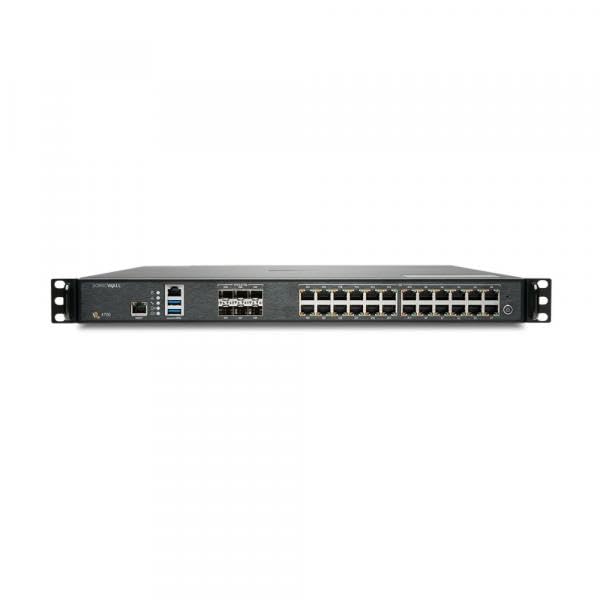
Figure 1: SonicWall NSA 4700 Front Panel. This image displays the front of the SonicWall NSA 4700, highlighting its network interfaces and LED indicators for status monitoring.
2.3 Magadzirirwo ekutanga
After physical installation, power on the device. Access the management interface via a web browser using the default IP address (refer to the Quick Start Guide for details). Follow the on-screen prompts to complete the initial setup, including setting up network parameters and administrative credentials.
3. Kushanda
3.1 Pamusoroview of Security Services
The SonicWall NSA 4700, with the Secure Upgrade Plus - Advanced Edition, provides a comprehensive suite of security services:
- Capture Advanced Threat Protection Service: Provides multi-engine sandboxing to detect and block advanced threats, including ransomware and zero-day attacks.
- Gateway Anti-Virus uye Anti-Spyware: Scans incoming and outgoing traffic for known malware signatures.
- Basa rekudzivirira kupinda kwechisimba (IPS): Protects against network-based attacks by detecting and preventing intrusions.
- Kudzora Mashandisirwo: Enables granular control over network applications to optimize bandwidth and enhance security.
- Content Filtering Service: Manages and controls access to inappropriate or unproductive web content.
- Comprehensive Anti-Spam: Filters out unwanted email, protecting against phishing and spam.
- NSM Essential with Management & 7-Day Reporting: Provides centralized management and reporting capabilities.
3.2 Kupinda muManagement Interface
Vhura a web browser and enter the IP address of your SonicWall device. Log in with your administrative credentials. The dashboard provides an overview of the system status, network activity, and security threats.
3.3 Configuring Security Policies
Navigate to the 'Security Services' section to configure and fine-tune your security policies. This includes setting up firewall rules, VPN connections, and customizing threat protection settings. Refer to the SonicWall documentation portal for detailed configuration guides.
4. Kuchengeta
4.1 Firmware Updates
Regularly check for and apply firmware updates to ensure your device has the latest security patches and features. Firmware updates can be performed through the management interface under 'System > Firmware'.
4.2 Kugadzirisa Negadziriro yeparutivi uye Dzosera
It is recommended to regularly back up your device configuration. This allows for quick recovery in case of misconfiguration or system failure. Configuration backups can be managed under 'System > Settings'.
4.3 Monitoring System Status
Utilize the dashboard and logging features to monitor the device's health, network traffic, and security events. This helps in proactive identification and resolution of potential issues.
5. Kugadzirisa matambudziko
5.1 Hapana Simba
- Verify the power cable is securely connected to both the device and a working power outlet.
- Check the power supply unit for any indicator lights.
5.2 Hapana Network Kubatana
- Ensure all Ethernet cables are properly connected to the correct ports.
- Check the status LEDs on the device and connected network equipment.
- Verify network configuration settings (IP addresses, subnet masks, gateways) in the management interface.
5.3 Security Service Issues
- Confirm that your Secure Upgrade Plus - Advanced Edition license is active and not expired.
- Review the security service logs for specific error messages.
- Ensure that the device has proper internet connectivity to update threat signatures.
6. Zvinotsanangurwa
| Feature | Tsanangudzo |
|---|---|
| Model Number | 02-SSC-9552 |
| Package Dimensions | 28 x 24 x 8 inches |
| Item Weight | 30 makirogiramu |
| Mabhatiri | Product Specific mabhatiri anodiwa. |
| Mugadziri | SonicWall |
| Kutanga Kuwanikwa | Nyamavhuvhu 12, 2021 |
7. Warranty uye Tsigiro
7.1 Ruzivo rweWaranti
This product includes a 2-year Secure Upgrade Plus - Advanced Edition, which typically covers hardware warranty and access to software updates and technical support during the subscription period. For detailed warranty terms and conditions, please refer to the official SonicWall warranty policy available on their website.
7.2 Tsigiro yehunyanzvi
SonicWall provides 24x7 technical support for registered products. For assistance, visit the official SonicWall support portal or contact their customer service. Ensure you have your product serial number and registration details ready when seeking support.
Zvekushandisa Pamhepo: For additional documentation, knowledge base articles, and community forums, please visit the official SonicWall website.


