1. Nhanganyaya
The Sonel CMM 30 is an advanced industrial multimeter engineered for versatility, modern functionality, and exceptional durability. This device integrates 11 fundamental measurement functions along with additional features, providing a broad spectrum of applications for professionals. Its robust design includes drop protection and an IP67 rated casing, ensuring reliable performance even in challenging environments.
Key features include a smartphone application for remote reading and data saving via wireless communication, an automatically adjusting backlight for optimal screen visibility, and a built-in flashlight for illumination in dark conditions. This manual provides essential information for the safe and effective use of your CMM 30 multimeter.
2. Safety Information
Gara uchitevedzera matanho anotevera ekuchengetedza kudzivirira kuvhunduka kwemagetsi, kukuvara, kana kukuvara kwemita kana michina iri kuyedzwa.
- Read and understand all instructions and safety information in this manual before operating the meter.
- Usashandise mita kana ikaita seyakakuvara kana kuti kana chinhu chinodzivirira kupisa chiri pamatambo ekuyedza chisina kunaka.
- Gara uchidzima simba kudunhu uye bvisa zvese zvakakwirira-voltage capacitors before making resistance, continuity, diode, or capacitance measurements.
- Shandisa kungwarira paunenge uchishanda nevoltages pamusoro pe30V AC RMS, 42V peak, kana 60V DC. Aya voltages inokonzeresa njodzi.
- Usapfuure miganhu yepamusoro yekupinda chero basa.
- Ensure the function switch is in the correct position for the desired measurement before connecting the test leads to the circuit.
- Tsiva mabhatiri nekukurumidza kana chiratidzo chebhatiri chakaderera chaonekwa kuti uve nechokwadi chekuverenga chaiko.
- Usashandise mita munzvimbo dzine gasi rinoputika, utsi, kana guruva.
3. Package Zviri mukati
Verify that all items listed below are present and undamaged upon opening the package:
- Sonel CMM 30 Industrial Multimeter
- Test Leads (Dzvuku uye Nhema)
- Temperature Probe (K-type thermocouple)
- 4 x AAA Batteries (pre-installed or separate)
- Mushandisi Chinyorwa (gwaro iri)
Kana paine zvinhu zvisipo kana kuti zvakakuvara, ndapota taura nemutengesi wako nekukasika.
4. Chigadzirwa Pamusoroview
Familiarize yourself with the components of your Sonel CMM 30 multimeter:
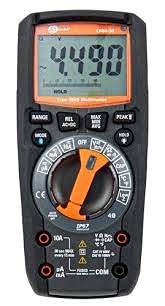
Mufananidzo 4.1: Mberi view of the Sonel CMM 30 Industrial Multimeter. This image displays the device's main components, including the digital display, the central rotary function switch, and the various input terminals for test leads.
4.1. Ratidza
The large LCD shows measurement readings, units, function indicators, and battery status. It features an automatic backlight that adjusts to ambient light conditions for optimal visibility.
4.2. Rotary Function Switch
This central switch is used to select the desired measurement function (e.g., Voltage, Current, Resistance, Capacitance, Temperature, Frequency).
4.3. Mabhatani Ekushanda
Various buttons provide additional controls and features:
- Range: Toggles between manual and automatic ranging.
- MUENZANISO: Selects sub-functions within a main rotary switch position (e.g., AC/DC voltage, Diode/Continuity).
- BATA: Inomisa kuverenga kwazvino kuratidzwa.
- MAX/MIN/AVG: Records maximum, minimum, and average readings.
- REL: Relative mode, subtracts a stored value from subsequent measurements.
- Bluetooth/Light: Activates Bluetooth connectivity for the smartphone app and controls the built-in flashlight.
4.4. Input Jacks
These are the connection points for the test leads:
- COM: Common terminal for the black test lead.
- VΩHzCAP°C: Input yevoltage, resistance, frequency, capacitance, and temperature measurements (red test lead).
- mAµA: Zvinoiswa pamamiriyoniamppano uye microampere current measurements (red test lead).
- 10A: Input for up to 10 Ampere current measurements (red test lead).
5. Setup
5.1. Kuiswa kwebhatiri
The Sonel CMM 30 requires 4 AAA batteries. These may be pre-installed or included separately.
- Ita shuwa kuti multimeter yakadzimwa.
- Tsvaga nzvimbo yebhatiri kuseri kwemamita.
- Shandisa screwdriver kusunungura screw(s) kuchengetedza chivharo chebhatiri.
- Bvisa chivharo chebhatiri.
- Insert the 4 AAA batteries, observing the correct polarity (+ and -) as indicated inside the compartment.
- Tsiva chivharo chebhatiri uye simbisa screw(s) zvakachengetedzeka.
Cherechedza: Always use fresh batteries of the same type. Remove batteries if the meter is not used for an extended period to prevent leakage.
6. Operating Instructions
6.1. Powering On / Off
Turn the rotary function switch from the OFF position to any desired measurement function to power on the meter. To power off, turn the switch back to the OFF position.
6.2. Basic Measurement Procedures
Before any measurement, ensure the test leads are correctly inserted into the appropriate input jacks for the selected function.
6.2.1. Vhoriyamutage Kuyera (AC/DC)
- Insert the black test lead into the COM jack and the red test lead into the VΩHzCAP°C jack.
- Shandura switch inotenderera kuV ~ (AC Voltage) kana V- (DC Voltage) position. If both are combined, use the MODE button to select AC or DC.
- Batanidza tambo dzekuedza dzakafanana mudunhu kana chikamu chinofanira kuyerwa.
- Verenga bhukutage kukosha pachiratidziro.
6.2.2. Kuyerwa Kwazvino (AC/DC)
Yambiro: Never connect the meter in parallel for current measurement. Always connect in series with the circuit.
- Insert the black test lead into the COM jack. For currents up to 10A, insert the red test lead into the 10A jack. For smaller currents (mA/µA), insert the red test lead into the mAµA jack.
- Turn the rotary switch to the A~ (AC Current) or A- (DC Current) position, or the mA/µA position as appropriate. Use the MODE button to select AC or DC if needed.
- Vhura dunhu rinofanira kuyerwa magetsi wobva wabatanidza mita yacho muzvikamu zvakatevedzana.
- Verenga kukosha kwazvino kuri pachiratidziro.
6.2.3. Resistance Measurement
- Insert the black test lead into the COM jack and the red test lead into the VΩHzCAP°C jack.
- Turn the rotary switch to the Ω (Resistance) position.
- Ensure the circuit or component is de-energized before connecting the test leads across it.
- Verenga kukosha kwekudzivisa pachiratidziro.
6.2.4. Capacitance Measurement
- Insert the black test lead into the COM jack and the red test lead into the VΩHzCAP°C jack.
- Turn the rotary switch to the CAP (Capacitance) position.
- Ensure the capacitor is fully discharged before connecting the test leads across it.
- Verenga iyo capacitance kukosha pane inoratidzwa.
6.2.5. Kuyera Kwekupisa
- Insert the temperature probe into the VΩHzCAP°C and COM jacks, observing polarity if applicable.
- Turn the rotary switch to the °C/°F (Temperature) position.
- Isa panoperera tembiricha pachinhu kana pedyo nechinhu chinoyerwa tembiricha.
- Verenga kukosha kwetembiricha pachiratidziro.
6.3. Advanced Features
6.3.1. True RMS Measurement
The CMM 30 features True RMS for AC voltage and current measurements, providing accurate readings for non-sinusoidal waveforms.
6.3.2. Wireless Communication and Smartphone App
The CMM 30 can connect wirelessly to a smartphone application, allowing for remote reading and saving of measurements. This is particularly useful in hard-to-reach or hazardous locations.
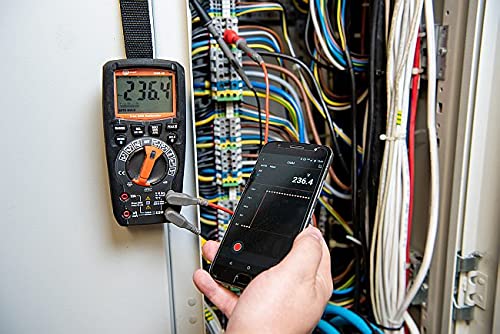
Figure 6.1: The Sonel CMM 30 Multimeter connected to an electrical panel, demonstrating its wireless communication feature. A smartphone displays the measurement reading remotely, highlighting the convenience for inaccessible areas.
Kushandisa chimiro ichi:
- Download the official Sonel CMM app from your smartphone's app store.
- Gonesa Bluetooth pane yako smartphone.
- Press the Bluetooth button on the multimeter to activate its wireless communication.
- Follow the app's instructions to pair with your CMM 30 and begin remote monitoring.
6.3.3. Yakavakwa-mukati Tochi
The integrated flashlight assists in illuminating measurement areas, especially in low-light conditions. Activate it by pressing the dedicated light button.
6.4. Durability and IP67 Rating
The CMM 30 is designed with an IP67 rating, signifying its protection against dust ingress and immersion in water up to 1 meter for 30 minutes. This makes it suitable for demanding industrial environments.
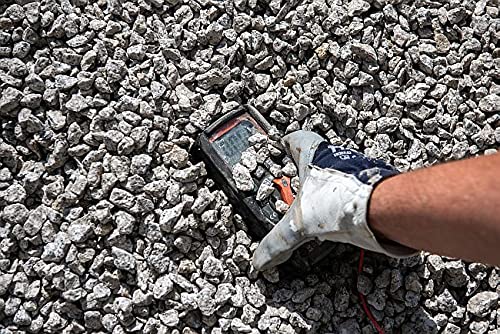
Figure 6.2: The Sonel CMM 30 Multimeter partially submerged in gravel, illustrating its robust construction and resistance to dust and debris, a testament to its IP67 rating.
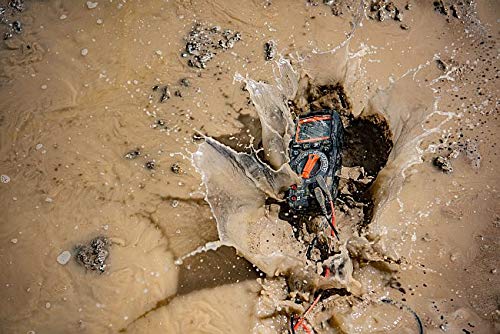
Figure 6.3: The Sonel CMM 30 Multimeter creating a splash as it impacts a muddy puddle, demonstrating its exceptional water resistance and ability to withstand harsh, wet conditions.
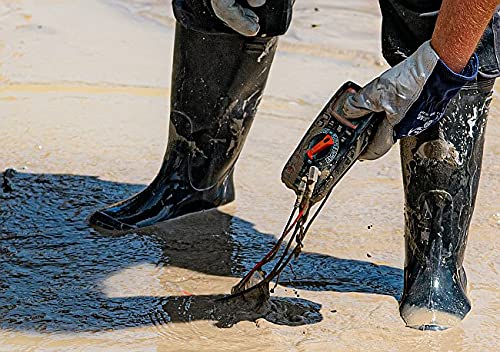
Figure 6.4: A person, wearing protective boots and gloves, retrieves the Sonel CMM 30 Multimeter from a muddy environment. This image emphasizes the device's resilience and ease of handling even after exposure to challenging conditions.
7. Kuchengeta
7.1. Kuchenesa
Pukuta mita yacho casing pamwe adamp jira nesipo isina kusimba. Usashandise zvinogumbura kana zvinonyungudutsa. Iva nechokwadi chekuti mita yacho yakaoma zvachose usati washandisa.
7.2. Kutsiviwa kwebhatiri
Refer to Section 5.1 for battery replacement instructions. Replace batteries promptly when the low battery indicator appears on the display.
7.3. Kuchengeta
When not in use for extended periods, store the multimeter in a dry, cool place, away from direct sunlight and extreme temperatures. Remove the batteries to prevent leakage.
8. Kugadzirisa matambudziko
| Dambudziko | Zvinogona Kukonzera | Solution |
|---|---|---|
| Chiyero chemita hachibatidzi. | Mabhatiri akafa kana kuti akaiswa zvisirizvo. | Tarisa bhatiri polarity kana kutsiva mabhatiri. |
| Hapana kuverenga kana "OL" (Overload) kunoratidzwa. | Incorrect function selected; open circuit; measurement exceeds range. | Select correct function; check circuit continuity; switch to a higher range or auto-range. |
| Kurava kusina kururama. | Low battery; dirty test leads/jacks; external interference. | Replace batteries; clean leads/jacks; move away from strong electromagnetic fields. |
| Bluetooth nyaya dzekubatanidza. | Bluetooth not enabled on meter/phone; app issues; distance. | Ensure Bluetooth is on; restart app/phone; reduce distance between devices. |
9. Zvinotsanangurwa
| Feature | Tsanangudzo |
|---|---|
| Brand | Sonel |
| Model Number | SON001 |
| Color | Nhema |
| Item Weight | 418 g |
| Package Dimensions | 30 x 15 x 10 cm |
| Mabhatiri | 4 AAA mabhatiri anodiwa (akabatanidzwa) |
| Kuyera Mabasa | AC / DC Voltage, AC/DC Current, Resistance, Capacity, Temperature, Duty Cycle, Frequency |
| Ranging | Manual uye otomatiki |
| Chokwadi RMS | Yes (for AC voltage uye ikozvino) |
| Ingress Dziviriro (IP) Rating | IP67 |
| Kubatana | Wireless (Smartphone App) |
| Zvimwe Zvimiro | HOLD function, Built-in flashlight, Backlight auto-adjustment |
10. Warranty uye Tsigiro
10.1. Ruzivo rweWaranti
Sonel products are manufactured to high standards and are warranted against defects in materials and workmanship for a period specified by your regional distributor from the date of purchase. This warranty does not cover damage caused by misuse, unauthorized modification, accident, or neglect. Please retain your proof of purchase for warranty claims.
10.2. Technical Support
For technical assistance, troubleshooting beyond this manual, or warranty inquiries, please contact your local Sonel distributor or the authorized service center. Contact information can typically be found on the Sonel official websaiti kana kuburikidza nenzvimbo yako yekutenga.
When contacting support, please have your product model number (SON001) and purchase date readily available.


