Kutanga
Package Zviri mukati
Upon opening the MAXTOP Smart Watch T5 package, you should find the following items:
- MAXTOP Smart Watch T5 device
- Silicone watch strap (black)
- USB yekuchaja tambo
- User Manual

Image: MAXTOP Smart Watch T5 package contents, showing the watch, a black silicone strap, a USB charging cable, and the user manual.
Kuchaja Chishandiso
Before first use, fully charge your smart watch. Connect the magnetic charging cable to the charging points on the back of the watch and plug the USB end into a standard USB power adapter (not included) or a computer's USB port. The watch display will indicate charging status.
Cherechedza:
- Iva nechokwadi chekuti ma contacts ekuchaja akachena uye akaoma.
- Use a 5V/1A charger for optimal charging.
Kubatidza/Kudzima
- Kubatidza: Press and hold the side button for a few seconds until the MAXTOP logo appears.
- Kudzima: From the watch face, swipe down to access quick settings, or navigate to the "Settings" menu. Select the power icon and confirm to shut down the device.
Kuiswa kweApp uye Pairing
To unlock the full functionality of your MAXTOP Smart Watch T5, you need to install the companion app on your smartphone.
- Dhaunirodha App: Tsvaga the "MAXTOP" app (or specified companion app in the included manual) in the Apple App Store (for iOS) or Google Play Store (for Android).
- Gadzira Akaundi: Open the app and follow the on-screen instructions to create an account and set up your profile.
- Patanidza Watch:
- Ita shuwa kuti Bluetooth yakagoneswa pane yako smartphone.
- Open the app and navigate to the device pairing section.
- Select "Add Device" or similar option. The app will search for nearby devices.
- Select "MAXTOP T5" from the list of found devices.
- Simbisa chikumbiro chekuparura pafoni yako newachi kana ukakumbirwa.
Zvakakosha:
- Keep the watch close to your phone during the pairing process.
- Allow all requested permissions for the app to function correctly.
Features uye Operation
Kufambisa iyo Interface
The MAXTOP Smart Watch T5 features a 1.54-inch full touch screen for easy navigation.
- Swipe Kumusoro/Kudzika: Skrora kuburikidza nemamenyu kana zviziviso.
- Swipe Kuruboshwe/Kurudyi: Access different feature screens or quick views.
- Top: Sarudza chinhu kana simbisa chiito.
- Side Button: Press to return to the main watch face or wake the screen.

Image: The MAXTOP Smart Watch T5 display showcasing multiple functions including heart rate, blood pressure, music control, and various sports modes.
Kutevera Mabasa Ezuva Nezuva
Your smart watch automatically tracks your daily activities, including steps, distance, and calories burned. You can view detailed summaries in the companion app.

Image: The MAXTOP Smart Watch T5 tracking daily activities such as steps, calories, and distance, alongside icons representing various sports modes like hiking, cycling, and running.
Mitambo Yemitambo
The watch supports 10 different sport modes to accurately track your workouts. To start a sport mode:
- Swipe on the watch face to find the "Sport" icon or menu.
- Tap to select your desired activity (e.g., Outdoor Run, Indoor Walk, Cycling).
- The watch will begin tracking your activity. Tap to pause or end the workout.

Image: The MAXTOP Smart Watch T5 interface showing 10 distinct sport modes, such as hiking, outdoor cycling, indoor running, and elliptical training.
Heart Rate and Blood Pressure Monitoring
The watch can monitor your heart rate (HR) and blood pressure (BP). For accurate readings:
- Wear the watch snugly on your wrist, about one finger's width from your wrist bone.
- Ramba wakadzikama panguva yekuyera.
- To measure: Navigate to the HR or BP icon on the watch and tap to start.

Image: The MAXTOP Smart Watch T5 displaying heart rate in beats per minute (BPM) and illustrating different sleep stages (awake, light, deep sleep).
Kurara Monitoring
The watch automatically tracks your sleep patterns, including awake time, light sleep, and deep sleep. View your sleep quality report in the companion app.

Image: The MAXTOP Smart Watch T5's sleep monitoring feature, displaying sleep duration and a detailed sleep quality analysis within the companion application.
Mharidzo Zviziviso
Receive notifications from your smartphone directly on your watch. Ensure the watch is paired and app notifications are enabled in your phone's settings and the companion app.
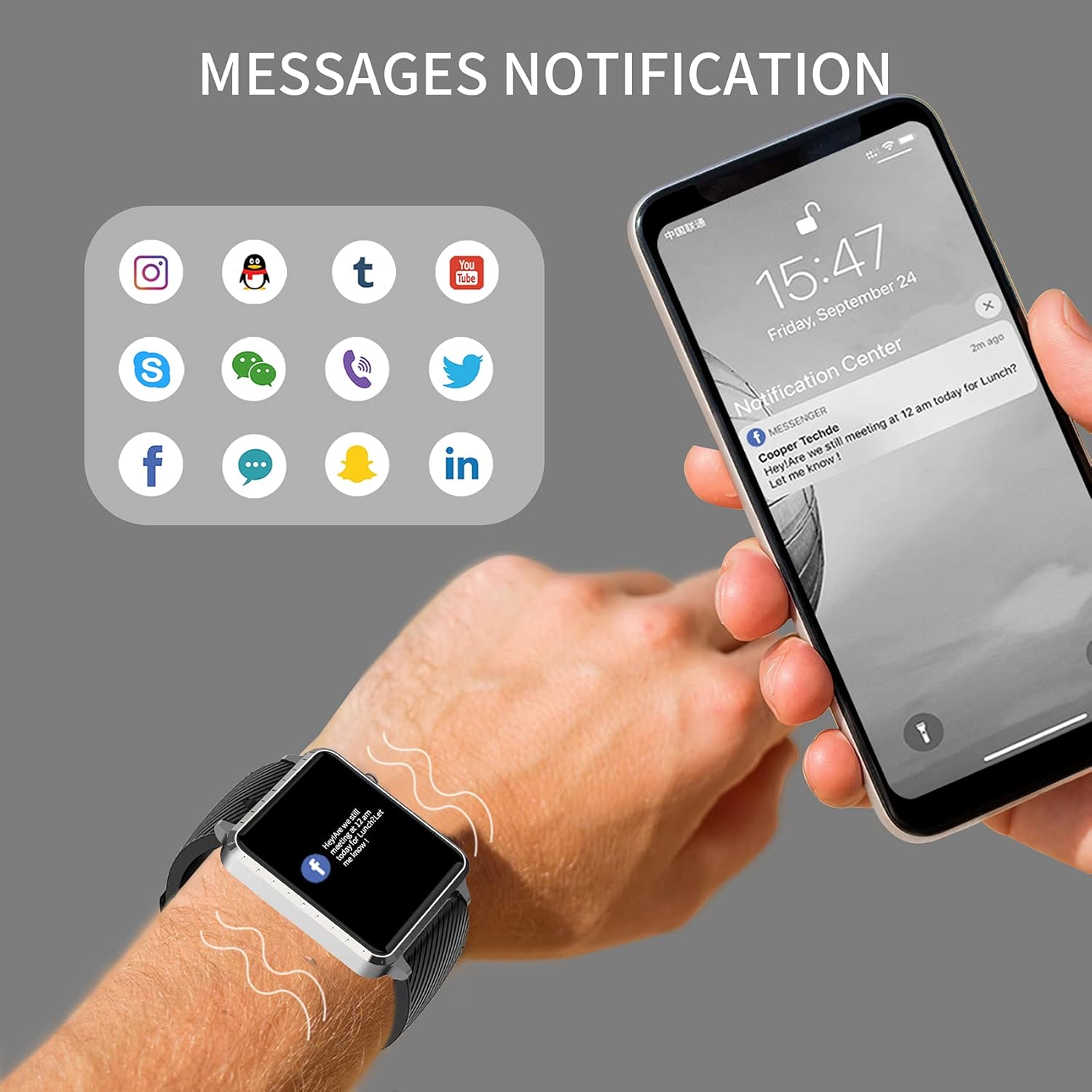
Image: The MAXTOP Smart Watch T5 showing incoming message notifications from popular social media and communication applications on its screen.
Music Control
Control music playback on your smartphone directly from your watch. This feature allows you to play, pause, skip tracks, and adjust volume without taking out your phone.

Image: The MAXTOP Smart Watch T5 demonstrating various features including music control, message notifications, sedentary reminders, and the 'find phone' function.
Mamwe Mabasa
- Sedentary Zviyeuchidzo: Set reminders in the app to encourage movement after periods of inactivity.
- Tsvaga Runhare: Use this feature on your watch to make your paired phone ring, helping you locate it.
- Stopwatch & Countdown: Access these tools from the watch's menu for timing activities.
Maintenance and Care
Kuramba Mvura
The MAXTOP Smart Watch T5 is rated IP67 waterproof. This means it is resistant to splashes, rain, and brief immersion in water. It is suitable for daily use and can withstand hand washing or light rain.
Yambiro:
- Do not use the watch for swimming, diving, or showering with hot water.
- Avoid exposing the watch to high-pressure water or steam.
- Water resistance is not a permanent condition and may decrease over time with normal wear.
Kuchenesa
Regularly clean your watch and strap to maintain hygiene and prevent skin irritation.
- Wipe the watch screen and body with a soft, damp, jira risina mucheka.
- For the silicone strap, you can wash it with mild soap and water, then rinse thoroughly and dry completely before reattaching to your wrist.
- Dzivisa kushandisa makemikari ane hasha kana abrasive zvinhu.
Battery Care
Kuwedzera hupenyu hwebhatiri:
- Charge the watch fully before first use.
- Dzivisa kupisa kwakanyanya.
- If not using the watch for an extended period, charge it to about 50% before storing.
Kugadzirisa matambudziko
Tarisa Usingabatidze
- Ita shuwa kuti wachi yachajiwa zvizere. Isungirire pachaja kweinenge maminitsi makumi matatu.
- Dzvanya wobata bhatani repadivi kwemasekonzi gumi kusvika gumi nemashanu kuti utangezve.
Cannot Pair with Phone
- Iva nechokwadi chekuti Bluetooth yakabatidzwa pafoni yako uye kuti wachi iri pedyo.
- Tangazve zvese foni yako newachi.
- Iva nechokwadi chekuti app iyi yakaiswa uye yagadziridzwa kusvika patsva.
- Forget the device from your phone's Bluetooth settings and try pairing again through the app.
- Tarisa kana wachi yatopetwa nemumwe mudziyo.
Inaccurate Readings (HR/BP/Sleep)
- Ensure the watch is worn correctly: snug on the wrist, not too tight or too loose.
- Ramba wakamira panguva yekuyerwa.
- Note that smart watch readings are for reference only and should not be used for medical diagnosis.
Zviziviso Hazvionekwi
- Iva nechokwadi chekuti wachi yacho yakabatana zvakanaka nefoni yako.
- Check app notification settings on your phone and within the companion app.
- Ensure the app is running in the background and not being closed by your phone's power-saving features.
Zvinotsanangurwa
| Feature | Detail |
|---|---|
| Brand | MAXTOP |
| Model | T5 |
| Screen Size | 1.54 inches |
| Product Dimensions | 1.46 x 1.57 x 0.28 inches |
| Item Weight | 1.87 ounces (53 magiramu) |
| Operating System | Android, iOS inoenderana |
| Wireless Kukurukurirana | Bluetooth |
| Bhatiri Type | Lithium Polymer (1 inosanganisirwa) |
| Hupenyu hwebhatiri | Kusvikira kumazuva makumi manomwe |
| Mvura Resistance Level | Isina mvura (IP67) |
| Kutanga Kuwanikwa Zuva | Chikunguru 6, 2022 |

Image: Detailed physical dimensions of the MAXTOP Smart Watch T5, including the watch face width, height, and the adjustable strap length.
Warranty uye Support
For warranty information and customer support, please refer to the official MAXTOP webtaura nevatengi vavo zvakananga. Ruzivo rwunowanzo wanikwa mupakeji kana pawebhusaiti yemugadziri website.
Chengetedza risiti yako yekutenga sehumbowo hwekutenga kune chero vimbiso yewaranti.