Nhanganyaya
Thank you for choosing the UrbanX Q63 Wireless Earbuds. This manual provides essential information for setting up, operating, and maintaining your earbuds to ensure optimal performance. The Q63 earbuds feature Bluetooth 5.3 connectivity, IPX7 waterproofing, touch controls, and an ergonomic design with ear hooks for a secure fit.
Chii chiri muBhokisi
- UrbanX Q63 Wireless Earbuds (Left and Right)
- Kuchaja Case
- Waya yekuchaja yeUSB-C (haina kunyorwa zvakajeka asi yakarongedzerwa kuchaja yeUSB-C)
- Ear Tips (Multiple Sizes)

Image: UrbanX Q63 Wireless Earbuds placed inside their charging case, illustrating the product components.
Product Overview
Earbud Components and Controls
Each earbud is equipped with a multi-function button and an ergonomic ear hook for stability.

Image: Diagram showing the location of controls on the UrbanX Q63 earbuds, detailing functions for calls and music playback.
- Call/Hang Up: Kudzvanya kamwe
- Ramba Kufona: Twice click
- Play Music/Pause Music: Kudzvanya kamwe
- Rwiyo Rwapfuura: Long press (2 seconds) on left earbud
- Rwiyo Runotevera: Long press (2 seconds) on right earbud
- Power On: Kudzvanya kwenguva refu (3 masekonzi)
- Power Off: Kudzvanya kwenguva refu (5 masekonzi)
Kuchaja Case LED Display
The charging case features a dual LED digital display to indicate battery levels.
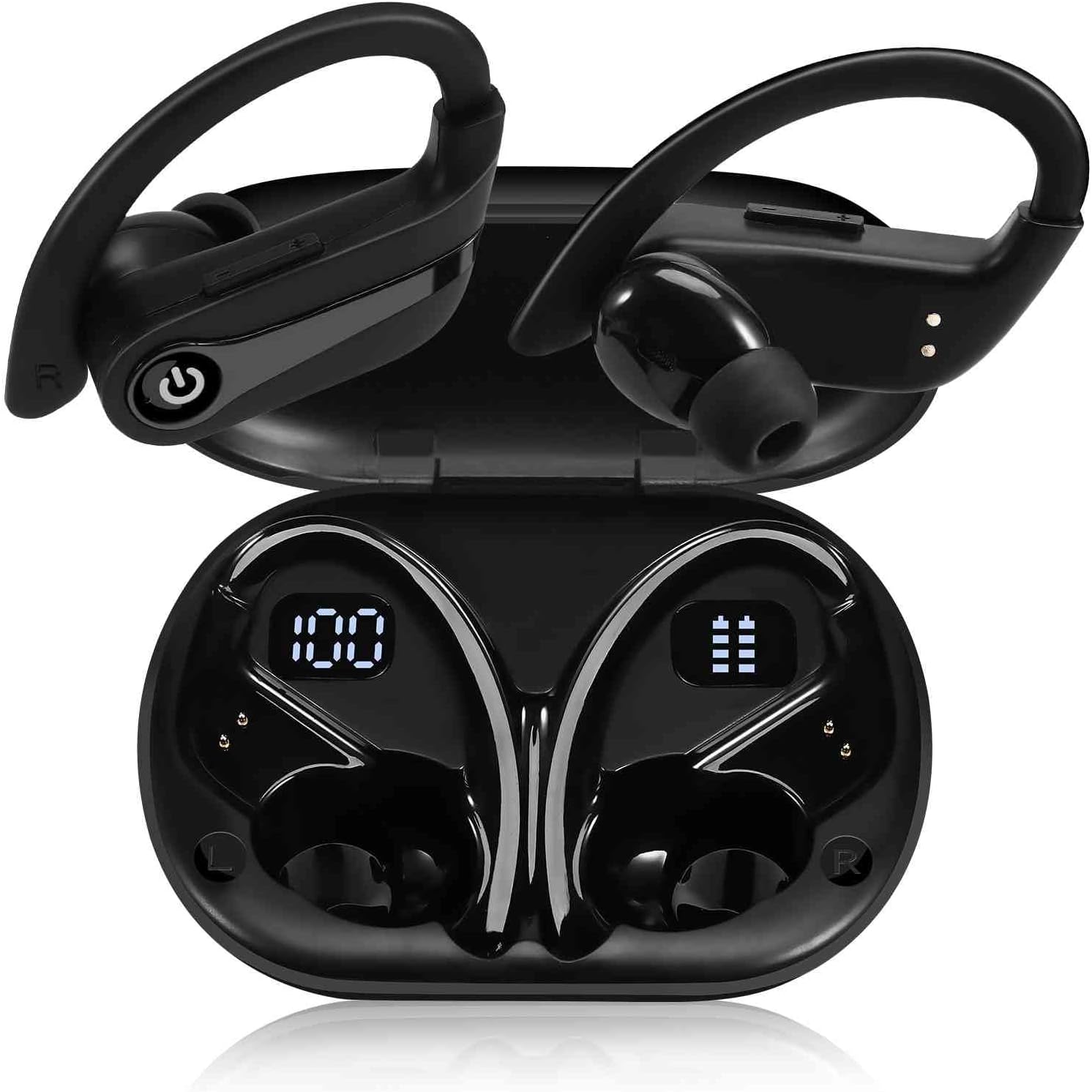
Image: The UrbanX Q63 charging case open, displaying digital readouts for both the charging case battery capacity and the individual earbud power levels.
- Kuchaja Kesi Kugona: Inoratidza chikamu chebhatiri chasaratage yemhosva yekuchaja.
- Earbud Power Display: Shows the individual battery level of each earbud.
Gadzirira
1. Kuchaja maEarbuds uye Case
Usati watanga kushandisa, chaja zvizere maearbud nekesi yekuchaja.
- Kuchaja maEarbuds: Isa maearbuds muchesi yekuchaja. Vanozotanga kuchaja otomatiki.
- Kuchaja Nyaya: Connect the USB-C charging cable to the charging port on the case and to a power source. The LED display will show the charging progress. The case also supports wireless charging.
- Nguva yekuchaja: Anenge maminetsi e80 yekuchaja yakazara.

Image: The UrbanX Q63 charging case connected via a USB-C cable, indicating the charging process and highlighting the extended playback time.
2. Kubatanidza neChishandiso Chako
The UrbanX Q63 earbuds feature one-step pairing for convenience.
- Ita shuwa kuti Bluetooth yemudziyo wako yakabatidzwa.
- Vhura kesi yekuchaja woburitsa ese maearbuds. Vanozopinda otomatiki pairing mode.
- On your device, search for Bluetooth devices and select "YYK-Q63" from the list.
- Kana yangobatanidzwa, unonzwa toni yekusimbisa, uye maearbuds anenge agadzirira kushandiswa.

Image: A hand holding a smartphone displaying Bluetooth settings, with "YYK-Q63" visible in the list of available devices, demonstrating the one-step pairing process.
Operating Instruction
Music Playback
- Tamba/Kumbomira: One click on either earbud.
- Next Track: Kurebesa earbud yekurudyi kwemasekonzi maviri.
- Previous Track: Dzvanya kwenguva refu earbud yekuruboshwe kwemasekonzi maviri.
Fonera Management
- Pindura/Pedzisa Kufona: One click on either earbud.
- Ramba Kufona: Double click on either earbud.
Simba On/Kudzima
- Power On: Long press the earbud button for 3 seconds.
- Power Off: Long press the earbud button for 5 seconds.

Image: A person wearing UrbanX Q63 earbuds, illustrating comfortable use during music listening.
Maintenance
Kuchenesa
- Pukuta zvinyoro nyoro maearbuds nekesi yekuchaja nejira rakapfava, rakaoma, risina lint.
- Usashandise makemikari ane hasha, kuchenesa zvinonyungudutsa, kana mishonga yakasimba.
- Geza matipi nzeve nguva nenguva nekushambadziraamp jira nesipo isina kunyorova, wozoomesa zvakanaka usati wabatanidzazve.
Storage
- Gara uchichengeta maearbuds mukesi yavo yekuchaja kana isiri kushandiswa kuadzivirira uye kuti agare aine chaji.
- Chengetedza munzvimbo inotonhorera, yakaoma kure nekupisa kwakanyanya uye zuva rakananga.
Kuramba Mvura
The earbuds are IPX7 waterproof, meaning they are protected against immersion in water up to 1 meter for up to 30 minutes. They are suitable for workouts and light rain. However, they are not designed for swimming or prolonged submersion. Ensure earbuds are dry before placing them back in the charging case to prevent damage.
Kugadzirisa matambudziko
- Maearbuds haana kubatanidza: Ita shuwa kuti ese maearbud abuda mukesi uye akazara. Dzima uye paBluetooth yemudziyo wako, woedza kubatanidza zvakare.
- Imwe chete earbud inoshanda: Place both earbuds back into the charging case, close the lid, wait a few seconds, then take them out again to re-establish the connection.
- Hapana ruzha: Tarisa huwandu hwevhoriyamu pamudziyo wako wakabatana. Ita shuwa kuti maearbud akanyatsopetwa uye akasarudzwa semaodhiyo ekubuda.
- Kuchaja nyaya: Verify the charging cable is securely connected to both the case and the power source. Ensure the charging contacts on the earbuds and inside the case are clean and free of debris.
Zvinotsanangurwa
| Feature | Tsanangudzo |
|---|---|
| Model Name | Q63 (TWS530) |
| Brand | UrbanX |
| Kubatana Technology | Wireless (Bluetooth 5.3) |
| Bluetooth Range | Kusvika kumamita gumi (18.29 tsoka) |
| Nguva yekutamba neEarbud (Kuchaja kamwe chete) | Kusvikira kuMaawa mashanu |
| Yese Yekutamba (ine Kesi yekuchaja) | Kusvikira kuMaawa mashanu |
| Kuchaja Nguva | Anenge maminitsi makumi maviri |
| Mvura Resistance Level | IPX7 (Isingapindi mvura) |
| Noise Control | Active Noise Cancellation, CVC Noise Reduction (for calls) |
| Audio Driver Type | Dynamic Driver (13mm speakers) |
| Kudzora Nzira | Touch/Button Control |
| Inowirirana Devices | Mobile Phone, Tablet, Laptop, Smartphone, Home and other Bluetooth enabled devices |
| Item Weight | 6.3 ounces |
| Product Dimensions | 3 x 2 x 2 inches |
| Inosanganisirwa Zvikamu | Kuchaja Case |
Warranty uye Support
For warranty information, please refer to the documentation provided with your purchase or contact the retailer. Specific warranty terms may vary by region and point of purchase.
If you encounter any issues or require further assistance, please contact the seller or visit the official UrbanX store on Amazon for support and additional product information. You can typically find seller contact details on your order page.
Visit the UrbanX Store: UrbanX Amazon Store


