1. Nhanganyaya
Thank you for choosing the HOMCOM L-Shaped Industrial Computer Desk. This manual provides essential information for the safe assembly, proper use, and maintenance of your new desk. Please read these instructions carefully before assembly and retain them for future reference.

Image 1.1: The HOMCOM L-Shaped Industrial Computer Desk, featuring a rustic brown finish and a sturdy black metal frame.
2. Mirayiridzo Yekuchengetedza
- Always read and understand all instructions before beginning assembly.
- Chengeta zvikamu zvidiki zvese nezvinhu zvekurongedza kure nevana nezvipfuyo kudzivirira njodzi dzekudzipwa.
- Unganidza dhesiki panzvimbo yakapfava, yakachena kudzivirira kukwenya.
- Ita shuwa kuti ese screws uye fasteners zvakasimbiswa zvakachengeteka usati washandisa. Nguva nenguva tarisa uye simbisa zvakare sezvinodiwa.
- Do not overload the desk. The maximum recommended load capacity is 40 kg (88 lbs).
- Avoid standing or sitting on the desk.
- Use the desk on a level surface. The adjustable leveling feet should be used to ensure stability and prevent wobbling.
- Ichi chigadzirwa chakagadzirirwa kushandiswa kwemukati chete.
3. Package Zviri mukati
Before assembly, verify that all components and hardware listed in the included assembly manual are present and undamaged. If any parts are missing or damaged, please contact customer support.
4. Mirayiridzo yeGungano
Assembly of this desk is designed to be straightforward. An illustrated assembly manual is provided with your product. Follow the step-by-step diagrams and instructions carefully.
- Burura uye Ziva: Carefully unpack all components and lay them out on a protected surface. Identify each part by comparing it to the parts list in the assembly manual.
- Pre-Assembly Check: Ensure all hardware (screws, bolts, brackets) is present.
- Frame Assembly: Begin by assembling the metal frame components as shown in the diagrams. Do not fully tighten screws until the entire frame is loosely assembled.
- Desktop Attachment: Once the frame is stable, attach the rustic brown desktop panels. Align the pre-drilled holes with the frame.
- Feature Installation: Install the magazine rack and perforated memo board onto the desktop as indicated.
- Final Tightening: Once all parts are in place, gradually tighten all screws and fasteners. Do not overtighten.
- Leveling: Adjust the non-slip leveling feet at the bottom of the desk legs to ensure the desk is stable and level on your floor.
Kurudziro: While assembly is designed to be easy, having two people for assembly is recommended to ensure stability and ease of handling larger components.

Image 4.1: Desk dimensions for planning your space.
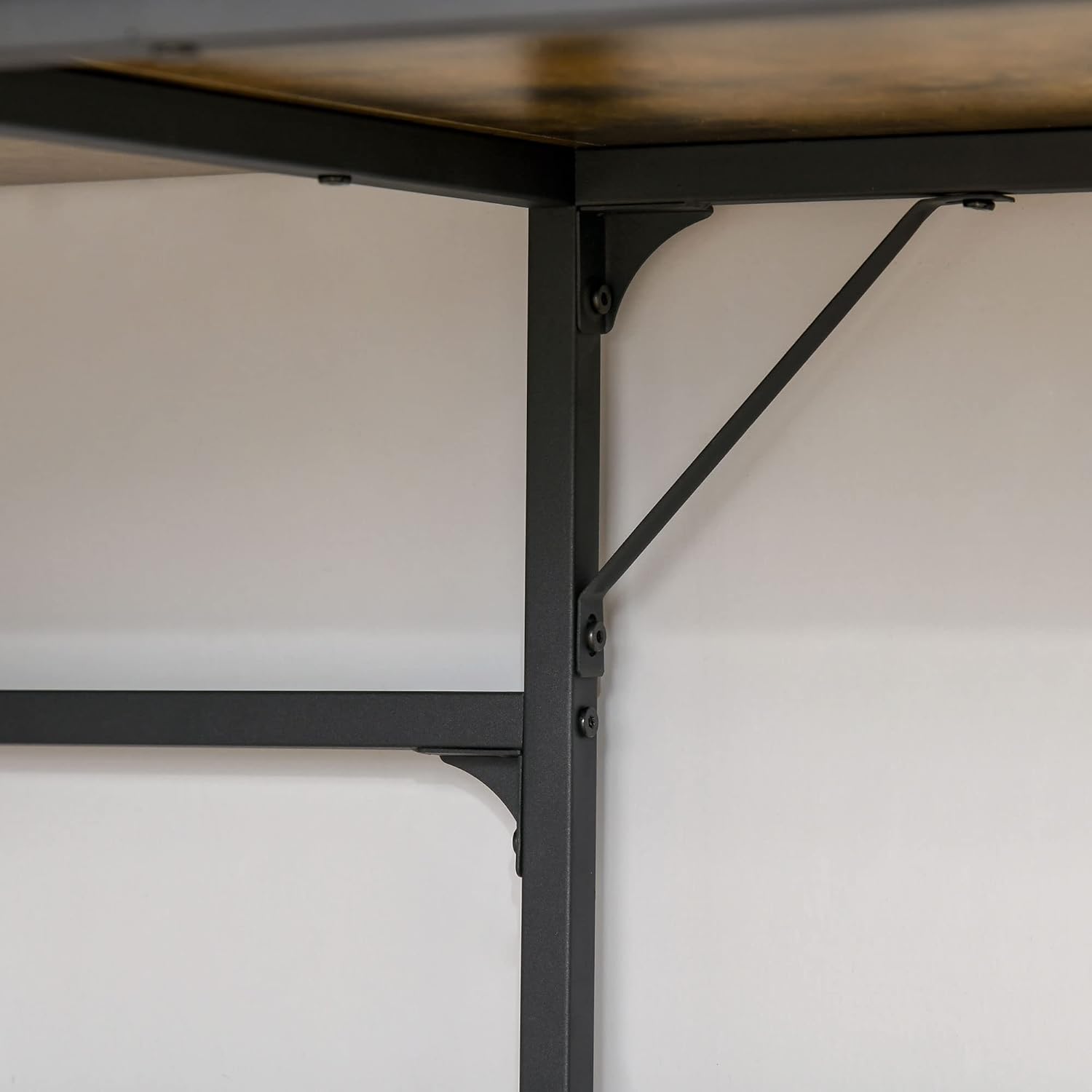
Image 4.2: Detail of the robust metal frame and support brackets.
5. Kushandisa
The HOMCOM L-Shaped Industrial Computer Desk is designed to optimize your workspace with its functional features and stylish design.
- L-Yakaumbwa Dhizaini: Ideal for corner placement, maximizing space efficiency in your office, bedroom, or living room.
- Nzvimbo Yakakura Yebasa: Inopa ample space for your computer, monitor, keyboard, and other work essentials.
- Integrated Storage: Features a convenient magazine rack for documents and books, and a perforated memo board for notes, photos, or small accessories.
- Industrial Aesthetic: The rustic brown wood-look finish combined with the black metal frame offers a modern industrial style.

Image 5.1: The desk in use, showcasing its spacious work area and integrated features.

Mufananidzo 5.2: Yakadzama view of the magazine rack and perforated memo board.
6. Kuchengeta
To ensure the longevity and appearance of your HOMCOM desk, follow these simple maintenance guidelines:
- Kuchenesa: The desk features an easy-care melamine coating. Wipe surfaces with a soft, damp jira. Dzivisa abrasive cleaners kana makemikari ane hutsinye anogona kukanganisa kupera.
- Kurasika: Immediately wipe up any spills to prevent staining or damage to the wood-look surface.
- Dziviriro: Use coasters for drinks and protective pads under hot items or sharp objects to prevent marks and scratches.
- Fasteners: Periodically check all screws and bolts to ensure they remain tight. Re-tighten if necessary to maintain structural integrity.
- Environment: Avoid placing the desk in direct sunlight or near heat sources, as this can cause fading or warping over time.
7. Kugadzirisa matambudziko
If you encounter any issues with your HOMCOM L-Shaped Industrial Computer Desk, please refer to the following common solutions:
- Desk iri Wobbly:
- Iva nechokwadi chekuti screws nemabolts ese akanyatso sungirirwa.
- Adjust the leveling feet on the bottom of each leg to compensate for uneven floors.
- Verify that the desk is placed on a flat, stable surface.
- Zvikamu Zvisipo kana Zvakakuvadzwa:
- Carefully check all packaging materials to ensure no small parts were overlooked.
- Refer to the parts list in your assembly manual. If parts are genuinely missing or damaged, contact HOMCOM customer support for assistance.
- Dambudziko neAssembly:
- Review the illustrated assembly manual step-by-step.
- Iva nechokwadi chekuti uri kushandisa hardware yakakodzera padanho rega rega.
- Do not force parts together; if they don't fit, re-check the instructions.
For further assistance, please contact HOMCOM customer support.
8. Zvinotsanangurwa
| Brand | HOMCOM |
| Model Number | 836-4270531 |
| Color | Rustic Brown |
| Material | Wood (MDF), Metal |
| Zvose Zviyero (L x W x H) | 165 masendimita x 110 masendimita x 95 masendimita (65 mu x 43.3 mu x 37.4 mukati) |
| Desktop Depth | 55 masendimita (21.7 mukati) |
| Perforated Memo Board Dimensions (L x H) | 107 masendimita x 20 masendimita (42.1 mu x 7.9 mukati) |
| Item Weight | 24 kg (52.9 lbs) |
| Max. Recommended Load | 40 kg (88 lbs) |
| Special Features | Scratch Resistant, Non-slip Leveling Feet, Magazine Rack, Perforated Memo Board |
9. Warranty uye Tsigiro
HOMCOM products are manufactured to high-quality standards. For information regarding warranty coverage, please refer to the documentation provided with your purchase or visit the official HOMCOM website.
If you require assistance with assembly, have questions about product features, or need to report missing/damaged parts, please contact our Specialized Customer Support team. Contact details can typically be found on the HOMCOM webwebhusaiti kana risiti yako yekutenga.

Image 9.1: HOMCOM Specialized Customer Support is available to assist you.


