User Manual
Strong SRT 8119 Digital Terrestrial DVB-T2 HDMI Decoder with Display
Muenzaniso: SRT8119
1. Nhanganyaya
This manual provides comprehensive instructions for the installation, operation, and maintenance of your Strong SRT 8119 Digital Terrestrial DVB-T2 HDMI Decoder. Please read this manual carefully before using the device to ensure proper functionality and to prevent damage.
The Strong SRT 8119 is designed to receive free-to-air TV programs in high definition, supporting the H.265 standard. It offers features such as recording capabilities, a 700-channel memory capacity, Electronic Program Guide (EPG), parental controls, and various channel editing options for an enhanced viewing experience.
2. Safety Information
Always observe the following safety precautions to avoid electric shock, fire, or damage to the device:
- Usaisa mudziyo kunaya kana hunyoro.
- Usavhura casing. Tumira masevhisi ese kuvashandi vanokwanisa.
- Ensure proper ventilation around the device. Do not block ventilation openings.
- Shandisa chete adapta yemagetsi inopihwa nemudziyo.
- Disconnect the device from the power outlet during lightning storms or when unused for long periods.
- Chengeta mudziyo kure nezuva rakananga, masosi ekupisa, uye simba remagineti rakasimba.
3. Package Zviri mukati
Tarisa uone kuti zvinhu zvese zviripo mupakeji:
- Strong SRT 8119 Digital Terrestrial DVB-T2 HDMI Decoder
- Kudzora Kure (ine mabhatiri maviri eAAA)
- Mushandisi Chinyorwa (gwaro iri)
- Power Adapter

Figure 3.1: Packaging of the Strong SRT 8119 decoder, showing the product box with branding and key features listed.
4. Chigadzirwa Pamusoroview
4.1. Pamberi Panel

Mufananidzo 4.1: Mberi view of the Strong SRT 8119 decoder, featuring the display, Strong logo, Dolby Audio branding, and a USB port on the right.
- Ratidza: Shows channel number or time.
- USB Port: For connecting USB storage devices for media playback and software updates.
- Power Indicator: Indicates the device's power status.
4.2. Rear Panel

Mufananidzo 4.2: Kumashure view of the Strong SRT 8119 decoder, clearly showing the input and output ports labeled for connection to a terrestrial antenna, HDMI TV, SCART TV, and S/PDIF coaxial audio output.
- ANT IN: Inobatanidza neantenna yako yepasi rose.
- HDMI: High-Definition Multimedia Interface output for connecting to an HD TV.
- TV SCART: SCART output for connecting to older TVs.
- Coaxial S/PDIF: Digital audio output.
- DC IN: Power input for the external power adapter.
4.3. Remote Control

Figure 4.3: The remote control for the Strong SRT 8119 decoder, showing various buttons for power, channel navigation, volume, menu access, EPG, media playback, and numeric input.
The remote control allows full operation of the decoder. Familiarize yourself with the button layout for easy navigation.
5. Setup
5.1. Connecting the Decoder
- Batanidza Antenna: Connect your terrestrial antenna cable to the ANT IN port on the rear panel of the decoder.
- Batanidza kuTV:
- For HD TVs: Connect an HDMI cable from the HDMI port on the decoder to an available HDMI input on your TV.
- For older TVs: Connect a SCART cable from the TV SCART port on the decoder to the SCART input on your TV.
- Batanidza Simba: Insert the power adapter cable into the DC IN port on the decoder, then plug the adapter into a wall outlet.
- Isa Mabhatiri: Vhura bhatiri riri pa remote control woisa mabhatiri maviri eAAA, uchicherechedza polarity.
5.2. First Time Installation
Upon first power-on, the decoder will guide you through the initial setup process:
- Sarudza zvaunoda Mutauro.
- Sarudza yako Nyika.
- The decoder will then perform an automatic channel scan. This may take several minutes. Do not interrupt this process.
- Once the scan is complete, the decoder will display the first available channel.
6. Operating Instructions
6.1. Basic Operation
- Batidza/Kudzima: Press the SIMBA bhatani riri paremote control.
- Kuchinja kweChannel: Shandisa iyo CH +/- mabhatani kana kuisa nhamba yechiteshi zvakananga uchishandisa kiyi yenhamba.
- Kudzora inzwi: Shandisa iyo VOL +/- mabhatani.
- Menu Access: Press the MENU button to access system settings and features. Use arrow keys to navigate and OK kusimbisa.
6.2. Gwaro reMapurogiramu eElektroniki (EPG)
The EPG provides a schedule of current and upcoming programs.
- Press the EPG bhatani riri paremote control.
- Navigate through channels and program times using the arrow keys.
- Press OK ku view details about a selected program.
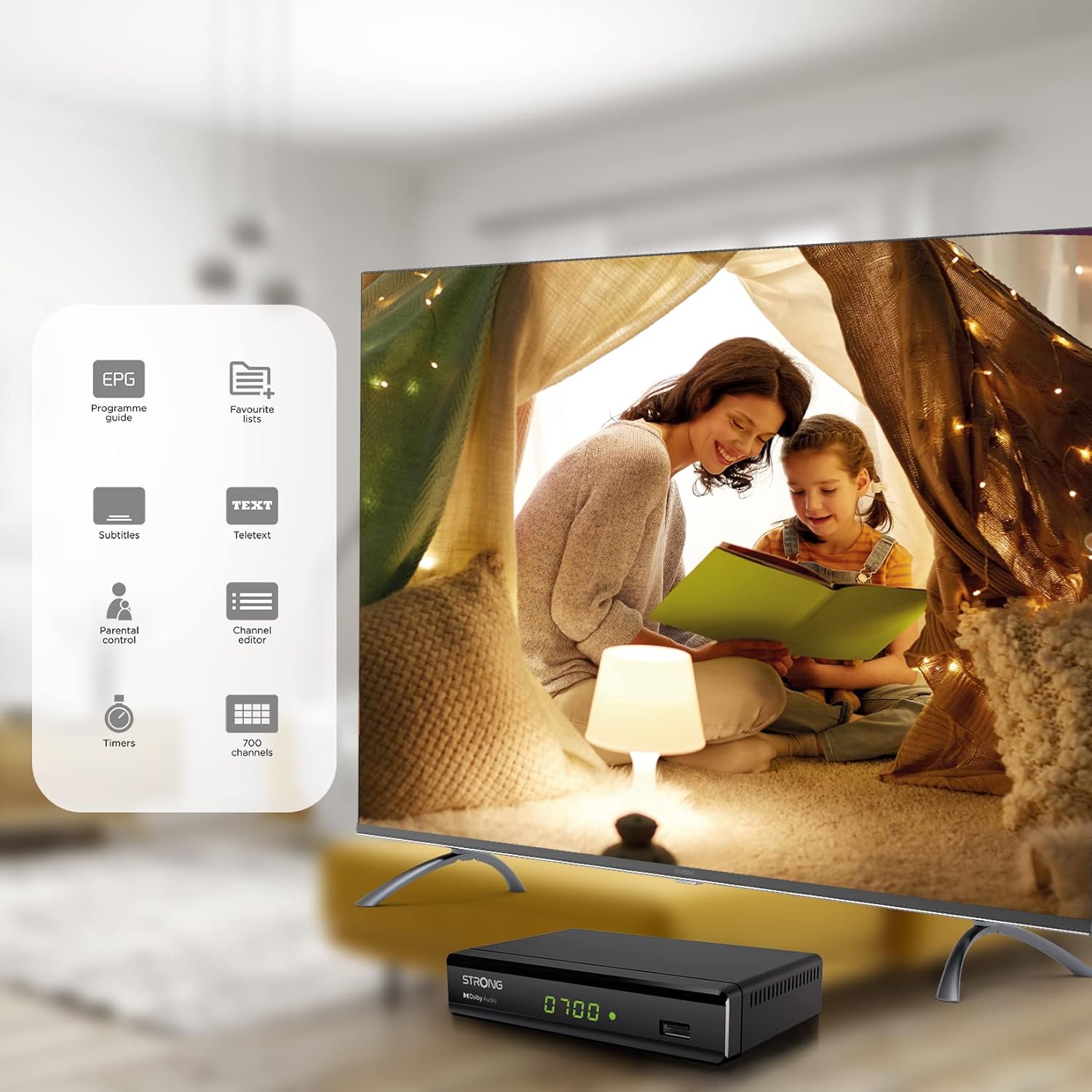
Figure 6.1: Visual representation of the Strong SRT 8119's features, including Electronic Program Guide (EPG), favorite lists, subtitles, teletext, parental control, channel editor, timers, and 700 channel capacity.
6.3. Media Playback and Recording (USB)
The decoder supports media playback from a USB storage device connected to the front USB port. Note: Recording function may not be active in all regions (e.g., Italy).
- Insert a USB flash drive or external hard drive into the front USB port.
- Press the MEDIA button on the remote control to access the media player.
- Enda kune chaunoda file (video, audio, image) and press OK kutamba.
- To record a program, press the REC button during live TV. Ensure a USB device with sufficient free space is connected.
- To schedule a recording, use the EPG and select the program, then follow the on-screen prompts to set a timer.

Figure 6.2: The Strong SRT 8119 decoder shown in a living room setting, highlighting its USB playback and recording capabilities. A note indicates that recording is not implemented for Italy.
6.4. Channel Management
- Channel Editor: Access the channel editor via the MENU to move, delete, or lock channels.
- Favorite Lists: Create up to 4 favorite lists for TV and radio programs for quick access to your preferred channels.
- Kudzora Kwevabereki: Set a password to restrict access to certain channels or programs.
7. Kuchengeta
- Kuchenesa: Use a soft, dry cloth to clean the exterior of the decoder. Do not use liquid or aerosol cleaners.
- Software Update: Periodically check the Strong website for available software updates. Updates can typically be installed via the USB port.
- Kuchengeta: Kana ukachengeta mudziyo kwenguva yakareba, ubvise pamagetsi wouchengeta munzvimbo inotonhorera, yakaoma.
8. Kugadzirisa matambudziko
| Dambudziko | Zvinogona Kukonzera | Solution |
|---|---|---|
| Hapana simba | Power cable isina kubatana; Power outlet yakanganisa. | Tarisa kubatana kwemagetsi; Edza imwe nzira yekuburitsa magetsi. |
| No signal / "No Signal" message | Antenna not connected; Antenna faulty; Incorrect input selected on TV. | Check antenna connection; Ensure antenna is working; Select correct HDMI/SCART input on your TV. |
| Hapana mufananidzo, asi inzwi riripo | Video cable (HDMI/SCART) loose or faulty. | Check video cable connections; Try a different cable. |
| Remote control haisi kushanda | Batteries depleted or inserted incorrectly; Obstruction between remote and decoder. | Replace batteries; Ensure correct polarity; Remove obstructions; Point remote directly at the decoder. |
| Haikwanise kurekodha mapurogiramu | USB device not connected or full; Recording function not available in your region. | Connect a USB device with sufficient space; Check regional limitations for recording. |
9. Zvinotsanangurwa
| Model Number | SRT8119 |
| Product Dimensions | 4.41 x 5.98 x 1.5 inches |
| Item Weight | 9.5 ounces |
| Kubatana Technology | Antenna (DVB-T2), HDMI, SCART, USB, Coaxial S/PDIF |
| Vhidhiyo Encoding | H.265 |
| Channel Capacity | 700 channels |
| Mabhatiri | Mabhatiri maviri eAAA (anowanikwa pakushandisa remote) |
| Audio Output Mode | Surround |
| Kutenderedza Inzwi Channel Configuration | 5.1 |
10. Tsigiro
For further assistance, technical support, or to find useful resources, please visit the official Strong website. You can also find information and support on their Facebook profile and LinkedIn page.
Note: Specific contact numbers or direct links are not provided in this manual. Please refer to the official Strong websaiti kune yakanyanya-kusvika-date rutsigiro ruzivo.


