1. Nhanganyaya
This manual provides essential instructions for the safe and efficient operation of your Crosley CR6252A-YS Portfolio 3-Speed Bluetooth Turntable. Please read this manual thoroughly before using the product and retain it for future reference.
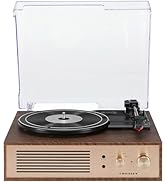
The Crosley Portfolio turntable is designed to play vinyl records at three speeds and features built-in speakers, Bluetooth connectivity for wireless audio streaming, and a moving magnetic cartridge for audio reproduction.

Figure 1.1: Crosley CR6252A-YS Portfolio Turntable (Open View)
2. Mirayiridzo Yekuchengetedza
- Verenga mirairo yose usati washandisa.
- Chengetedza chigadzirwa kure nemvura kana unyoro.
- Do not place near heat sources such as radiators, heat registers, stoves, or other apparatus that produce heat.
- Chenesa chete nemucheka wakaoma.
- Shandisa zvinonamirwa/zvishandiso zvinotsanangurwa nemugadziri chete.
- Bvisa mudziyo uyu panguva yemadutu emheni kana kuti usina kushandiswa kwenguva yakareba.
- Tumira masevhisi ese kuvashandi vanokwanisa. Kushumira kunodiwa kana mudziyo wakuvadzwa neimwe nzira, senge tambo yemagetsi-yekugovera kana plug yakuvadzwa, mvura yadeuka kana zvinhu zvawira mumidziyo, iyo midziyo yave ichinaya mvura kana hunyoro, haishande zvakajairika. , kana kuti yadonha.
3. Package Zviri mukati
Tarisa kuti zvinhu zvese zvakanyorwa pazasi zvinosanganisirwa mupakeji yako:
- Crosley CR6252A-YS Portfolio Turntable
- Power Adapter
- Mushandisi Chinyorwa (gwaro iri)
4. Zvigadzirwa zveChigadzirwa uye Zvikamu
The Crosley CR6252A-YS Portfolio Turntable includes the following key features and components:
- Turntable ine Speed 3: Supports 33 1/3, 45, and 78 RPM records.
- Built-in Bluetooth Receiver: Inobvumira kutenderera pasina waya kubva kumidziyo inoenderana nayo.
- Adjustable Pitch Control: Fine-tune record speed.
- Moving Magnetic Cartridge: Pre-mounted for optimal sound.
- Zvekubatsira: Connect external audio sources.
- USB Enabled: For PC connection.
- Vakavakwa-Vatauri: Integrated audio output.

Figure 4.1: Turntable Mechanism and Controls
Mufananidzo 4.2: Ruzivo rwePaneru Yekudzora

Mufananidzo 4.3: Rear Panel Connections
5. Setup
5.1 Kutanga Kuiswa
Isa turntable panzvimbo yakati sandara, yakagadzikana kure nezuva rakananga, manyuko ekupisa, uye guruva rakawandisa kana kudedera.
5.2 Simba Connection
- Connect the power adapter to the DC 12V input jack on the rear of the turntable.
- Batanidza iyo adapta yemagetsi mune yakakodzera madziro yekubuda.
5.3 Turntable Preparation
- Carefully remove any protective packaging materials from the turntable platter and tonearm.
- Ensure the tonearm is unlocked from its rest.
6. Operating Instructions
6.1 Playing Records
- Turn the ON/OFF knob clockwise to power on the unit.
- Select the desired speed (33 1/3, 45, or 78 RPM) using the speed selector switch. Note: A 78 RPM stylus (not included) is required for 78 RPM records.
- Place a record on the turntable platter. If playing a 45 RPM single, place the 45 RPM adapter (if included) over the spindle.
- Lift the tonearm using the cueing lever and position it over the desired track on the record.
- Lower the tonearm slowly onto the record using the cueing lever. The record will begin to play.
- Chinja vhoriyamu uchishandisa iyo VOLUME knob.
- Shandisa iyo PITCH control knob to fine-tune the playback speed if necessary.
- To stop playing, lift the tonearm, return it to its rest, and turn the ON/OFF Knob inopesana newachi.
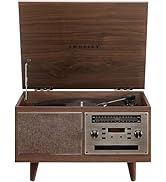
Figure 6.1: Stylus on Record
6.2 Kushanda kweBluetooth
- Turn the ON/OFF knob clockwise to power on the unit.
- Slide the function switch to the Bluetooth position. The indicator light will flash, indicating pairing mode.
- Enable Bluetooth on your external device (e.g., smartphone, tablet) and search for "Crosley Portfolio".
- Select "Crosley Portfolio" from the list of available devices to pair. Once paired, the indicator light will stop flashing and remain solid.
- You can now stream audio wirelessly from your device to the turntable's built-in speakers.
- Chinja vhoriyamu uchishandisa iyo VOLUME knob on the turntable and/or your external device.
6.3 Kupinza Kwekubatsira (AUX IN)
- Turn the ON/OFF knob clockwise to power on the unit.
- Batanidza mudziyo wekunze wekuteerera (semuenzaniso, MP3 player, CD player) kune AUX IN port using a 3.5mm audio cable (not included).
- Iyo turntable ichachinja otomatiki kuAUX IN modhi.
- Chinja vhoriyamu uchishandisa iyo VOLUME knob on the turntable and/or your external device.
6.4 USB Kubatana
The turntable features a PC-USB port for connecting to a computer. This allows for digital conversion of your vinyl records using appropriate software (not included). Refer to your chosen software's instructions for recording procedures.
7. Kuchengeta
7.1 Kuchenesa Turntable
- Gara uchibvisa turntable kubva pamagetsi usati waichenesa.
- Shandisa jira rakapfava, rakaoma kupukuta nzvimbo dzekunze. Usashandise zvinochenesa zvinogumbura kana zvinonyungudutsa.
- Gently brush the stylus with a soft brush designed for stylus cleaning, moving from back to front.
7.2 Stylus Replacement
The stylus (needle) is a consumable part and will wear out over time. A worn stylus can damage your records and degrade sound quality. Replace the stylus after approximately 200-300 hours of playback. Consult your retailer or Crosley support for compatible replacement styli.
8. Kugadzirisa matambudziko
| Dambudziko | Zvinogona Kukonzera | Solution |
|---|---|---|
| Hapana simba | Power adapta haina kubatana kana kukanganisa kubuda. | Iva nechokwadi chekuti adapta yemagetsi yakabatana zvakanaka uye kuti soketi inoshanda zvakanaka. |
| Hapana ruzha kubva kumatauri | Volume too low; function switch in wrong position; Bluetooth not paired. | Increase volume; ensure function switch is set to PHONO or Bluetooth is correctly paired. |
| Rekodha kusvetuka | Record is dirty or damaged; stylus is worn; turntable not level. | Clean record; replace stylus; ensure turntable is on a level surface. |
| Chishandiso cheBluetooth hachibatanidzwe | Turntable not in pairing mode; device too far; device already paired to another unit. | Ensure turntable is in Bluetooth pairing mode; move device closer; disconnect from other Bluetooth devices. |
9. Zvinotsanangurwa
- Zviyero zvechigadzirwa: 12.4 x 15.28 x 6.5 inches
- Chinhu Weight: 13 makirogiramu
- Nhamba Yemhando Yechinhu: CR6252A-YS
- Brand: Crosley
- Zvinosanganisirwa Zvikamu: CR6252A-YS Portfolio Turntable
- Style: Vintage
- Ruvara: Yellow Submarine
- Fomati Yechiratidzo: Analogi
- Kunobva Simba: Corded Electric
- UPC: 710244246569
10. Warranty uye Tsigiro
For warranty information and technical support, please refer to the warranty card included with your product or visit the official Crosley website. Chengetedza risiti yako yekutenga sehumbowo hwekutenga kune chero vimbiso yewaranti.
Mugadziri: Crosley
Zuva Rokutanga Kuwanikwa: Mbudzi 30, 2021


