1. Nhanganyaya
This manual provides comprehensive instructions for the installation, operation, and maintenance of your COUGAR Archon 2 RGB Mid Tower Case. Please read this manual carefully before beginning installation to ensure proper setup and to maximize the performance and longevity of your product.

Mufananidzo 1.1: Angled view of the COUGAR Archon 2 RGB Mid Tower Case, showcasing the tempered glass side panel and front RGB fans.
2. Zvigadzirwa zveChigadzirwa
The COUGAR Archon 2 RGB Mid Tower Case is designed for PC enthusiasts seeking a balance of aesthetics, airflow, and functionality. Key features include:
- Elegant Design with Tempered Glass: A sleek black finish combined with a tempered glass side panel allows for a clear view of internal components and RGB lighting.
- Optimized Airflow: Supports multiple fan configurations and includes three pre-installed 120mm ARGB fans at the front for efficient cooling.
- Yakakura Kuenderana: Accommodates Mini ITX, Micro ATX, and ATX motherboards.
- Ample Storage Options: Provides bays for both 3.5" HDDs and 2.5" SSDs.
- Yakanaka Mberi I/O: Features USB 3.0 and USB 2.0 ports for easy peripheral connectivity.
- RGB Lighting Control: Integrated ARGB fans offer customizable lighting effects.

Mufananidzo 2.1: Mberi view of the COUGAR Archon 2 RGB case, highlighting the three pre-installed ARGB fans.
3. Setup Guide
Follow these steps to properly install your components into the COUGAR Archon 2 RGB case.
3.1. Pre-Instalation Checklist
- Ensure you have all necessary components: motherboard, CPU, RAM, GPU, power supply, storage drives, and appropriate tools (screwdriver, zip ties).
- Work on a clean, static-free surface. Consider using an anti-static wrist strap.
3.2. Kuvhura Nyaya
- Carefully remove the tempered glass side panel by unscrewing the thumbscrews located at the rear of the case. Set the panel aside on a soft, flat surface to prevent scratches.
- Remove the opposite metal side panel by unscrewing its thumbscrews and sliding it backward.
3.3. Motherboard Installation
- Isa shield yeI/O (kana isina kusungirirwa pabhodhi reamai rako) muburi rekumashure rebhokisi.
- Align your motherboard with the standoffs inside the case. Ensure all standoffs match the screw holes on your motherboard.
- Secure the motherboard using the provided screws. Do not overtighten.
3.4. Kuiswa kweChigadziko cheMagetsi (PSU)
- Tsvaga nzvimbo yekuisira PSU pasi kumashure kwebhokisi.
- Slide your PSU into the designated bay from the rear of the case, ensuring the fan faces downwards for optimal cooling (if the case has a bottom vent).
- Chengetedza PSU ne screws kubva kumashure kwebhokisi.
3.5. Kuisa Dhiraivha Yekuchengetera Zvinhu
The Archon 2 RGB supports both 3.5" HDDs and 2.5" SSDs.
- For 3.5" HDDs: Locate the drive cage usually beneath the PSU shroud. Slide the HDD into the drive bay and secure it with screws.
- For 2.5" SSDs: Mount SSDs to the designated mounting points on the back of the motherboard tray or within the drive cage, securing them with screws.
3.6. Kuiswa kweKadhi rekuwedzera (GPU)
- Bvisa zvivharo zvePCIe slot zvinodiwa kubva kumashure kwekesi.
- Insert your graphics card or other expansion cards into the appropriate PCIe slot on the motherboard.
- Secure the card with screws to the case.
3.7. Cable Management and Front Panel Connections
Route all power and data cables neatly behind the motherboard tray. Connect the front panel I/O cables (USB, audio, power switch, reset switch, LED indicators) to their respective headers on the motherboard according to your motherboard manual.

Figure 3.1: Dimensions of the COUGAR Archon 2 RGB case, useful for planning component fit and space.
4. Operating Instructions
4.1. Powering On
Once all components are installed and cables are connected, replace both side panels. Connect your monitor, keyboard, mouse, and power cable to the PSU. Press the power button on the top panel of the case to start your system.
4.2. RGB Lighting Control
The pre-installed ARGB fans are typically controlled via a dedicated button on the case's front I/O panel or through your motherboard's RGB software (if connected to an ARGB header). Refer to your motherboard manual for software-based control options.
5. Kuchengeta
Kugaro gadzirisa kunobatsira kuve nechokwadi chekuita kwakaringana uye hupenyu hurefu hwezvinhu zvePC yako.
- Kuchenesa Hupfu: Nguva nenguva chenesa mafirita eguruva (kana aripo) nezvinhu zvemukati uchishandisa mhepo yakamanikidzwa. Iva nechokwadi chekuti system yadzimwa uye yabviswa paplug usati wachenesa.
- Cable Management: Ensure cables are neatly routed to avoid obstructing airflow.
- Kuongorora kweFan: Check fans for dust buildup or obstructions that could impede their operation.
6. Kugadzirisa matambudziko
Kana ukasangana nematambudziko, tarisa kune anotevera akajairika matanho ekugadzirisa dambudziko:
- Sistimu Haisi Kubatidzwa:
- Check all power connections, including the PSU to the wall outlet, PSU to motherboard (24-pin and CPU 8-pin), and front panel power switch header.
- Iva nechokwadi chekuti switch yePSU iri panzvimbo yekuti 'ON'.
- Mafeni Haasi Kutenderera / RGB Haisi Kushanda:
- Verify fan power cables are securely connected to the motherboard or fan controller.
- Check ARGB headers for proper connection to the motherboard or RGB controller.
- Ensure RGB software or case button is correctly configured.
- Hapana Kubuda
- Confirm the monitor cable is connected to the graphics card (not the motherboard integrated graphics, unless no dedicated GPU is present).
- Dzorerazve kadhi yemifananidzo uye RAM modules.
7. Zvinotsanangurwa
Detailed specifications for the COUGAR Archon 2 RGB Mid Tower Case:
| Feature | Detail |
|---|---|
| Model Name | ARCHON 2 RGB |
| Nyaya Type | Mid tower |
| Motherboard Kuenderana | Mini ITX, Micro ATX, ATX |
| Dimensions (LxWxH) | 14.96 x 8.27 x 18.5 inches (380 x 210 x 470 mm) |
| Item Weight | 11.37 makirogiramu (5.17 kg) |
| Material | Metal, Tempered Glass |
| Color | Nhema |
| Pre-yakaiswa Fans | 3 x 120mm ARGB fans (Front) |
| Tsigiro yeFani (Kumberi) | 3 x 120mm kana 2 x 140mm |
| I/O Zviteshi | 1 x USB 2.0, 2 x USB 3.0, Audio In/Out |
| Power Supply Mounting Type | Gomo rezasi |
| Kutonhodza Nzira | Air |
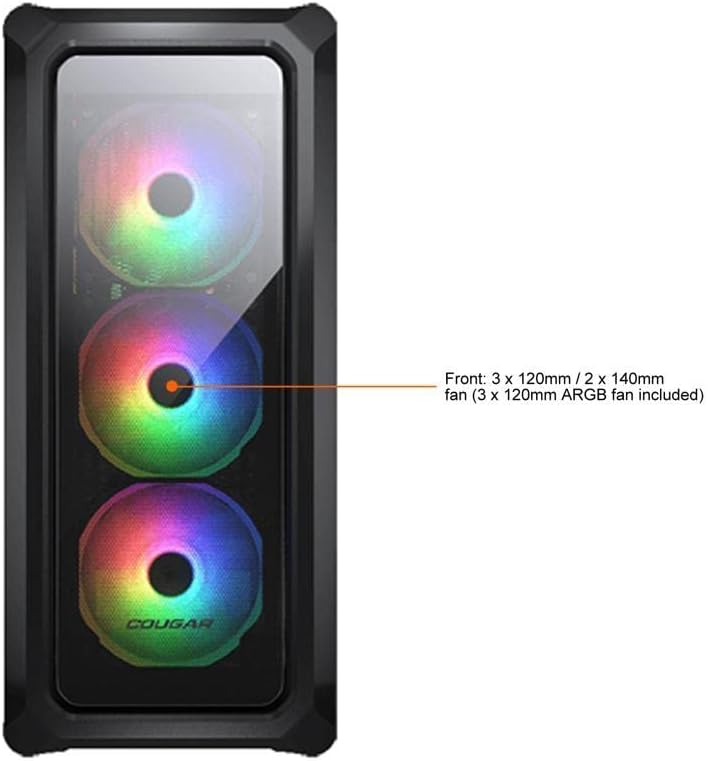
Figure 7.1: Front panel fan configuration and size options for the COUGAR Archon 2 RGB case.
8. Warranty uye Tsigiro
Kuti uwane ruzivo rwewarandi uye rutsigiro rwehunyanzvi, ndapota tarisa COUGAR yepamutemo websaiti kana kubata dhipatimendi ravo rebasa revatengi. Chengetedza humbowo hwako hwekutenga kune warranty claim.
Mukuru weCOUGAR Websaiti: cougargaming.com


