Nhanganyaya
This manual provides comprehensive instructions for setting up, operating, and maintaining your new Tecno Pop 5 LTE smartphone. Designed for seamless performance and a vibrant user experience, your device comes equipped with advanced features to keep you connected and entertained.

Figure 1: Tecno Pop 5 LTE - Front and Back View
Product Overview Vhidhiyo
Watch this official video for a quick overview of the Tecno Pop 5 LTE's main features and design.
Video 1: Tecno Pop 5 LTE Product Overview
Package Zviri mukati
Upon unboxing your Tecno Pop 5 LTE, please ensure all the following items are present:
- Tecno Pop 5 LTE Smartphone
- Power Adapter
- Micro USB Cable
- SIM Ejector Tool
Setup Guide
Kuisa SIM neSD Card
Your Tecno Pop 5 LTE supports dual Nano SIM cards and expandable memory via a microSD card.
- Tsvaga iyo SIM tray padivi pechishandiso.
- Isa SIM ejector mudziyo mugomba diki padivi petireyi uye sunda zvinyoro nyoro kusvika tireyi yabuda.
- Place your Nano SIM card(s) and/or microSD card into the designated slots on the tray, ensuring correct orientation.
- Nyatsosaidzira tireyi mumudziyo kusvika yatsvuka nedivi.
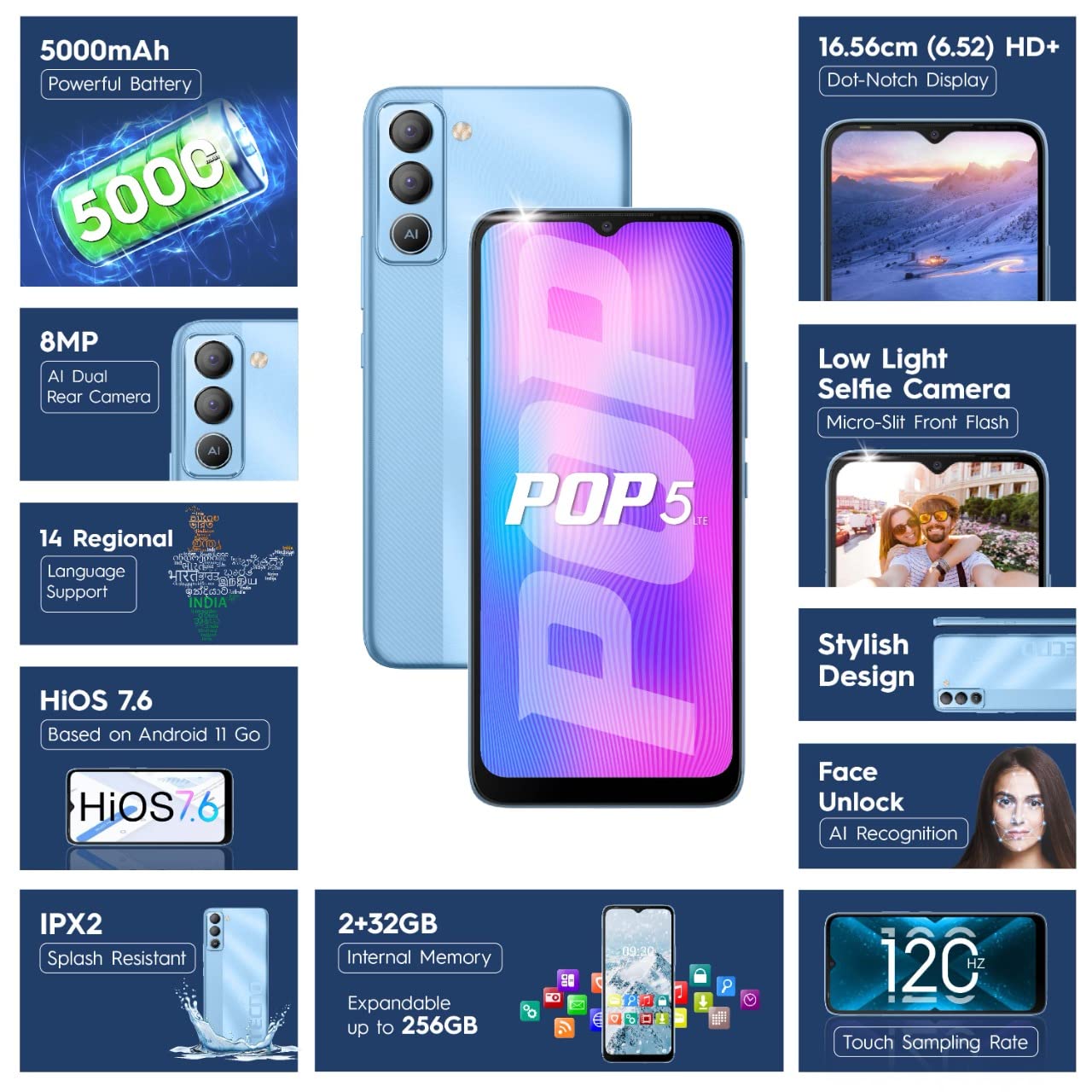
Figure 2: SIM Tray Insertion
Yekutanga Power On uye Setup
Press and hold the power button located on the side of the device until the Tecno logo appears. Follow the on-screen prompts to select your language, connect to Wi-Fi, and set up your Google account.
Key Features Overview
Vibrant Display
The Tecno Pop 5 LTE features a vibrant 6.52-inch Dot Notch HD+ display with a 90% screen-to-body ratio, offering an immersive viewing experience. With up to 480 nits maximum brightness, content remains clear even in bright conditions.

Figure 3: Immersive Dot Notch Display
Bhatiri Inogara kwenguva refu
Akashongedzerwa ane simba 5000mAh bhatiri, the Tecno Pop 5 LTE provides extended usage times, including up to 48 hours of video playback and 31 days of standby time. The Ultra Power Saving Mode further optimizes battery life.
Yepamberi Kamera System
Capture clear and detailed images with the 8MP Portrait Dual rear Camera, featuring excellent image processing and a dual flashlight for enhanced low-light photography. For selfies, the 5MP F2.0 Aperture Front Camera includes a Micro Slit Front Flash with adjustable brightness for brighter night selfies.

Mufananidzo 4: Module yeKamera Yekumashure
Kuita uye Kuchengeta
The device runs on a 2GB RAM and is powered by a MediaTek Helio A22 2GHz Quad-core processor, ensuring smooth daily operations. It comes with 32GB yekuchengetedza mukati, expandable up to 256GB, providing ampnzvimbo yemapurogiramu ako nemidziyo.
Software uye Chengetedzo
Your smartphone operates on HiOS 7.6 based on Android 11, offering a user-friendly interface and various localized features. Security features include Face Unlock with closed eye protection for instant and secure access. Additional features like Kids Mode, Anti-Theft Alarm, Vault 2.0, and Voice Changer enhance usability and safety.
Enhanced Durability
The Tecno Pop 5 LTE is Splash Resistant up to IPX2 rating, providing protection against water splashes.
Kushandisa mudziyo wako
Basic Navigation
Navigate your device using intuitive touch gestures. The 120Hz Touch Sampling Rate ensures a smoother and more responsive touch experience.
Using Face Unlock
To set up Face Unlock, go to Settings> Chengetedzo> Face Unlock and follow the instructions. Once set up, simply look at your phone to unlock it instantly.
Kamera Mabasa
Open the Camera app to access various modes like AI Portrait, HDR, AI Beauty, and Filters. Tap the shutter button to capture photos or switch to video mode for 1080P video recording.
Power Saving Mode
To extend battery life, activate Ultra Power Saving Mode via the quick settings panel or in Settings > Battery Lab.
Regional Language Support
The device supports 14 regional languages. To change your device language, go to Settings > System > Languages & input > Languages.
Phone Cloner
Easily migrate your data from an old device to your new Tecno Pop 5 LTE using the Phone Cloner feature, which allows one-tap data migration without using mobile data.
Maintenance and Care
Battery Care
To maximize battery lifespan, avoid extreme temperatures and try to keep the battery charge between 20% and 80%. Use only the provided adaptor and Micro USB cable for charging.
Kuchenesa Chishandiso Chako
Shandisa jira rakapfava, risina ruvara kuti upukute zvinyoro nyoro sikirini nemuviri wefoni yako. Dzivisa kushandisa makemikari akasimba kana zvinhu zvinokwesha.
Software Updates
Regularly check for and install software updates to ensure your device has the latest features, security patches, and performance improvements. You can find updates in Settings> System> System update.
Kugadzirisa matambudziko
Matambudziko Anowanikwa uye Mhinduro
- Mudziyo haubatike: Ensure the battery is charged. Connect the phone to the charger for at least 15 minutes before attempting to power on.
- Sikirini haina kupindura: Try restarting the device by holding the power button for 10-15 seconds. If the issue persists, a factory reset might be necessary (Cherechedza: Izvi zvichadzima data rese).
- Netiweki isina kunaka chiratidzo: Tarisa kuiswa kweSIM card yako. Enda kunzvimbo ine network iri nani.
- Mapurogiramu arikuparara: Bvisa cache yeapp inonetsa (Settings > Apps & notifications > App info > [App Name] > Storage & cache > Clear cache). If the issue continues, reinstall the app.
Zvinotaurwa Nezvehunyanzvi
Yakadzama Magadzirirwo
| Feature | Detail |
|---|---|
| Model Number | BD4i |
| Operating System | HiOS 7.6 based on Android 11 |
| RAM | 2 GB |
| Kuchengeta Kwemukati | 32GB (Inowedzera kusvika ku256GB) |
| processor | MediaTek Helio A22, 2 GHz Quad-core |
| Display | 6.52" Dot Notch HD+ (720p), 480 nits max. brightness, 120Hz Touch Sampling Rate |
| Rear Camera | 8MP + AI Lens, Dual Flashlight, F2.0 Aperture, AI Portrait, HDR, AI Beauty, Filters, 16 AI Scene Detection, 4X Zoom, 1080P Video |
| Front Camera | 5MP F2.0 Aperture, Micro Slit Front Flash |
| Bhatiri | 5000mAh Lithium Polymer |
| Kubatana | Cellular (LTE), Bluetooth, Wi-Fi, USB, GPS/GNSS/BEIDOU/Galileo |
| Sravana Sameeralu Serial 4th Audio Jack | 3.5 mm |
| Dimensions | 16.5 x 7.6 x 0.9 cm |
| Kurema | 195 g |
| Color | Ice Blue |
| Special Features | Enhanced Regional Language Supports (14 languages), Kids Mode, Anti Theft Alarm, Vault 2.0, Voice Changer, Splash Resistant (IPX2), Face Unlock (0.93 Sec Instant Unlock) |
Warranty uye Support
Product Support
Your Tecno Pop 5 LTE comes with a 1 Year Warranty from the manufacturer, G Mobiles India.
For any technical assistance, service, or warranty claims, please contact Tecno customer support. You can find more information on their official website or visit one of their 950+ Service Centers across India.
Manufacturer: G Mobiles India, Ismartu India Private Limited, D-197 and 198, Sector 63, Noida, Gautam Buddha nagar, Uttar Pradesh 201301.
Importer: G-Mobile Devices Private Limited, Unit No. B 301, Third Floor Tower B Plot no 7, Sec - 142, Noida, Uttar Pradesh PIN - 201301.
For further information, you may also visit the product detail page on Amazon.in.


