Nhanganyaya
This manual provides detailed instructions for the operation and maintenance of your Midland T10 FRS Walkie Talkie. The T10 is a compact and user-friendly two-way radio designed for reliable communication in various settings, including family activities, camping, and hiking. It features 22 FRS channels, NOAA Weather Alert, and eVOX hands-free operation. Please read this manual thoroughly to ensure proper use and to maximize the performance of your device.
Product Overview
Zvinokosha:
- 22 FRS Channels for clear communication.
- 38 CTCSS Privacy Codes to minimize interference.
- eVOX (Easy Voice and Sound Activated Transmission) for hands-free operation.
- NOAA Weather Scan + Alert for severe weather updates.
- Channel Scan and Monitor Mode functions.
- Keystroke Tones and Silent Operation options.
- Up to 20-mile range in open areas.
Chii chiri muBhokisi:
- Midland T10 Two-Way Radios (quantity as purchased, e.g., 4 radios)
- Belt Clips (one per radio)
- Bhuku reMuridzi (gwaro iri)
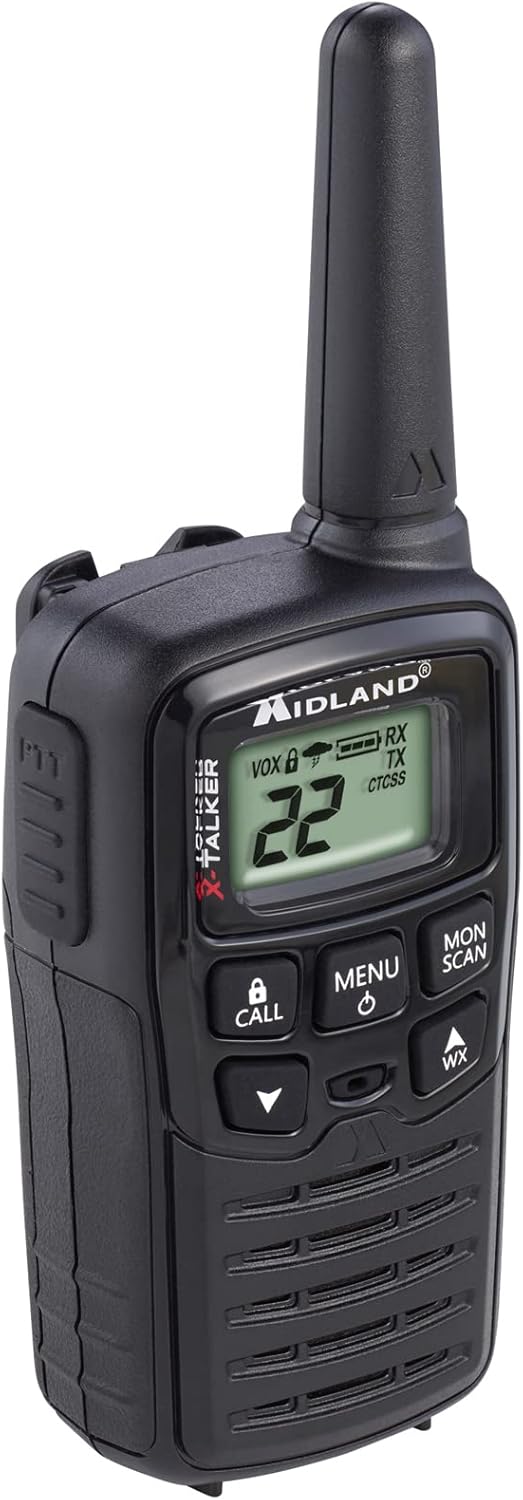
Figure 1: Midland T10 Walkie Talkie, angled front view showing display and buttons.
Gadzirira
1. Kuiswa kwebhatiri
- Ita shuwa kuti radio yakadzimwa.
- Tsvaka chivharo chebhatiri kuseri kweredhiyo.
- Press down on the tab and slide the cover downwards to remove it.
- Insert 3 AAA alkaline batteries (not included) into the compartment, observing the correct polarity (+/-) as indicated.
- Chinja chifukidziro chebhatiri nekuchitsvedza mudenga kusvika chadzvanya panzvimbo yacho.
Zvakakosha: Use only AAA alkaline batteries. Do not mix old and new batteries, or different types of batteries.
2. Kubatanidza Belt Clip
- Gadzirisa bhandi remachira nemitsara iri kumashure kweredhiyo.
- Slide the belt clip upwards until it locks securely into position.
- To remove, push the release tab on the belt clip and slide it downwards.

Mufananidzo 2: Rutivi view of the Midland T10 Walkie Talkie with the belt clip attached.
Operating Instruction
1. Simba On / Off
- Kubatidza: Dzvanya uye ubate iyo MENU/SIMBA button until the display illuminates and you hear a tone.
- Kudzima: Dzvanya uye ubate iyo MENU/SIMBA bhatani kusvikira chiratidziro chadzima.
2. Kugadzirisa Inzwi
- Press the UP (▲) button to increase the volume.
- Press the PASI (▼) button to decrease the volume.
- The current volume level (1-8) will be displayed.
3. Kusarudzwa kweChannel
- Neredhiyo yakabatidzwa, dzvanya iyo MENU bhatani kamwe. Nhamba yechiteshi ichapenya.
- Shandisa iyo UP (▲) kana PASI (▼) buttons to select one of the 22 FRS channels.
- Press the MENU button again to confirm your selection, or wait 5 seconds for the selection to be automatically saved.
4. Kutumira uye Kugamuchira
- Kutumira: Dzvanya uye ubate iyo PTT (Push-To-Talk) button located on the side of the radio. Speak clearly into the microphone. Release the PTT button to stop transmitting.
- Kugamuchira: Ensure the PTT button is not pressed. The radio will automatically receive signals on the selected channel.
5. Privacy Codes (CTCSS)
Privacy Codes help reduce interference from other users on the same channel. Your radio has 38 CTCSS codes.
- Mushure mekusarudza chiteshi, tinya MENU bhatani kaviri. Iyo yakavanzika kodhi nhamba ichapenya.
- Shandisa iyo UP (▲) kana PASI (▼) buttons to select a privacy code (01-38). Code 00 means no privacy code is active.
- Press the MENU button again to confirm, or wait 5 seconds.
Cherechedza: Both radios must be set to the same channel and privacy code to communicate.
6. eVOX (Hands-Free Operation)
eVOX allows you to transmit without pressing the PTT button.
- Press the MENU button three times. The eVOX sensitivity level will flash (oF, 1-3).
- Shandisa iyo UP (▲) kana PASI (▼) buttons to select a sensitivity level (1 being highest sensitivity, 3 being lowest). Select "oF" to turn eVOX off.
- Press the MENU button again to confirm, or wait 5 seconds.
7. NOAA Weather Scan + Alert
Your radio can receive NOAA Weather Radio alerts.
- To Activate Weather Scan: Press the WX button. The radio will scan 10 NOAA weather channels and lock onto the strongest signal.
- To Activate Weather Alert: While in Weather Scan mode, press the MENU button. The "AL" icon will flash. Use UP (▲) kana PASI (▼) to turn the alert ON or OFF. Press MENU to confirm. When activated, the radio will sound an alarm if a severe weather alert is broadcast.
- To Exit Weather Mode: Press the WX bhatani zvakare.
8. Call Alert
Press the FANA button to send an audible call tone to other radios on the same channel and privacy code.
9. Monitor Basa
The Monitor function allows you to temporarily disable the squelch to listen for weak signals or to check for activity on a channel.
- Dzvanya uye ubate iyo MONI / SCAN button to activate the Monitor function.
- Sunungura bhatani kuti urege kushanda.
10. Scan Rinoshanda
The Scan function allows you to scan all 22 channels for activity.
- Press the MONI / SCAN button once (do not hold). The radio will begin scanning.
- When activity is detected, the scan will pause on that channel.
- Press the MONI / SCAN bhatani zvakare kuti umise kuongorora.
Maintenance
- Kuchenesa: Shandisa nyoro, damp cloth to clean the radio's exterior. Do not use abrasive cleaners or solvents.
- Battery Care: Bvisa mabhatiri kana redhiyo isingashandiswe kwenguva yakareba kudzivirira kubuda.
- Kuchengeta: Chengetedza redhiyo munzvimbo inotonhorera, yakaoma kure nechiedza chezuva uye tembiricha yakanyanyisa.
- Kuramba Mvura: This radio is not water-resistant. Avoid exposure to water or high humidity.
Kugadzirisa matambudziko
| Dambudziko | Possible Solution |
|---|---|
| Hapana simba. |
|
| Mutsara wakashata kana kuti static. |
|
| Haikwanise kutumira. |
|
| Hearing other conversations. |
|
Zvinotsanangurwa
| Model Number | FBA-4PK-T10 |
| Channels | 22 FRS Channels |
| Privacy Codes | 38 CTCSS Codes |
| Frequency Range | 462.5625 MHz - 462.7250 MHz |
| Talking Range Maximum | Up to 20 Miles (in open areas) |
| Simba Source | 3 AAA Alkaline Batteries (not included) |
| Item Weight | 1.23 pounds (for the pack of 4) |
| Product Dimensions | 7 x 7 x 4 inches |
| Mvura Resistance Level | Kwete Kudzivirira Mvura |
Warranty uye Support
The Midland T10 FRS Walkie Talkie comes with an industry-leading 3-makore waranti against defects in materials and workmanship. This warranty covers normal use and service. For warranty claims or technical support, please refer to the contact information provided with your purchase or visit the official Midland website.
For additional information, FAQs, or to register your product, please visit www.midlandusa.com.


