1. Nhanganyaya
This manual provides detailed instructions for the installation, operation, and maintenance of your DAHUA IMOU Indoor WiFi Camera, model IPC-T22AP. Please read this manual thoroughly before using the product to ensure correct usage and optimal performance. Retain this manual for future reference.
2. Chigadzirwa Pamusoroview
The DAHUA IMOU IPC-T22AP is an indoor WiFi camera designed for home surveillance. It features 2MP resolution, infrared night vision, and motion-activated alerts. The camera supports both WiFi and Ethernet connectivity, with Power over Ethernet (PoE) capability for simplified installation when used with compatible equipment. It is designed to quickly identify human targets within its field of view.

Figure 2.1: DAHUA IMOU IPC-T22AP Indoor WiFi Camera shown with an included 128GB memory card.
3. Package Zviri mukati
Iva nechokwadi chekuti zvinhu zvese zviripo uye zviri mumamiriro akanaka paunovhura pasuru. Kana paine zvinhu zvisipo kana kuti zvakakuvara, taura nemutengesi wako.
- DAHUA IMOU IPC-T22AP Indoor WiFi Camera
- Power Adapter
- Mounting Screws uye Wall Plugs
- Quick Start Guide (isina kuisirwa mubhuku rino)
- 128GB Memory Card (if purchased as a bundle)
4. Setup
4.1 Kuiswa Kwenyama
Select a suitable indoor location for the camera, ensuring it has a clear view of the area you wish to monitor. The camera can be mounted on a ceiling or wall. Use the provided mounting screws and wall plugs to secure the camera in place.
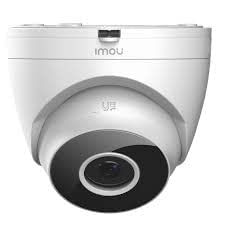
Mufananidzo 4.1: Mberi view of the IPC-T22AP camera, showing the lens and infrared sensors.
4.2 Simba Connection
Connect the included power adapter to the camera's power input port and then plug the adapter into a standard electrical outlet. Alternatively, if using a Power over Ethernet (PoE) compatible network switch or injector, connect an Ethernet cable from the PoE source directly to the camera's Ethernet port. This will provide both power and data connectivity.
4.3 Network Kubatana
The camera supports both WiFi and wired Ethernet connections.
- WiFi Kubatana: Ensure your smartphone is connected to the 2.4GHz WiFi network you intend to use for the camera. Follow the instructions in the IMOU Life app to add the device and connect it to your WiFi network.
- Ethernet Connection: Connect an Ethernet cable from your router or network switch to the camera's Ethernet port. The camera will automatically establish a wired network connection.
4.4 Kuiswa kweApp uye Pairing
- Download the "IMOU Life" app from your mobile device's app store (available for Android and iOS).
- Register for an IMOU account or log in if you already have one.
- Dzvanya chiratidzo che "+" chiri muapp kuti uwedzere mudziyo mutsva.
- Skena kodhi yeQR iri pakamera kana pakarongedza kayo.
- Follow the on-screen prompts to complete the pairing process, including connecting the camera to your WiFi network if applicable.
5. Operating Instructions
5.1 Rarama View
Open the IMOU Life app and select your IPC-T22AP camera from the device list to access the live video feed. You can view real-time footage, take snapshots, and record video directly from the live view interface.
5.2 Kurekodha uye Kutamba
The camera supports local recording to a microSD card (up to 128GB, if included). Recordings can be accessed and played back through the IMOU Life app. Navigate to the camera's settings in the app to configure recording schedules and motion-triggered recording.
5.3 Kuonekwa Kwekufamba uye Zviziviso
The IPC-T22AP camera is equipped with advanced motion detection capabilities, including human target detection. When motion is detected, the camera can send instant alerts to your mobile phone via the IMOU Life app. Adjust sensitivity and detection zones in the app settings to minimize false alarms.
5.4 Chiratidzo chehusiku
The camera features infrared night vision, providing clear surveillance footage even in complete darkness. The night vision mode activates automatically in low-light conditions. Ensure no obstructions are blocking the camera's view, especially the infrared LEDs.
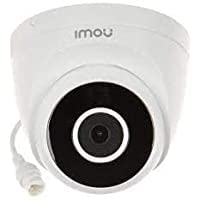
Mufananidzo 5.1: Pedyo-kumusoro view of the IPC-T22AP camera lens, highlighting the infrared emitters for night vision.
6. Kuchengeta
6.1 Kuchenesa
Regularly clean the camera lens with a soft, dry cloth to ensure clear image quality. Avoid using harsh chemicals or abrasive materials that could scratch the lens or housing.
6.2 Firmware Updates
Periodically check for firmware updates through the IMOU Life app. Keeping your camera's firmware updated ensures optimal performance, security, and access to new features.
6.3 Kuchengeta Kuchengeta
If using a microSD card for local storage, the camera will typically overwrite the oldest recordings when the card is full. You can manage storage settings, including formatting the SD card, through the IMOU Life app.
7. Kugadzirisa matambudziko
- Kamera haisi kubatika: Ensure the power adapter is securely connected to both the camera and a working power outlet. If using PoE, verify the Ethernet cable is connected to a PoE-enabled port.
- Haikwanisi kubatana neWiFi:
- Ensure the camera is within range of your 2.4GHz WiFi router.
- Verify the WiFi password entered in the app is correct.
- Tangazve router yako nekamera.
- No video feed:
- Check network connectivity (WiFi or Ethernet).
- Ita shuwa kuti kamera yakabatidzwa.
- Restart the camera and the IMOU Life app.
- Motion alerts not received:
- Tarisa kuti kuona mafambiro kwagoneswa muzvirongwa zveapp.
- Check alert schedules and sensitivity settings.
- Ensure your phone's notification settings allow alerts from the IMOU Life app.
- Mufananidzo usina kunaka:
- Chenesa lenzi yekamera.
- Ensure adequate lighting in the monitored area, especially for color images.
- Check network bandwidth if streaming quality is low.
8. Zvinotsanangurwa
| Model | IPC-T22AP |
| Brand | DAHUA |
| Resolution | 2 Megapixel (2MP) |
| Kubatana Technology | Wireless (WiFi), Wired (Ethernet) |
| Kubatana Protocol | Ethernet |
| Special Features | Local Recording, Night Vision, Motion Detection, Human Target Detection |
| Indoor / Outdoor Kushandiswa | Indoor |
| Simba Source | AC Adapter, Power over Ethernet (PoE) |
| Inowirirana Devices | Laptop, Android/iOS Mobile Devices (via IMOU Life App) |
| Controller Type | Android, iOS |
| Product Dimensions | 11 x 11 x 8 cm |
| Item Weight | 450 g |
| Nyika Yekwakabva | China |
9. Ruzivo rweWaranti
For specific warranty terms and conditions, please refer to the warranty card included with your product or visit the official DAHUA/IMOU webNzvimbo yekutarisira garandi inowanzo sanganisira zvikanganiso zvekugadzira kwenguva yakatarwa kubva pazuva rekutenga.
10. Tsigiro
If you encounter any issues or have questions not covered in this manual, please contact DAHUA/IMOU customer support. You can usually find contact information on the official product website or in the IMOU Life app's help section.
Zvekushandisa Pamhepo:


