Nhanganyaya
Thank you for choosing the iJoy Ultra Wireless Over-Ear Bluetooth Headphones. These headphones are designed to provide a versatile audio experience with multiple connectivity options and comfortable wear. This manual will guide you through the features, setup, and operation of your new headphones.

Image: iJoy Ultra Wireless Over-Ear Bluetooth Headphones, showcasing the sleek design and over-ear cushions.
Chii chiri muBhokisi
Ndokumbira utarise kuti zvinhu zvese zviripo mupakeji yako:
- iJoy Ultra Wireless Over-Ear Bluetooth Headphones
- USB Type C Yekuchaja Cable
- Waya yeAUX (3.5mm)
Product Overview
Familiarize yourself with the headphone controls and ports:

Mufananidzo: Side view of the headphone ear cup, highlighting the control buttons for volume, track skipping, and power/play/pause/call management.
- Volume + / Skip Song: Hold for Volume Up, Press for Next Song.
- Power / Play / Pause / Answer/Reject Calls: Press to Play/Pause or Answer/Reject Calls. Hold to Power On/Off.
- Volume - / Previous Song: Hold for Volume Down, Press for Previous Song.
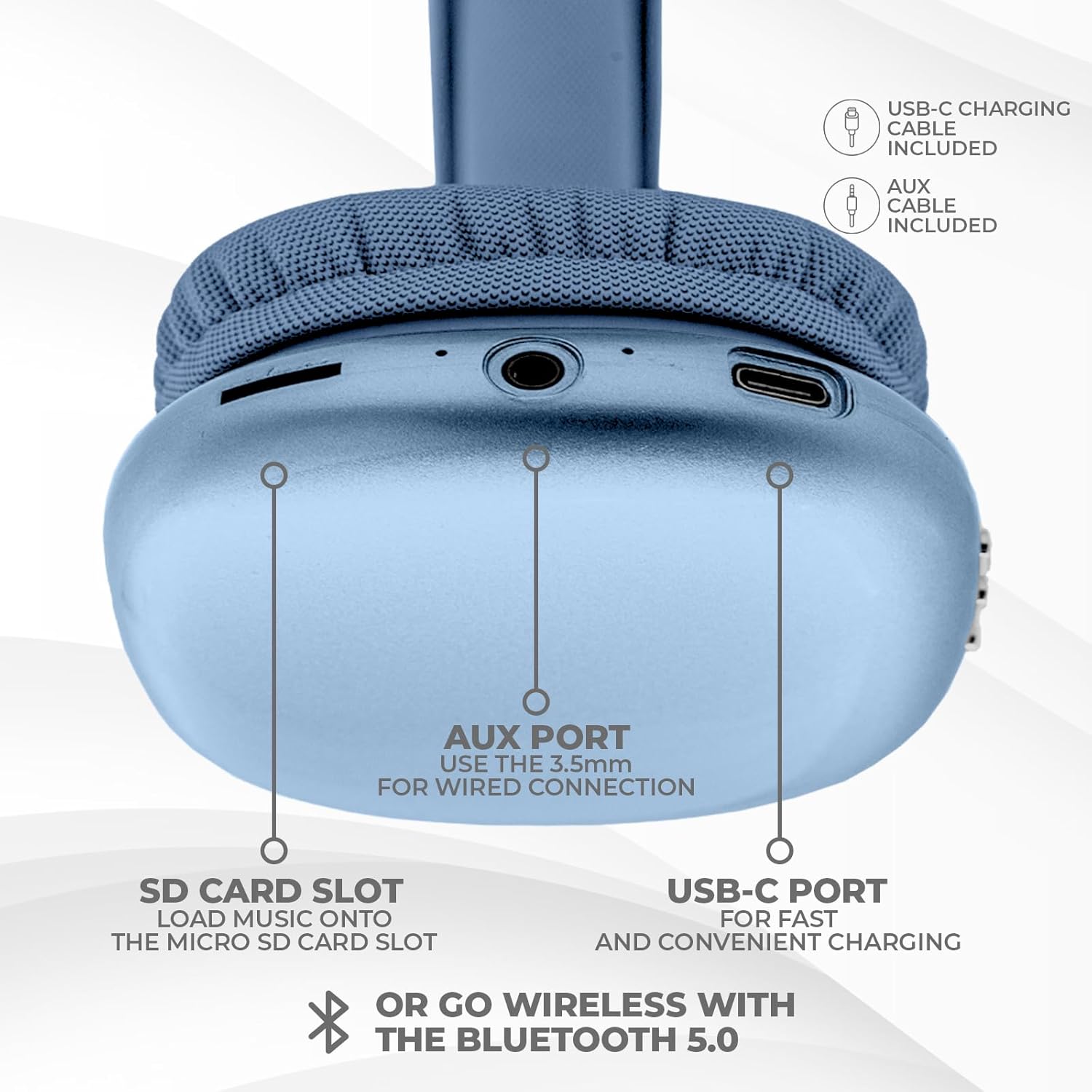
Mufananidzo: Pazasi view of the headphone ear cup, showing the USB-C charging port, AUX port, and SD card slot.
- USB-C Chiteshi: Zvekuchaja mahedhifoni.
- AUX Port (3.5mm): Kune wired audio connection.
- SD Card Slot: Kuti utarise odhiyo zvakananga kubva pakadhi reMicro SD.
Gadzirira
1. Kuchaja mahedhifoni
Usati watanga kushandisa, chaja mahedhifoni ako zvizere. Chaja yakakwana inotora maawa maviri.
- Connect the provided USB Type C charging cable to the USB-C port on the headphone.
- Batanidza rimwe divi retambo yeUSB kune sosi yemagetsi yeUSB inoenderana nayo (semuenzaniso, adapta yemadziro, chiteshi cheUSB chekombuta).
- Chiratidzo che LED chinoratidza mamiriro ekuchaja uye chinodzima kana kuchinja ruvara kana chachaja zvizere.
2. Bluetooth Kubatanidza
Kuti ubatanidze mahedhifoni ako pasina waya:
- Iva nechokwadi chekuti mahedhifoni akadzimwa uye achangochajwa.
- Dzvanya uye ubate bhatani reSimba kusvika chiratidzo che LED chapenya, chichiratidza pairing mode.
- Pamudziyo wako (smartphone, piritsi, laptop), shandisa Bluetooth uye tsvaga zvishandiso zviripo.
- Select "iJoy Ultra" from the list of devices.
- Once connected, the LED indicator will typically show a solid light or slow flash.
Note: The Bluetooth range is approximately 10 meters (33 feet).
3. Kubatanidza Netambo (AUX)
For a non-wireless connection or when the battery is low:
- Connect one end of the provided 3.5mm AUX cable to the AUX port on the headphone.
- Batanidza rimwe divi retambo yeAUX kune jeki re3.5mm reaudio riri pachishandiso chako.
- Iwo mahedhifoni anozochinja otomatiki kune wired mode.
4. SD Kadhi Kutamba
Kutamba mimhanzi zvakananga kubva pakadhi reMicro SD:
- Insert a Micro SD card (with music files) into the SD card slot on the headphone.
- The headphones will automatically detect the card and begin playing music.
- Use the track control buttons to navigate your music.
Operating Instruction
Simba On/Kudzima
- Power On: Dzvanya uye bata bhatani reSimba kweanenge masekonzi matatu.
- Power Off: Dzvanya uye bata bhatani reSimba kweanenge masekonzi matatu.
Music Playback
- Tamba/Kumbomira: Dhinda bhatani reMasimba kamwe.
- Next Track: Dzvanya bhatani reVolume + kamwe chete.
- Previous Track: Dzvanya bhatani rekuti Vhoriyamu - kamwe chete.
- Vhoriyamu Kumusoro: Hold the Volume + button.
- Vhoriyamu Pasi: Hold the Volume - button.
Fonera Management
When connected via Bluetooth:
- Pindura Call: Dhinda bhatani reMasimba kamwe.
- Pedzisa Kufona: Press the Power button once during a call.
- Ramba Kufona: Dzvanya uye bata bhatani reSimba kweanenge masekonzi matatu.
Hupenyu hwebhatiri
The headphones offer up to 10 hours of wireless playtime on a single charge.

Image: Visual representation of the headphones' battery life, indicating up to 10 hours of wireless playtime.
Maintenance
To ensure the longevity and optimal performance of your iJoy Ultra headphones:
- Geza mahedhifoni nguva dzose nejira rakapfava, rakaoma.
- Dzivisa kuisa mahedhifoni kune tembiricha yakanyanyisa, humidity, kana zuva rakananga.
- Usashandise abrasive cleaners kana solvents.
- Chengetedza mahedhifoni munzvimbo inotonhorera, yakaoma kana isiri kushandiswa.
- Dzivisa kudonhedza kana kuisa mahedhifoni pasi kune akasimba maitiro.
Kugadzirisa matambudziko
Kana ukasangana nematambudziko nemahedhifoni ako, tarisa kune anotevera akajairika mhinduro:
| Dambudziko | Solution |
|---|---|
| Mahedhifoni haabatike. | Iva nechokwadi chekuti mahedhifoni akazara. Batanidza kune simba remagetsi uchishandisa tambo yeUSB-C. |
| Haikwanise kubatanidza kuburikidza neBluetooth. | Make sure the headphones are in pairing mode (flashing LED). Turn off and on Bluetooth on your device. Ensure no other devices are currently connected to the headphones. Try 'forgetting' the device on your phone and re-pairing. |
| No sound or choppy audio. | Check volume levels on both headphones and your device. Ensure Bluetooth connection is stable or try a wired AUX connection. If using an SD card, ensure it is properly inserted and the files inowirirana. |
| Headphones are uncomfortable or too tight. | Adjust the headband for a better fit. The over-ear cushions are designed for comfort, but individual fit may vary. |
| Cannot connect to multiple devices simultaneously. | These headphones typically support connection to one device at a time. Disconnect from the current device before attempting to connect to another. |
Zvinotsanangurwa
| Feature | Detail |
|---|---|
| Model Name | Ultra |
| Item Model Number | IJHP21 |
| Kubatana Technology | Waya isina waya (Bluetooth), Yakabatana newaya (3.5mm AUX) |
| Wireless Communication Technology | Bluetooth |
| Bluetooth Range | 10 Mamita (33 Tsoka) |
| Maheadphone Jack | 3.5 mm Jack |
| Special Features | SD Card Slot, Soft Cushion Padding, USB Type C |
| Hupenyu hwebhatiri | Kusvikira kuMaawa mashanu |
| Kuchaja Nguva | 2 Maawa |
| Control Type | Volume Control, Track Management, Call Management |
| Kuiswa Nzeve | Over Ear |
| Material | Plastiki |
| Item Weight | 8 Onzi |
| Product Dimensions | 7 x 3 x 8 inches |
| UPC | 842700193053 |
Official Product Video
Video: An official product video from iJoy Electronics showcasing the features and design of the iJoy Ultra Bluetooth Over-Ear Headphones.
Warranty uye Support
For warranty information or technical support, please refer to the documentation included with your product or contact iJoy customer service directly. Keep your proof of purchase for any warranty claims.


