1. Nhanganyaya
Thank you for choosing the HXSJ X50 Wireless Game Mouse. This manual provides detailed instructions for setting up, operating, and maintaining your new wireless mouse. Please read this manual thoroughly before use to ensure optimal performance and longevity of your device.
Package Zviri mukati:
- HXSJ X50 Wireless Game Mouse
- USB Receiver

Image 1.1: The HXSJ X50 Wireless Game Mouse and its USB receiver.
2. Safety Information
- Usaisa mbeva mumvura kana hunyoro hwakawandisa.
- Dzivisa kudonhedza kana kuisa mbeva kune simba rinokanganisa.
- Chengetedza mudziyo kure nekupisa kwakanyanya.
- Do not attempt to disassemble or repair the mouse yourself. Contact qualified service personnel if needed.
- Rasa mabhatiri maererano nemitemo yemunharaunda.
3. Setup
3.1 Kuiswa kwebhatiri
The HXSJ X50 Wireless Game Mouse requires batteries for operation. Please ensure you have the necessary batteries (typically 1x AA battery, not included) before proceeding.
- Tsvaga nzvimbo yebhatiri pazasi pegonzo.
- Vhura chivharo chebhatiri.
- Insert the battery, ensuring correct polarity (+/-).
- Vhara chivharo chebhatiri zvakachengeteka.
3.2 Kubatanidza USB Receiver
- Tsvaga inowanikwa USB port pakombuta yako.
- Insert the USB receiver into the USB port. Your computer should automatically detect and install the necessary drivers.
3.3 Kubatidza
Slide the power switch, located on the underside of the mouse, to the 'ON' position. The mouse is now ready for use.
4. Operating Instructions
4.1 Bhatani Mabasa
The HXSJ X50 mouse features 6 buttons for enhanced functionality:
- Bhatani reKudzvanya Kuruboshwe: Primary function, selection.
- Bhatani rekudzvanya kurudyi: Secondary function, context menus.
- Mupumburu Wheel: Skrira kumusoro/pasi, tinya pakati.
- DPI Kugadzirisa Bhatani: Cycles through DPI settings.
- Bhatani reKutungamira Peji: Inofamba ichienda mberi ichipinda web browsers kana file vaongorori.
- Page Backward Button: Anofamba achidzokera kumashure web browsers kana file vaongorori.

Mufananidzo 4.1: Kurutivi view showing the ergonomic design and side buttons.
4.2 DPI Kugadziriswa
Press the DPI adjustment button (located behind the scroll wheel) to cycle through the available sensitivity settings: 1000DPI, 1200DPI, 1600DPI, and 2400DPI. Select the DPI that best suits your preference and task.
4.3 Kuchengetedza Simba
The mouse features a power switch on its underside. To conserve battery life, slide the switch to the 'OFF' position when the mouse is not in use for extended periods.
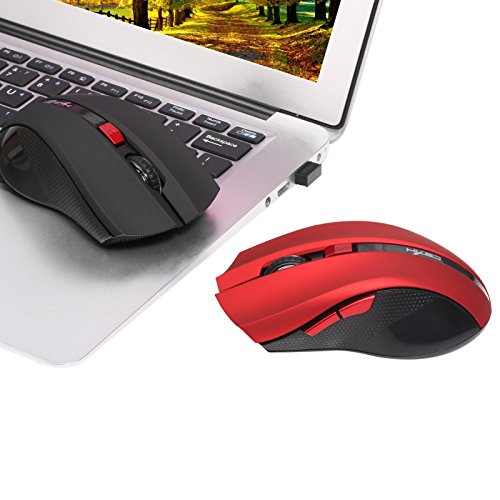
Image 4.2: The HXSJ X50 mouse in use with a laptop.
5. Kuchengeta
5.1 Kuchenesa
To clean the mouse, gently wipe its surface with a soft, dry cloth. For stubborn dirt, slightly dampen jira nemvura. Dzivisa kushandisa makemikari ane hasha kana abrasive cleaners.
5.2 Kuchengeta
When not in use, store the mouse and USB receiver in a dry, cool place, away from direct sunlight and extreme temperatures. If storing for an extended period, it is recommended to remove the battery.
6. Kugadzirisa matambudziko
- Mbeva isingapindure:
Ensure the mouse is powered on. Check if the USB receiver is securely plugged into a working USB port. Replace the battery if it is low or depleted. - Erratic cursor movement:
Clean the optical sensor on the underside of the mouse. Ensure the surface you are using the mouse on is clean and non-reflective. - Nyaya dzekubatanidza:
Try plugging the USB receiver into a different USB port. Move the mouse closer to the receiver to rule out interference. - Side buttons not working:
Ensure your operating system and applications support the forward/backward functions. Some software may require specific drivers or settings.
7. Zvinotsanangurwa
| Feature | Detail |
|---|---|
| Brand | HXSJ |
| Model | X50 |
| Kubatana | Wireless (USB Receiver) |
| Wireless Range | Kusvika 10-15 metres |
| Kufambisa Kwekufamba | Optical |
| DPI Zvirongwa | 1000, 1200, 1600, 2400 (Inogona Kugadziriswa) |
| Nhamba yeMabhatani | 6 (Left, Right, Scroll Wheel, DPI, Forward, Backward) |
| Simba Source | Bhatiri (1x AA, isina kuisirwa) |
| Hupenyu hwebhatiri (Avhareji) | 6 Mwedzi |
| Hand Orientation | Ambidextrous |
| Material | Plastiki |
| Item Weight | 80 g |
| Inoenderana OS | Windows 98/ME/2000/XP/Vista/7/8, Linux |
8. Warranty uye Tsigiro
Kuti uwane ruzivo nezvewarandi kana rutsigiro rwehunyanzvi, ndapota tarisa magwaro akapihwa pakutenga kwako kana kuti bata mutengesi/mugadziri zvakananga. Chengeta humbowo hwekutenga kwako kuti uwane zvikumbiro zvewarandi.


