1. Nhanganyaya
The AeroCool Blade is an ATX semi-tower PC case designed for optimal airflow and aesthetic appeal. It features an RGB front panel with preset lighting modes, a full tempered glass side window, and ample space for component installation. This manual provides essential information for the proper setup, operation, and maintenance of your PC case.
Zvekuchengetedza Always disconnect power from your system before performing any installation or maintenance. Handle components with care to avoid damage. Refer to individual component manuals for specific installation instructions.
2. Package Zviri mukati
- AeroCool Blade ATX Semi-Tower PC Case
- 1 x 120mm RGB Rear Fan (pre-installed)
- 3 x 120mm Front Fans (pre-installed)
- Accessory Kit (screws, standoffs, cable ties)
3. Setup uye Kuiswa
3.1 Kugadzirira Nyaya
Carefully remove the case from its packaging. Place it on a stable, flat surface. Remove the tempered glass side panel by unscrewing the thumb screws at the rear of the case and gently pulling the panel away.

Mufananidzo 3.1: Yemukati view of the AeroCool Blade PC case, illustrating the layout for component installation.
3.2 Kuisirwa mamaboardboard
- Install the necessary motherboard standoffs into the motherboard tray according to your motherboard's form factor (ATX, Micro-ATX, Mini-ITX).
- Isa chivharo cheI/O muburi rekumashure rekesi.
- Isa motherboard yako nokungwarira panzvimbo dzinomira, uchigadzirisa maburi escrew.
- Chengetedza motherboard ne screws dzakapihwa.
3.3 Kuisa Simba Chikamu (PSU) Kuisirwa
The AeroCool Blade supports bottom-mounted PSUs. Slide your PSU into the dedicated compartment at the bottom rear of the case. Secure it with screws from the rear of the case.
3.4 Kuisa Dhiraivha Yekuchengetera Zvinhu
- MaHDD e3.5": Install 3.5" hard drives into the drive cage located beneath the PSU shroud.
- 2.5" SSDs/HDDs: Install 2.5" drives onto the dedicated mounting points on the motherboard tray or behind it.

Figure 3.2: Rear internal view, highlighting cable management routes and 2.5-inch drive mounting locations.
3.5 Expansion Card (GPU) Installation
Remove the necessary expansion slot covers from the rear of the case. Insert your graphics card or other expansion cards into the PCIe slots on your motherboard and secure them with screws.
3.6 Fan and Cooling Installation
The case comes with one 120mm RGB fan pre-installed at the rear and three 120mm fans pre-installed at the front. Ensure all fan cables are connected to appropriate headers on your motherboard or fan controller.

Figure 3.3: A 120mm RGB fan, similar to those pre-installed in the AeroCool Blade case.
3.7 Front Panel I/O Connections
Connect the front panel cables (USB 3.0, USB 2.0, HD Audio, Power Switch, Reset Switch, LED Switch, Power LED, HDD LED) to the corresponding headers on your motherboard. Refer to your motherboard manual for exact pin configurations.
4. Operating Instructions
4.1 Kubatidza
Once all components are installed and connected, replace the side panel. Connect your monitor, keyboard, mouse, and power cable to the PSU. Press the Power button located on the top panel of the case to turn on your system.

Mufananidzo 4.1: Kumberi view of the case, indicating the location of the power button and front I/O ports.
4.2 Kudzora Mwenje weRGB
The AeroCool Blade features an RGB front panel. Use the dedicated LED button on the top panel to cycle through various preset lighting modes and effects. Pressing the button will change the lighting pattern or color.

Mufananidzo 4.2: Mberi view of the AeroCool Blade case with its distinctive RGB lighting.
4.3 Front Panel Ports
The top panel provides convenient access to:
- 1 x USB 3.0 chiteshi
- 2 x USB 2.0 zviteshi
- HD Audio output
- Maikorofoni kuiswa
Connect your USB devices, headphones, and microphone to these ports as needed.
5. Kuchengeta
5.1 Dust Sefa Yekuchenesa
Regularly check and clean the dust filters to maintain optimal airflow and prevent dust buildup inside the case. Dust filters are typically located at the top, front, and bottom (under the PSU). Gently remove them and clean with compressed air or rinse with water (ensure they are completely dry before re-installation).
5.2 Kucheneswa Kwekunze
Pukuta nzvimbo dzekunze dzekesi nekanyoro, damp cloth. Avoid using harsh chemicals or abrasive materials that could damage the finish or tempered glass.
6. Kugadzirisa matambudziko
- Sisitimu Haibatidzi:
Ensure the PSU is switched on and properly connected to the wall outlet. Verify all power cables from the PSU are correctly connected to the motherboard and components. Check the front panel power switch connection to the motherboard. - RGB Mwenje Haisi Kushanda:
Ensure the RGB controller (if applicable) and fan RGB cables are securely connected. Press the LED button on the top panel to cycle through modes. If connected to a motherboard header, check motherboard software settings. - Vateveri Vasiri Kutenderera:
Verify that all fan power cables are securely connected to the motherboard fan headers or a fan controller. Check BIOS/UEFI settings for fan speed control. - Front Panel USB/Audio Not Working:
Ensure the USB and HD Audio cables from the front panel are correctly connected to the corresponding headers on your motherboard.
7. Zvinotsanangurwa
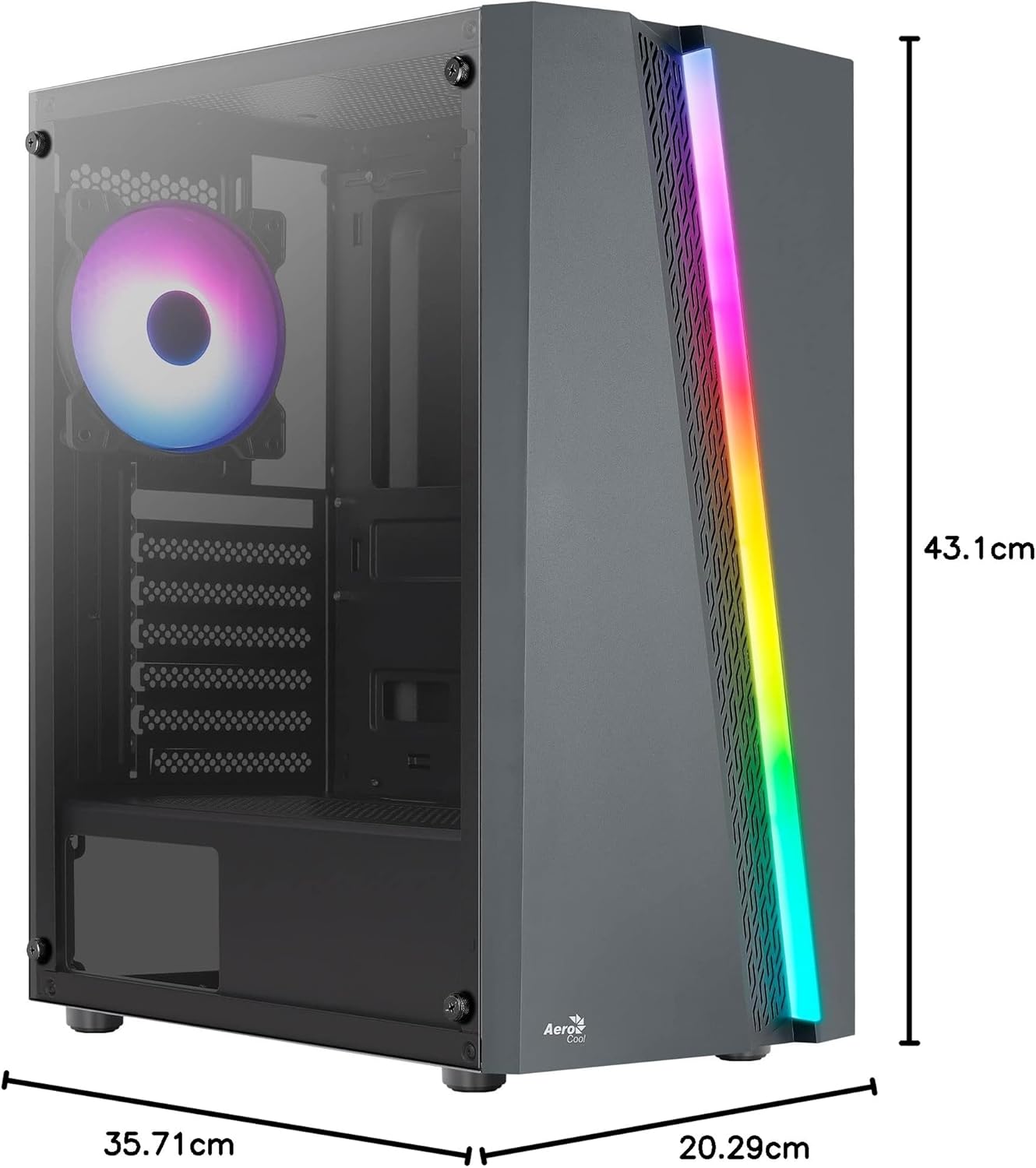
Figure 7.1: Dimensions of the AeroCool Blade PC Case.
| Feature | Tsanangudzo |
|---|---|
| Brand | AeroCool |
| Model Name | BLADEBK |
| Nyaya Type | Semi-Tower |
| Motherboard Kuenderana | ATX, Micro ATX, Mini ITX |
| Material | Tempered Glass (Side Panel) |
| Zviyero zveChigadzirwa (L x W x H) | 43.1 x 20.3 x 35.7 cm |
| Item Weight | 4 kg |
| Drive Bays | 2 x 3.5", 2 x 2.5" |
| GPU Clearance | Kusvika ku307mm |
| CPU Inotonhorera Height | Kusvika ku155mm |
| Kumberi I / O Zviteshi | 1 x USB 3.0, 2 x USB 2.0, HD Audio, Mic, LED Control, Power |
| Pre-yakaiswa Fans | 1 x 120mm RGB Rear, 3 x 120mm Front |
| Kutonhodza Nzira | Air |
8. Warranty uye Tsigiro
For warranty information and technical support, please refer to the official AeroCool webtsvaga webhusaiti kana kuti taura nemutengesi wemuno. Chengeta humbowo hwekutenga kwako kuti zvikubatsire kuwana garandi.
Contact Information: Kuti uwane rumwe rubatsiro, ndapota shanya www.aerocool.io.


