1. Chigadzirwa Pamusoroview
The UNV NVR302-16E2 is a high-performance Network Video Recorder (NVR) designed for advanced surveillance systems. It supports 4K resolution recording and playback, offering robust video management capabilities for up to 32 channels. This NVR is compatible with various camera protocols, including ONVIF, and features Ultra H.265 compression for efficient storage.
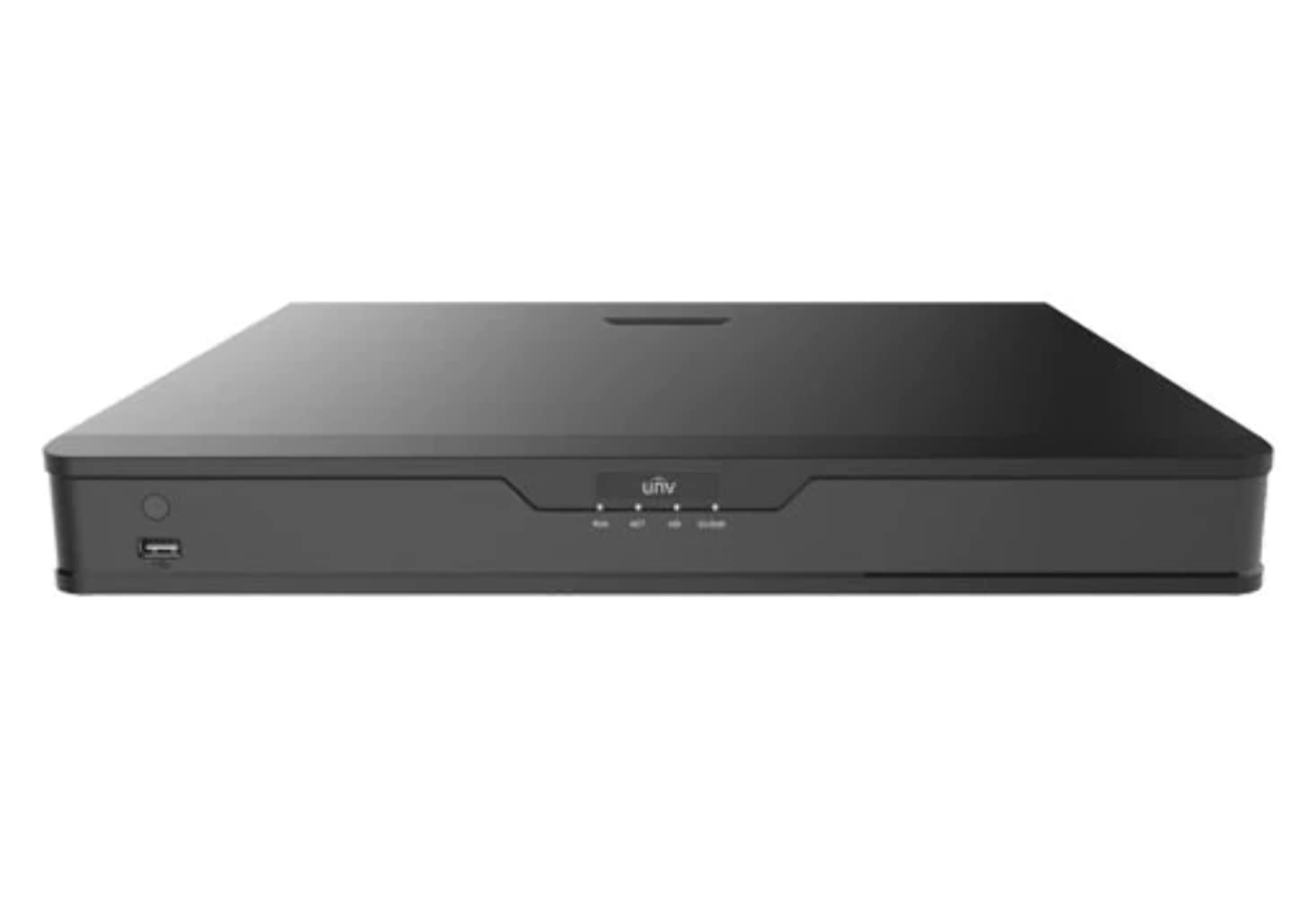
Mufananidzo 1: Mberi view of the UNV NVR302-16E2 4K NVR. The front panel includes a power button, a USB port, and indicator lights for power, HDD activity, network status, and alarm.
2. Key Features
- Supports Ultra H.265/H.265/H.264 video formats for efficient compression.
- 8/16-channel input with Plug & Play functionality via independent PoE network interfaces.
- Compatibility with mainstream cameras supporting ONVIF conformance (Profile S, Profile G, Profile T) and RTSP protocols.
- Equipped with 1-channel HDMI and 1-channel VGA outputs, with HDMI supporting up to 4K (3840x2160) resolution.
- Independent HDMI and VGA outputs for flexible display options.
- Supports recording resolutions up to 12 Megapixels.
- Accommodates 2 SATA HDDs, with support for up to 10TB per HDD.
- Features various fisheye dewarping modes for live view and playback, accessible via both web interface and GUI.
- Incorporates ANR (Automatic Network Replenishment) technology to enhance storage reliability during network disconnections.
- Supports cloud upgrade for convenient firmware updates.
3. Package Zviri mukati
Please check the package contents upon unboxing. If any items are missing or damaged, contact your vendor immediately.
- UNV NVR302-16E2 NVR Unit
- Power Adapter
- USB Mouse
- SATA Data Cables (for HDD installation)
- HDD Mounting Screws
- Quick Start Guide
4. Setup
4.1 Kuiswa Kwenyama
- Kuiswa kweHDD:
Unscrew and remove the NVR cover. Securely mount the SATA hard disk drives (HDDs) into the designated bays using the provided screws. Connect the SATA data and power cables from the NVR motherboard to the HDDs. Replace the NVR cover and secure it with screws.
- Batanidza Chiratidziro:
Connect a monitor to the NVR's HDMI or VGA output port using a compatible cable.
- Batanidza Mouse:
Batanidza USB mouse mune imwe yema USB ports eNVR.
- Batanidza Network:
Connect an Ethernet cable from the NVR's LAN port to your network router or switch.
- Batanidza Makamera:
For PoE cameras, connect them directly to the NVR's independent PoE ports. For non-PoE cameras, ensure they are connected to the same network as the NVR and powered separately.
- Batanidza Simba:
Batanidza adapta yemagetsi kune simba reNVR wobva waibatanidza mugomba remagetsi. NVR inongotanga kushanda yoga.
4.2 Magadzirirwo ekutanga
Upon the first boot, the NVR will guide you through an initial setup wizard. Follow the on-screen prompts to configure essential settings.
- Gadza Password yeMutariri: Create a strong password for the 'admin' user. This is crucial for security.
- Network Settings: Configure the NVR's IP address (DHCP or Static IP). Ensure it is on the same network as your cameras for proper communication.
- Zuva uye Nguva: Isa zuva, nguva, uye nzvimbo yenguva chaiyo.
- Kutanga kweHDD: The NVR will prompt you to initialize (format) the newly installed HDDs. This step is necessary before recording can begin.
- Camera Search and Add: The NVR will automatically search for connected cameras. Select and add the cameras you wish to manage.
5. Kushanda kweNVR
5.1 Rarama View
After setup, the NVR will display the live view yemakamera akabatana. Unogona kuchinja pakati pekamera imwe chete view, grid rine makamera akawanda view, and customize the display layout.
- Kusarudzwa kweChannel: Click on a channel window to select it.
- PTZ Kudzora: If using PTZ cameras, use the on-screen controls or joystick (if connected) to pan, tilt, and zoom.
- Kutamba chiriporipo Right-click on a channel and select "Instant Playback" to view zvinorekodhwa.
5.2 Kurekodha Management
The NVR supports various recording modes.
- Yakarongwa Kurekodha: Configure recording schedules based on time, day, and event (e.g., motion detection).
- Motion Yekuona Kurekodha: Set up motion detection zones and sensitivity for each camera to trigger recording only when movement is detected.
- Manual Recording: Start or stop recording manually from the live view interface.
5.3 Kutamba
Svika yakanyorwa footage yezveview.
- Navigate to the "Playback" menu.
- Select the camera(s) and date/time range for playback.
- Shandisa nguva yekufamba-famba kuburikidza nezvakanyorwa.
- Options include fast forward, rewind, pause, and frame-by-frame playback.
5.4 Backup
Export recorded video clips to an external USB drive.
- Insert a USB flash drive into the NVR's USB port.
- Go to the "Backup" menu.
- Select the camera, time range, and desired video format for export.
- Start the backup process.
5.5 Remote Access
Access your NVR remotely via a web browser kana application yefoni.
- Web Browser Isa IP kero yeNVR mu a web browser on a computer connected to the same network. Log in with your credentials.
- Mobile App: Download the official Uniview mobile application (e.g., EZView). Register an account, add your NVR by scanning the QR code or entering its serial number, and view live feeds or playback remotely.
6. Kuchengeta
6.1 Firmware Updates
Regularly check for and install firmware updates to ensure optimal performance, security, and access to new features. Updates can typically be performed via the NVR's web interface or local GUI, often with cloud upgrade support.
6.2 Kutarisira HDD
Monitor the health and status of your hard drives. The NVR provides tools to check HDD status, format drives, and configure overwrite settings when storage is full.
6.3 System Logs
Review system logs for any errors, warnings, or important events. This can assist in troubleshooting and system monitoring.
7. Kugadzirisa matambudziko
| Dambudziko | Zvinogona Kukonzera | Solution |
|---|---|---|
| Hapana vhidhiyo inobuda pamonitor. | Loose cable connection; incorrect display resolution; NVR not powered on. | Check HDMI/VGA cable connections. Ensure NVR is powered. Try a different monitor or cable. Adjust NVR output resolution if possible. |
| Makamera haasi kuratidzwa. | Network issue; incorrect camera IP; camera not powered; camera not added to NVR. | Verify network connectivity. Ensure cameras are powered. Check camera IP addresses and add them to the NVR if not already done. |
| Haukwanise kushandisa NVR uri kure. | Network configuration issue (port forwarding, DDNS); NVR offline; incorrect credentials. | Verify NVR's network settings. Ensure necessary ports are forwarded on your router. Check internet connection. Confirm login credentials. |
| Hapana kurekodhwa. | HDD not initialized or full; recording schedule not set; camera not recording. | Initialize the HDD. Check recording schedules and ensure they are active. Verify camera status and ensure it's configured to record. |
8. Zvinotsanangurwa
| Feature | Detail |
|---|---|
| Model Number | NVR302-16E2 |
| Mafomati eVhidhiyo Anotsigirwa | Ultra H.265 / H.265 / H.264 |
| Channel Inzwa Zvinotaurwa | 8/16-channel (with independent PoE interfaces) |
| HDMI Output | 1-channel, up to 4K (3840x2160) resolution |
| VGA Kubuda | 1-chiteshi |
| Max Kurekodha Resolution | Kusvika ku12 Megapixels |
| Rutsigiro rweHDD | 2 SATA HDDs, up to 10TB each (20TB total) |
| Kubatana Technology | HDMI, VGA, Ethernet, USB |
| Inowirirana Devices | IP Cameras (ONVIF Profile S, G, T; RTSP) |
| Product Dimensions | 18 x 14 x 4 inches (45.72 x 35.56 x 10.16 cm) |
| Item Weight | 3.97 makirogiramu (1.8 kg) |
| Mugadziri | Uniview |
9. Warranty uye Tsigiro
Uniview products typically come with a limited manufacturer's warranty. For specific warranty terms and conditions, please refer to the warranty card included with your product or visit the official Uniview website.
For technical support, troubleshooting assistance, or service inquiries, please contact Uniview customer support through their official channels. You can usually find contact information, FAQs, and support resources on the Uniview websaiti (www.uniview.com).
Related Documents - NVR302-16E2
 |
Troubleshoot Uniview NVR Two-Way Audio Issues | Uniview Support Comprehensive guide to troubleshoot and resolve two-way audio problems on Uniview NVRs and cameras. Includes steps for web interface, mobile app, and NVR GUI. |
 |
Uniview Network Video Recorder Quick Guide A quick guide for Uniview Network Video Recorders (NVRs), covering device indicators, interface ports, disk installation for various HDD configurations (1, 2, 4, 8, 9, 16-bay), startup and shutdown procedures, local operations like adding IP devices and playback, UNV-Link mobile app usage, web login, and essential safety warnings, disclaimers, and regulatory compliance information. |
 |
Maitiro ekuchinja Uniview NVR's Nguva Zvirongwa Nhanho-ne-nhanho gwara rekugadzirisa sei nguva uye zuva marongero eUniview Network Vhidhiyo Recorder (NVRs) vachishandisa nzira dzakasiyana siyana kusanganisira web interface, yakananga yekutarisa kuwana, EZTools software, uye nharembozha seEZView uye UNV-Link. |
 |
Uniview XVR301-G3 Series Digital Video Recorder: NDAA Compliant Datasheet Comprehensive datasheet for the Uniview XVR301-G3 Series Digital Video Recorder, including models XVR301-04G3, XVR301-08G3, and XVR301-16G3. Details features, specifications, connectivity, and compliance. |
 |
Uniview 2021 Product Guide: Network Cameras, NVRs, VMS & Security Solutions Discover the comprehensive Uniview 2021 Product Guide, detailing a wide array of professional video surveillance solutions. This guide covers Network Cameras, NVRs, VMS, Professional Storage, Display & Control systems, and Accessories, featuring advanced technologies like LightHunter and PixelSense. Find detailed specifications and model information for Easy, Prime, and Pro series products, suitable for various applications from residential security to large-scale enterprise deployments. |
 |
NVR-B3601.33.45.221212 Release Notes - Zhejiang Uniview Technologies Official release notes for Zhejiang Uniview Technologies' NVR-B3601.33.45.221212 Network Video Recorder software, detailing version information, new features, changes, and upgrade procedures. |