1. Nhanganyaya
Welcome to the user manual for your boAt Airdopes 190 True Wireless Stereo (TWS) Earbuds. These earbuds are designed to provide a high-quality audio experience with features tailored for gaming and everyday use. This manual will guide you through the setup, operation, maintenance, and troubleshooting of your device.

Image: boAt Airdopes 190 TWS Earbuds in black and white, highlighting features such as Breathing LEDs, Quad Mics with ENx Technology, BEAST Mode for low latency, 40 hours total playback, and 10 minutes ASAP Charge for 180 minutes playtime.
2. Setup
2.1. Unboxing uye Package Zviri mukati
Paunenge uchivhura package, ita shuwa kuti zvese zvikamu zviripo:
- 1 x boAt Airdopes 190 TWS Earbuds
- 1 x Kuchaja Nyaya
- 2 x Additional Earbuds (pairs of different sizes)
- 1 x USB Type-C yekuchaja Cable
- 1 x Chinyorwa cheMushandisi (gwaro iri)
2.2. Kutanga Kuchaja
Before first use, fully charge the earbuds and the charging case. Connect the provided USB Type-C cable to the charging port on the case and to a power source. The LEDs on the case will indicate charging status.
- ASAP Charge: A 10-minute charge provides up to 180 minutes of playtime.
- Full charging time for the case is approximately 120 minutes.

Image: The boAt Airdopes 190 charging case open with earbuds, illustrating the 40 hours total playback time (10 hours per charge + 30 hours from case) and the ASAP Charge feature, providing 180 minutes of playback from a 10-minute charge.
2.3. Kubatanidza neChishandiso
- Instant Connect (IWP™ Tech): Vhura chivharo chebhesi yekuchaja. Maearbuds anozobatidza otomatiki uye opinda papairing mode.
- Pamudziyo wako (smartphone, piritsi, laptop), shandisa Bluetooth.
- Tsvaga available Bluetooth devices and select "Airdopes 190" from the list.
- Once connected, you will hear an audio prompt, and the earbud LEDs will indicate a successful connection.
- The earbuds utilize Bluetooth v5.3 for a stable and seamless connection.
3. Kushanda
3.1. Kubata Kudzora
The Airdopes 190 features intuitive touch controls on each earbud for managing playback, calls, and voice assistant activation.
| Function | Chiito |
|---|---|
| Tamba/Misa | Top kamwechete pane imwe earbud |
| Next Track | Tokonya kaviri pane earbud yekurudyi |
| Previous Track | Tokonya kaviri kuruboshwe rwenzeve |
| Pindura/Pedzisa Kufona | Top kamwechete pane imwe earbud |
| Ramba Kufona | Dzvanya kwenguva refu pane chero earbud |
| Activate Voice Assistant | Tokonya katatu pane imwe earbud |
| Toggle BEAST Mode | Long press on the right earbud (specific gesture may vary, refer to quick start guide) |

Image: A visual representation of key features including IPX4 splash and sweat resistance, easy touch controls on the earbuds, a Type-C charging interface, and one-touch access to voice assistants like Google Assistant and Siri.
3.2. BEAST Mode (Low Latency)
For an enhanced gaming and entertainment experience, activate BEAST Mode. This mode reduces audio latency to 50ms, ensuring synchronized audio and visuals during fast-paced activities. Refer to the touch control table for activation.
3.3. ENx™ Technology (Quad Mics)
The Airdopes 190 features quad microphones with ENx™ Technology. This technology helps to cancel out unwanted background noise during calls, ensuring your voice is heard clearly by the recipient.
3.4. Breathing LEDs
The earbuds and charging case are equipped with breathing LEDs that provide visual feedback and add to the aesthetic, especially during gaming sessions. These lights typically activate for a few seconds when the case is opened or closed.

Image: The boAt Airdopes 190 charging case and earbuds, showcasing the "Fancy Breathing LED Lights" which illuminate in blue, designed to enhance the gaming experience.
3.5. boAt Signature Sound
Experience immersive audio with the boAt Signature Sound, delivered by powerful 10mm audio drivers within the earbuds.
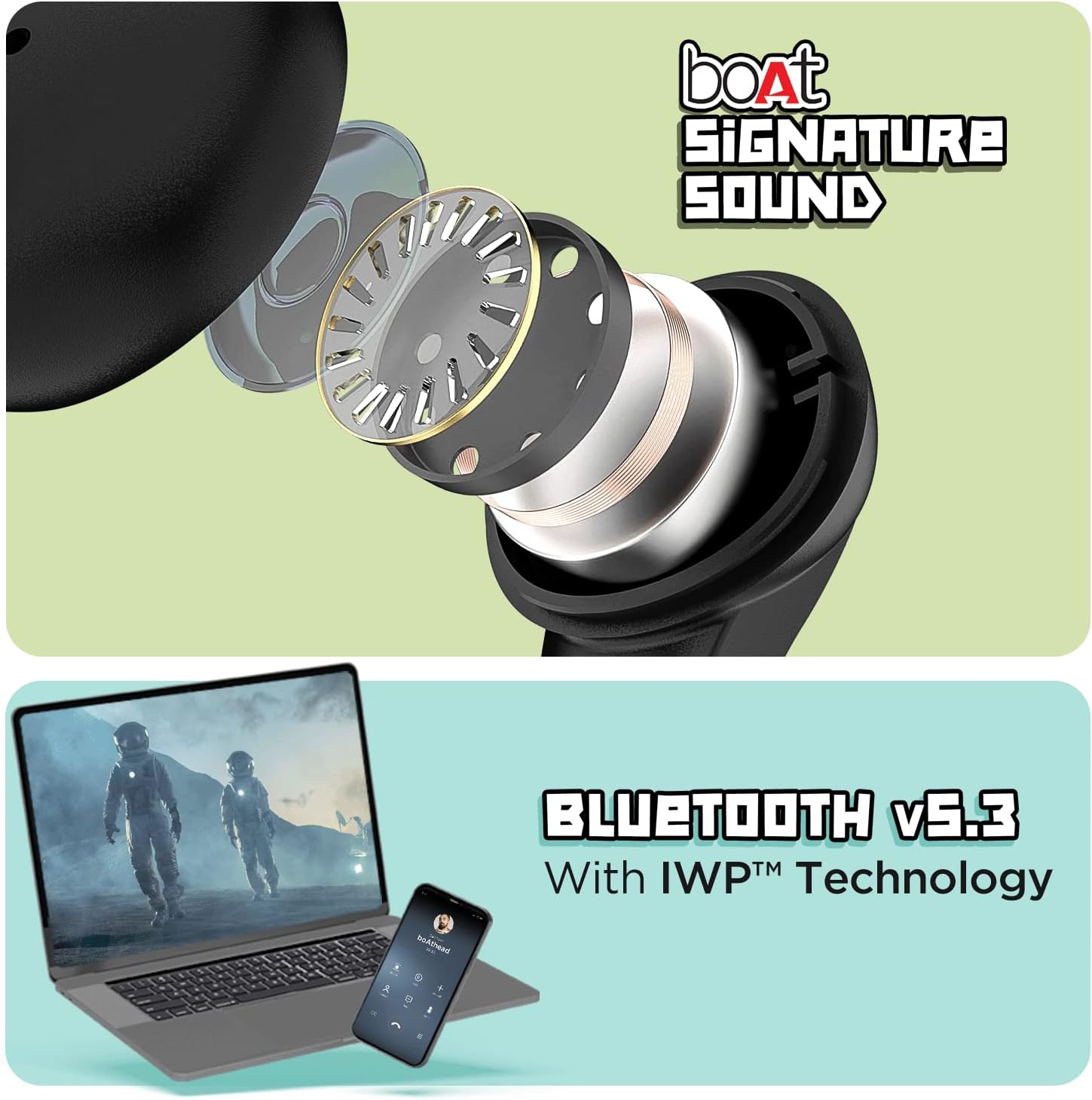
Image: The top section displays an exploded view of an earbud, illustrating the internal components responsible for delivering boAt Signature Sound. The bottom section shows a laptop and a mobile phone, symbolizing the seamless connectivity provided by Bluetooth v5.3 with IWP™ Technology.
4. Kuchengeta
4.1. Kuchenesa
- Pukuta zvinyoro nyoro maearbuds nekesi yekuchaja nejira rakapfava, rakaoma, risina lint.
- Usashandise makemikari ane hasha, kuchenesa zvinonyungudutsa, kana mishonga yakasimba.
- Remove ear tips and clean them separately with water if necessary, ensuring they are completely dry before reattaching.
4.2. Kuchengeta
Kana usingashandise, chengeta ma earbuds mubhokisi rawo rekuchaja kuti uadzivirire kubva kuguruva, kukuvara, uye kuti arambe achichajiwa.
4.3. Kuramba Mvura
The Airdopes 190 earbuds are marked with an IPX4 mvura yekudzivirira chiyero. This means they are resistant to splashes and sweat, making them suitable for workouts and light rain. They are not designed for submersion in water or exposure to pressurized water jets.
5. Kugadzirisa matambudziko
5.1. Maearbuds Haabatanidzwe
- Ita shuwa kuti maearbuds akachajwa.
- Place both earbuds back into the charging case, close the lid, wait a few seconds, then open the lid again to re-initiate pairing mode.
- Dzima uye vhura Bluetooth pane chako kifaa.
- Forget "Airdopes 190" from your device's Bluetooth list and try pairing again.
5.2. Hapana Ruzha kana Kuti Vhoriyamu Yakaderera
- Tarisa huwandu hwevhoriyamu pane zvese mudziyo wako uye munzeve.
- Ita shuwa kuti maearbuds akagara zvakanaka munzeve dzako.
- Chenesa chero tsvina kubva munzeve nozzles uye nzeve mazano.
- Batanidzazve maearbuds kumudziyo wako.
5.3. Nyaya dzekuchaja
- Tarisa kuti tambo yekuchaja yakabatana zvakachengeteka kune ese ari maviri kesi uye sosi yemagetsi.
- Edza imwe tambo ye USB Type-C yakasiyana neadapter yemagetsi.
- Iva nechokwadi chekuti ma contacts ekuchaja ari pama earbuds nemukati mebhokisi akachena uye haana kuvharika.
6. Zvinotsanangurwa
| Feature | Detail |
|---|---|
| Model Name | Airdopes 190 |
| Kubatana Technology | Wireless (Bluetooth v5.3) |
| Low Latency | 50ms (BEAST Mode) |
| Total Playtime | Kusvikira kuMaawa mashanu |
| Playtime Per Earbud | Kusvikira kuMaawa mashanu |
| ASAP Charge | 10 mins kuchaja = 180 mins nguva yekutamba |
| Maikorofoni | Quad Mics with ENx™ Technology |
| Vatyairi | Vatyairi veAudio ve10mm |
| Kuramba Mvura | IPX4 (Splash & Sweat Resistant) |
| Kudzora Nzira | Bata, Izwi |
| Kuchaja Interface | USB Type-C |
| Item Weight | 42 magiramu |
| Product Dimensions | 7 x 5 x 2 cm |
| Material | Plastiki |
| Mugadziri | Imagine Marketing Ltd |
| Nyika Yekwakabva | China or India |
7. Warranty & Tsigiro
For warranty information, technical support, or service inquiries, please refer to the official boAt websaiti kana kubata basa ravo revatengi. Chengetedza risiti yako yekutenga sehumbowo hwekutenga kwezvichemo zvewaranti.


