1. Chigadzirwa Pamusoroview
The Point Wired Mini Keyboard Pt-350 is a compact and versatile keyboard designed for both gaming and general typing. It features a high-quality build and a modern design, adhering to industry standards for reliable performance. This keyboard is an ideal choice for users seeking a durable and efficient input device.
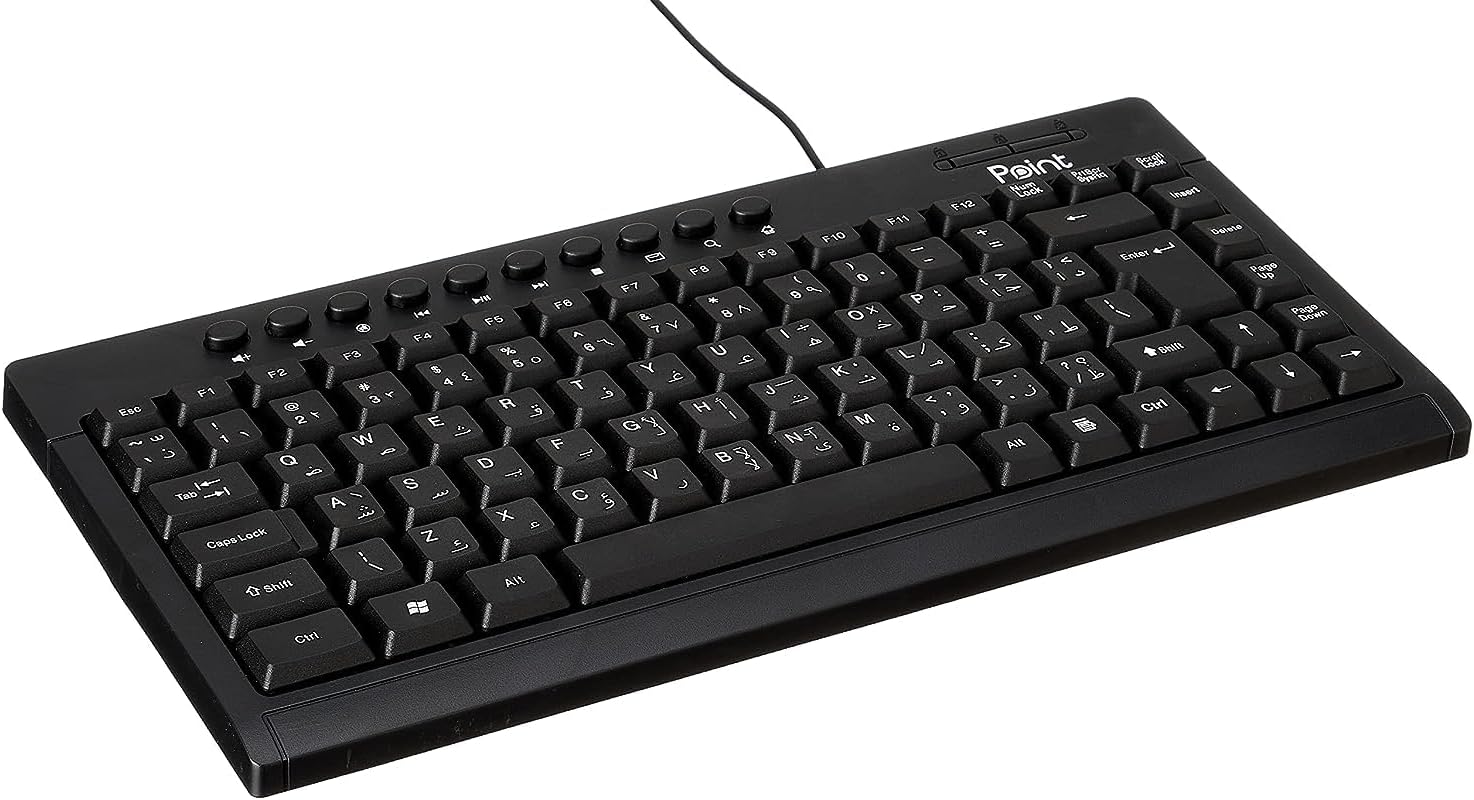
Mufananidzo 1.1: Angled view of the Point Wired Mini Keyboard Pt-350, showcasing its compact design and key layout.
Zvinokosha:
- Wired connectivity for stable performance.
- Compact design suitable for various setups.
- Durable construction from high-quality plastic materials.
- Designed for both gaming and typing applications.
2. Package Zviri mukati
Ndokumbira utarise pasuru yacho nekungwarira kuti uone kuti zvinhu zvese zviripo:
- Point Wired Mini Keyboard Pt-350
- Mushandisi Chinyorwa (gwaro iri)
3. Setup
Follow these steps to set up your Point Wired Mini Keyboard Pt-350:
- Bvisa kiyibhodhi: Bvisa kiibhodhi nokungwarira kubva pakurongedza kwayo.
- Identify the USB Connector: The keyboard comes with an integrated USB cable.
- Batanidza kuKombuta yako: Locate an available USB port on your computer (desktop PC, laptop, etc.). Insert the keyboard's USB connector firmly into the USB port.
- Kuiswa kweDriver (Plug & Play): The keyboard is plug-and-play compatible. Your operating system (Windows, macOS, Linux) should automatically detect and install the necessary drivers. This process usually takes a few seconds.
- Simbisa Mashandiro: Once connected, open a text editor or any application that accepts text input and test the keys to ensure proper operation.

Mufananidzo 3.1: Pamusoro-pasi view of the keyboard, illustrating the key layout and integrated cable for connection.
4. Operating Instructions
The Point Wired Mini Keyboard Pt-350 operates like a standard computer keyboard. Below are general instructions and tips for use:
Kunyora Kwepakutanga:
- Simply press the desired keys to input characters, numbers, and symbols into your active application.
- Shandisa iyo Shift key for uppercase letters and alternative symbols on keys.
- The Caps Lock key toggles permanent uppercase typing.
- The Backspace key deletes characters to the left of the cursor.
- The Enter key confirms input or moves to the next line.
Makiyi Ekushanda (F1-F12):
The function keys (F1 through F12) perform various tasks depending on the active program or operating system. Some common uses include:
- F1: Often opens help for the active program.
- F2: Renames a selected item.
- F5: Inozorodza a web page or document.
- F11: Toggles full-screen mode in many browsers.
Multimedia Keys:
The keyboard may include dedicated multimedia keys or secondary functions on the F-keys (accessed via the Fn key, if present). These typically control:
- Volume control (Mute, Volume Up, Volume Down)
- Media playback (Play/Pause, Stop, Previous Track, Next Track)
5. Kuchengeta
Kugadzirisa kwakakodzera kunovimbisa kugara kwenguva refu uye kushanda zvakanaka kwekhibhodi yako:
- Kuchenesa: Regularly clean the keyboard to prevent dust and debris buildup. Use a soft, lint-free cloth slightly dampyakavharwa nemvura kana muto wekuchenesa wakapfava. Dzivisa makemikari ane hasha kana abrasive zvinhu.
- Kubvisa Dust: Use compressed air to blow out dust and crumbs from between the keys.
- Dzivisa Kurasika: Keep liquids away from the keyboard to prevent damage to internal components. In case of a spill, immediately disconnect the keyboard and allow it to dry completely before reconnecting.
- Kuchengeta: Kana usiri kushandisa, chengeta kiyibhodhi munzvimbo yakachena, yakaoma kure nekupisa kwakanyanya.
6. Kugadzirisa matambudziko
If you encounter issues with your Point Wired Mini Keyboard Pt-350, refer to the following common problems and solutions:
Kiyibhodhi Haisi Kupindura:
- Tarisa USB Connection: Ita shuwa kuti tambo ye USB yakanamirwa zvakachengetedzeka mu USB port inoshanda pakombuta yako. Edza imwe USB port yakasiyana.
- Restart Computer: Kutanga zvakare nyore kunogona kazhinji kugadzirisa nyaya dzekubatanidza.
- Edza pane Imwe Kombuta: Connect the keyboard to another computer to determine if the issue is with the keyboard or your computer's setup.
- Tarisa Device Manager (Windows): In Windows, go to Device Manager and check if the keyboard is listed under 'Keyboards' and if there are any error symbols. You might need to update or reinstall the driver.
Keys Not Working or Sticky:
- Makiyi Akachena: Dust, crumbs, or liquid residue can cause keys to stick or malfunction. Refer to the Maintenance section for cleaning instructions.
- Kukuvadza Pamuviri: Inspect the keys for any visible physical damage.
Incorrect Character Output:
- Tarisa Marongero eMutauro: Ensure your operating system's keyboard language settings match the physical layout of your keyboard.
- Driver Issue: Reinstalling the keyboard driver might resolve this.
Kana dambudziko rikaramba riripo mushure mekuedza matanho aya, ndapota taura nerutsigiro rwevatengi.
7. Zvinotsanangurwa
Technical specifications for the Point Wired Mini Keyboard Pt-350:

Mufananidzo 7.1: Rutivi view of the keyboard, highlighting its profile and compact form factor.
| Feature | Detail |
|---|---|
| Brand Name | Point |
| Model | Pt-350 |
| Kubatana Technology | Wired |
| Inowirirana Devices | Computer |
| Keyboard Tsanangudzo | Multifunctional |
| Inokurudzirwa Zvishandiso | PC Gaming |
| Special Features | Mutambo |
| Color | Nhema |
| Style | Mazuvano |
| Material | Plastiki |
| Shipping Dimensions | 34.5 x 26.4 x 3 cm |
| Kurema | 800 magiramu |
| Kutanga Kuwanikwa Zuva | Gunyana 4, 2022 |
| ASIN | B0BD2DM9ZJ |
8. Warranty uye Tsigiro
This product is covered by a standard manufacturer's warranty. Please refer to the warranty card included with your purchase for specific terms and conditions, including the warranty period and coverage details.
For technical support, troubleshooting assistance, or warranty claims, please contact Point customer service through the contact information provided on the product packaging or the official Point website. When contacting support, please have your product model (Pt-350) and purchase details ready.


