1. Nhanganyaya
This manual provides detailed instructions for the operation and maintenance of your LFF DAB+/FM Digital Radio, Model YT81107. Please read this manual thoroughly before using the device to ensure proper function and to maximize your listening experience.

Mufananidzo 1: Mberi view of the LFF DAB+/FM Digital Radio, Model YT81107, featuring its speaker grille, color LCD display, and telescopic antenna.
2. Package Zviri mukati
Ndokumbira utarise pasuru yezvinhu zvinotevera:
- 1 x LFF DAB Digital Radio (Model YT81107)
- 1 x AC Simba Adapter
- 1 x Quick Start Guide (this manual)
Kana chero zvinhu zvisipo kana kukuvadzwa, ndapota taura nerutsigiro rwevatengi nekukurumidza.
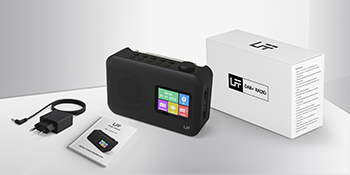
Image 2: The LFF DAB+/FM Digital Radio, AC power adapter, and quick start guide as included in the package.
3. Zvigadzirwa zveChigadzirwa
The LFF DAB+/FM Digital Radio YT81107 offers a range of features designed for versatile listening:
- DAB+ and FM Digital Radio: Supports ultra-wide signals in DAB+ (174.928 - 239.2 MHz) and FM (87.5 - 108 MHz) bands.
- Chiteshi Presets: Store up to 30 FM and 30 DAB+ stations for quick access.
- Bvisa LCD Display: Large color LCD screen displays station information and time.
- Flexible Power Options: Operates with the included AC adapter or 4 x 1.5V (LR6, AA) batteries (not included).
- Enhanced Reception: Features a 39 cm extendable antenna for improved signal strength.
- Kurara Nguva: Programmable sleep timer (15/30/45/60/90/120 minutes).
- Dual Alarm Clock: Seta maaramu maviri akazvimirira.
- Kubatana kweBluetooth: Functions as a Bluetooth speaker for streaming audio from compatible devices.
- Headphone Jack: Jeki ye3.5mm yekuteerera yega.

Mufananidzo 3: Pamusoroview of the radio's functions, including DAB+ radio, 60 presets, FM radio, sleep timer, headphone jack, Bluetooth, full-color screen, and dual alarm.

Image 4: Close-up of the radio's full-color LCD display, showing time and date.
4. Setup
4.1 Kusimbisa Chishandiso
Your radio can be powered by either the AC adapter or batteries.
- AC Simba: Connect the included AC adapter to the DC 5V input port on the radio and plug the other end into a standard wall outlet.
- Battery Power: Open the battery compartment on the back of the radio. Insert 4 x 1.5V AA (LR6) batteries, ensuring correct polarity. Close the compartment securely. (Batteries are not included.)
4.2 Antenna Kugadziriswa
Extend the telescopic antenna fully and adjust its angle for optimal reception. For DAB+ and FM radio, a fully extended antenna generally provides the best signal.

Image 5: Illustration of the radio's dimensions (16.1 x 10.9 x 5.6 cm), battery requirements (4 x 1.5V AA), AC adapter (5V/1000mA), and the 360° adjustable antenna.
4.3 Initial Scan for Stations
Upon first power-on, the radio will typically perform an automatic scan for available DAB+ and FM stations. This process may take a few minutes. Once complete, the radio will store the found stations.
5. Operating Instructions
5.1 Kubatidza/Kudzima
Press the Simba button (usually located on the top or front panel) to turn the radio on or off.
5.2 Mode Sarudzo
Press the Mode button to cycle through available modes: DAB+ Radio, FM Radio, and Bluetooth.
5.3 Tuning Radio Stations (DAB+/FM)
There are three primary ways to find and select radio stations:
- Automatic Scan: In DAB+ or FM mode, initiate an auto-scan. The radio will search for and list all available stations.
- Kutsvaga Nemaoko: Use the tuning knob or navigation buttons to manually adjust the frequency.
- Presets: Store your favorite stations to preset numbers (1-30 for FM, 1-30 for DAB+). To save a station, tune to it, then press and hold a preset number button until the display confirms storage. To recall a station, simply press the corresponding preset number button.

Image 6: Visual representation of the three methods for selecting radio stations: Automatic Scan, Manual Search, and using Presets.
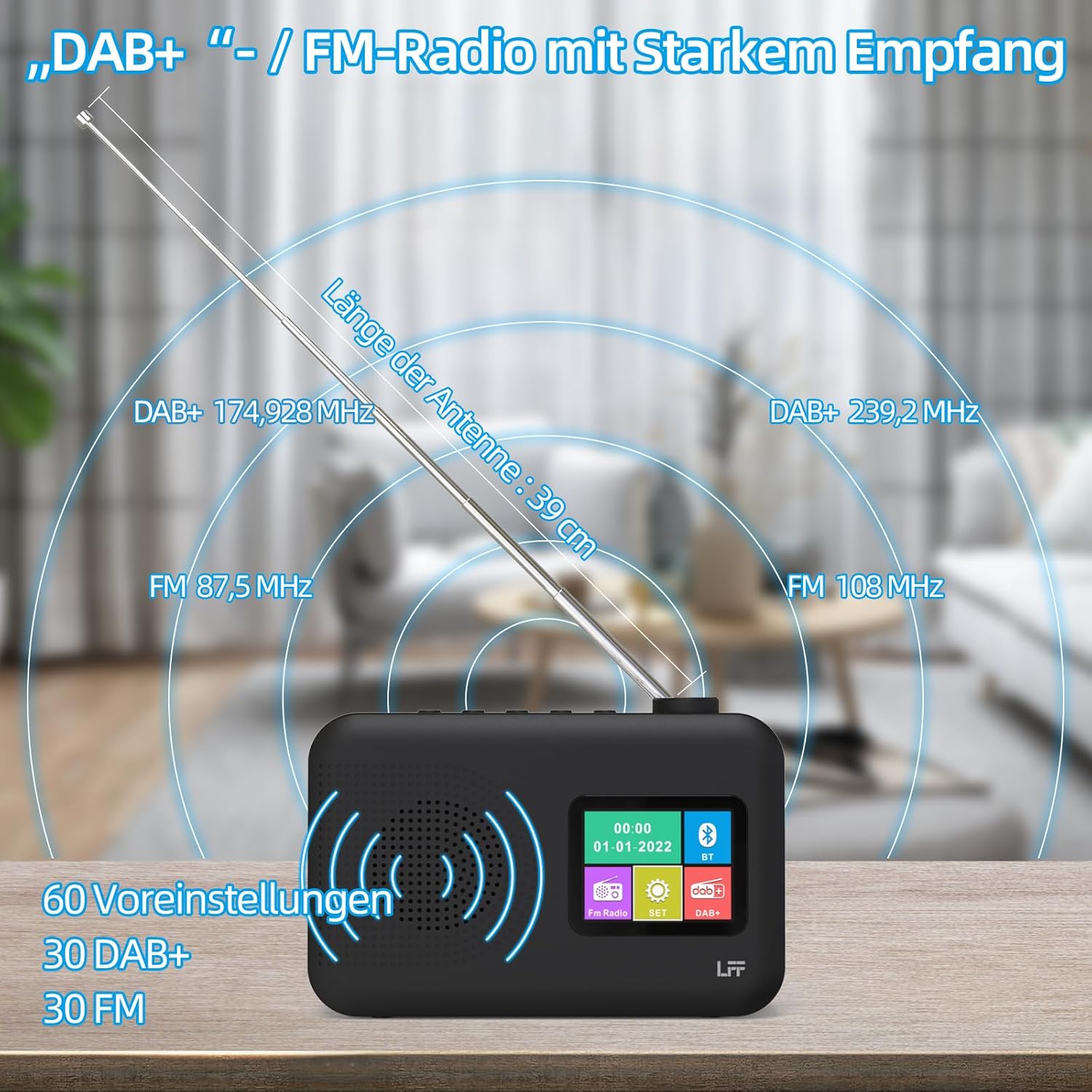
Image 7: Diagram showing the radio's reception capabilities for DAB+ (174.928 - 239.2 MHz) and FM (87.5 - 108 MHz) bands, highlighting the 39 cm antenna and 60 total presets.
5.4 Kudzora Inzwi
Adjust the volume using the dedicated volume knob or buttons, typically located on the top or side of the radio. The radio features 16 adjustable volume levels.
5.5 Kurara Nguva
To activate the sleep timer:
- Press the Kurara Nguva bhatani.
- Cycle through the available durations: 15, 30, 45, 60, 90, or 120 minutes.
- Redhiyo inozodzima yega mushure menguva yakasarudzwa.

Image 8: Visual guide to setting the sleep timer, showing options for 15, 30, 45, 60, 90, and 120 minutes.
5.6 Dual Alarm Clock
Kuseta maaramu:
- Press the Alarm bhatani rekuti uwane marongero earamu.
- Sarudza Alamu 1 kana Alamu 2.
- Set the desired alarm time, alarm source (e.g., buzzer, DAB+, FM), and volume.
- Simbisa marongero ako.

Image 9: Depiction of the dual alarm clock feature, allowing for two separate alarm settings (Alarm 1 and Alarm 2).
5.7 Kubatana kweBluetooth
Kubatanidza mudziyo wako neBluetooth:
- Switch the radio to Bluetooth mode. The display will indicate it is searching for devices.
- Pafoni yako kana chimwe chinhu chinoshandisa Bluetooth, tsvaga zvishandiso zveBluetooth zviripo.
- Select "LFF YT81107" (or similar name) from the list to pair.
- Once connected, you can stream audio from your device to the radio.
Note: This radio acts as a Bluetooth receiver. It cannot connect to Bluetooth headphones.

Image 10: The radio's display showing a successful Bluetooth connection, indicating the paired device name.
5.8 Kushandiswa Kwemahedhifoni
Plug standard 3.5mm wired headphones into the headphone jack on the side of the radio for private listening. The internal speaker will automatically mute when headphones are connected.

Image 11: Close-up of the 3.5mm headphone jack located on the side of the radio.
6. Kuchengeta
Kuti uve nechokwadi chekuti redhiyo yako inogara kwenguva refu uye inoshanda zvakanaka, tevera nhungamiro idzi dzekuchengetedza:
- Kuchenesa: Use a soft, dry cloth to clean the exterior of the radio. Do not use abrasive cleaners, waxes, or solvents.
- Kuchengeta: When not in use for extended periods, remove batteries and store the radio in a cool, dry place.
- Environment: Avoid exposing the radio to extreme temperatures, direct sunlight, high humidity, or dusty environments.
- Kuratidzwa kwemvura: This radio is not waterproof. Keep it away from water and liquids.
7. Kugadzirisa matambudziko
Kana mukasangana nematambudziko neredhiyo yenyu, tarisai matambudziko nemhinduro dzinotevera:
| Dambudziko | Zvinogona Kukonzera | Solution |
|---|---|---|
| Hapana simba | AC adapter not connected, batteries depleted or incorrectly inserted. | Ensure AC adapter is securely plugged in. Replace batteries or check polarity. |
| Kugamuchirwa kweredhiyo kusina kunaka | Antenna not extended, weak signal area, interference. | Fully extend and adjust the antenna. Move the radio to a different location. Avoid placing near other electronic devices. |
| Bluetooth haina kubatana | Radio not in Bluetooth mode, device not discoverable, already paired with another device. | Ensure radio is in Bluetooth mode. Make sure your device's Bluetooth is on and discoverable. Disconnect from other Bluetooth devices. |
| Alarm haisi kurira | Alarm not activated, volume too low, incorrect time setting. | Verify alarm is set and enabled. Increase alarm volume. Check alarm time. |
| Hapana ruzha kubva kumutauri | Vhoriyamu yakaderera zvakanyanya, mahedhifoni akabatana. | Increase volume. Disconnect headphones. |
If the problem persists after trying these solutions, please contact LFF customer support.
8. Zvinotsanangurwa
| Feature | Detail |
|---|---|
| Brand | LFF |
| Model Number | YT81107 |
| Color | Nhema |
| Dimensions (L x W x H) | 16.1 x 5.9 x 10.9 cm |
| Tekinoroji Yekugadzirisa | DAB+ |
| Mabhendi eRedhiyo Anotsigirwa | DAB+ (174.928 - 239.2 MHz), FM (87.5 - 108 MHz) |
| Kubatana | Bluetooth, 3.5mm Headphone Jack |
| Simba Source | AC Adapter (5V/1000mA), 4 x 1.5V AA (LR6) Batteries |
| Special Features | Color LCD Display, Sleep Timer, Dual Alarm Clock, 60 Presets (30 DAB+, 30 FM) |
| Inowirirana Devices | Smartphones (for Bluetooth audio), Wired Headphones |
9. Warranty uye Tsigiro
LFF is committed to providing quality products. If you experience any quality issues or require assistance with your LFF DAB+/FM Digital Radio, please contact our customer support directly. Refer to the contact information provided in your purchase documentation or on the official LFF website.


