1. Nhanganyaya
This manual provides essential information for the installation, operation, and maintenance of your Montech Titan Gold 850W ATX 3.0 Power Supply. This high-end power supply is designed for gaming systems, featuring 80 Plus Gold and Cybenetics Gold certifications, fully modular cabling, and readiness for PCIe 5.0 with a new 12VHPWR connector. Please read this manual thoroughly before installation and use to ensure proper functionality and safety.

Figure 1: Montech Titan Gold 850W Power Supply and its retail packaging.
2. Safety Information
Always observe the following safety precautions to prevent injury or damage to your power supply and system components:
- Ensure the power supply is disconnected from the AC power outlet before installation or handling.
- Usavhure magetsi casing. Voliyumu yepamusorotages dziripo mukati, uye hapana zvikamu zvinogona kushandiswa.
- Isa magetsi munzvimbo ine mhepo inofefetera zvakanaka, kure nekupisa, zuva rakananga, uye hunyoro.
- Use only the modular cables provided with this power supply. Using incompatible cables may cause damage.
- Iva nechokwadi chekuti ma connector ese agara zvakanaka usati waisa simba pa system.
3. Package Zviri mukati
Tarisa uone kuti zvinhu zvese zviripo mupakeji:
- Montech Titan Gold 850W Power Supply Unit
- Modular Cable Set (including 12VHPWR cable)
- AC Power Cord
- Mounting Screws
- Matayi etambo/Matambo eVelcro
- Mushandisi Chinyorwa (gwaro iri)

Figure 2: Included modular cables and accessories for the power supply.
4. Setup uye Kuiswa
Tevedzera matanho aya kuti uise simba rako:
- Gadzirira PC Case yako: Ensure your PC case is compatible with ATX power supplies.
- Isa PSU: Secure the power supply into the designated PSU bay in your PC case using the provided mounting screws. Ensure the fan is oriented correctly for optimal airflow (typically facing downwards if your case has a bottom vent).
- Batanidza Matambo eModular: Identify the necessary cables for your motherboard, CPU, graphics card(s), and storage devices. Connect these cables to the corresponding ports on the power supply. The fully modular design allows you to connect only the cables you need, reducing clutter.
- Batanidza kuComponents: Route the connected cables through your case's cable management channels and connect them to your motherboard (24-pin ATX, 8-pin EPS/CPU), graphics card(s) (PCIe, including the 12VHPWR for compatible GPUs), and storage drives (SATA, Molex).
- Secure Connections: Double-check all connections to ensure they are firm and properly seated.

Mufananidzo 3: Kupfuuraview of the modular cable connection ports on the power supply.
5. Operating Instructions
After installation, follow these steps to operate your power supply:
- Batanidza AC Power: Batanidza tambo yemagetsi yeAC muAC inlet yemagetsi wobva waisa muwall outlet kana surge protector.
- Simba Chinja: Locate the main power switch on the rear of the power supply and flip it to the 'ON' (I) position.
- Kubatidza Sisitimu: Press the power button on your PC case to start your computer.
- Smart Zero Fan Feature: This power supply includes a 'Smart Zero Fan' switch. When enabled (ON), the fan will remain off under low load conditions for silent operation. The fan will automatically activate when the load increases to maintain optimal temperatures. If disabled (OFF), the fan will operate continuously.

Figure 4: Rear panel with main power switch and Smart Zero Fan control.
6. Kuchengeta
Kuti uve nechokwadi chekuti magetsi ako anogara kwenguva refu uye achishanda zvakanaka, kugadzirisa magetsi nguva nenguva kunokurudzirwa:
- Kuchenesa Hupfu: Regularly clean dust from the power supply's fan intake and exhaust vents using compressed air. Ensure the power supply is turned off and unplugged before cleaning.
- Cable Inspection: Periodically check all modular cable connections for looseness or damage. Re-seat any loose cables.
- Environmental Conditions: Maintain a clean, dry, and cool environment for your PC to prevent excessive heat and dust buildup.

Mufananidzo 5: Pamusoro view of the power supply, highlighting the fan grill for cleaning.
7. Kugadzirisa matambudziko
Kana mukasangana nematambudziko nemagetsi enyu, tarisai matambudziko nemhinduro dzinotevera:
- Hapana Simba:
- Iva nechokwadi chekuti tambo yemagetsi yeAC yakabatanidzwa zvakanaka mumagetsi nepamadziro.
- Tarisa kuti switch huru yemagetsi paPSU iri panzvimbo ye 'ON' (I).
- Check all modular cable connections, especially the 24-pin ATX and 8-pin EPS/CPU cables, for secure seating.
- Edza nzvimbo yekubuditsa magetsi pamadziro nemumwe mudziyo kuti uone kuti ine simba.
- System Shuts Down Unexpectedly:
- This could indicate an overload or overheating. Ensure your system's power consumption does not exceed the PSU's 850W capacity.
- Check for proper ventilation around the PSU and inside the PC case. Clean any dust buildup.
- Ensure the 'Smart Zero Fan' is functioning correctly or try disabling it to force continuous fan operation.
- Fan Not Spinning (under low load):
- If the 'Smart Zero Fan' feature is enabled, the fan will not spin under low loads. This is normal operation. The fan will activate when the system load increases.
- If the fan never spins even under high load with 'Smart Zero Fan' disabled, contact customer support.
8. Zvinotsanangurwa
Detailed technical specifications for the Montech Titan Gold 850W Power Supply:
| Feature | Tsanangudzo |
|---|---|
| Brand | Montech |
| Model Name | Titan Gold 850W (TIS0124) |
| Wattage | 850 Watts |
| Output Wattage | 750 Watts (Note: Product title states 850W, specifications list 750W. Please verify with manufacturer if discrepancy is critical.) |
| Chitupa Chekushanda Zvakanaka | 80 Plus Gold, Cybenetics Gold |
| Fomu Factor | ATX |
| Power Supply Design | Full Modular |
| Connector Type | ATX, PCIe 5.0 (12VHPWR) |
| Kutonhodza Nzira | Air (1 Fan) |
| Item Weight | 7.52 makirogiramu |
| Zuva Rokutanga Kuwanikwa | Zvita 13, 2022 |
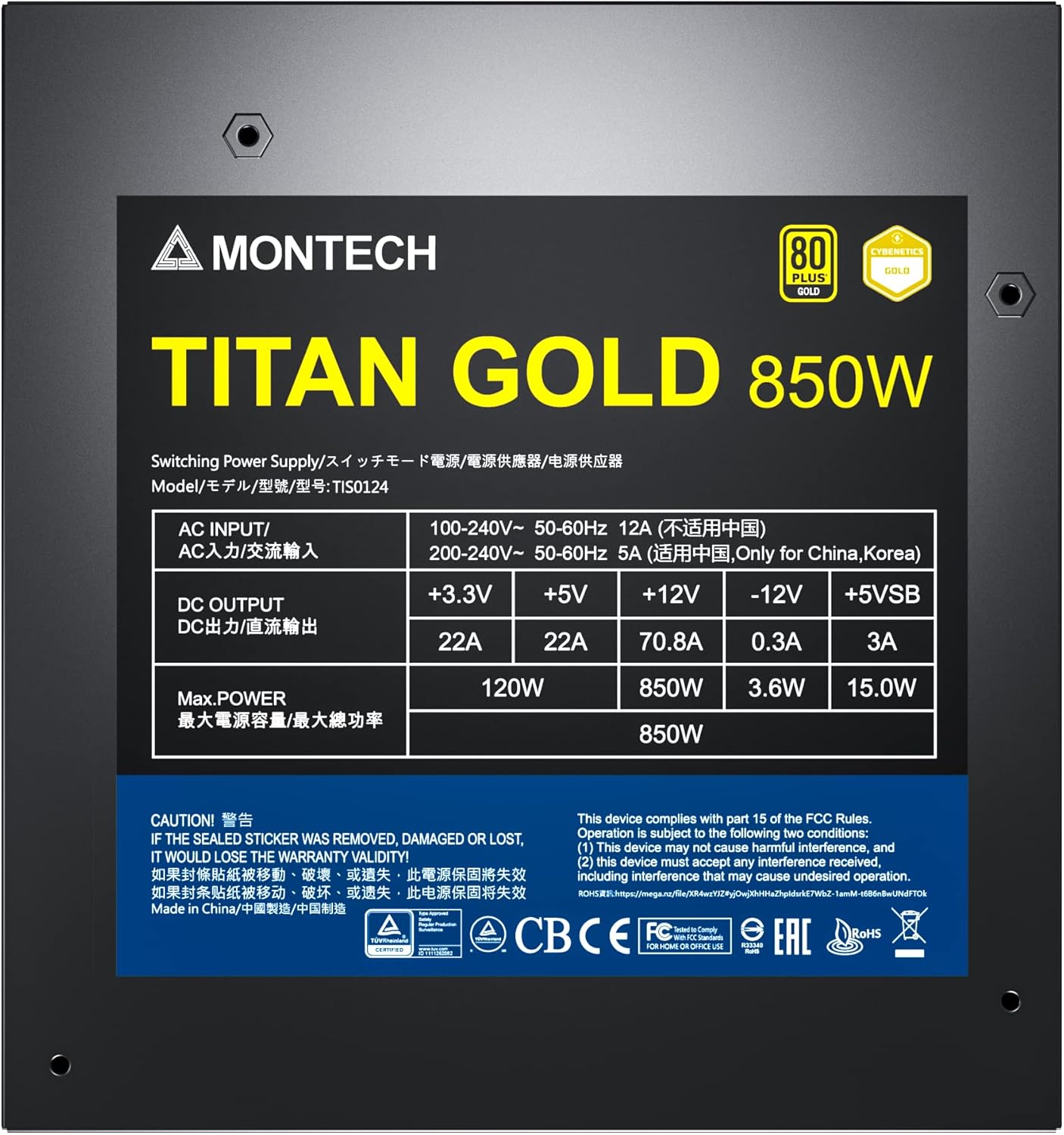
Figure 6: Product label displaying electrical specifications and certifications.
9. Warranty & Tsigiro
The Montech Titan Gold 850W Power Supply comes with a 10-makore waranti, ensuring long-term reliability and peace of mind. For technical support, warranty claims, or further assistance, please visit the official Montech websaiti kana kubata dhipatimendi ravo rebasa revatengi.
Ndapota chengetedza humbowo hwako hwekutenga kuti utsigire waranti.


