1. Nhanganyaya
Thank you for choosing the Cecotec TotalPure 2in1 MoonStyle Dark Fan and Air Purifier. This innovative appliance combines the functions of a powerful bladeless fan and an efficient air purifier, designed to enhance your indoor comfort and air quality. Featuring a DC motor, Wi-Fi control, an intuitive LED display, and multiple operating modes, this device offers a superior user experience. Please read this manual thoroughly before use to ensure proper operation, maintenance, and safety.

Image 1.1: The Cecotec TotalPure 2in1 MoonStyle Dark Fan and Air Purifier in a bedroom setting, showcasing dhizaini yayo inoyevedza.
2. Mirayiridzo Yekuchengetedza
Kuti uderedze njodzi yemoto, kuvhunduka kwemagetsi, kana kukuvara, gara uchitevera izvi zvakakosha zvekuchengetedza:
- Verenga mirairo yese usati washandisa mudziyo.
- Ita shuwa kuti magetsi emagetsi awandatage inofananidzwa neratidzo label pamudziyo.
- Usanyudze mudziyo, tambo yemagetsi, kana plug mumvura kana zvimwe zvinwiwa.
- Bvisa mudziyo kubva mudura remagetsi paunenge usiri kushandiswa, usati wachenesa, kana usati waita chero kugadzirisa.
- Chengetedza mudziyo kunze kwekusvikirwa nevana nemhuka dzinovaraidza.
- Usashandise mudziyo netambo yakakanganisika kana plug, kana mushure mekunge mudziyo watadza kushanda kana wakadonha kana kukuvara chero nzira.
- Do not block air openings or operate near curtains or other objects that could block air intake.
- Shandisa mudziyo uyu chete pakushandiswa kwawo pamba sezvakatsanangurwa mubhuku rino.
- Do not attempt to repair or disassemble the appliance yourself. Contact authorized service personnel.
3. Chigadzirwa Pamusoroview uye Zvikamu
The Cecotec TotalPure 2in1 MoonStyle Dark is designed with user convenience and performance in mind. Below are the main components and key features of your device.

Mufananidzo 3.1: Mberi View

Mufananidzo 3.2: Rutivi View
Zvinokosha:
- Simba Repamusoro (35W): Delivers strong airflow for effective cooling.
- Bladeless Technology: Provides a safe and elegant design, reducing noise and making cleaning easier.
- High-Efficiency Filter: Ensures powerful air purification, capturing airborne particles.
- Wi-Fi Control: Manage settings conveniently via your smartphone.
- Akatungamirira Screen: Displays all operational parameters and air quality information.
- Kubata Kudzora & Remote Kudzora: Offers multiple ways to interact with the device.
- 120° Oscillation: Inoparadzira mhepo zvakaenzana mukamuri rese.
- Kumhanya Kutatu & Maitiro Matatu: Customize your experience for various needs and preferences.
- 8-Hour Timer: Set the device to automatically turn off after a specified period.

High Power 35W

Bladeless Design

Kucheneswa Kwemhepo
4. Setup
4.1 Kusunungura uye Gungano
- Nyatsobvisa zvese zvikamu kubva pakurongedza.
- Isa hwaro panzvimbo yakati sandara, yakagadzikana.
- Insert the main body of the fan/purifier into the base, ensuring it clicks securely into place.
- Connect the power cord to the appliance and then plug it into a suitable electrical outlet.
4.2 Wi-Fi Connection Setup
To utilize the smart features of your device, connect it to your home Wi-Fi network via the Cecotec smartphone application.
- Download the "Cecotec" app from your smartphone's app store (available for iOS and Android).
- Register or log in to your Cecotec account.
- Follow the in-app instructions to add your new device. This typically involves putting the device into pairing mode (refer to the LED screen for indicators) and connecting to its temporary Wi-Fi hotspot before linking it to your home network.
- Once connected, you can control the fan/purifier remotely and access additional features.
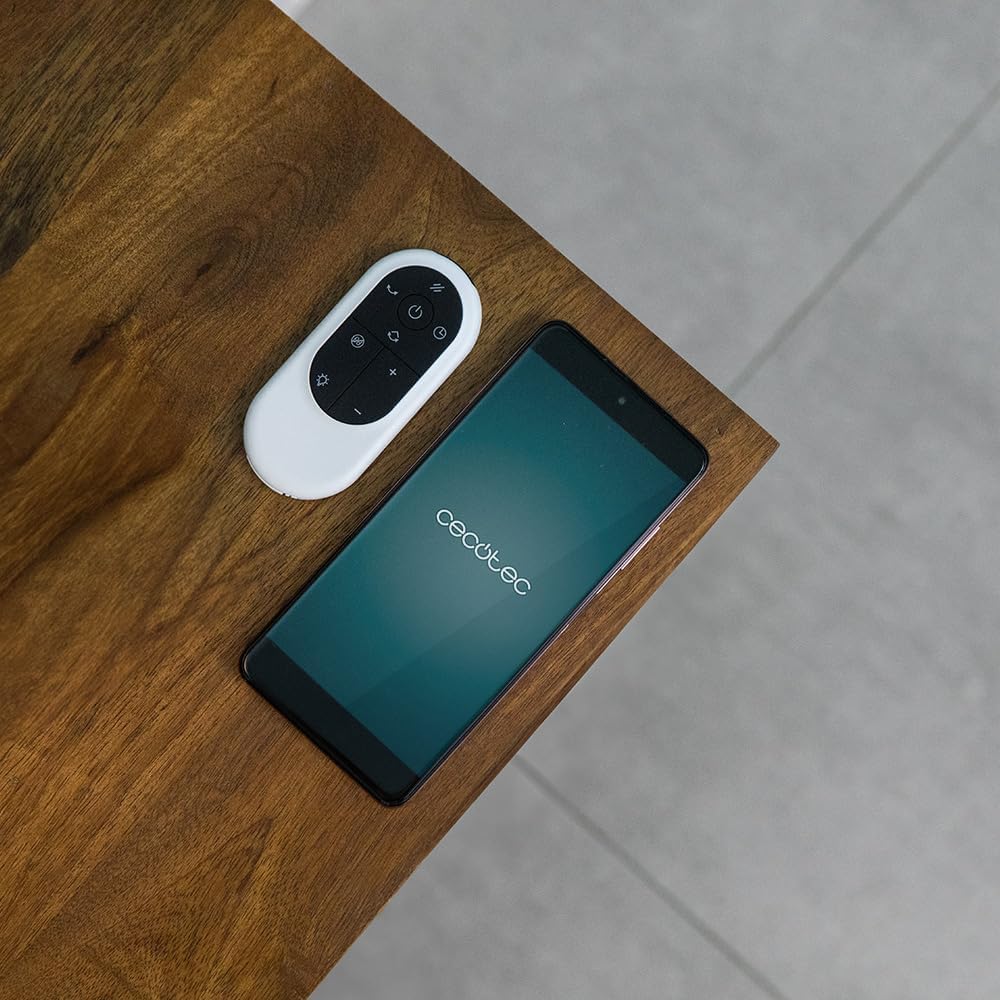
Image 4.1: The remote control and a smartphone displaying the Cecotec app, illustrating the control options.
5. Operating Instructions
5.1 Control Panel uye akatungamirira Ratidza
The device features a touch-sensitive control panel and an LED display for easy operation. The LED screen shows current settings, air quality, and other relevant information.

Image 5.1: A hand interacting with the touch control panel on the device.

Mufananidzo 5.2: A pedyo-up view of the LED display, showing current settings.
5.2 Modes and Speeds
The fan/purifier offers 9 speed settings and 4 distinct operating modes:
- Normal Mode: Constant airflow at your selected speed.
- Nzira yekurara: Operates at a lower, quieter speed for undisturbed rest.
- Natural Mode: Inotevedzera mhepo yakasikwa nekusiyanisa kumhanya kwefani.
- Auto Mode: Adjusts fan speed automatically based on detected air quality.

Mufananidzo 5.3: Kupfuuraview of 9 speeds, 4 modes, and 8-hour timer.
5.3 Oscillation Basa
Activate the oscillation function to distribute purified and cooled air across a wider area. The device can oscillate up to 120 degrees.

Image 5.4: The fan demonstrating its 120-degree oscillation capability.
5.4 Timer Basa
Set the timer for up to 8 hours to automatically turn off the appliance, saving energy and providing convenience.
6. Kuchengeta
Regular maintenance ensures the longevity and optimal performance of your Cecotec TotalPure 2in1 MoonStyle Dark.
6.1 Kuchenesa mudziyo
- Gara uchibvisa mudziyo usati wachenesa.
- Pukuta nzvimbo dzekunze nekanyoro, damp jira. Usashandise abrasive cleaners kana solvents.
- Use a soft brush or vacuum cleaner with a brush attachment to gently clean the air intake and outlet grilles.
6.2 Kutsiva Sefa
The air purification function relies on a high-efficiency filter. The filter needs to be replaced periodically to maintain purification effectiveness. The LED display may indicate when a filter change is due.

Image 6.1: The internal air filter of the Cecotec TotalPure 2in1 MoonStyle Dark.
- Bvisa mudziyo.
- Locate the filter compartment, usually at the rear or side of the main unit.
- Open the compartment and carefully remove the old filter.
- Insert a new genuine Cecotec replacement filter, ensuring it is correctly oriented.
- Vhara nzvimbo yekusefa zvakachengeteka.
- Reset the filter life indicator on the device or via the app, if applicable.
Note: Availability of replacement filters may vary. Please contact Cecotec customer support or check their official webnzvimbo yekutengaasing replacement filters.
7. Kugadzirisa matambudziko
If you encounter any issues with your Cecotec TotalPure 2in1 MoonStyle Dark, please refer to the following common problems and solutions:
| Dambudziko | Zvinogona Kukonzera | Solution |
|---|---|---|
| Appliance haibatike. | Haina kubatirwa mukati; magetsi akanganisa; bhatani remagetsi harina kudzvanywa. | Iva nechokwadi chekuti tambo yemagetsi yakabatanidzwa zvakanaka mu soketi inoshanda. Dzvanya bhatani rekudzima magetsi. |
| Kuyerera kwemhepo kusina simba. | Low speed setting; blocked air intake/outlet; dirty filter. | Increase speed setting. Check for obstructions. Clean or replace the air filter. |
| Poor air purification. | Dirty or old filter. | Replace the air filter as per maintenance instructions. |
| Wi-Fi nyaya dzekubatanidza. | Incorrect Wi-Fi password; device too far from router; app issues. | Re-enter Wi-Fi password. Move device closer to router. Restart app and device. |
| Ruzha rusina kujairika. | Obstruction inside; unstable surface. | Unplug and check for foreign objects. Place on a stable, flat surface. If noise persists, contact support. |
If the problem persists after trying these solutions, please contact Cecotec customer support.
8. Zvinotsanangurwa
Detailed technical specifications for the Cecotec TotalPure 2in1 MoonStyle Dark Fan and Air Purifier:
| Feature | Tsanangudzo |
|---|---|
| Brand | Cecotec |
| Model Number | 08249 |
| Color | Rima |
| Simba | 35 Watts |
| Voltage | 230 Volts |
| Material | Metal uye Plastiki |
| Nhamba Yekumhanya | 9 |
| Special Features | Timer, Wi-Fi Control, Bladeless Technology, LED Display, Oscillation |
| Item Weight | 8.7 makirogiramu |
| Product Dimensions | 10P x 10W x 10H millimeters (Approximate, based on provided data) |
| Inokurudzirwa Zvishandiso | Cooling, Air Purification |
| Mounting Type | Floor Mount |
9. Warranty uye Tsigiro
Cecotec products are manufactured to the highest quality standards. This product comes with a standard manufacturer's warranty. For specific warranty terms and conditions, please refer to the warranty card included with your purchase or visit the official Cecotec website.
For technical support, troubleshooting assistance, or to inquire about replacement parts (such as filters), please contact Cecotec customer service through their official channels. You can usually find contact information on the Cecotec websaiti kana pane yako chigadzirwa kurongedza.
Rutsigiro rwepamhepo: www.cecotec.com


