1. Nhanganyaya
This manual provides essential information for the safe and efficient operation of your KLIM K9000 Portable Air Conditioner. Please read it thoroughly before use and retain it for future reference. The KLIM K9000 is a versatile 3-in-1 unit offering cooling, dehumidification, and fan functions.
2. Mirayiridzo Yekuchengetedza
To reduce the risk of fire, electrical shock, or injury, always follow these basic precautions:
- Verenga mirairo yese usati washandisa mudziyo.
- Ita shuwa kuti magetsi anoenderana nevoltage yakatsanangurwa pane iyo reti label.
- Usashandise chikwata netambo yakakanganisika kana plug.
- Chengetedza mudziyo kure nezvinopisa uye zuva rakananga.
- Usavhare maburi emhepo.
- Gara uchibvisa plug usati wachenesa kana kusevha.
- Chishandiso ichi hachina kuitirwa kuti chishandiswe nevanhu (kusanganisira vana) vane masimba emuviri, pfungwa kana pfungwa dzakadzikira, kana kushaya ruzivo neruzivo, kunze kwekunge vapihwa tarisiro kana kuraira maererano nekushandiswa kwemudziyo nemunhu ane mutoro wekuchengetedza kwavo.
- Usashandise mudziyo uyu munzvimbo dzakanyorova kana pedyo nemvura.
- Shandisa zvinhu zvinokurudzirwa chete nemugadziri.
3. Package Zviri mukati
Tarisa uone kuti zvinhu zvese zviripo mupakeji:
- KLIM K9000 Air Conditioner Unit
- Remote Control
- Exhaust Hose
- Pedza Chiteshi
- Pedza Hose Connector
- Drainage Hose
- Window Seal Fixing Plate
- Window Cover Extension
- 2 AAA Alkaline Batteries (for remote control, if included)
4. Chigadzirwa Pamusoroview
The KLIM K9000 is a compact and efficient portable air conditioner designed to provide comfort in various environments. It integrates three primary functions: cooling, dehumidification, and fan operation.

Mufananidzo 4.1: KLIM K9000 Portable Air Conditioner unit with remote control, illustrating air circulation.
Its 3-in-1 functionality allows it to cool rooms, circulate air as a fan, and reduce humidity levels, making it suitable for various climate control needs.

Mufananidzo 4.2: The KLIM K9000 offers 3-in-1 comfort: cooling, dehumidifying, and fan functions, with a 9000 BTU cooling capacity.
5. Setup uye Kuiswa
Proper installation is crucial for optimal performance. Follow these steps for quick setup:
- Positioning: Place the unit on a flat, stable surface, ensuring at least 30 cm (12 inches) of space around it for proper airflow.
- Batanidza Exhaust Hose: Connect the exhaust hose to the unit's exhaust port. Extend the hose and connect the window seal fixing plate or window cover extension.
- Window Installation: Secure the window seal fixing plate or extension in a compatible window opening (sliding windows). For tilt windows, a separate seal kit is required and sold separately. Ensure the hot air is expelled outdoors.
- Power Connection: Batanidza tambo yemagetsi mudura remagetsi rakadzika.
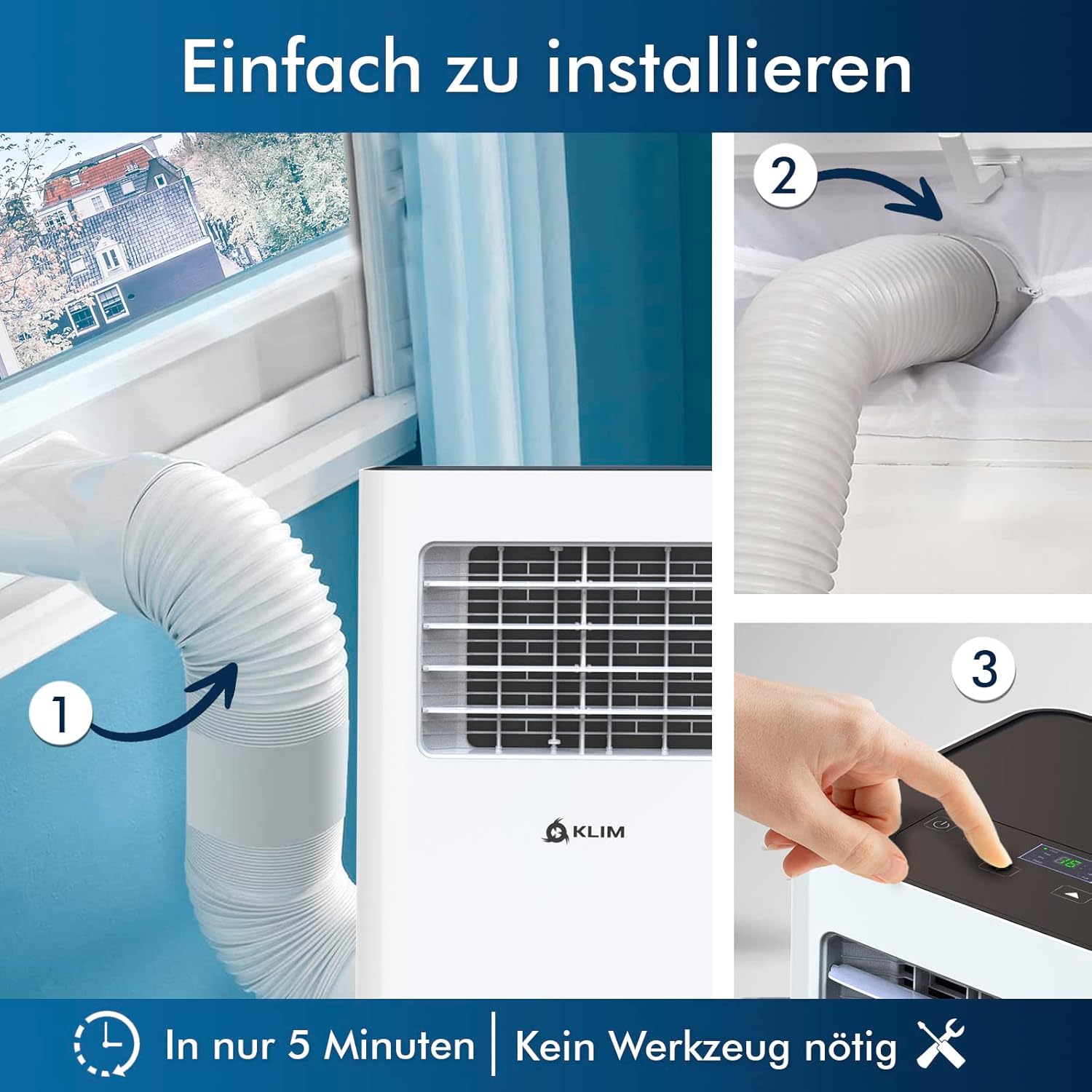
Mufananidzo 5.1: Visual guide for quick installation, typically completed in 5 minutes without special tools.

Mufananidzo 5.2: Illustration of window kit compatibility, showing options for sliding windows and mentioning a separate seal for tilt windows.
6. Operating Instructions
The KLIM K9000 can be operated via the control panel on the unit or the included remote control.
6.1. Panera Yekudzora uye Kudzora Kure
The remote control allows convenient operation from a distance. Ensure AAA batteries are correctly inserted. The control panel on the unit provides direct access to all functions.
6.2. Maitiro Okushandisa
- Kutonhodza Mode: Activates the compressor to cool the room. Set your desired temperature (down to 16°C). This mode is effective for rooms up to 20 m² (80 m³).
- Fan Mode: Circulates air without cooling. Adjustable fan speeds are available.
- Dehumidifier Mode: Removes excess moisture from the air. In this mode, the unit collects water, which will need to be drained.
- Nzira yekurara: Designed for quiet operation during rest. The unit operates at a reduced noise level (approx. 65 dB) and may adjust temperature settings automatically for comfort.

Mufananidzo 6.1: The sleep mode provides a cool and quiet environment for restful sleep, operating at approximately 65 dB.
To switch between modes, press the "Mode" button on the control panel or remote control.
7. Kuchengeta
Regular maintenance ensures the longevity and efficiency of your KLIM K9000.
7.1. Kuchenesa Mhepo Sefa
The air filter should be cleaned every two weeks or more frequently depending on usage. A dirty filter can reduce cooling efficiency and airflow.
- Bvisa air conditioner kubva pamagetsi.
- Tsvaga wobvisa firita yemhepo (kazhinji iri kumashure kana kurutivi rwechishandiso).
- Geza sefa nemvura inodziya ine sipo. Sukurudza zvakanaka wosiya kuti iome zvachose usati waisazve.
- Isazve firita yakaoma wobva wabatanidza mudziyo wacho zvakare.
7.2. Drainage yemvura
The unit features an auto-evaporation system in cooling mode, reducing the need for frequent drainage. However, in high humidity or dehumidifier mode, water will accumulate and needs to be drained.
- Continuous Drainage: For continuous dehumidification, attach the drainage hose to the drain outlet and direct it to a suitable container or floor drain.
- Manual Drainage: When the internal water tank is full, the unit may stop operating and display an indicator. To drain manually, unplug the unit, place a shallow pan or tray under the drain plug, and remove the plug. Be aware that the internal water container can be cumbersome to empty, and it may require two people to safely tilt the unit for complete drainage if using the bottom drain.
8. Kugadzirisa matambudziko
Tarisa kuchikamu chino kune zvinowanzoitika uye mhinduro dzadzo.
| Dambudziko | Zvinogona Kukonzera | Solution |
|---|---|---|
| Unit haibatike. | No power, tripped circuit breaker, full water tank. | Check power cord, reset breaker, drain water tank. |
| Kusakwana kutonhora. | Dirty air filter, blocked air intake/outlet, open windows/doors, room too large, exhaust hose not properly installed. | Clean filter, clear obstructions, close windows/doors, ensure proper exhaust hose installation. |
| Chikwata chine ruzha. | Normal operation sound (compressor/fan), unit not on a level surface. | The unit operates at approximately 65 dB, which is normal. Ensure it is on a flat surface. |
| Kubuda kwemvura. | Drain plug not securely closed, drainage hose improperly connected. | Check drain plug, ensure drainage hose is securely attached and not kinked. |
Kana dambudziko rikaramba riripo mushure mekuyedza mhinduro idzi, ndapota taura nerutsigiro rwevatengi.
9. Zvinotsanangurwa
| Brand | KLIM |
| Model Number | K9000WH |
| Cooling Capacity | 9000 BTU |
| Yakakurudzirwa Saizi Yekamuri | Kusvika 20 m² (80 m³) |
| Mabasa | Kutonhodza, Dehumidifier, Fani |
| Kirasi Yekuita Nesimba | A |
| Kushandiswa Kwemagetsi Kwegore | 960 Watts |
| Noise Level | 65 Decibel |
| Refrigerant | R-290 (Natural Refrigerant) |
| Dimensions (L x W x H) | 29.5 x 32.5 x 70.4 cm |
| Kurema | 25.58 kg |
| Material | ABS |
| Simba Source | Electric Cable |

Mufananidzo 9.1: The KLIM K9000's high energy efficiency (Class A) contributes to cost savings and environmental protection.
10. Warranty uye Tsigiro
The KLIM K9000 Portable Air Conditioner comes with a 5-makore waranti, kuvimbisa rugare rwepfungwa maererano nemhando yayo uye kuita kwayo.
For technical assistance, warranty claims, or any questions not covered in this manual, please contact KLIM customer support through their official website or the retailer where the product was purchased. Please have your model number (K9000WH) and purchase date ready.


