1. Nhanganyaya
Thank you for choosing the HIKMICRO HEIMDAL H4D Digital Night Vision Monocular. This device is designed for observation in low light and complete darkness, featuring a high-resolution sensor and AMOLED display for clear imaging.
Zvinokosha:
- 1.39" AMOLED display with 454 x 454 resolution
- High-resolution 2560 x 1440 sensor
- Integrated 850 nm infrared illuminator with smart IR function
- Day/Night/Auto/Defog modes
- Electronic Image Stabilization (EIS)
- Detection range up to 200 meters
- Replaceable and rechargeable battery with over 4 hours of use
- Compact and portable design, waterproof and dustproof (IP67)
- Integrated 32 GB EMMC for storing recorded videos and photos
- Wireless connection via HIKMICRO Sight app, local album function
Package Zviri mukati:
- HIKMICRO HEIMDAL H4D Digital Night Vision Monocular
- Bhatiri
- Mucheka weguruva
- Bag rinodzivirira
- Wrist tambo
- USB-C tambo
- Kurumidza Kutungamira
2. Chigadzirwa Pamusoroview
Familiarize yourself with the components and controls of your HIKMICRO HEIMDAL H4D monocular.
Device Layout
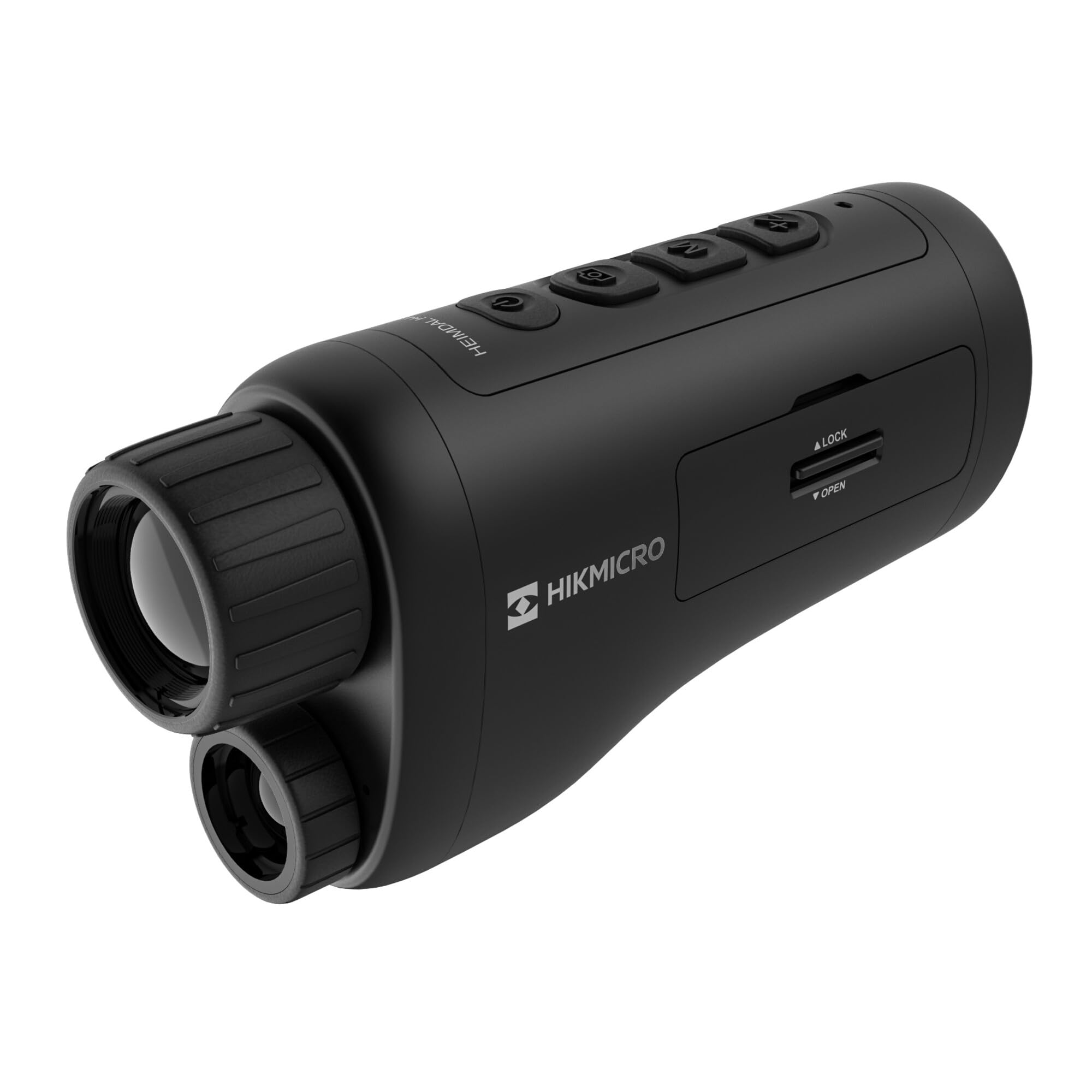
An angled view of the HIKMICRO HEIMDAL H4D monocular, showing its compact, ergonomic design and the main lens.
Zvidzore uye Mabhatani

Top view of the monocular showing the power button, photo/video record button, mode button, and zoom/IR adjustment buttons.
Lenses and Focus

Mberi view displaying the objective lens and the integrated infrared illuminator.
Battery Compartment

Side view showing the battery compartment with 'LOCK' and 'OPEN' indicators.
3. Setup
Kuiswa kweBattery
- Locate the battery compartment on the side of the device.
- Slide the lock mechanism to the 'OPEN' position.
- Isai bhatiri rinochajwa zvakare, muchiva nechokwadi che polarity chaiyo.
- Close the compartment and slide the lock mechanism to the 'LOCK' position.
Kuchaja Bhatiri
Connect the device to a power source using the provided USB-C cable. The charging indicator will show the charging status.
Chekutanga Power On
Dzvanya uye ubate bhatani remagetsi (rinowanzo nyorwa ne Ⓘ) until the HIKMICRO logo appears on the display.
4. Operating Instructions
Simba On/Kudzima
- Power On: Dzvanya uye bata bhatani remagetsi kweanenge masekonzi maviri.
- Power Off: Press and hold the power button for approximately 3 seconds until the device shuts down.
Kugadzirisa Kutarisa
Rotate the focus ring on the objective lens to achieve a clear image of your target.
Mode Selection
Press the 'M' (Mode) button to cycle through observation modes: Day, Night, Auto, and Defog.
Zoom and IR Adjustment
Use the '+' and '-' buttons to adjust the digital zoom level. These buttons also control the intensity of the infrared illuminator in night mode.
Photo and Video Recording
- Tora Mufananidzo: Press the photo/video button (usually marked with 📷) once to capture an image.
- Rekodha Vhidhiyo: Press and hold the photo/video button to start recording. Press again to stop.
Connecting to HIKMICRO Sight App
Download the HIKMICRO Sight app from your device's app store. Follow the in-app instructions to connect your monocular for live view, remote control, and media management.
5. Kuchengeta
Kuchenesa
- Use the provided dust cloth or a soft, lint-free cloth to clean the lenses.
- For stubborn dirt, use a lens cleaning solution specifically designed for optics.
- Pukuta muviri wemudziyo nekanyoro, damp jira. Usashandise abrasive cleaners kana solvents.
Storage
- Store the monocular in its protective bag in a cool, dry place when not in use.
- Bvisa bhatiri kana mudziyo usingazoshandiswe kwenguva yakareba.
Battery Care
- Charge the battery regularly, even if not in frequent use, to maintain its lifespan.
- Dzivisa kupisa kwakanyanya panguva yekuchaja nekuchengetedza.
6. Kugadzirisa matambudziko
Matambudziko Anowanikwa uye Mhinduro
| Dambudziko | Zvinogona Kukonzera | Solution |
|---|---|---|
| Mudziyo haubatike. | Bhatiri rapera kana kuti rakaiswa zvisirizvo. | Chaja bhatiri. Iva nechokwadi chekuti bhatiri rakaiswa ne polarity chaiyo. |
| Mufananidzo hauna kujeka. | Focus haina kugadziriswa. | Rotate the focus ring on the objective lens until the image is clear. |
| Poor image quality in darkness. | IR illuminator is off or set to low intensity. | Activate the IR illuminator or increase its intensity using the '+' button. Ensure you are in Night mode. |
| Cannot connect to HIKMICRO Sight app. | Bluetooth/Wi-Fi is off on device or phone, or app is not updated. | Ensure Bluetooth/Wi-Fi is enabled on both devices. Restart the app and monocular. Check for app updates. |
| Mudziyo unodzima kana kusadaira. | Temporary software glitch. | Perform a soft reset by holding the power button until the device restarts. If issue persists, contact support. |
7. Zvinotsanangurwa
| Feature | Detail |
|---|---|
| Sensor Resolution | 2560 x 1440 |
| Display Type | AMOLED |
| Display Resolution | 454 x 454 |
| Kukura Kwekuratidza | 1.39 inches (3.5 cm) |
| Muchini Illuminator | Integrated 850 nm |
| Detection Range | Kusvika 200 metres |
| Storage | 32 GB EMMC (internal) |
| Hupenyu hwebhatiri | More than 4 hours (replaceable, rechargeable) |
| Waterproof Rating | IP67 |
| Dimensions | 153 mm x 50 mm x 80 mm (6.02" x 1.97" x 3.15") |
| Kurema | 375 magiramu (0.83 lbs) |
| Material | Plastiki |
| Inowirirana Devices | Rifle, Compound Bow |
| Mounting Type | Picatinny mount |
| Kushandiswa Kwemitambo | Camping, Hiking |
| Color | Chena |
8. Warranty uye Tsigiro
HIKMICRO products are covered by a limited warranty. For detailed warranty information, please refer to the official HIKMICRO websaiti kana kubata mutengesi wako wepano.
For technical support, troubleshooting assistance, or service inquiries, please visit the official HIKMICRO support page or contact their customer service department.
Official Websaiti: www.hikmicrotech.com


