Nhanganyaya
This manual provides essential instructions for the safe operation, maintenance, and troubleshooting of your Hisense RVCG144AB Robot Vacuum Mop. Please read this manual thoroughly before using the product and retain it for future reference.
Mirayiridzo Yekuchengetedza
Kuti uderedze njodzi yekukuvara kana kukuvara, tevera matanho ekuchengetedza:
- Ita shuwa kuti robhoti rachajiswa zvizere usati watanga kushandisa.
- Do not operate the robot near open flames or flammable materials.
- Chengeta bvudzi, zvipfeko zvisina kusimba, zvigunwe, uye nhengo dzese dzemuviri kure nekuvhura uye nhengo dzinofamba.
- Musabvumira vana kushandisa robhoti. Tarisai vana nezvipfuyo kana robhoti iri kushanda.
- Use only the original charging adapter and dock provided by Hisense.
- Remove power cords, small objects, and fragile items from the floor before cleaning to prevent entanglement or damage.
- Usashandise robhoti kunhonga marara makuru, zvinwiwa, kana zvinhu zvinopisa.
- Gara uchichenesa mabhurashi nemafirita kuti urambe uchishanda zvakanaka.
Product Overview
The Hisense RVCG144AB is a versatile robot vacuum mop designed for efficient floor cleaning. It features gyroscopic mapping for systematic navigation, adjustable power and water levels, and convenient control via a mobile application.
Package Zviri mukati
Pakuburitsa, tarisa kuti zvese zviriko zviripo:
- Hisense RVCG144AB Robot Vacuum Mop
- Kuchaja Station
- Chaja Cable
- Remote Control
- HEPA Filter (1 piece)
- Cleaning Pad (Mop Cloth)
- Side Brushes (2 pieces)
- Nhungamiro yekuraira (bhuku rino)
Robhoti Zvikamu
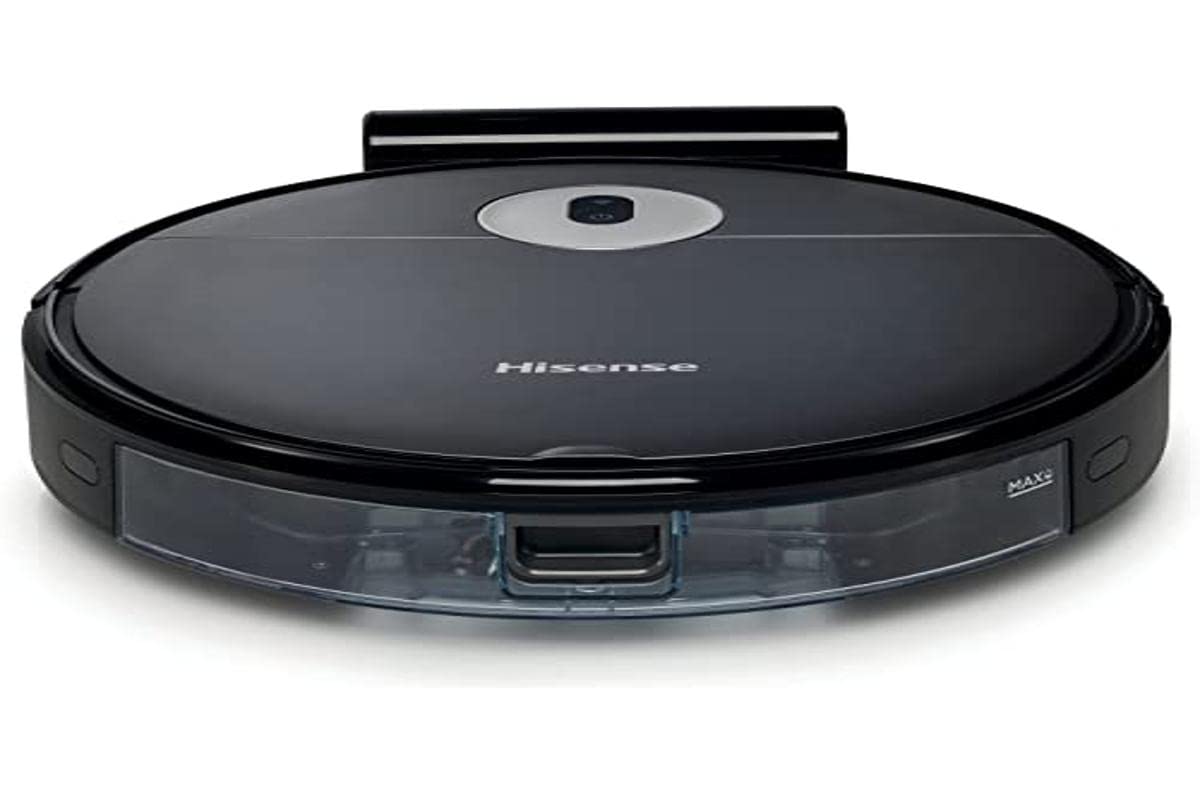
Image: The Hisense RVCG144AB Robot Vacuum Mop, showcasing dhizaini yayo nhema uye chimiro chayo chakasimba.
The robot includes a floating roller brush for adapting to different floor conditions and dual-sided brushes for edge cleaning and preventing hair entanglement.
Gadzirira
1. Kuchaja Station Placement
Place the charging station against a wall in an open area, ensuring there are no obstacles within 1 meter (3 feet) to the sides and 2 meters (6 feet) in front of the station. Connect the charging cable to the station and plug it into a power outlet.

Image: Illustration of the charging station, showing its power connection and recommended clear space around it.
2. Kutanga Kuchaja
Place the robot onto the charging station. Ensure the charging contacts on the robot align with those on the station. The robot will begin charging automatically. For first use, allow the robot to charge completely, which typically takes several hours.
3. Isa Side Brushes
Dzvanya mabhurashi eparutivi pamatanda ari pasi perobhoti kusvika adzvanya panzvimbo yawo.
4. App Connection (Wi-Fi)
- Download the Hisense ConnectLife app from your smartphone's app store.
- Bhalisa account uye pinda.
- Follow the in-app instructions to add your RVCG144AB robot vacuum. This typically involves connecting the robot to your home Wi-Fi network.
- Ensure your Wi-Fi network is 2.4GHz for optimal connectivity.
Operating Instruction
1. Kutanga uye Kumisa Kuchenesa
- Kutanga Kutanga: Press the power button on the robot once to start cleaning. Press again to pause.
- App Control: Use the Hisense ConnectLife app to start, pause, or stop cleaning from anywhere.
- Remote Control: Use the provided remote control to initiate or stop cleaning.
2. Kuchenesa Modes
The robot offers various cleaning modes to suit different needs:
- Auto Cleaning: The robot intelligently navigates and cleans the entire accessible area.
- Selective Room/Zone Cleaning: Use the app to define specific rooms or areas for cleaning.
- Deep Cleaning: For thorough cleaning of a specific area.
- Zigzag Kuchenesa: A systematic cleaning pattern to cover large areas efficiently.
- Edge Cleaning: Robhoti rinochenesa nemadziro nemacheto efenicha.
3. Adjusting Suction Power and Water Flow
The robot features 3 levels of suction power and water flow. These can be adjusted via the mobile app to match your cleaning requirements and floor type.
4. Scheduling Cleanings
Set up cleaning schedules through the Hisense ConnectLife app. This allows the robot to automatically clean at preferred times and days.
Maintenance
Regular maintenance ensures optimal performance and extends the lifespan of your robot vacuum mop.
1. Kubvisa Dustbin
Open the top cover of the robot and remove the dustbin. Empty its contents into a trash bin. It is recommended to empty the dustbin after each cleaning cycle.

Mufananidzo: Kuvhara view of the robot's dustbin being removed for emptying, highlighting its capacity.
2. Kuchenesa HEPA Sefa
Remove the HEPA filter from the dustbin. Tap it gently to remove dust. Do not wash the HEPA filter with water; replace it every 3-6 months depending on usage.
3. Kuchenesa bhurashi guru
Remove the main brush cover and then the main brush. Use the cleaning tool to remove hair and debris tangled around the brush. Reinstall the brush and cover.
4. Kuchenesa Side Brushes
Periodically check the side brushes for tangled hair or debris. Remove them by pulling gently and clean as needed. Replace if damaged.
5. Cleaning the Water Tank and Mop Pad
Detach the water tank and empty any remaining water. Clean the mop pad by hand or machine wash. Allow all components to dry completely before reassembly.

Image: The water tank and mop pad assembly, illustrating how to detach and clean them.
6. MaSensor Ekuchenesa uye MaContact Ekuchaja
Wipe the cliff sensors, wall sensors, and charging contacts on both the robot and the charging station with a clean, dry cloth to ensure proper function.
Kugadzirisa matambudziko
Tarisa kuchikamu chino kune zvinowanzoitika uye mhinduro dzadzo.
| Dambudziko | Zvinogona Kukonzera | Solution |
|---|---|---|
| Robhoti haribati kana kuchaji. | Battery depleted; charging contacts dirty; charging station not powered. | Ensure robot is on charging station; clean charging contacts; check power to charging station. |
| Robhoti inonamira kazhinji. | Obstacles on floor; robot caught on wires or rugs. | Clear floor of obstacles, wires, and thick rugs before cleaning. |
| Kusaita zvakanaka kwekuchenesa. | Dustbin full; brushes tangled; filter clogged. | Empty dustbin; clean main and side brushes; clean or replace HEPA filter. |
| App haigone kubatana nerobhoti. | Incorrect Wi-Fi password; robot out of Wi-Fi range; 5GHz Wi-Fi network. | Simbisa password yeWi-Fi; fambisa robhoti pedyo nerouter; ita shuwa kuti Wi-Fi ye2.4GHz yashandiswa. |
Zvinotsanangurwa
Technical specifications for the Hisense RVCG144AB Robot Vacuum Mop:
| Feature | Detail |
|---|---|
| Brand | Hisense |
| Model Number | RVCG144AB |
| Color | Nhema |
| Simba | 55 Watts |
| Suction Power | 4000 Pa |
| Number of Speeds/Levels | 3 (Power and Wash) |
| Bhatiri Type | Lithium-ion |
| Battery Capacity | 2600 mAh |
| Runtime | Kusvikira kumaminitsi makumi matatu |
| Dustbin Capacity | 500 ml |
| Mvura Tangi Kugona | 250 ml |
| Rudzi rwesefa | HEPA |
| Navigation | Gyroscopic Mapping |
| Control Type | App Control (Wi-Fi), Remote Control |
| Product Dimensions | 35L x 35W x 4H masendimita |
| Item Weight | 5.4 makirogiramu |
| Yakakurudzirwa Surface | Marble, laminate, linoleum, carpet, wood |
Warranty uye Support
For warranty information, please refer to the warranty card included with your product packaging or visit the official Hisense website. For technical support or service inquiries, please contact Hisense customer service through their official channels.
Unogona kuwana rumwe ruzivo uye zviwanikwa zvekutsigira pa Hisense official website.


