Nhanganyaya
This manual provides essential information for the safe and efficient use of your ADEQWAT Magnetic Wall Charger with USB-C Cable. Please read these instructions carefully before using the product and retain them for future reference.
Safety Information
- Usaisa charger kumvura, mwando, kana tembiricha yakanyanyisa.
- Do not attempt to disassemble, repair, or modify the charger. This may void the warranty and pose safety risks.
- Chengetedza pasingasvikirwi nevana.
- Ensure the charger is plugged into a compatible power outlet.
- Disconnect the charger from the power outlet when not in use or during electrical storms.
- Dzivisa kudonhedza kana kuisa charger kune zvinokanganisa zvakasimba.
Package Zviri mukati
Tarisa uone kuti zvinhu zvese zviripo mupakeji:
- ADEQWAT Magnetic Wall Charger
- Yakabatanidzwa USB-C Cable
- Additional Metallic Plate (for magnetic attachment)
Gadzirira
- Vhura Plug: Gently pull out the retractable plug from the back of the charger until it locks into place.

Mufananidzo: Kumashure view of the charger with the retractable plug extended.
- Batanidza kune Power Outlet: Insert the charger's plug into a standard wall power outlet.

Image: The charger plugged into a wall outlet, demonstrating its use with a smartphone and tablet.
- Optional: Attach Metallic Plate: If you wish to use the magnetic feature with a device that is not inherently magnetic, attach the provided metallic plate to the back of your smartphone or its case. Ensure the plate is securely positioned.
Kushanda
- Charging with USB-C Cable: Connect the integrated USB-C cable to your compatible device's USB-C port. Charging will begin automatically.
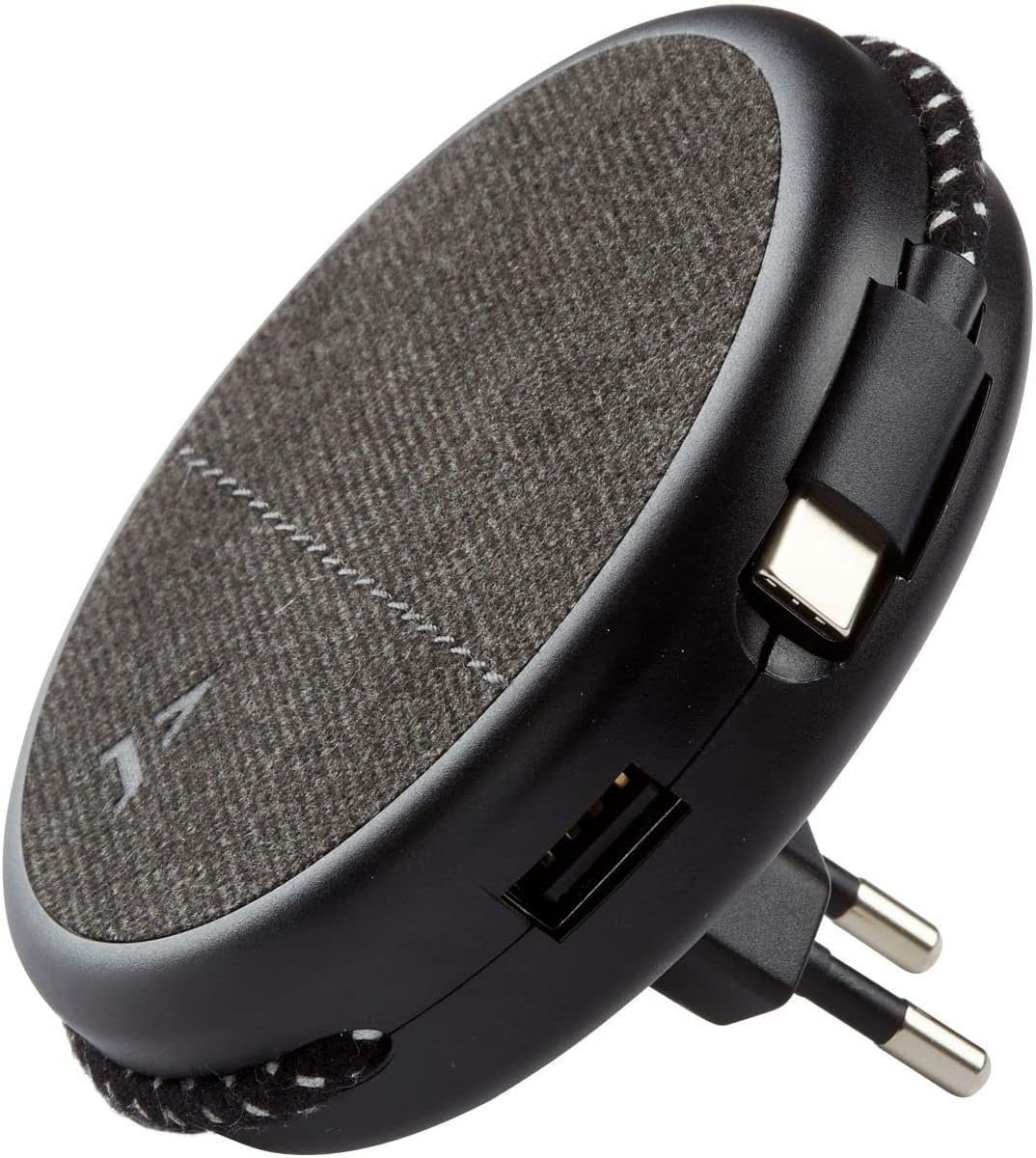
Image: Close-up of the charger, highlighting the integrated USB-C cable and an additional USB-A port.
- Charging with USB-A Port: For devices requiring a USB-A connection, use your own USB-A cable and plug it into the USB-A port on the charger.
- Kushandisa Magnetic Feature: Once the charger is plugged into a wall outlet, you can magnetically attach your smartphone (with or without the metallic plate) to the charger's surface for convenient holding while charging.
Maintenance
- Kuchenesa: Bvisa charger kubva pamagetsi usati wachenesa. Shandisa jira rakapfava, rakaoma kupukuta pamusoro. Usashandise zvicheneso zvemvura kana zvinhu zvinokurisa.
- Kuchengeta: When not in use, store the charger in a cool, dry place, away from direct sunlight and extreme temperatures. The retractable plug can be folded back into the charger for compact storage.
Kugadzirisa matambudziko
| Dambudziko | Zvinogona Kukonzera | Solution |
|---|---|---|
| Mudziyo hauchaji. | Chaja haina kuvharwa zvakanaka. Device cable faulty. Device incompatible. | Ensure the charger is fully inserted into the wall outlet. Edza imwe waya yakasiyana. Simbisa kuti mudziyo unoenderana nezvinodiwa pakuchaja neUSB. |
| Kubatanidzwa kwemagineti hakuna kusimba. | Device not magnetic. Metallic plate not properly attached. | Ensure your device has a magnetic back or use the provided metallic plate. Re-position or re-attach the metallic plate securely. |
| Charger inonzwa kudziya. | Normal kushanda. Overload. | A slight warmth during charging is normal. If it becomes excessively hot, disconnect immediately and contact support. Avoid charging multiple high-power devices simultaneously if it causes overheating. |
Zvinotsanangurwa
| Brand | ADEQWAT |
| Model Number | 8005668 |
| Color | Nhema |
| Connections | USB (Integrated USB-C Cable, 1x USB-A Port) |
| Special Feature | Magnetic |
| Total USB Ports | 1 (USB-A) + 1 (Integrated USB-C) |
| Inowirirana Devices | Cellular Phones, Tablets |
| Power Output | 17 Watts |
| Nhamba Yezvinhu | 2 (Charger + Metallic Plate) |
| Simba Source | Corded Electric |
| Portable | Ehe |
Warranty uye Support
For warranty information or technical support, please refer to the documentation provided with your purchase or visit the official ADEQWAT website. Chengetedza humbowo hwako hwekutenga kune warranty claim.


