Nhanganyaya
Thank you for choosing the Faber 34L Double Glazed 1600W Oven Toaster Grill (OTG). This manual provides essential information for the safe and efficient operation, maintenance, and troubleshooting of your appliance. Please read these instructions thoroughly before first use and retain them for future reference.

Mufananidzo: Mberi view of the Faber 34L OTG with its control panel and glass door.
Yakakosha Mirayiridzo Yekuchengetedza
Gara uchitevera chenjedzo dzekuchengetedza paunenge uchishandisa midziyo yemagetsi kuderedza njodzi yemoto, kuvhunduka kwemagetsi, uye kukuvara kwevanhu.
- Read all instructions before operating the OTG.
- Usabate nzvimbo dzinopisa. Shandisa zvibato kana mapfundo. Nguva dzose shandisa mitts yeovheni kana magirovhosi paunenge uchibata zvinhu zvinopisa.
- To protect against electrical shock, do not immerse cord, plug, or any non-removable parts of the oven in water or other liquid.
- Kutariswa kwepedyo kunodiwa kana chero mudziyo uchishandiswa nevana kana pedyo.
- Bvisa paburiro kana isiri kushandiswa uye usati wachenesa. Bvumira kutonhora usati wapfeka kana kubvisa zvikamu.
- Usashandise chero mudziyo uine tambo yakakuvadzwa kana plug, kana mushure mekunge mudziyo watadza kushanda kana wakakuvadzwa chero nzira.
- Usashandise kunze.
- Usarege tambo ichirembera pamusoro petafura kana counter, kana kubata panopisa.
- Usaise pairi kana pedyo negasi rinopisa kana chibatiso chemagetsi, kana muovheni inopisa.
- Kuchenjerera kwakanyanya kunofanira kushandiswa pakufambisa mudziyo une mafuta anopisa kana zvimwe zvinwiwa zvinopisa.
- Usashandise mudziyo kune zvimwe kunze kwechinangwa chekushandisa.
- Zvokudya zvakawandisa kana midziyo yesimbi haifanirwe kuiswa muhovhoni yekubikisa sezvo inogona kugadzira moto kana njodzi yekuvhundutswa nemagetsi.
- Moto unogona kuitika kana hovhoni yakavharwa kana kubata zvinhu zvinobvira moto, kusanganisira maketeni, madhiri, madziro, nezvimwe zvakadaro, painoshanda.
- Usaise chero chimwe chezvinhu zvinotevera muovheni: bepa, kadhibhodhi, purasitiki, kana zvimwe zvinhu zvakafanana.
- Usachengete chero zvinhu, kunze kwezvinokurudzirwa nemugadziri, muovheni ino kana isiri kushandiswa.
- Always wear protective, heat-resistant gloves when inserting or removing items from the hot oven.
- Ita shuwa kufefetera kwakaringana kutenderedza mudziyo panguva yekushanda.
Zvigadzirwa Zvikamu uye Zvishandiso
Your Faber OTG comes with the following components and accessories:
- Faber 34L OTG Unit
- Enamelled Bake Tray
- Grill Tray
- Crumb tireyi
- Pizza Plate (9-inch)
- Rotisserie Rod
- Rotisserie Handle (Tongs)
- SS Wire Tray
- Silicon Heat Guard Glove

Image: All included accessories for the Faber 34L OTG, laid out for clear identification.
Setup uye Kutanga Kushandisa
Kuburitsa
- Carefully remove the OTG and all accessories from the packaging.
- Remove any protective films, stickers, or packaging materials from the appliance and accessories.
- Ongorora mudziyo kana pane kukuvara. Usashandise kana wakuvadzwa.
Placement
- Place the OTG on a stable, flat, heat-resistant surface.
- Ensure there is adequate space (at least 10-15 cm) around all sides of the oven for proper ventilation. Do not place it directly against a wall or under cabinets.
- Keep the appliance away from flammable materials like curtains, tablecloths, and paper.
Kutanga Kuchenesa
- Usati watanga kushandisa, pukuta mukati uye kunze kwevheni nechizivisoamp jira.
- Wash all accessories (bake tray, grill tray, rotisserie rod, etc.) in warm, soapy water, rinse thoroughly, and dry completely.
- Isa tireyi ine zvidimbu pasi peovheni.
First Use Burn-in
It is recommended to run the oven empty for about 15 minutes on its highest temperature setting (250°C) with the Function Selector set to 'Top + Bottom Heating' to burn off any manufacturing residues. A slight odor or smoke may be present during this process; this is normal. Ensure the area is well-ventilated.
Operating Instruction
The Faber OTG features intuitive controls for various cooking functions.

Mufananidzo: Pedyo-up view of the control knobs on the Faber 34L OTG, indicating their respective functions.
Kudzora Panel Pamusoroview
- Basa Knob: Selects the cooking function (Off, Rotisserie, Convection, Rotisserie + Convection).
- Tembiricha Knob: Inogadzirisa tembiricha yekubikira kubva pa100°C kusvika 250°C.
- Selector Knob: Chooses the heating mode (Defrost, Top Heating, Bottom Heating, Top + Bottom Heating).
- Timer Knob: Sets the cooking time up to 60 minutes. Includes an auto-cutoff feature.
Cooking Functions and Modes
Your OTG supports 6 cooking functions and various heating modes:

Image: Visual representation of the various cooking modes available with the Faber 34L OTG, including baking, roasting, and grilling.
- Kubika: Ideal for cakes, cookies, and bread. Use Top + Bottom Heating with or without Convection.
- Kugocha: Perfect for meats and vegetables. Use Top + Bottom Heating, often with Convection.
- Grilling: For browning and crisping. Use Top Heating.
- Toast: For bread and similar items. Use Top Heating.
- Defrosting: Thaws frozen foods. Use the Defrost setting on the Selector Knob.
- Kupisa patsva: Warms up cooked food. Use Top + Bottom Heating at a lower temperature.
Rotisserie Basa
The auto motorized rotisserie allows for even grilling of whole chickens or large cuts of meat.
- Skewer the food onto the rotisserie rod, securing it with the forks.
- Place the rotisserie rod into the designated slots inside the oven.
- Set the Function Knob to 'Rotisserie' or 'Rotisserie + Convection'.
- Adjust Temperature and Timer as required for your recipe.
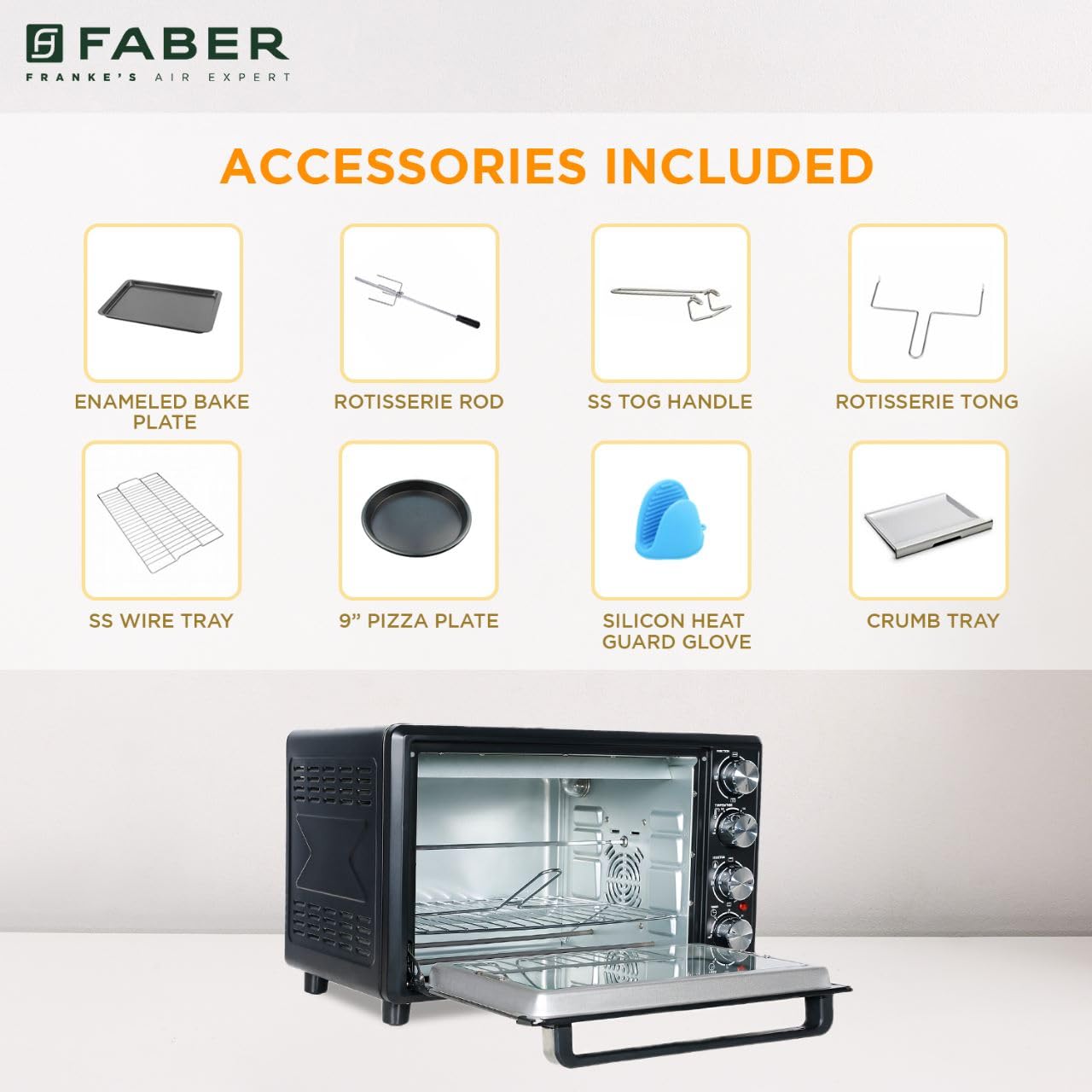
Image: The auto motorized rotisserie feature of the OTG, demonstrating two chickens being evenly grilled.
360° Convection Technology
The 360° Convection Technology ensures uniform cooking by circulating hot air throughout the oven chamber. This results in optimum browning, better crispiness, and higher nutrient retention.
- To activate convection, turn the Function Knob to 'Convection' or 'Rotisserie + Convection'.
- Convection cooking often requires slightly lower temperatures and shorter cooking times compared to conventional baking.

Image: Diagram illustrating the 360° convection technology, showing hot air circulating inside the oven for even cooking.
Timer with Auto Cut-off
The mechanical timer can be set for up to 60 minutes. Once the set time elapses, the oven will automatically switch off, indicated by a bell sound.
- Turn the Timer Knob clockwise to set the desired cooking duration.
- For shorter times (less than 10 minutes), turn the knob past 10 minutes and then back to the desired time for better accuracy.
Kuchengetedza uye Kuchenesa
Regular cleaning and maintenance will ensure the longevity and optimal performance of your OTG.
General Cleaning
- Gara uchisunungura ovheni kubva pamagetsi uye wobvumira kuti itonhore zvakakwana usati wachenesa.
- Pukuta nzvimbo dzekunze nekanyoro, damp jira. Usashandise abrasive cleaners kana scouring pads.
- Clean the interior walls, floor, and ceiling with a damp cloth and mild detergent. For stubborn stains, a non-abrasive oven cleaner designed for OTGs can be used, following the product instructions carefully.
- The double glazed glass door can be cleaned with a glass cleaner. The double glazing helps retain heat and prevents burns from touching the outer glass.
- Remove and empty the crumb tray regularly. Wash it in warm, soapy water, rinse, and dry thoroughly.
Accessory Cleaning
- All removable accessories (bake tray, grill tray, wire rack, rotisserie rod, pizza plate, tongs, silicon glove) can be washed in warm, soapy water. Rinse well and dry completely before storing or reusing.
- Do not use metal scouring pads or abrasive cleaners on non-stick surfaces (if applicable) to avoid damage.

Mufananidzo: Mukati view of the Faber 34L OTG with the chamber light on, highlighting the clean racks and crumb tray, ready for use or after cleaning.
Kugadzirisa matambudziko
If you encounter any issues with your Faber OTG, refer to the following table for common problems and solutions.
| Dambudziko | Zvinogona Kukonzera | Solution |
|---|---|---|
| Ovheni haibatike. | Haina kubatirwa mukati; power iwetage; faulty outlet; timer not set. | Ensure the power cord is securely plugged into a working outlet. Check your household's circuit breaker. Set the timer knob to the desired cooking duration. |
| Chikafu chisina kubikwa zvakaenzana. | Incorrect temperature/mode; overcrowding; improper rack position; convection fan issue. | Verify temperature and heating mode settings. Avoid overcrowding the oven. Use the appropriate rack position. Ensure the convection fan is not obstructed (if using convection). |
| Utsi hwakawandisa panguva yekuvhiyiwa. | Food spills; grease buildup; initial burn-off. | Clean the oven interior and accessories thoroughly. Ensure the crumb tray is clean. If it's the first use, some smoke is normal. |
| Rotisserie haisi kutenderera. | Rotisserie rod not properly seated; Function Knob not set to Rotisserie. | Ensure the rotisserie rod is correctly inserted into the drive socket and support. Set the Function Knob to 'Rotisserie' or 'Rotisserie + Convection'. |
| Timer haisi kushanda. | Knob not turned past 10 minutes for short times; mechanical issue. | For times under 10 minutes, turn the knob past 10 and then back to the desired time. If the issue persists, contact customer support. |
Kana dambudziko rikaramba riripo mushure mekuedza mhinduro idzi, ndapota taura nerutsigiro rwevatengi veFaber.
Zvinotsanangurwa
Detailed technical specifications for the Faber 34L OTG:
- Brand: Faber
- Model Number: 131.0676.817
- Kugona 34 marita
- Wattage: 1600 Watts
- Ruvara: Nhema
- Special Feature: Temperature Control, 360° Convection, Rotisserie, Double Glazed Glass
- Kudzora Type: Knob
- Door Style: Dropdown Door
- Door Material Type: Tempered Glass
- Kunobva Simba: Corded Electric
- Chinhu Weight: 10 kg 900g
- Zvinhu Zviyero (LxWxH): 51 x 39 x 32 Masendimita
- Nyika Yekwakabva: China

Image: Diagram showing the physical dimensions (Length, Width, Height) of the Faber 34L OTG.
Warranty uye Support
Warranty Information
Your Faber OTG is covered by a manufacturer's warranty. Please refer to the warranty card included with your product for specific terms, conditions, and duration of the warranty. Keep your purchase receipt as proof of purchase for warranty claims.
Mutengi Support
For any service, repair, or technical assistance, please contact Faber customer support. You can find contact details on the warranty card or the official Faber website.
- Rutsigiro rwepamhepo: Visit the official Faber websaiti ye FAQ uye zviwanikwa zvekutsigira.
- Service Centre: Locate authorized service centers in your region.


