1. Nhanganyaya
The Waveshare Quectel EM060K-GL is an advanced LTE-A Cat 6 module designed with an M.2 form factor. It offers robust global multi-band GNSS positioning capabilities and supports DL 2 Carrier Aggregation and 64QAM for enhanced data rates. This module provides worldwide LTE-A and UMTS/HSPA+ coverage, featuring a low power mode for energy efficiency. Its integrated multi-constellation GNSS receiver ensures fast and accurate positioning in diverse environments, while MIMO technology enhances data rate and link reliability in modern wireless communication systems.

Mufananidzo 1: Kupfuuraview of the Quectel EM060K-GL Module, highlighting its branding and model number.
2. Key Features

Figure 2: Visual representation of the EM060K-GL module's key features and capabilities.
- LTE-A Cat 6 Module: Utilizes an M.2 form factor for compact integration.
- Mutakuri Aggregation: Supports DL 2 Carrier Aggregation and 64QAM for improved data throughput.
- Global Coverage: Provides worldwide LTE-A and UMTS/HSPA+ network coverage.
- Low Power Mode: Designed for power efficiency, reducing energy consumption.
- Integrated GNSS: Features a multi-constellation GNSS receiver for precise and rapid positioning.
- MIMO Technology: Incorporates MIMO for enhanced data rates and link reliability in wireless communications.
3. Setup uye Kuiswa
This section outlines the general steps for installing the EM060K-GL M.2 module. Always refer to the host device's manual for specific installation instructions.
- Gadzirira Chishandiso Chekugamuchira: Ensure the host device (e.g., laptop, router, industrial PC) is powered off and disconnected from any power source.
- Tsvaga M.2 Slot: Identify the available M.2 slot on your host device's motherboard. The EM060K-GL module is compatible with M.2 Key B slots.
- Isa iyo Module: Gently insert the EM060K-GL module into the M.2 slot at a 30-degree angle. Apply even pressure until the module is fully seated.
- Chengetedza iyo Module: Press the module down and secure it with the provided screw (usually included with the host device or module accessory kit) to hold it in place.
- Batanidza maAntena (kana zvichibvira): If your host device and module require external antennas for LTE/GNSS, carefully connect them to the appropriate connectors on the module.
- Close the Device: Reassemble your host device, ensuring all covers are properly secured.
- Vhura uye Isa madhiraivha: Power on the host device. You may need to install specific drivers for the Quectel EM060K-GL module. These drivers are typically available from the Waveshare or Quectel official webnzvimbo.

Mufananidzo 3: Kumashure view of the EM060K-GL module, showing the M.2 connector pins and mounting notch.
4. Operating Instructions
Once the EM060K-GL module is installed and drivers are in place, follow these general steps for operation:
- Kusimbiswa kweMutyairi: Confirm that the necessary drivers are correctly installed and the module is recognized by the operating system. Check Device Manager on Windows or use
lsusb/lspcicommands on Linux. - Kuiswa kweSIM Card: If using cellular connectivity, ensure a valid and activated SIM card is inserted into the host device's SIM card slot (if available and connected to the module).
- Network Configuration: Configure your network settings. This typically involves selecting the cellular network, setting up an Access Point Name (APN), and enabling mobile data. Refer to your operating system's network settings or your router's interface.
- GNSS Functionality: For GNSS positioning, ensure the module has a clear view of the sky (if external antenna is used) and that GNSS services are enabled in your application or operating system.
- Monitoring: Use diagnostic tools or software provided by Quectel or your host device manufacturer to monitor signal strength, data usage, and GNSS status.
5. Kuchengeta
Proper maintenance ensures the longevity and optimal performance of your EM060K-GL module.
- Ramba Waoma: Protect the module from moisture and liquids. Water damage can lead to malfunction.
- Chenesa Zvinyoro: If cleaning is necessary, use a soft, dry cloth. Avoid harsh chemicals or abrasive materials. Ensure the device is powered off before cleaning.
- Dzivisa Static Discharge: When handling the module outside of its host device, always use anti-static precautions (e.g., anti-static wrist strap) to prevent damage from electrostatic discharge.
- Kudzora Tembiricha: Operate the module within its specified temperature ranges to prevent overheating or performance degradation.
- Firmware Dzokorora: Periodically check the Waveshare or Quectel website for firmware updates. Applying updates can improve performance, add features, or fix bugs.
6. Kugadzirisa matambudziko
If you encounter issues with your EM060K-GL module, consider the following troubleshooting steps:
- Module Not Detected:
- Ensure the module is correctly seated in the M.2 slot.
- Verify that the host device's BIOS/UEFI settings recognize the M.2 slot.
- Check if the necessary drivers are installed.
- Hapana Network Connection:
- Confirm the SIM card is properly inserted and activated.
- Check APN settings and network configuration in your operating system or router.
- Ensure antennas are securely connected (if applicable) and have a clear signal path.
- Verify that your cellular plan is active and has data allowance.
- Simba Risina Chiratidzo:
- Relocate the host device to an area with better cellular coverage.
- Ensure external antennas (if used) are positioned optimally and are not obstructed.
- Check antenna connections for looseness or damage.
- GNSS Haisi Kushanda:
- Ita shuwa kuti mudziyo une yakajeka view yedenga kuti igone kugamuchira satellite.
- Verify that GNSS services are enabled in your application or operating system.
- Check for any physical obstructions or interference sources.
- Module Overheating:
- Ensure adequate airflow around the module and host device.
- Verify that the module is operating within its specified temperature range.
- Reduce workload if possible.
If these steps do not resolve the issue, please contact Waveshare technical support for further assistance.
7. Zvinotsanangurwa
Detailed technical specifications for the Waveshare Quectel EM060K-GL module.

Figure 4: Comprehensive table detailing the technical specifications of the EM060K-GL module, including frequency bands and data rates.
| Feature | Detail |
|---|---|
| Brand | Waveshare |
| Model Number | EM060K-GL |
| Fomu Factor | M.2 |
| Kubatana Technology | USB |
| LTE Chikamu | Cat 6 (LTE-A) |
| Mutakuri Aggregation | DL 2CA, 64QAM |
| GNSS Tsigiro | Integrated multi-constellation (GPS, GLONASS, BDS, Galileo) |
| Operating Temperature | -30 °C ~ +70 °C |
| Extension Temperature | -40 °C ~ +85 °C |
| Dimensions | 42.0 x 30.0 x 2.3 mm |
| Magetsi | 3.135V ~ 4.4V, typical 3.7V |
| Simba Risina Kushandiswa | 16.57mA (yakajairika) |
| Shutdown Power Consumption | 62 µA (typical) |
| Inowirirana Devices | Laptop, Router |
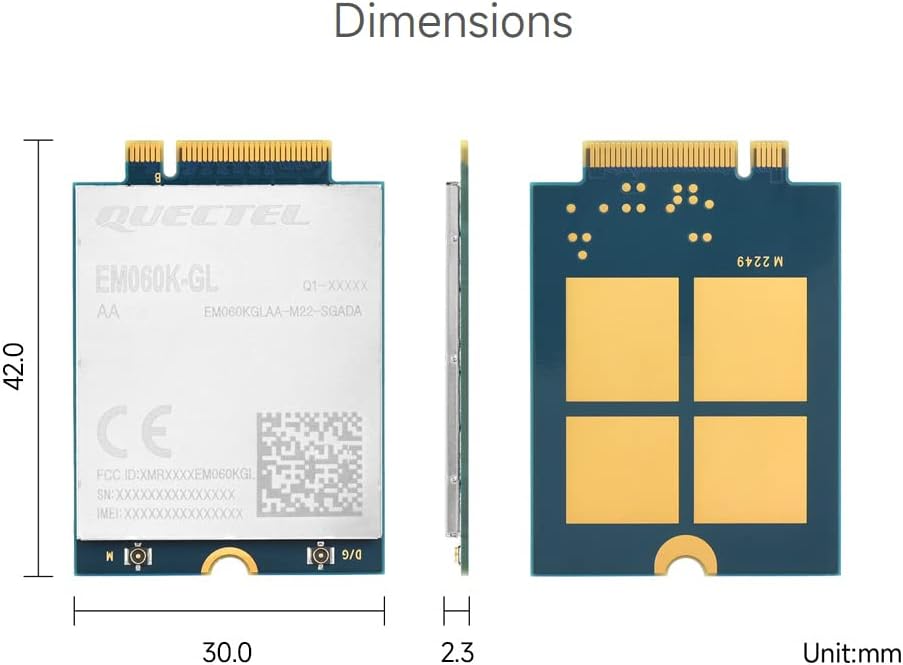
Figure 5: Physical dimensions of the EM060K-GL module in millimeters.
8. Mamiriro Ekushandisa
The EM060K-GL module is designed for a wide range of industrial and commercial applications requiring reliable LTE-A connectivity and GNSS positioning.

Mufananidzo 6: Examples of environments and devices where the EM060K-GL module can be utilized, including industrial routers, laptops, and digital signage.
- Industrial Routers: Providing robust cellular connectivity for remote monitoring and control.
- Home Gateways: Enabling high-speed internet access in residential settings.
- Set Top Boxes: Integrating cellular data for smart TV and media applications.
- Industrial Laptops & PDAs: Offering mobile connectivity for field operations and data collection.
- Rugged Industrial Tablet PCs: Ensuring reliable communication in harsh environments.
- Digital Signage: Providing remote content updates and management for advertising displays.
9. Ruzivo rweWaranti
Waveshare products typically come with a standard limited warranty against defects in materials and workmanship. The specific duration and terms of the warranty may vary by region and product. Please retain your proof of purchase for warranty claims.
For detailed warranty information, please refer to the official Waveshare website or contact their customer service directly. Unauthorized modifications or improper use of the module may void the warranty.
10. Technical Support
For technical assistance, driver downloads, firmware updates, or any inquiries regarding the EM060K-GL module, please visit the official Waveshare support resources:
- Official Websaiti: www.waveshare.com
- Product Wiki/Documentation: Tsvaga "EM060K-GL" on the Waveshare Wiki for detailed documentation and resources.
- Bata Rutsigiro: Refer to the "Contact Us" section on the Waveshare website for email, phone, or forum support options.
When contacting support, please have your product model number (EM060K-GL) and a detailed description of your issue ready.


