1. Nhanganyaya
The BARSKA Escape Porro 10-30x60 Zoom Binoculars (Model AB11050) are designed for versatile long-distance viewing. These binoculars feature a powerful variable magnification range, allowing users to observe a wide field of view and then zoom in for detailed examination of distant objects. The large objective lenses and multi-coated optics enhance light gathering, providing clear images even in low-light conditions. Ergonomic design elements, such as a zoom lever and fold-down eyecups, ensure comfortable and efficient use.
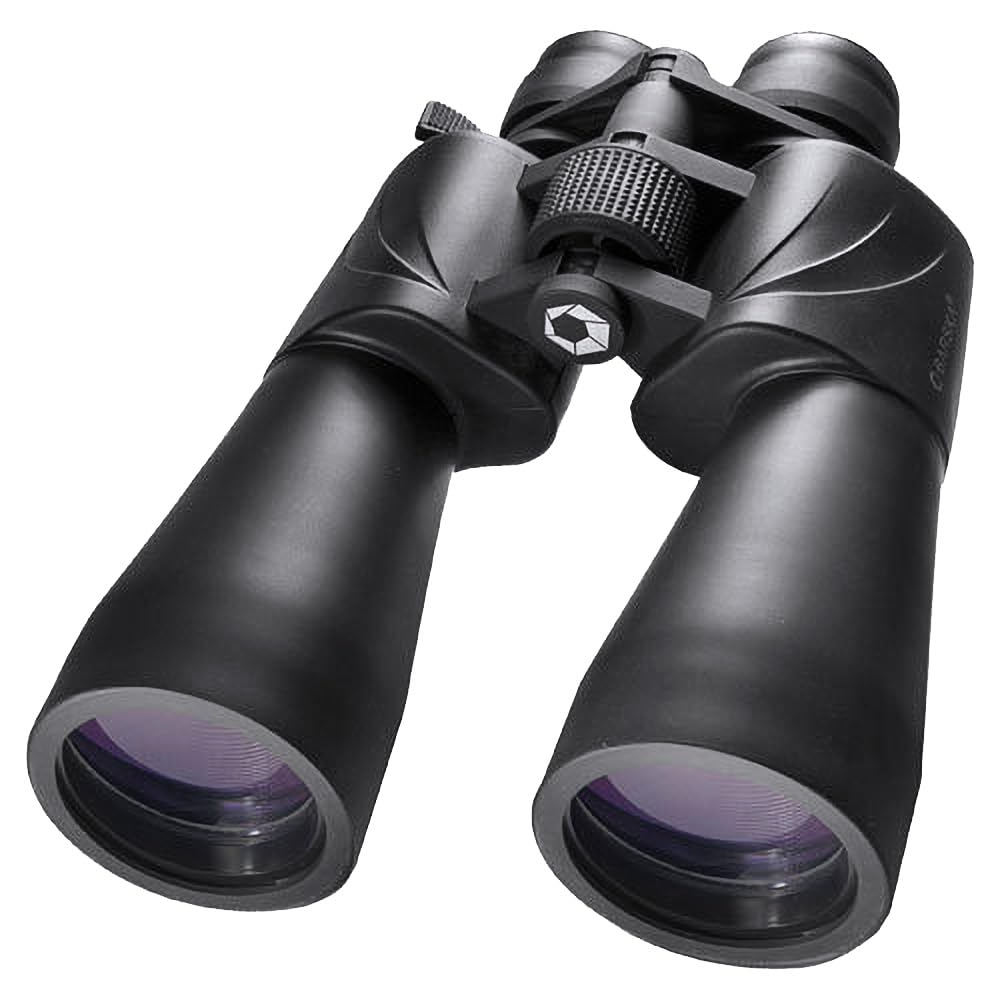
Mufananidzo 1.1: Mberi view of the BARSKA Escape Porro 10-30x60 Zoom Binoculars.
2. Chigadzirwa Pamusoroview
2.1 Zvikamu
The BARSKA Escape Porro 10-30x60 Zoom Binoculars include the following main components:
- Chinangwa Lenzi: The large front lenses that gather light.
- Eyepiece: Where you look through to view mufananidzo.
- Central Focus Wheel: Used to adjust focus for both barrels simultaneously.
- Diopter Adjustment Ring: Located on the right eyepiece, used for fine-tuning focus to compensate for differences between your eyes.
- Chinodhonza Zoom: Adjusts the magnification level.
- Kugadziriswa kweNharaunda yeVana Vechikoro: The hinge mechanism that allows you to adjust the distance between the two barrels to match your eye spacing.
- Neck Strap Lugs: Attachment points for the included neck strap.
- Tripod Adapter Socket: A threaded socket for mounting the binoculars on a tripod (adapter sold separately).

Mufananidzo 2.1: Pamusoro view highlighting the central focus wheel and zoom lever.

Image 2.2: Close-up of the eyepiece and focus wheel.
2.2 Mamiriro Akakosha
- Kukudza: 10-30x variable zoom.
- Chinangwa Lens Diameter: 60mm for enhanced light gathering.
- Prism Type: Porro Prism for bright, clear images.
- Girazi Type: BK-7 glass.
- Optics Coating: Multi-Coated for improved light transmission and image clarity.
- Armor: Durable rubber armor for protection and a secure grip.
- Eyecups: Fold-down eyecups for comfortable viewing with or without eyewear.
- Kuramba Mvura: Kuvakwa kusingapindi mvura.
- Tripod Adaptable: Can be mounted on a tripod for extended viewing sessions.

Image 2.3: Key features of the binoculars.
3. Setup
3.1 Kusunungura uye Zvishandiso
Carefully remove the binoculars and all accessories from the packaging. Ensure the following items are present:
- BARSKA Escape Porro 10-30x60 Zoom Binoculars
- Neck Strap
- Kutakura Nyaya
- Lens Caps (Objective and Eyepiece)
- Lens Kuchenesa Mucheka

Image 3.1: Binoculars with included neck strap and carrying case.
3.2 Attaching the Neck Strap
- Thread the ends of the neck strap through the strap lugs on each side of the binocular body.
- Secure the strap by threading it back through the buckle, ensuring it is tight and will not slip.
- Adjust the strap length for comfortable carrying around your neck.
3.3 Kugadzirisa Nharaunda yevana (IPD)
The interpupillary distance is the distance between the centers of your pupils. To adjust:
- Bata mabinoculars nemaoko maviri uye tarisa kuburikidza nemaziso.
- Bend the binocular body at the hinge until you see a single, clear circular field of view.
- Cherechedza marongero aya kuitira kushandiswa mune ramangwana.
3.4 Diopter Kugadziriswa
This adjustment compensates for differences in vision between your left and right eyes.
- Vhara ziso rako rekurudyi kana kuti vhara lenzi chaiyo.
- Look through the left eyepiece at a distant object. Rotate the central focus wheel until the image is sharp and clear.
- Vhara ziso rako rekuruboshwe kana kuti vhara lenzi yekuruboshwe.
- Look through the right eyepiece. Without touching the central focus wheel, rotate the diopter adjustment ring on the right eyepiece until the image is sharp and clear.
- Both eyes should now be in focus. The diopter setting can be left in this position for subsequent use unless another user adjusts it.
4. Operating Instructions
4.1 Kutarisa
After performing the initial diopter adjustment:
- Look through both eyepieces at your desired object.
- Rotate the central focus wheel until the image is sharp and clear for both eyes.
4.2 Zooming
To change the magnification:
- Locate the zoom lever on the right eyepiece.
- While observing, move the zoom lever to increase or decrease magnification.
- After changing the zoom, you may need to slightly re-adjust the central focus wheel for optimal clarity.
4.3 Eyecup Adjustment
The binoculars feature fold-down eyecups for comfortable viewing.
- Kune vanhu vasina magirazi emaziso: Use the eyecups in the fully extended position to block out peripheral light and ensure proper eye relief.
- Kune vanopfeka magirazi emaziso: Fold down the eyecups to bring your eyes closer to the eyepieces, allowing you to see the full field of view without your eyeglasses interfering.
4.4 Tripod Mounting
Kuwedzerwa viewing or to stabilize the image at higher magnifications, the binoculars can be mounted on a tripod.
- Locate the tripod adapter socket, usually found under a cap at the front of the central hinge.
- Bvisa chivharo.
- Screw a compatible tripod adapter (sold separately) into the socket.
- Batanidza chitatu cheadapter kune yako yemifananidzo katatu.
5. Kuchengeta
5.1 Magirazi Ekuchenesa
Proper lens cleaning is crucial to maintain optical performance.
- First, use a soft brush or compressed air to remove any loose dust or debris from the lens surfaces.
- If further cleaning is needed, apply a small amount of lens cleaning fluid to a clean, soft microfiber lens cloth.
- Gently wipe the lens surface in a circular motion. Avoid excessive pressure.
- Do not use abrasive cloths, paper towels, or household cleaners, as these can scratch or damage the lens coatings.
5.2 General Care uye Kuchengeta
- Always replace lens caps when the binoculars are not in use to protect the lenses from dust and scratches.
- Store the binoculars in their carrying case in a cool, dry place, away from direct sunlight and extreme temperatures.
- Avoid dropping or subjecting the binoculars to harsh impacts, as this can misalign the optics.
- The rubber armor provides a degree of protection and grip; keep it clean by wiping with a damp jira kana zvakakodzera.
- While water-resistant, avoid submerging the binoculars in water. If they get wet, wipe them dry immediately.
6. Kugadzirisa matambudziko
Kana ukasangana nematambudziko nemabinoculars ako, tarisa matambudziko akajairika nemhinduro dzinotevera:
| Dambudziko | Zvinogona Kukonzera | Solution |
|---|---|---|
| Mufananidzo hauna kujeka kana kuti hauna kutariswa. | Incorrect focus adjustment; diopter not set correctly; zoom level too high for conditions. | Adjust the central focus wheel. Re-perform diopter adjustment (Section 3.4). Reduce zoom magnification. |
| Two overlapping images or difficulty merging images. | Interpupillary distance (IPD) is incorrect. | Adjust the binocular body at the hinge until a single circular field of view is seen (Section 3.3). |
| Difficulty focusing at higher zoom levels (e.g., 20x or 30x). | Atmospheric conditions (heat haze); natural hand-shake at high magnification; optical limitations. | Use a tripod for stability. Try focusing on a closer object first, then fine-tune for the distant object. High magnification can be more sensitive to environmental factors. |
| Central focus wheel or zoom lever is stiff or stuck. | Internal mechanism issue; dirt or debris. | Do not force the mechanism. Contact customer support for assistance. Avoid attempting to disassemble the binoculars. |
| Reduced image brightness or clarity. | Dirty lenses; low light conditions; damaged lens coatings. | Clean lenses as per Section 5.1. Ensure viewing in adequate light. If coatings are damaged, contact support. |
7. Zvinotsanangurwa
The following are the technical specifications for the BARSKA Escape Porro 10-30x60 Zoom Binoculars (Model AB11050):
- Brand: Barska
- Zita remuenzanisi: AB11050
- Kukudza: 10-30x
- Chinangwa Lens Diameter: 60 mm
- Prism Type: Porro Prism
- Exit-Pupil Diameter: 2 mm (at 30x)
- Coating: Multi-Coated
- Mvura Inodzivisa Level: Mvura Inodzivirira
- Focus Type: Manual Focus (Fixed Focus, Individual Focus)
- Diopter Adjustment Range: +/- 3 diopters
- Munda we View: Mamita makumi maviri nematanhatu (pa 1000m)
- Low Light Technology: Ehe
- Ruvara: Nhema
- Enclosure Material: Rubber
- Chinhu Weight: 40.8 Onzi
- Zvinosanganisirwa Zvikamu: Unit, Instruction Guide
- UPC: 658240292930, 790272979868
8. Warranty uye Tsigiro
8.1 Ruzivo rweWaranti
For detailed warranty information regarding your BARSKA Escape Porro 10-30x60 Zoom Binoculars (AB11050), please refer to the official Barska manufacturer's website or the warranty card included with your product. Warranty terms and conditions may vary.
8.2 Mutengi Tsigiro
If you require technical assistance, have questions about product operation, or need to inquire about repairs, please contact Barska customer support directly. Contact information can typically be found on the manufacturer's websaiti kana mune chigadzirwa kurongedza.
Mugadziri: Barska
Websaiti: Visit the Barska Store on Amazon (kune ruzivo rwechigadzirwa)


