1. Nhanganyaya
Thank you for choosing the UrbanX Wireless Bluetooth Keyboard and Mouse Combo. This manual provides detailed instructions for setting up, operating, and maintaining your new peripheral devices. Please read this manual thoroughly before use to ensure optimal performance and longevity of your product.
2. Package Zviri mukati
Ndokumbira utarise zvirimo pasuru kuti uone kuti zvinhu zvese zviripo:
- UrbanX Bluetooth Wireless Keyboard
- UrbanX Wireless Mouse
- Shared USB Receiver (stored in the mouse battery compartment)
- USB Kuchaja Cable
- User Guide
3. Chigadzirwa Pamusoroview
The UrbanX Keyboard and Mouse Combo is designed for versatility and comfort, featuring dual-mode connectivity (Bluetooth and 2.4GHz wireless) and long-lasting rechargeable batteries.
3.1 Keyboard Zvimiro
- Yakazara Saizi Magadzirirwo: Includes a numeric keypad and arrow keys for comprehensive functionality.
- Yakaderera-Profile Makiyi: Designed for a quiet and comfortable typing experience.
- Hotkeys: Dedicated keys for Windows functions such as volume control, playback, and copy/paste.
- Dual-Mode Connectivity: Supports Bluetooth (BT1, BT2) and 2.4GHz wireless connection.
- Multi-Device Support: Easily switch between up to three connected devices.

Image: The UrbanX keyboard highlighting the BT1, BT2, and 2.4G connection buttons for multi-device pairing.

Image: The UrbanX keyboard and mouse, illustrating the low-profile, scissor-switch keys designed for quiet and comfortable typing.
3.2 Mouse Zvimiro
- Ergonomic Dhizaini: Shaped to reduce hand strain during extended use.
- DPI Shandura: Allows adjustment of cursor speed for precision or rapid movement.
- Dual-Mode Connectivity: Supports Bluetooth (BT1, BT2) and 2.4GHz wireless connection.
- USB Receiver Storage: The nano USB receiver is conveniently stored within the mouse.

Image: The underside of the UrbanX mouse, indicating its Bluetooth and 2.4GHz dual-mode wireless capabilities.
4. Setup Instructions
The UrbanX combo offers two connection methods: 2.4GHz wireless via USB receiver or Bluetooth.
4.1 2.4GHz Wireless Connection (USB Receiver)
- Locate the nano USB receiver stored in the battery compartment of the mouse.
- Batanidza USB inogamuchira mune inowanikwa USB port pakombuta yako kana mudziyo.
- Batidza kiibhodhi uye mbeva uchishandisa iwo akasiyana magetsi switch.
- The devices should connect automatically. No additional drivers are required.
4.2 Bluetooth Connection
The keyboard and mouse can connect to up to two Bluetooth devices each (BT1 and BT2 channels).
4.2.1 Kubatanidza Kiibhodhi neBluetooth
- Batidza kiibhodhi.
- Dzvanya uye ubate iyo BT1 or BT2 bhatani kwemasekonzi 3-5 kusvika rambi rechiratidzo rapenya, zvichiratidza nzira yekuwiriranisa.
- Pamudziyo wako (semuenzaniso, laptop, piritsi, smartphone), enda kumasetin'i eBluetooth uye tsvaga zvishandiso zvitsva.
- Select "UrbanX Keyboard" from the list of available devices.
- Follow any on-screen prompts to complete the pairing.
- Repeat for a second Bluetooth device using the other BT channel (BT2 if BT1 was used first).
4.2.2 Kubatanidza Bluetooth neMouse
- Batidza mbeva.
- Dzvanya uye ubate iyo BT1 or BT2 button (usually on the bottom of the mouse) for 3-5 seconds until the indicator light flashes.
- Pamudziyo wako, enda kuBluetooth marongero uye tsvaga zvishandiso zvitsva.
- Select "UrbanX Mouse" from the list.
- Follow any on-screen prompts to complete the pairing.
- Dzokorora kwechimwe chishandiso cheBluetooth uchishandisa imwe BT channel.

Image: An illustration showing the UrbanX keyboard and mouse connected to a tablet (Channel 1), a laptop (Channel 2), and a smartphone (Channel 3), demonstrating multi-device connectivity.
5. Operating Instructions
5.1 Kuchinja pakati pemidziyo
Kuchinja pakati pemidziyo yakabatana:
- Kiyibhodhi: Press the BT1, BT2, kana 2.4G button briefly to switch to the corresponding connected device.
- Mbeva: Press the BT1, BT2, kana 2.4G button (usually on the bottom) briefly to switch to the corresponding connected device.
5.2 Keyboard Hotkeys
The keyboard features dedicated hotkeys for quick access to common functions. These are typically located on the F-keys row and activated by pressing the Fn key in combination with the desired F-key, or directly depending on the operating system.
| Key Combination | Function |
|---|---|
| Fn + F1 | Vadivelu Comedy Media Player |
| Fn + F2 | Volume Down |
| Fn + F3 | Volume Up |
| Fn + F4 | Mute |
| Fn + F5 | Previous Track |
| Fn + F6 | Next Track |
| Fn + F7 | Tamba/Misa |
| Fn + F8 | Mira |
| Fn + F9 | Peji Yekumusha |
| Fn + F10 | |
| Fn + F11 | Computer yangu |
| Fn + F12 | Calculator |
| Fn + Esc | Kiya Screen |
Note: Some hotkey functions may vary depending on your operating system (Windows, macOS, Android, iPadOS).
5.3 Mouse DPI Kugadziriswa
The mouse features a DPI switch button, usually located near the scroll wheel. Press this button to cycle through different cursor speeds (DPI settings). This allows you to adjust the sensitivity of the mouse to your preference.
6. Kubhadharisa Mirayiridzo
Both the keyboard and mouse are equipped with rechargeable Li-polymer batteries.
- Connect the provided USB charging cable to the charging port on the keyboard or mouse.
- Batanidza rimwe divi retambo yeUSB mune sosi yemagetsi yeUSB (semuenzaniso, doko reUSB rekombuta, adapta yemadziro eUSB).
- An indicator light will typically show the charging status. It will turn off or change color when fully charged.
Hupenyu hwebhatiri:
- Kiyibhodhi: Up to 6 months on a single charge (based on 2 hours of non-stop use per day).
- Mbeva: Up to 4 months on a single charge (based on 2 hours of non-stop use per day).
- Nguva yekuchaja: Anenge maawa maviri ekuchajisa kwakazara.
- Nguva Yakamira Exceeds 2160 hours (90 days).

Image: The UrbanX keyboard and mouse shown connected via USB cables for charging, with indicators for charging time and standby time.
7. Kuchengeta
To ensure the longevity and optimal performance of your UrbanX Keyboard and Mouse Combo:
- Kuchenesa: Use a soft, dry cloth to wipe the surfaces. For stubborn dirt, a slightly damp jira rinogona kushandiswa, zvichiita kuti hunyoro husapinde mumudziyo.
- Kuchengeta: Chengetedza midziyo munzvimbo inotonhorera, yakaoma kure nechiedza chezuva uye tembiricha yakanyanyisa.
- Dzivisa Zvinwiwa: Do not expose the devices to water or other liquids.
- Bata Nekungwarira: Dzivisa kudonhedza kana kuisa midziyo yacho pakukuvadzwa kwakasimba.
8. Kugadzirisa matambudziko
If you encounter issues with your UrbanX Keyboard and Mouse Combo, please refer to the following common solutions:
| Dambudziko | Possible Solution |
|---|---|
| Devices not connecting via 2.4GHz |
|
| Devices not connecting via Bluetooth |
|
| Kiyibhodhi/Mbeva haisi kudaira |
|
| Kufamba kwemuchina wekunyorera (cursor) kunononoka kana kuti kunonoka |
|
9. Zvinotsanangurwa
| Feature | Detail |
|---|---|
| Model Number | UXM030 |
| Kubatana Technology | Bluetooth, 2.4GHz Wireless |
| Inowirirana Devices | HP ENVY 17t CG Laptop, Mobile Phone, Tablet, Laptop, Smartphone, PC, Mac (Windows, macOS, iPadOS, Android, Chrome OS) |
| Keyboard Tsanangudzo | US Layout, Full-Size, Low-Profile, Scissor-Switch |
| Special Features | Ergonomic, Rechargeable, Multi-Device Switching |
| Simba Source | Battery Powered (Built-in Li-polymer) |
| Keyboard Battery Hupenyu | Up to 6 months (2 hours/day usage) |
| Mouse Battery Hupenyu | Up to 4 months (2 hours/day usage) |
| Kuchaja Nguva | Approx. 2 maawa |
| Operating Range | Kusvika 33 tsoka (10 metres) |
| Zviyero zvechigadzirwa (Kiyibhodhi) | 17.1 x 5.1 x 0.7 inches (anenge) |
| Zviyero zvechigadzirwa (mbeva) | 4.5 x 2.2 x 1 inches (anenge) |
| Item Weight | 1.54 ounces (Mouse only, approximate) |
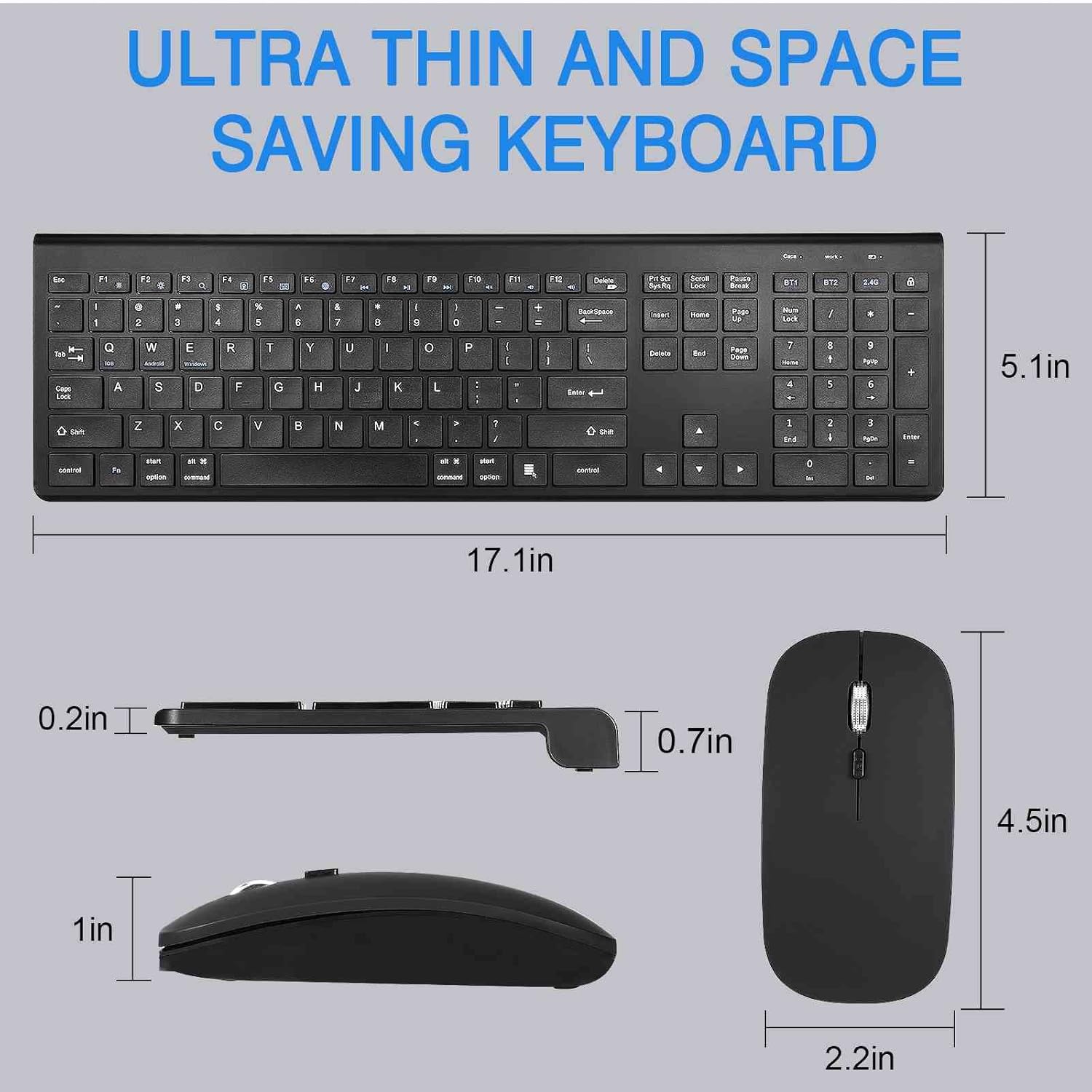
Image: Detailed dimensions of the UrbanX keyboard and mouse, showing their ultra-thin and space-saving design.
10. Warranty uye Tsigiro
The UrbanX Keyboard and Mouse Combo comes with a 1-makore waranti kubva pazuva rekutenga.
For technical support, warranty claims, or any questions regarding your product, please contact UrbanX customer support. Refer to the contact information provided on the product packaging or the UrbanX official website.


