1. Nhanganyaya
This manual provides essential information for the installation and use of your SCREENARAMA NV156FHM-N4U laptop screen replacement. This product is designed to replace a damaged or non-functional 15.6-inch Full HD (1920x1080) IPS LCD LED display with a 40-pin connector and 144Hz refresh rate. Please read these instructions carefully before proceeding with installation.
2. Key Features
- Resolution: Full HD (FHD) 1920x1080 pixels
- Refresh Rate: 144Hz for smooth visuals
- Type yekubatanidza: 40-pin eDP (Embedded DisplayPort)
- Ratidza Tekinoroji: IPS (In-Plane Switching) for wide viewing angles and vivid colors
- Surface: Matte finish to reduce glare
- Touchscreen: Non-touchscreen display
- Warranty: Includes a 2-year warranty
- Kuiswa: Designed for DIY installation with included tools
3. Compatibility and Screen Selection
It is crucial to verify that this replacement screen matches the specifications of your original laptop screen. Incompatible screens may not function correctly or could cause damage.

Image 3.1: How to Select the Correct Screen. This diagram illustrates the key specifications to match when selecting a replacement screen: video connector type (30-pin vs 40-pin), resolution (HD, FHD, UHD), touchscreen vs. non-touch, and refresh rate (60Hz, 144Hz, 240Hz).

Image 3.2: Back of Screen with 40-pin Connector. This image shows the rear of a 15.6-inch 144Hz FHD screen, highlighting the location of the 40-pin video connector at the bottom center.

Image 3.3: 40-pin vs. 30-pin Video Connector. A close-up comparison of a 40-pin video connector (top) and a 30-pin video connector (bottom, marked with an 'X'), emphasizing the need to match the pin count.

Image 3.4: Non-Touchscreen Display. This image clarifies that the product is an LCD screen only and does not include touchscreen functionality. A touchscreen is shown with a red 'X' through it.
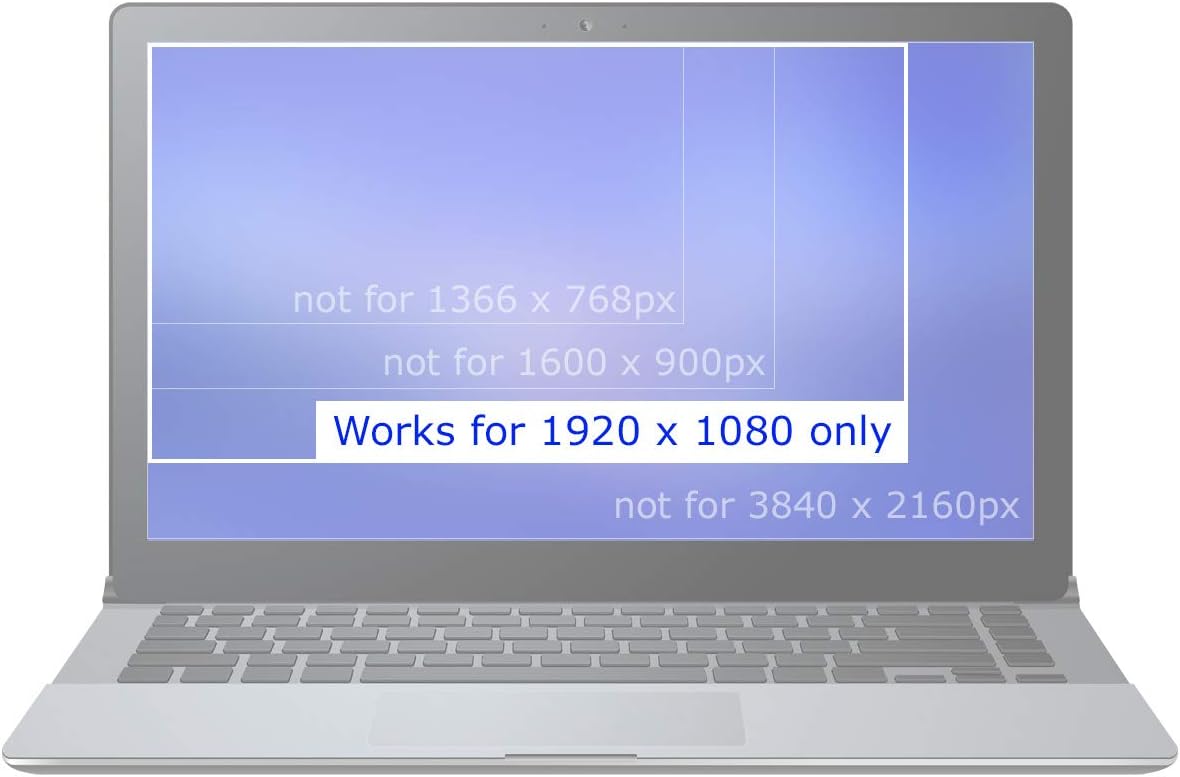
Image 3.5: Resolution Compatibility. This image indicates that the screen is compatible only with 1920x1080 resolution, explicitly stating it is not for 1366x768, 1600x900, or 3840x2160 resolutions.

Image 3.6: IPS Screen Benefits. Mufananidzo uyu unoratidza advantages of an IPS screen, showing better viewing angles and more vivid colors compared to a TN screen, which typically has narrow viewing angles and washed-out colors.
Usati watengaasing, ensure your original screen has the following specifications:
- Video Connector: 40-pini
- Resolution: 1920x1080 (FHD)
- Touchscreen: Kwete-kubata
- Refresh Rate: 144Hz
4. Package Zviri mukati
Pasuru yako inofanira kunge iine zvinhu zvinotevera:
- SCREENARAMA NV156FHM-N4U Replacement Screen
- Installation Tool Kit
- Adhesive Tape (for securing connectors)

Image 4.1: Included Installation Tools. This image displays the various tools provided for DIY installation, typically including screwdrivers, spudgers, and tweezers.
5. Setup uye Kuiswa
Replacing a laptop screen requires careful handling and technical proficiency. If you are not comfortable with electronic repairs, it is recommended to seek professional assistance.
General Installation Guidelines:
- Kudzima uye Bvisa: Completely power off your laptop and disconnect it from all power sources, including removing the battery if possible.
- Discharge Static: Ground yourself to discharge any static electricity before handling components.
- Kubvarura: Carefully disassemble the laptop bezel and remove the old screen. Refer to specific guides or videos for your laptop model for detailed steps.
- Disconnect Old Screen: Gently disconnect the 40-pin video cable from the old screen.
- Connect New Screen: Connect the 40-pin video cable to the new SCREENARAMA NV156FHM-N4U screen. Ensure the connection is secure and use the provided adhesive tape if necessary to prevent accidental disconnection.
- Muedzo: Before fully reassembling, temporarily connect the battery and power on the laptop to test the new screen.
- Reassembly: If the screen functions correctly, proceed with reassembly in reverse order of disassembly.
For detailed, model-specific installation instructions, search for video tutorials or service manuals relevant to your particular laptop model.
6. Hunhu hwekushanda
Once installed, your SCREENARAMA NV156FHM-N4U display will provide a high-quality visual experience:
- IPS Technology: Enjoy consistent and accurate colors with wide viewing angles, making the screen suitable for various tasks and viewing zvinzvimbo.
- 144Hz Refresh Rate: Experience smoother motion and reduced input lag, particularly beneficial for fast-paced applications and gaming.
- Matte Finish: The anti-glare matte surface minimizes reflections from ambient light, improving visibility in brightly lit environments.
7. Kuchengeta
To ensure the longevity and optimal performance of your screen, follow these maintenance guidelines:
- Kuchenesa: Use a soft, lint-free microfiber cloth specifically designed for electronics. Lightly dampen the cloth with water or a screen-cleaning solution (avoid harsh chemicals like ammonia or alcohol). Gently wipe the screen in one direction.
- Kubata: Avoid touching the screen surface directly with your fingers. When closing the laptop, ensure no objects are left on the keyboard that could press against the screen.
- Dziviriro: Consider using a screen protector if you frequently transport your laptop or work in environments where the screen might be exposed to physical damage.
8. Kugadzirisa matambudziko
If you encounter issues after installation, refer to the following troubleshooting steps:

Image 8.1: Troubleshooting Steps. This image outlines common troubleshooting steps for display issues, such as checking external monitor functionality, verifying pin count, ensuring secure video cable connections, and inspecting the backlight fuse.
- External Monitor Check: Connect an external monitor to your laptop. If the external monitor displays an image, the laptop's internal components (motherboard, GPU) are likely operational, indicating the issue might be with the screen or its connection.
- Verify Pin Count: Double-check that the number of pins on your original LCD connector and the new screen's connector are identical (40-pin in this case).
- Blank Image: If the screen remains blank, carefully disconnect and reconnect the video cable from both the screen and the laptop's motherboard. Ensure the connector is fully seated and secured with tape if provided. Check for any visible damage to the cable or connectors.
- Dambudziko Rinoramba Richienderera Mberi: If the problem persists and is identical to the issue with the old LCD, the problem is likely not with the screen itself but with another part of the laptop (e.g., video card, motherboard).
- Dim Image: If the image is dim or very faint, try connecting the old LCD again. If both LCDs do not light up, check the backlight fuse on the laptop's motherboard, usually located near the video connector.
9. Zvinotsanangurwa
| Feature | Tsanangudzo |
|---|---|
| Model Number | NV156FHM-N4U |
| Screen Size | 15.6 inches |
| Resolution | 1920x1080 (Yakazara HD) |
| Refresh Rate | 144Hz |
| Connector Type | 40-pin eDP |
| Display Technology | IPS LCD LED |
| Surface Type | Matt |
| Touchscreen | Aihwa |
| Warranty | 2-Gore |
10. Warranty uye Tsigiro
This SCREENARAMA replacement screen comes with a 2-year warranty, covering manufacturing defects. For warranty claims, technical assistance, or further support, please contact SCREENARAMA customer service through their official channels.
Video 10.1: Product Feature Overview. Vhidhiyo iyi inopa pfupiso pamusoroview of the key features of the 15.6-inch FHD 40-pin Matte 144Hz non-touchscreen display, highlighting its specifications and characteristics.

