1. Chigadzirwa Pamusoroview
The Phillips MX7067 PMD-140 is a digital furniture lock designed for securing drawers, filing cabinets, lockers, and other furniture. It features a high-sensitivity biometric fingerprint sensor, supports up to 100 fingerprints, operates on three 1.5V AAA alkaline batteries, and includes a micro USB interface for emergency power supply. This lock is intended for indoor use.
Zvinokosha:
- Ideal for use in drawers, filing cabinets, cabinets, lockers, and wardrobes.
- Micro USB interface for emergency power supply.
- Operates on three 1.5V AAA alkaline batteries (not included).
- High-sensitivity and fast-response biometric fingerprint sensor.
- Equipped with a bright light for visual operation assistance.
- Supports up to 100 fingerprints for multiple users.
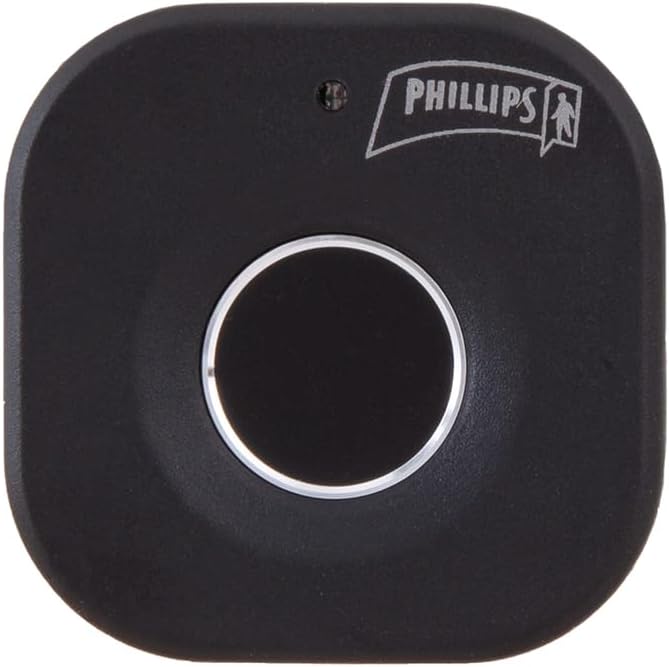
Mufananidzo 1: Mberi view of the Phillips MX7067 Digital Furniture Lock. This image shows the main fingerprint sensor and the Phillips logo on the black, square-shaped lock unit.
2. Safety Information
Please read and understand all safety instructions before installing and operating this product. Failure to follow these instructions may result in product malfunction or damage.
- This device is designed for indoor use only. Do not expose to water, moisture, or extreme temperatures.
- Use only 1.5V AAA alkaline batteries. Do not mix old and new batteries, or different types of batteries.
- Chengeta sensor yeminwe yakachena uye yakaoma kuti ishande zvakanaka.
- Do not attempt to disassemble or modify the lock. This will void the warranty.
- Ensure proper installation to prevent unauthorized removal or damage.
3. Package Zviri mukati
Tarisa uone kuti zvinhu zvese zviripo mupakeji:
- Phillips MX7067 Digital Furniture Lock Unit
- Mounting Hardware (screws, adhesive, etc. - specific items may vary)
- Chinyorwa Chirairo (gwaro iri)

Mufananidzo 2: Product packaging of the Phillips MX7067 Digital Furniture Lock. The box displays product features and branding, indicating a single unit is included.
4. Setup
4.1 Kuiswa kwebhatiri
- Locate the battery compartment on the back or side of the lock unit.
- Vhura chivharo chebhatiri.
- Insert three (3) 1.5V AAA alkaline batteries, ensuring correct polarity (+/-).
- Vhara chivharo chebhatiri zvakachengeteka.
4.2 Installation on Furniture
The lock can be installed on various types of furniture such as drawers, cabinets, or lockers. Specific installation steps may vary based on your furniture type. Generally, the lock unit is mounted on the inside of the furniture, with the fingerprint sensor accessible from the outside.
- Determine the optimal placement for the lock unit and the strike plate on your furniture. Ensure the fingerprint sensor is easily accessible.
- Mark the drilling points for the lock unit and strike plate.
- Drill pilot holes as needed, taking care not to damage the furniture.
- Secure the main lock unit to the furniture using the provided screws or adhesive.
- Install the strike plate on the corresponding surface, ensuring proper alignment for secure locking.
- Test the mechanical function of the lock before proceeding to fingerprint registration.

Mufananidzo 3: Side view of the Phillips MX7067 Digital Furniture Lock. This angle provides a perspective on the lock's depth and mounting mechanism.
4.3 Initial Fingerprint Registration (Administrator)
The first fingerprint registered will automatically be set as the administrator fingerprint. This fingerprint is required to add or delete other user fingerprints.
- With the lock powered on, press and hold the registration button (usually located on the back or inside the lock unit) until the indicator light turns blue.
- Isa chigunwe chako pachinongedzo cheminwe. Chiedza chechiratidzo chichapenya.
- Lift your finger and place it again, repeating this process approximately 5-10 times from different angles until the indicator light turns green, indicating successful registration.
- The first registered fingerprint is now the administrator.
5. Operating Instructions
5.1 Kuwedzera maFingerprints emushandisi
Up to 100 fingerprints can be stored in total (including the administrator).
- Wake up the lock by touching the sensor or pressing a button (if available).
- Place the administrator's finger on the sensor. Once recognized, the indicator light will turn blue.
- Immediately after, place the new user's finger on the sensor. The indicator light will flash.
- Lift the new user's finger and place it again, repeating this process approximately 5-10 times from different angles until the indicator light turns green, indicating successful registration.
- To add more fingerprints, repeat steps 2-4. If no further fingerprints are added, the lock will exit registration mode after a short period.
5.2 Deleting All Fingerprints
This action will delete all registered fingerprints, including the administrator's. The lock will revert to factory settings, requiring a new administrator fingerprint registration.
- Muka kiya.
- Place the administrator's finger on the sensor. Once recognized, the indicator light will turn blue.
- While the light is blue, press and hold the registration button (or specific reset button) for approximately 5-10 seconds until the indicator light flashes red, then turns green. This confirms all fingerprints have been deleted.
- You must now register a new administrator fingerprint as per Section 4.3.
5.3 Kukiya nekukiinura
- Kukiya: The lock automatically locks when the furniture is closed. Some models may require a brief touch on the sensor to engage the lock.
- Kuvhura: Place a registered finger on the fingerprint sensor. If the fingerprint is recognized, the indicator light will turn green, and the lock will disengage. If the fingerprint is not recognized, the light will flash red.
5.4 Emergency Power Supply
If the batteries are depleted, the lock can be temporarily powered using a micro USB cable connected to an external power source (e.g., power bank, USB charger).
- Locate the micro USB port on the lock unit.
- Connect a micro USB cable from an external power source to the lock's micro USB port.
- Once powered, you can use a registered fingerprint to unlock the furniture.
- After unlocking, replace the internal AAA batteries as soon as possible.

Mufananidzo 4: Angled view of the Phillips MX7067 Digital Furniture Lock. This view may show the location of the battery compartment or micro USB port, crucial for setup and emergency power.
6. Kuchengeta
6.1 Kuchenesa
To maintain optimal performance, regularly clean the fingerprint sensor and the lock's exterior.
- Use a soft, dry, lint-free cloth to wipe the sensor and lock surface.
- Usashandise mishonga inobvisa simba, zvinonyungudutsa, kana makemikari ane simba, sezvo izvi zvinogona kukuvadza magumo ebasa kana zvikamu zvemagetsi.
6.2 Kutsiviwa kwebhatiri
When the battery level is low, the indicator light may flash red or emit an audible warning during operation. Replace the batteries promptly to ensure continuous functionality.
- Vhura chivharo chebhatiri.
- Bvisa mabhatiri ekare AAA.
- Insert three (3) new 1.5V AAA alkaline batteries, observing correct polarity.
- Vhara chivharo chebhatiri.
7. Kugadzirisa matambudziko
| Dambudziko | Zvinogona Kukonzera | Solution |
|---|---|---|
| Kukiya haidaire. | Mabhatiri akafa. | Replace batteries or use emergency micro USB power. |
| Fingerprint haisi kuzivikanwa. | Chigunwe chakanyorova, chakasviba, kana kuti hachina kuiswa zvakanaka. Chigunwe hachina kunyoreswa. | Ensure finger is clean and dry. Place finger firmly and completely on the sensor. Re-register fingerprint if necessary. |
| Cannot register new fingerprint. | Not using administrator fingerprint. Maximum fingerprints reached. | Ensure administrator fingerprint is used to initiate registration. Delete existing fingerprints if capacity is full. |
| Lock is loose after installation. | Mounting screws dzakasununguka. | Tighten mounting screws. Ensure proper installation. |
8. Zvinotsanangurwa
- Model Number: MX7067 PMD-140
- Brand: Phillips
- Ruvara: Nhema
- Zviyero (L x W x H): 8.99 masendimita x 5.31 masendimita x 7.49 masendimita (3.54 mu x 2.09 mu x 2.95 mukati)
- Kurema 160 g
- Magetsi: 3 x 1.5V AAA Alkaline Batteries (not included)
- Emergency Simba: Micro USB interface
- Fingerprint Capacity: Kusvikira ku100 zvigunwe
- Operating Environment: Indoor kushandiswa chete
9. Warranty uye Tsigiro
This Phillips MX7067 Digital Furniture Lock PMD-140 comes with a 1-makore waranti kubva pazuva rekutenga. Ndapota chengetedza humbowo hwako hwekutenga kwezvichemo zvewaranti.
For technical support or warranty inquiries, please contact Phillips customer service through their official webnzvimbo kana mutengesi uko chigadzirwa chakatengwa.


