Nhanganyaya
This manual provides comprehensive instructions for the HOCO Y1 Pro Smart Sports Watch. Please read this manual carefully before using the device to ensure proper operation and to maximize its features. Keep this manual for future reference.
Package Zviri mukati
Pakuvhura pasuru, simbisa kuti zvinhu zvese zviripo:
- HOCO Y1 Pro Smart Sports Watch
- Chaja Cable
- User Manual
Product Overview
The HOCO Y1 Pro Smart Sports Watch features a 1.91-inch TFT display and a durable design suitable for sports and daily wear.

Mufananidzo 1: Mberi view of the HOCO Y1 Pro Smart Watch, showing the main watch face with time, date, battery level, and activity data.

Mufananidzo 2: Side view illustrating the digital crown and the side button for navigation and control.
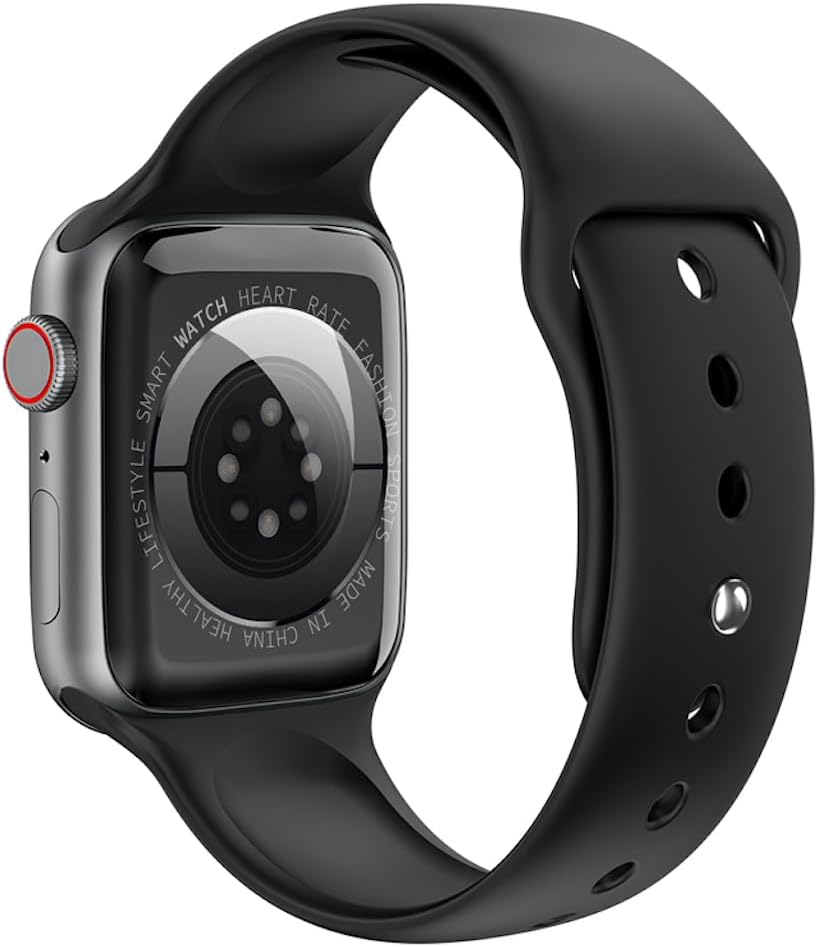
Mufananidzo 3: Rear view of the watch, highlighting the optical heart rate sensors and charging contacts.
Zvikamu:
- Ratidza: 1.91-inch TFT color touchscreen.
- Digital Crown: Inoshandiswa pakushandisa menyu uye kugadzirisa marongero.
- Side Button: Typically used for power on/off, returning to the home screen, or accessing specific functions.
- Mwoyo Wekunzwa Sensor: Located on the back for continuous heart rate monitoring.
- Kuchaja Mazita: Magnetic contacts on the back for connecting the charging cable.
Gadzirira
1. Kuchaja Chishandiso
Before initial use, fully charge your HOCO Y1 Pro Smart Watch. Connect the magnetic charging cable to the charging contacts on the back of the watch and plug the USB end into a power adapter (not included) or a computer's USB port.
- Kuchaja kwakazara kunotora nguva ingangoita maawa matatu.
- Iyo bhatiri inokwana 280mAh.
- Expected battery life: 3 days with dual Bluetooth enabled, 5-7 days with calls turned off.
2. Simba On / Off
- Power On: Press and hold the side button until the HOCO logo appears.
- Power Off: Dzvanya wobata bhatani repadivi, wobva wasarudza "Kudzima" pachiratidziro.
3. Kuiswa kweApp uye Kubatanidza
To unlock the full functionality of your HOCO Y1 Pro, download and install the companion application on your smartphone. Tsvaga the official HOCO smartwatch app in your device's app store (e.g., Google Play Store or Apple App Store).
- Ensure your watch is powered on and fully charged.
- Gonesa Bluetooth pane yako smartphone.
- Open the HOCO companion app and follow the on-screen instructions to create an account or log in.
- Within the app, select "Add Device" or "Pair New Device" and choose "HOCO Y1 Pro" from the list of available devices.
- Simbisa chikumbiro chekubatanidza pane zvese zviri zviviri smartphone yako uye wachi.
- The watch supports dual Bluetooth for calls and data synchronization.
Operating Instruction
Basic Navigation
- Swipe Kumusoro/Kudzika: Skrora kuburikidza nemamenyu kana zviziviso.
- Swipe Kuruboshwe/Kurudyi: Wana mabasa anokurumidza kana mawachi akasiyana.
- Top: Sarudza chinhu kana simbisa chiito.
- Digital Crown: Rotate to scroll, press to return to the home screen or open the app list.
- Side Button: Short press to return to the previous screen or home screen. Long press for power options.
Call Basa
With dual Bluetooth enabled and paired to your smartphone, the HOCO Y1 Pro supports making and receiving calls directly from your wrist.
- Kufona: Access the dialer or contacts list on the watch to initiate a call.
- Kutambira mafoni: When a call comes in, you can answer or reject it from the watch screen.
Health Monitoring
- Yekutsika Kwemoyo Kuonekwa: Iyo wachi inogara ichitarisa kurova kwemoyo wako. View ruzivo rwenguva chaiyo pawachi kana mafambiro akadzama ari muapp.
- Kuongorora Kurara: Wear the watch to bed to track your sleep patterns, including deep sleep, light sleep, and wake times.
- Exercise Pedometer: Tracks your daily steps, distance, and calories burned.
Sports Modes and GPS Track
The watch offers various sports modes to track your workouts. When connected to your phone's GPS, it can record your outdoor activity routes.
- Select a sports mode (e.g., running, walking) from the watch menu.
- Ensure GPS tracking is enabled in the app for outdoor activities.
Notifications
Receive notifications for calls, messages, and app alerts directly on your watch. Configure notification settings within the companion app.
Mamwe Mabasa
- Remote Music: Control music playback on your smartphone from the watch.
- Real-time Weather: View current weather conditions and forecasts (requires app connection).
- Mobile Phone Search: Use the watch to locate your paired smartphone by making it ring.
Maintenance
Kuchenesa
Regularly clean your watch to ensure optimal performance and hygiene.
- Pukuta sikirini wobva wasunga netambo yakapfava, damp jira.
- Dzivisa kushandisa makemikari ane hasha kana abrasive zvinhu.
- Iva nechokwadi chekuti ma contacts ekuchaja akachena uye akaoma usati wachaja.
Kuramba Mvura (IP68)
The HOCO Y1 Pro is IP68 waterproof, meaning it is resistant to dust and can withstand immersion in water up to 1.5 meters for up to 30 minutes. While it is suitable for daily use and light water activities, it is not recommended for diving, hot showers, or prolonged submersion.
- Usashandise mabhatani ari pasi pemvura.
- Omesa wachi zvakanaka mushure mekunge yaiswa mumvura.
Kugadzirisa matambudziko
| Nyaya | Possible Solution |
|---|---|
| Wachi haibatike. | Ita shuwa kuti wachi yachajiwa zvizere. Isungirire pachaja kweinenge maminitsi makumi matatu. |
| Haikwanise kubatana ne smartphone. |
|
| Inaccurate heart rate or activity data. |
|
| Zviziviso hazvina kugamuchirwa. |
|
| Sikirini haibatike. | Try restarting the watch by long-pressing the side button. If unresponsive, allow the battery to drain completely and then recharge. |
Zvinotsanangurwa
| Feature | Detail |
|---|---|
| Model Name | Y1 pro |
| Main Screen | TFT 1.91 inches; Resolution: 240*285 pixel |
| CPU | Realtek 8762CW |
| Memory | RAM 192KB + ROM 64MB |
| Kubatana | Dual Bluetooth (supports calls) |
| Kuramba Mvura | IP68 isina mvura |
| Battery Capacity | 280mAh Lithium Ion |
| Hupenyu hwebhatiri | 3 days (dual Bluetooth on), 5-7 days (calls off) |
| Anokosha Mabasa | GPS track support, Information push, Heart rate detection, Sleep monitoring, Exercise pedometer, Remote music, Real-time weather, Mobile phone search |
| Mitauro Inotsigirwa | 22 language packs including Chinese, English, Russian, Arabic, Vietnamese, Danish, Thai, Polish, Persian, Spanish, Malay, Greek, French, Italian, German, Portuguese, Turkish, Latin, Romanian, Hebrew, Burmese, Ukrainian. |
| Package Dimensions | 21.9 x 6.9 x 3.2 cm |
| Item Weight | 176 g |
Safety Information
- Usaedze kuparadzanisa kana kugadzirisa mudziyo.
- Chengetedza mudziyo kure nekupisa kwakanyanya, kupenya kwezuva, uye kuvhurika marimi.
- Dzivisa kufumura mudziyo kune yakasimba magineti minda.
- Shandisa chete tambo yekuchaja yakapihwa.
- Consult a medical professional before starting any new exercise regimen, especially if you have pre-existing health conditions. The heart rate data is for reference only and should not be used for medical diagnosis.
- Rasa mudziyo uye bhatiri rayo zvine hungwaru maererano nemitemo yenzvimbo.
Warranty uye Support
For warranty information and technical support, please refer to the documentation included with your purchase or visit the official HOCO website. Chengetedza humbowo hwako hwekutenga kune warranty claim.
Mugadziri: Hoco
ASIN: B0CBVTSX1V
UPC/EAN: 6931474766106


