1. Nhanganyaya
Thank you for choosing BUGANI Open Ear Headphones, Model MH22109. These headphones are designed to provide a comfortable, open-ear listening experience with advanced Bluetooth 5.3 technology, immersive stereo sound, and clear call functionality. This manual will guide you through the setup, operation, and maintenance of your new headphones.
2. Safety Information
- Usafumure mahedhifoni kana kesi yekuchaja kune tembiricha yakanyanya, zuva rakananga, kana moto.
- Dzivisa kushandisa mahedhifoni ane ruzha rwakanyanya kwenguva yakareba kudzivirira kukuvara kwekunzwa.
- Keep the device away from water and liquids, although it is IPX5 rated for sweat and light splashes, it is not designed for submersion.
- Usaedze kuparadzanisa kana kugadzirisa mudziyo. Izvi zvinobvisa waranti.
- Shandisa tambo yekuchaja yakapihwa chete kana tambo yeType-C yakasimbiswa pakuchaja.
- Be aware of your surroundings when using open-ear headphones, especially in traffic or hazardous environments.
3. Package Zviri mukati
The BUGANI Open Ear Headphones package includes the following items:
- BUGANI Open Ear Headphones (Left and Right)
- Kuchaja Case
- Waya yekuchaja yeUSB Type-C (haina kunyorwa zvakajeka asi yakajairwa)
- Mushandisi Chinyorwa (gwaro iri)

Image: The BUGANI Open Ear Headphones and their transparent charging case.
4. Chigadzirwa Pamusoroview
The BUGANI Open Ear Headphones feature a unique design that rests gently on your ears without entering the ear canal, providing comfort and situational awareness. The charging case protects the earbuds and provides extended battery life.

Image: A woman wearing the BUGANI Open Ear Headphones, illustrating the open-ear design and comfortable fit.

Image: A man relaxing and listening to music with the headphones, highlighting the immersive stereo sound.
5. Setup
5.1 Kuchaja Mahedhifoni Nekesi
Usati washandisa kekutanga, chaja mahedhifoni zvizere nebhokisi rekuchaja.
- Isa maearbuds muchesi yekuchaja. Ita shuwa kuti vakagara zvakanaka.
- Connect the Type-C charging cable to the charging port on the case and plug the other end into a USB power adapter (not included) or a computer's USB port.
- The LED indicator on the charging case will show the charging status. A full charge for the case typically takes 1-2 hours.
- The earbuds provide up to 6 hours of playtime on a single charge, and the charging case extends total playtime to approximately 30 hours.

Image: The charging case with earbuds, displaying the battery level, next to a smartphone playing music, illustrating the 30-hour playtime.
5.2 Bluetooth Pairing
The headphones feature one-step auto-pairing for convenience.
- Vhura kesi yekuchaja. Maearbuds anozobatidza otomatiki uye opinda papairing mode.
- Pamudziyo wako (smartphone, piritsi, komputa), gonesa Bluetooth.
- Tsvaga available Bluetooth devices and select "BUGANI OpenFit" from the list.
- Once connected, you will hear an audible confirmation, and the device will show "Connected".
- Mahedhifoni anozobatana otomatiki kumudziyo wekupedzisira wakabatanidzwa kana abviswa mubhokisi, kana Bluetooth yakabatidzwa pamudziyo.

Image: A smartphone screen displaying the Bluetooth settings, with "BUGANI OpenFit" listed as a connected device, demonstrating the one-step auto-pairing process.
6. Operating Instructions
6.1 Kupfeka mahedhifoni
The open-ear design ensures a secure and comfortable fit without blocking your ear canal.
- Ziva Kuruboshwe (L) uye Kurudyi (R) mahedhifoni.
- Gently hook the earbud over your ear, ensuring the speaker portion is positioned near your ear canal without entering it.
- Adjust for a snug and comfortable fit.
6.2 Kudzora Kubata Kwakangwara
The headphones feature touch-sensitive areas for controlling various functions:
| Chiito | Earbud | Function |
|---|---|---|
| Tinya x1 | R/L | Ridza/Misa Mimhanzi, Pindura Kufona |
| Tinya x2 | R | Volume Up |
| Tinya x2 | L | Volume Down |
| Tinya x3 | R | Next Track |
| Tinya x3 | L | Previous Track |
| Dzvanya uye Bata (2s) | R/L | Pedzisa Kufona, Ramba Kufona |
| Dzvanya uye Bata (2s) | L | Activate Voice Assistant |
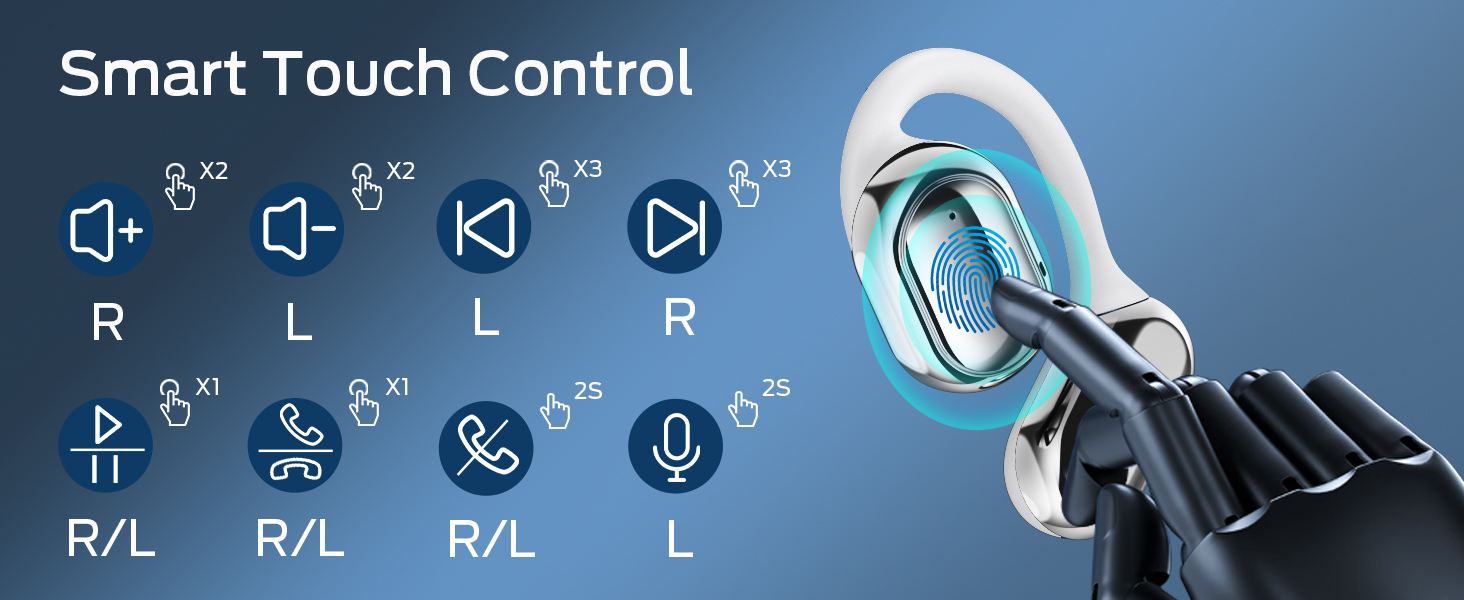
Image: A visual guide to the smart touch controls on the BUGANI Open Ear Headphones, detailing single, double, triple taps, and long presses for various functions.
6.3 Kuita uye kugamuchira mafoni
The built-in dual microphones with environmental noise reduction technology ensure clear calls.
- Pindura Call: Tokonya chero earbud kamwe.
- Pedzisa Kufona: Dzvanya uye bata chero earbud kwemasekonzi maviri.
- Ramba Kufona: Dzvanya uye bata chero earbud kwemasekonzi maviri.

Image: A man using the BUGANI Open Ear Headphones to make a phone call, emphasizing the clear call feature.
7. Kuchengeta
7.1 Kuchenesa
- Pukuta maearbud nekesi yekuchaja nejira rakapfava, rakaoma, risina lint.
- Usashandise abrasive cleaners, doro, kana makemikari zvinonyungudutsa.
- Ensure charging contacts are clean and dry.
7.2 Kuchengeta
- Chengeta mahedhifoni mubhokisi rawo rekuchaja kana asiri kushandiswa kuti adzidzivirire uye agare akachajiwa.
- Chengetedza munzvimbo inotonhorera, yakaoma, kure nekupisa kwakanyanya.
7.3 Kuramba Mvura (IPX5)
The headphones are rated IPX5, meaning they are protected against low-pressure water jets from any direction. This makes them suitable for sports and running, protecting against sweat and light rain. They are not designed for swimming or submersion in water.
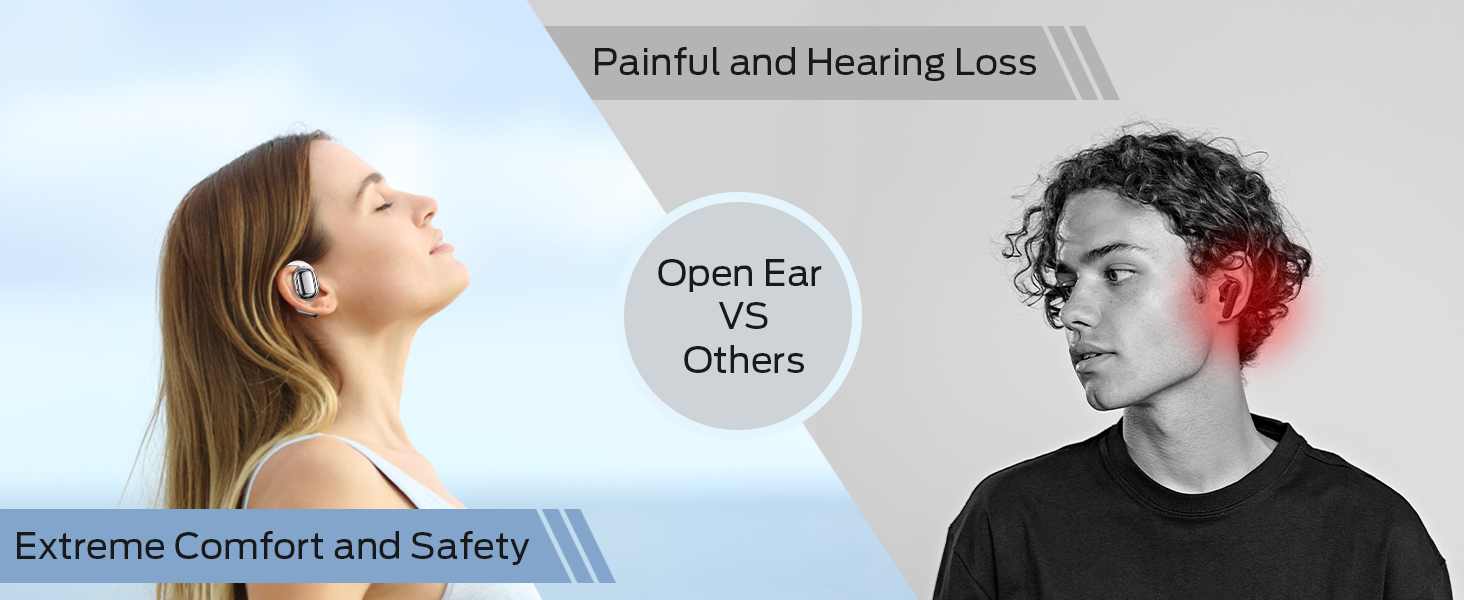
Image: A man running with water splashing on him, demonstrating the IPX5 waterproof feature of the headphones, suitable for active use.
8. Kugadzirisa matambudziko
If you encounter issues with your BUGANI Open Ear Headphones, please refer to the following common solutions:
- Hapana Inzwi: Ensure the headphones are charged, paired correctly, and the volume on both the headphones and your device is turned up.
- Kubatanidza Matambudziko: Turn off Bluetooth on your device, then turn it back on. Place the earbuds back in the case, close it, then open it again to re-enter pairing mode. Try pairing again.
- Kubatana Kwenguva: Ensure you are within the Bluetooth range (up to 10 meters) and there are no significant obstacles between the headphones and your device. Avoid strong electromagnetic interference.
- Maearbuds haachaji: Check that the charging cable is securely connected and the charging contacts on the earbuds and case are clean. Ensure the charging case itself has power.
- Imwe Earbud Haisi Kushanda: Try placing both earbuds back in the case, closing it, and then taking them out again to reset the connection. If the issue persists, try re-pairing.
9. Zvinotsanangurwa
| Feature | Tsanangudzo |
|---|---|
| Model Name | BUGANI OpenFit |
| Model Number | MH22109 |
| Kubatana Technology | Wireless (Bluetooth) |
| Bluetooth Version | 5.3 |
| Bluetooth Range | 10 Mamita |
| Kuiswa Nzeve | Vhura Nzeve |
| Kukura Kwemutyairi | 16mm (Dual Large Driver) |
| Hupenyu hwebhatiri (Kuchaja Kamwechete) | Kusvikira kuMaawa mashanu |
| Yese Yekutamba (ine Kesi yekuchaja) | Kusvikira kuMaawa mashanu |
| Kuchaja Port | Type-C |
| Water Resistance Rating | IPX5 |
| Maikorofoni | Built-in Dual Microphones with Environmental Noise Reduction |
| Inowirirana Devices | Bluetooth-enabled devices (smartphones, computers, TVs) |
| Material | Plastiki |
| Item Weight | 6.4 ounces |
10. Warranty uye Tsigiro
BUGANI products are designed for reliability and performance. For warranty information, please refer to the warranty card included with your purchase or visit the official BUGANI website. If you require technical support or have questions not covered in this manual, please contact BUGANI customer service through their official channels.
You can often find support contact information on the BUGANI brand store page: Chitoro cheBUGANI paAmazon