Yakakosha Mirayiridzo Yekuchengetedza
Please read these instructions carefully before operating the unit and retain them for future reference.
- Usaise mudziyo uyu kumvura inodonha kana kumwaya mvura.
- Usaise zvinhu zvakazadzwa nezvinwiwa, zvakaita semavhasi, pamudziyo.
- Iva nechokwadi chekufema zvakanaka. Usavhare chero mazaru emhepo.
- Usaise padhuze nechero zvitubu zvekupisa zvakaita semaradiator, marejita ekupisa, zvitofu, kana zvimwe midziyo (kusanganisira amplifiers) zvinoburitsa kupisa.
- Shandisa zvinonamirwa/zvishandiso zvinotsanangurwa nemugadziri chete.
- Bvisa mudziyo uyu panguva yemadutu emheni kana kuti ukasashandiswa kwenguva refu.
- Tarisa ese servicing kune vanokwanisa basa revashandi. Kushanda kunodiwa kana midziyo yacho yakanganisa chero nzira.
Product Overview
The Muse M17CB is a compact dual PLL FM/MW digital alarm clock radio designed for reliable timekeeping and audio playback. It features a clear 0.9-inch white LED display with a dimmer function and a 24-hour time format. Users can set two independent alarms, choosing to wake up to either the radio or a buzzer. The digital tuner allows for 6 preset stations (3 FM and 3 MW) for quick access to your favorite broadcasts. Additional functions include SNAP, SLEEP, and SNOOZE for enhanced user convenience.
Mberi View

Tsanangudzo yemufananidzo This image displays the front of the Muse M17CB alarm clock radio. It features a prominent 0.9-inch white LED display showing "12:00". Above the display are various control buttons and two rotary knobs. The buttons include P.1, P.2, P.3, DIM., O/SOURCE, and a large SNOOZE button. The left rotary knob is for VOLUME, and the right is for TUNING/SET. A small "muse" logo tag is visible on the left side.
MaPaneru Ekumusoro ePaneru

Tsanangudzo yemufananidzo Mufananidzo uyu unopa kumusoro-pasi view of the Muse M17CB alarm clock radio, highlighting the control panel. It shows two large rotary knobs for Volume and Tuning/Set, along with several push buttons: P.1, P.2, P.3 (for radio presets), DIM. (dimmer), O/SOURCE (power/source selection), and a large circular SNOOZE button. The layout is clear and intuitive.
Rear Panel Connections

Tsanangudzo yemufananidzo This image shows the rear panel of the Muse M17CB alarm clock radio. It clearly displays the "AC~" power input socket, the "FM ANT." wire antenna, and an "AUX IN" 3.5mm jack for connecting external audio devices. A speaker grille is also visible on the right side.
Gadzirira
Power Connection
- Unpack the Muse M17CB unit and all accessories.
- Connect the AC power cord to the "AC~" input on the rear of the unit.
- Batanidza rimwe divi retambo yemagetsi muchikamu chekunze chemadziro.
- The LED display will light up, indicating the unit is receiving power.
Kanyanga Setup
- For optimal FM reception, fully extend the FM wire antenna located at the back of the unit.
- Adjust the position of the antenna for the best possible signal reception.
Operating Instruction
Kuronga Nguva
- Ita shuwa kuti unit yakabatidzwa.
- Dzvanya uye ubate iyo TUNING/SET knob for approximately 2 seconds until the hour digits flash on the display.
- Rotate the TUNING/SET knob kugadzirisa awa.
- Press the TUNING/SET knob once to confirm the hour; the minute digits will flash.
- Rotate the TUNING/SET bhatani rekugadzirisa maminitsi.
- Press the TUNING/SET knob again to confirm the minutes and exit time setting mode.
- Nguva inoratidzwa mumaawa makumi maviri nemana.
Setting the Alarm (Alarm 1 and Alarm 2)
Chigadzirwa ichi chine maaramu maviri akazvimiririra (Alarm 1 neAlarm 2).
- Press the P.1 bhatani (reAlarm 1) kana P.2 button (for Alarm 2) once. The alarm icon and hour digits will flash.
- Rotate the TUNING/SET bhatani rekugadzirisa nguva yekuridza alarm.
- Press the TUNING/SET knob to confirm the hour; the minute digits will flash.
- Rotate the TUNING/SET bhatani rekugadzirisa maminitsi ealarm.
- Press the TUNING/SET knob to confirm the minutes. The alarm source (radio or buzzer) will flash.
- Rotate the TUNING/SET bhatani rekusarudza chero ripi zvaro Radio or Buzzer as the alarm sound.
- Press the TUNING/SET knob to confirm the alarm source. The alarm volume will flash (if radio is selected).
- Rotate the VOLUME knob to set the desired alarm volume (for radio alarm).
- Press the TUNING/SET knob to save the alarm settings. The corresponding alarm icon will appear on the display, indicating the alarm is active.
To deactivate an alarm, press the corresponding P.1 or P.2 button until the alarm icon disappears from the display.
Radio Operation (FM/MW)
- Press the O/SOURCE button to turn on the radio. Press it repeatedly to cycle between FM, MW, and AUX modes.
- Rotate the TUNING/SET knob to manually tune to a desired frequency.
- Kuti uongorore otomatiki zviteshi, tinya wobata bhatani TUNING/SET knob for 2 seconds. The radio will scan and stop at the next available station.
Setting and Recalling Presets (P.1, P.2, P.3)
- To Store a Preset: Tune to the desired station. Press and hold one of the preset buttons (P.1, P.2, kana P.3) for 2 seconds until the display confirms the preset is saved.
- Kuyeuka Preset: Briefly press the desired preset button (P.1, P.2, kana P.3) to tune to the stored station.
Dimmer Function
Press the DIM. button repeatedly to adjust the brightness of the LED display to your preference (e.g., High, Medium, Low, Off).
Snooze Basa
Kana alarm yarira, tinya bhatani guru KUSVIRA bhatani rekunyaradza alarm kwenguva pfupi. Alarm icharira zvakare mushure memaminitsi angangoita mapfumbamwe.
Kurara Basa
The sleep function allows you to fall asleep to the radio, which will automatically turn off after a set period.
- Redhiyo ichiri kurira, dzvanya iyo P.3 button (often doubles as SLEEP function) repeatedly to cycle through available sleep timer durations (e.g., 90, 60, 30, 15 minutes, or OFF).
- Radhiyo inodzima otomatiki mushure menguva yakasarudzwa.
SNAP Function
The specific operation of the SNAP function is not detailed in the provided product description. Please refer to the full printed manual included with your device for instructions on using the SNAP feature.
Auxiliary Input (AUX IN)
Batanidza mudziyo wekuteerera wekunze (semuenzaniso, MP3 player, smartphone) kune AUX IN jack on the rear of the unit using a 3.5mm audio cable. Press the O/SOURCE button repeatedly until "AUX" appears on the display to switch to auxiliary input mode. Audio from the connected device will play through the alarm clock's speaker.
Maintenance
- Kuchenesa: Shandisa jira rakapfava, rakaoma kuchenesa kunze kwechikwata. Usashandise abrasive cleaners, wax, kana solvents.
- Kuchengeta: If the unit is not used for an extended period, unplug it from the power outlet and store it in a cool, dry place.
- Dzivisa Unyoro: Keep the unit away from water and high humidity.
Kugadzirisa matambudziko
| Dambudziko | Zvinogona Kukonzera | Solution |
|---|---|---|
| Hapana simba / Kuratidzwa kwakadzimwa | Tambo yemagetsi haina kubatana zvakanaka. | Iva nechokwadi chekuti tambo yemagetsi yeAC yakabatanidzwa zvakanaka muyuniti uye pamadziro anoshanda. |
| Kugamuchirwa kweredhiyo kusina kunaka | Antena yeFM haina kutambanudza kana kuiswa zvakanaka. | Fully extend and adjust the position of the FM wire antenna for better reception. Try moving the unit to a different location. |
| Alarm hainzwi | Alarm haina kushanda kana kuiswa zvisizvo. | Verify that the alarm icon is displayed. Recheck alarm time and source settings. Ensure alarm volume is not set to minimum if radio alarm is selected. |
| Display too bright/dim | Kugadzirisa dimmer kunoda kugadziriswa. | Press the DIM. button repeatedly to cycle through brightness levels. |
Zvinotsanangurwa
- Muenzaniso: M17CB
- Ratidza: 0.9-inch White LED with Dimmer
- Nguva Format: 24-awa
- Tuner: Digital FM/MW PLL
- Presets: 6 (3 FM + 3 MW)
- Maaramu: Dual Alarm (Radio or Buzzer)
- Mabasa: SNAP, SLEEP, SNOOZE
- Kunobva Simba: AC Simba
- Dimensions: 13 cm (Kureba) x 11 cm (Upamhi) x 6.5 cm (Kureba)
- Ruvara: Turquoise
- Material: Resin or Plastic
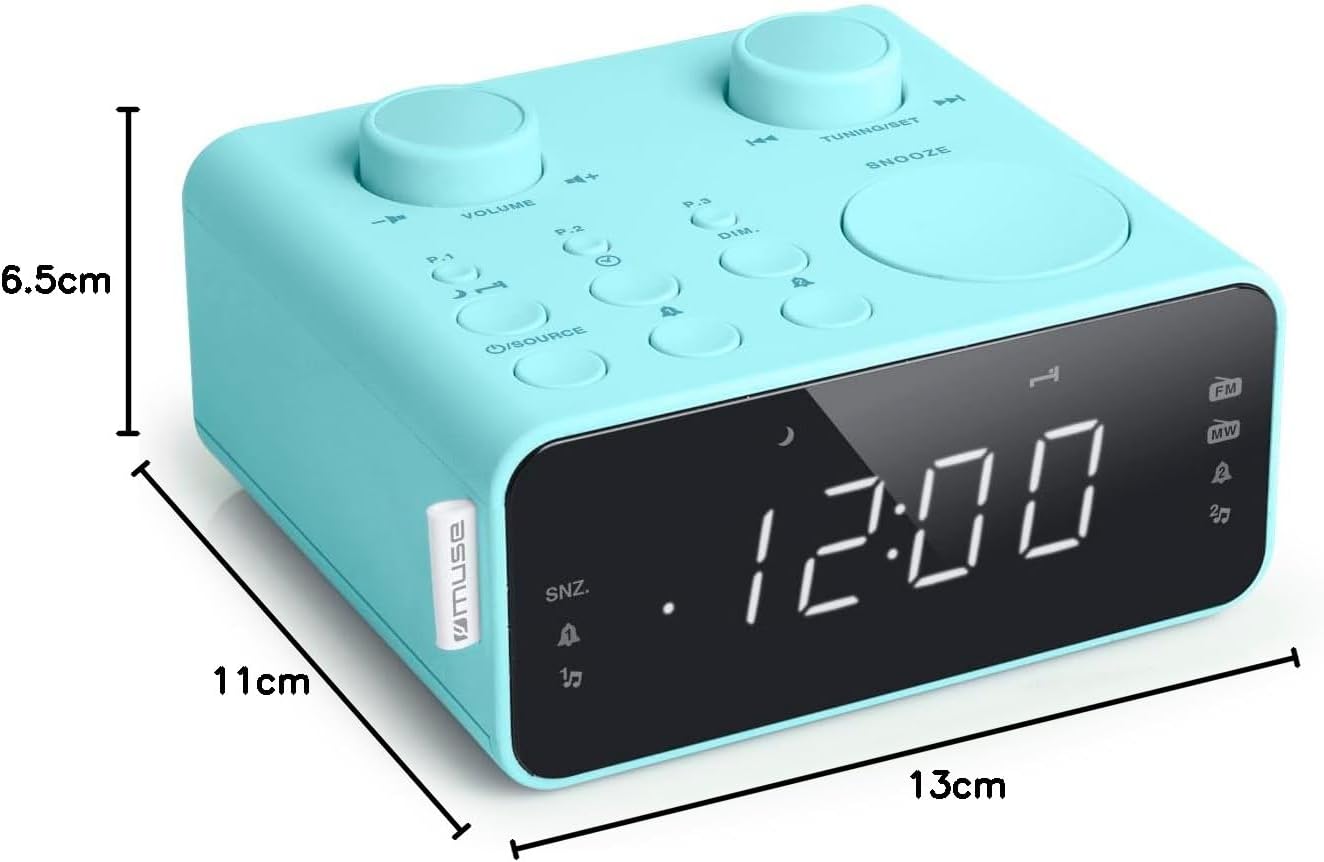
Tsanangudzo yemufananidzo This image illustrates the dimensions of the Muse M17CB alarm clock radio. It shows the unit with measurements indicating a length of 13cm, a width of 11cm, and a height of 6.5cm.
Warranty uye Support
For warranty information and technical support, please refer to the warranty card included with your product or visit the official Muse website. Chengeta risiti rako rekutenga seumboo hwekutenga.
The product includes a user manual (as indicated by "Pièces incluses: Manuel du propriétaire").


