Amazon Echo Ratidza 21 Mushandisi Manual
Model: Echo Show 21
1. Nhanganyaya
Welcome to your new Amazon Echo Show 21. This smart display is designed to be the central hub for your home, offering a large Full HD screen for entertainment, organization, and communication. With built-in Fire TV and Alexa, you can stream content, manage your smart home, make video calls, and keep your family organized with customizable widgets.

Figure 1.1: Amazon Echo Show 21 Overview
The Echo Show 21 integrates seamlessly into your daily life, providing a visual and interactive experience for all your Alexa commands.
2. Kutanga: Setup
2.1 Chii chiri muBhokisi
- Echo Show 21 device
- Alexa Voice Remote with batteries (2 AAA included)
- Power adapter (30W) and 5 ft. cord (white)
- Wall mount, anchors, screws, mounting template
- Kurumidza kutanga gwara
2.2 Kutanga Setup
The Echo Show 21 is designed for simple setup. You will need a Wi-Fi connection.
- Power On: Batanidza adapta yemagetsi kuEcho Show 21 yako woiisa mugomba rekumashure. Mudziyo wacho unongozvibatidza wega.
- Kubatanidza Wi-Fi: Follow the on-screen instructions to connect your device to your Wi-Fi network. Amazon Wi-Fi simple setup can automatically connect your device if you are a Prime member and have previously saved your Wi-Fi credentials.
- Kupinda muAkhawunti yeAmazon: Pinda uchishandisa zvitupa zveakaundi yako yeAmazon.
- Personalization: Customize your home screen, set up profiles, and configure your preferred settings.
- Remote Pairing: The included Alexa Voice Remote should pair automatically. If not, follow the on-screen instructions or refer to the quick start guide for manual pairing.
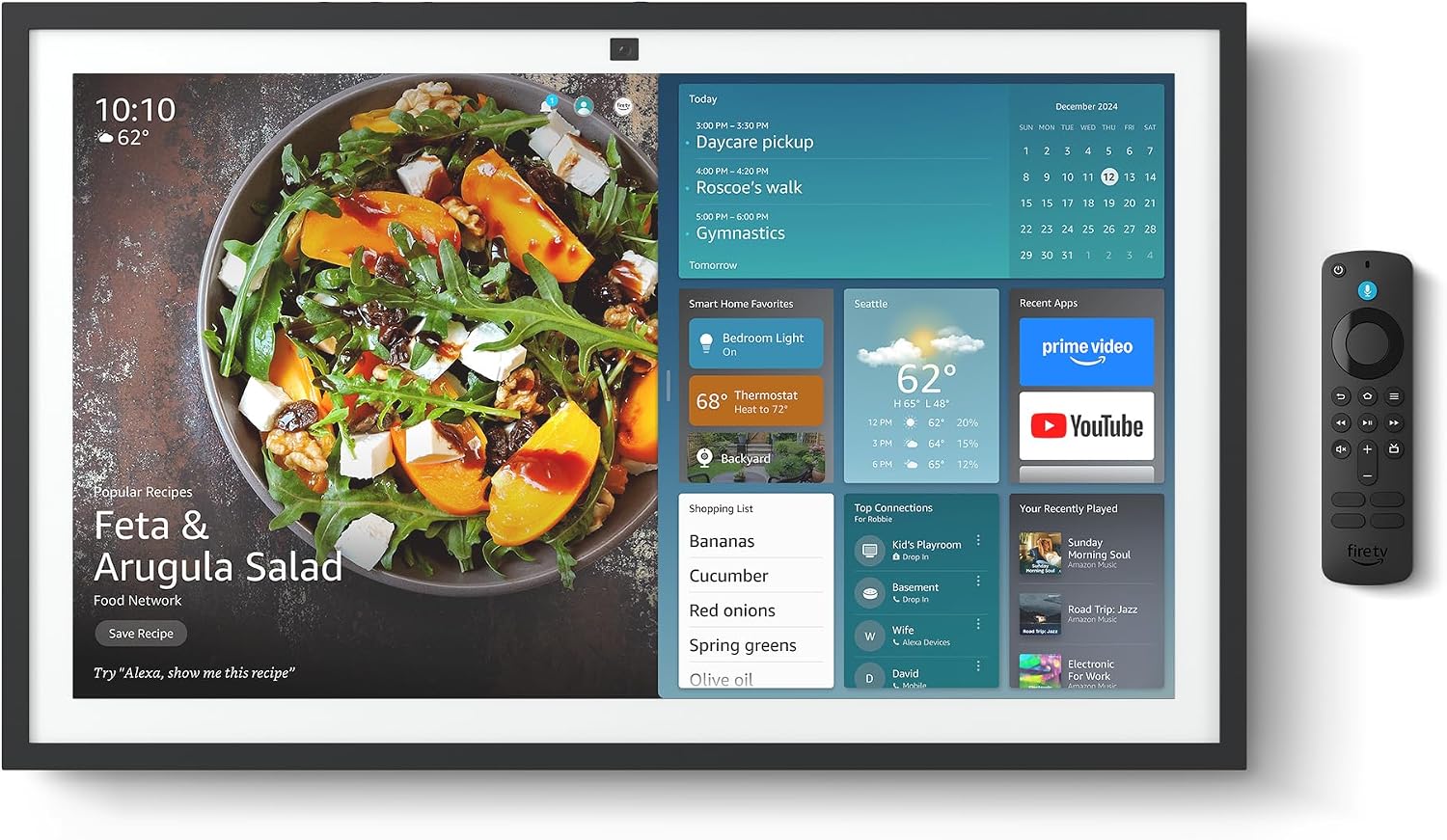
Figure 2.1: Echo Show 21 with Alexa Voice Remote
2.3 Mounting Sarudzo
The Echo Show 21 can be wall-mounted using the included hardware or placed on a stand (sold separately). Wall mounting requires an electric drill.
3. Kushanda Chiratidziro Chako cheEcho 21
3.1 Kudzora Izwi neAlexa
Your Echo Show 21 is primarily controlled by voice using Alexa. Simply say the wake word "Alexa" followed by your command or question.
- General Commands: "Alexa, what's the weather?", "Alexa, set a timer for 10 minutes."
- Mumhanzi & Audio: "Alexa, play pop music," "Alexa, play my morning playlist."
- Video & Entertainment: "Alexa, open Prime Video," "Alexa, play The Boys on Netflix."
3.2 Fire TV Integration
Enjoy endless entertainment with built-in Fire TV. Use the included Alexa Voice Remote or voice commands to navigate.

Figure 3.1: Fire TV Interface
- Access thousands of apps like Prime Video, Netflix, YouTube, Apple TV.
- Stream movies, TV shows, and live content.
- The Fire TV remote allows for traditional navigation and playback control.
3.3 Home Screen & Widgets
The 21-inch display is ideal for organizing your day with customizable widgets.

Figure 3.2: Customizable Home Screen Widgets
- Keep important information like calendars, shopping lists, and weather in view.
- Personalize your home screen with family photos.
3.4 Kudzora Musha Kwakangwara
Control compatible smart devices using your voice or the smart home dashboard.

Figure 3.3: Smart Home Dashboard
- Turn lights on/off, adjust thermostats, or view mavhidhiyo emakamera aripo.
- Supports Zigbee, Matter, and Thread Border Router for broad compatibility.
3.5 Kufona neVhidhiyo
Connect with family and friends using the 13 MP camera with auto-framing, wide field of vision, 3.3x zoom, and noise reduction.

Figure 3.4: Echo Show 21 as a Digital Photo Frame
The camera can also be used to display your favorite memories as a digital photo frame.
4. Kuchengeta
Kuti uve nechokwadi chekuti Echo Show 21 yako inogara kwenguva refu uye inoshanda zvakanaka, tevera nhungamiro idzi dzekugadzirisa:
- Kuchenesa Screen: Shandisa jira rakapfava, risina ruvara kuti upukute sikirini zvinyoro nyoro. Kana paine tsvina yakaoma, pukuta zvishomaampen the cloth with water. Avoid abrasive cleaners or sprays directly on the screen.
- Kuchenesa Muviri Wechishandiso: Wipe the exterior surfaces with a dry, soft cloth. Do not use harsh chemicals or solvents.
- Kufefetedza Ita shuwa kuti mavhuriro ekufemesa emudziyo haana kuvharika kudzivirira kupisa.
- Zvigadziriso zveSoftware: Your Echo Show 21 receives automatic software security updates. Ensure your device is connected to Wi-Fi to receive these updates.
5. Kugadzirisa matambudziko
If you encounter issues with your Echo Show 21, try the following common solutions:
- Mudziyo Hausi Kupindura: Try saying "Alexa" again clearly. If unresponsive, unplug the power adapter for a few seconds and then plug it back in to restart the device.
- Hapana Wi-Fi Connection: Check your router and modem to ensure they are working correctly. Restart your router. On the Echo Show 21, go to Settings > Network to re-select your Wi-Fi network and re-enter the password.
- Audio Nyaya: Ensure the volume is not muted or too low. Say "Alexa, turn up the volume." Check audio settings in the device menu.
- Kamera Haisi Kushanda: Ensure the physical camera shutter is open and the mic/camera-off button is not activated (red light indicates off).
- Remote Kwete Kupindura: Check the batteries in the Alexa Voice Remote. If necessary, replace them. Re-pair the remote if it becomes disconnected.
6. Zvinyorwa zveUnyanzvi
| Feature | Tsanangudzo |
|---|---|
| Size | 21.4"W x 13.2"H x 1.5"D |
| Kurema | 10.7 lb |
| Display | 21” with 1920 x 1080 resolution (landscape or portrait) |
| Kamera | 13 MP + Shutter |
| Vadivelu Comedy Audio | Two 2” woofers + two 0.6” tweeters |
| Wi-Fi Kubatana | Wi-Fi 6E (802.1ax), Tri-band, dual-antenna (MIMO). Supports 802.11a/b/g/n/ac. |
| Smart Kumba Hub | Zigbee + Matter + Thread Border Router |
| processor | Octa-core SoC with Amazon AZ2 neural network engine |
| Sensors | ALS RGB + Accelerometer |
| Mutauro | Chirungu neSpanish |

Figure 6.1: Echo Show 15 vs. Echo Show 21 Dimensions
7. Zvinhu Zvekuchengetedza Zvakavanzika
Echo Show 21 yakagadzirwa nematanho akasiyana-siyana ekuchengetedza zvakavanzika:
- Mic/Camera-Off Button: A physical button to electronically disconnect the microphones and camera.
- Shutter yekamera: A built-in physical shutter to cover the camera lens.
- Tekinoroji yeWake Word: Alexa devices only begin recording and sending audio to the cloud after detecting the wake word.
- Zviratidzo zveKuyerera: Visual indicators show when audio or video is being streamed to the cloud.
- Voice Recording Control: Kugona view uye bvisa marekodhi ako ezwi.

Figure 7.1: Mic/Camera-Off Button and Camera Shutter
For more details, visit the Alexa Privacy Hub.
8. Accessibility Features
The Echo Show 21 includes various accessibility features to personalize Alexa to your abilities:
- Dzvanya paAlexa: Access Alexa via touch through on-screen tiles or a keyboard.
- Kuteerera Kunoenderana Nezvinodiwa: Zvinopa nguva yakawanda yekupedza kutaura Alexa asati apindura.
- Mwero wekutaura waunoda: Dzora kuti Alexa anotaura nekukurumidza kana kunonoka sei.
- Kunyora mashoko: Alexa Captioning, Call Captioning, uye Closed Captioning zvinopa mashoko ezvinyorwa zvinotsigirwa.
- Ratidza uye Taura: Helps users who are blind or visually impaired identify products.
- VoiceView Screen Reader: Enables access for customers who are blind or visually impaired.
- Chinokudza Sikirini: Zoom in/out wobva wadzvanya pani uchitenderedza skrini.
- Kuverenga Zvinonzwika Kindle: Ita kuti Alexa averenge mabhuku ako eKindle zvinonzwika.
- Rugwaro Rwenguva Chaiyo: Type live text in a video call.
These features can be enabled via Settings > Accessibility on your device.
9. Warranty uye Tsigiro
9.1 Chigadzirwa Chivimbiso
Your Echo Show 21 comes with a 1-makore mashoma waranti uye sevhisi. Optional 1-year, 2-year, and 3-year extended warranties are available for U.S. customers, sold separately.
Use of Echo Show 21 and Fire TV on Echo Show 21 is subject to their respective terms of service.
9.2 Mutengi Tsigiro
For further assistance, troubleshooting, or to learn more about your device, please visit the Amazon support webwebhusaiti kana kuti taura neAmazon customer service.


