Nhanganyaya
This manual provides comprehensive instructions for the safe and proper installation, operation, and maintenance of your ONKRON Full Motion TV Wall Mount, model STE344-B. Please read this manual thoroughly before installation and retain it for future reference. Incorrect installation can lead to product damage or personal injury.

Image: The ONKRON Full Motion TV Wall Mount STE344-B, showcasing its articulating arm and VESA plate.
Safety Information
- Weight Capacity: Usapfuure huremu hwepamusoro hwe88 lbs (40 kg).
- Kukura Kwesikirini: Chigadziko ichi chakagadzirirwa maTV ane hurefu hwemasendimita ari pakati pe26 ne55.
- Rudzi rweMadziro: Ensure the mounting surface can safely support the combined weight of the mount and your TV. Consult a professional if unsure.
- Zvishandiso: Shandisa maturusi akakodzera uye tevera mirairo yese nokungwarira.
- Vana: Chengetedza vana kure panguva yekuisa.
- Kukuvadza: Do not install if any parts are damaged or missing. Contact customer support for replacement parts.
Package Zviri mukati
Tarisa kuti zvese zviriko zviripo uye hazvina kukuvara usati watanga kuisa.
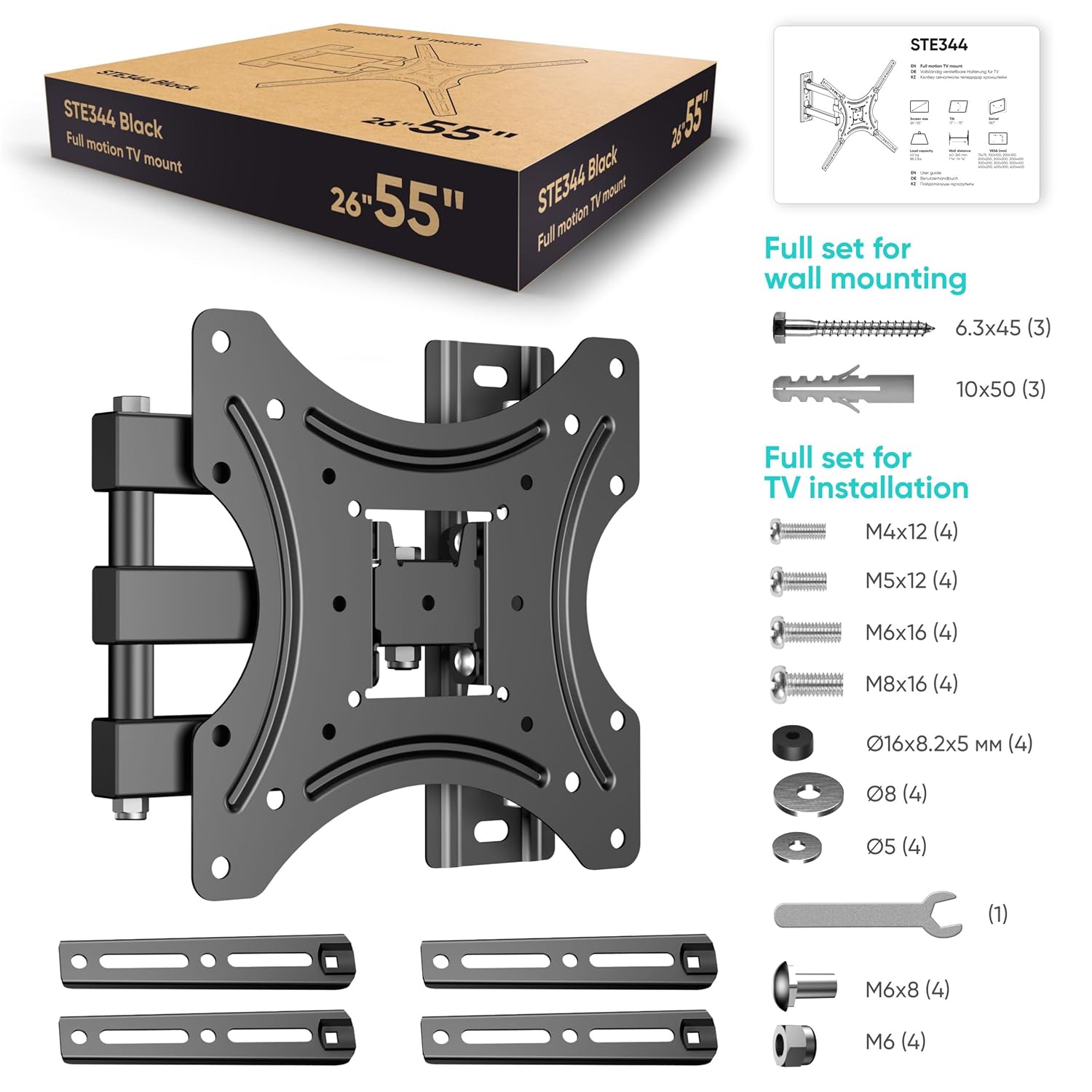
Image: All components included in the ONKRON STE344-B package, including the wall plate, TV brackets, and various screws and hardware for wall and TV installation.
Mount Components:
- Kuungana kwePlati remadziro
- TV Bracket Arms (4 pieces)
- Kiti yeHardware Yokugadzika (zvikururu zvakasiyana-siyana, mawasher, maspacers, zvibatiso)
- Chipanera (1)
Full Set for Wall Mounting:
- Lag Screws (e.g., 6.3x45 mm, 3 pcs)
- Concrete Anchors (e.g., 10x50 mm, 3 pcs)
Full Set for TV Installation:
- M4x12 Screws (4 pcs)
- M5x12 Screws (4 pcs)
- M6x16 Screws (4 pcs)
- M8x16 Screws (4 pcs)
- Washers (various sizes, e.g., Ø16x8.2x5 mm, Ø8, Ø5)
- Spacers (e.g., M6x8, M6)
Zvishandiso Zvinodiwa (Zvisina Kubatanidzwa)
- Chinotsvagisa matanda (chekuisa matanda ehuni)
- Drill
- Drill Bits (appropriate sizes for pilot holes and anchors)
- Level
- Penzura
- Tape Kuyera
- Phillips Musoro Screwdriver
Setup uye Installation
Zvakakosha: Ensure you have identified your wall type (wood stud, concrete, brick) and have the correct hardware before proceeding. If installing into wood studs, locate the center of the stud. For concrete/brick, use the provided anchors.
Danho 1: Batanidza mabhureki eTV kuTV
- Isa TV yako pasi zvinyoro nyoro panzvimbo yakachena uye yakapfava kudzivirira kukuvara kwechiso.
- Ziva maburi anokwira eVESA kuseri kweTV yako.
- Select the appropriate screws, washers, and spacers from the hardware kit that fit your TV's VESA holes. Ensure screws are not too long, which could damage internal components.
- Attach the four TV bracket arms to the back of your TV using the selected hardware. Ensure they are securely fastened but do not overtighten.
Danho rechitatu: Isa puratifomu yemadziro kumadziro
- Determine the desired height for your TV. Mark the pilot hole locations for the wall plate on the wall. Use a level to ensure the marks are perfectly horizontal.
- Zvematanda ehuni: Use a stud finder to locate the center of a wood stud. Drill pilot holes (e.g., 5/32" or 4mm) at the marked locations. Attach the wall plate using the lag screws.
- Kune Madziro eKonkriti/Masvingo eZvidhinha: Drill pilot holes (e.g., 3/8" or 10mm) at the marked locations. Insert the concrete anchors flush with the wall surface. Attach the wall plate using the lag screws into the anchors.
- Ensure the wall plate is securely fastened and level.
Danho rechitatu: Isa TV paWall Mount
- Nerubatsiro, simudza TV nokungwarira uchishandisa mabhureki akabatanidzwa.
- Align the TV brackets with the arms of the wall mount.
- Secure the TV to the mount using the provided locking mechanisms or screws, as per the specific design of your mount. Ensure the TV is firmly seated and cannot be accidentally dislodged.
Operating Instruction
The ONKRON STE344-B mount offers various adjustments for optimal viewing.
Tilt Adjustment:
This mount allows for a tilt range of 0° to -15° (downward tilt). Loosen the tilt adjustment knobs or bolts on the TV plate, adjust the screen to the desired angle, and then securely tighten the knobs/bolts to lock the position.

Image: Illustration showing the TV tilting downwards from 0° to -15° on the ONKRON STE344-B mount.
Swivel Adjustment:
The articulating arm allows for left and right swivel movement. The maximum swivel angle depends on your TV's size and the distance from the wall. For screens up to 32 inches, a swivel of ±73° is possible. For 55-inch screens, the swivel is approximately ±36°.

Image: A TV mounted on the ONKRON STE344-B mount swiveling up to 180 degrees, demonstrating its full motion capability.
| Screen Size | Swivel Angle |
|---|---|
| <32" | ±73° |
| 37" | ±60° |
| 40" | ±49° |
| 43" | ±47° |
| 50" | ±40° |
| 55" | ±36° |
Image: A table detailing the maximum swivel angles for the STE344 mount based on various TV screen sizes, accompanied by diagrams illustrating the swivel motion.
Kuwedzerwa kubva kuWall:
The mount can extend your TV from the wall, providing a distance range of 1 5/8" to 14 3/8". Gently pull or push the TV to achieve the desired distance. Ensure cables are not strained during movement.

Mufananidzo: Side view of a TV mounted on the ONKRON STE344-B, illustrating the adjustable distance from the wall, ranging from 1 5/8 inches to 14 3/8 inches.
Maintenance
- Nguva Dzose Kuongorora: Nguva nenguva tarisa ese screws uye zvinongedzo kuti uone kuti zvinoramba zvakasimba uye zvakachengeteka.
- Kuchenesa: Geza chigadziko nejira rakapfava, rakaoma. Dzivisa zvinochenesa zvinogumbura kana zvinonyungudutsa.
- Lubrication: No lubrication is typically required for the moving parts. If movement becomes stiff, contact customer support.
Kugadzirisa matambudziko
- TV haina kuenzana:
Ensure the wall plate was installed level. Some mounts have a post-installation leveling adjustment; refer to the specific mechanism on your mount. If not, the wall plate may need re-installation.
- Gomo rinonzwa kusagadzikana:
Immediately remove the TV. Re-check all wall mounting screws and TV attachment screws for tightness. Verify that the wall type and hardware used are appropriate for the TV's weight. Ensure the mount is installed into a solid wood stud or concrete/brick with proper anchors.
- Difficulty adjusting movement:
Check for any overtightened bolts on the articulating arms or tilt mechanism. Loosen slightly if necessary, but ensure they are still secure enough to hold the TV's position.
- Zvisipo zvikamu:
Refer to the "Package Contents" section. If parts are missing, contact ONKRON customer support for assistance.
Zvinotsanangurwa

Image: A visual representation of the ONKRON STE344-B mount's compatibility, showing it supports TVs from 26 to 55 inches and a maximum load of 88.2 lbs.
| Feature | Detail |
|---|---|
| Model Number | STE344-B |
| Screen Saizi Kuenderana | 26 - 55 inches |
| Maximum Load Capacity | 88 lbs (40 kg) |
| VESA kuenderana | 75x75 mm kusvika 400x400 mm |
| Movement Type | Articulating, Swivel, Tilt |
| Tilt Angle | 0 ° kusvika -15 ° |
| Swivel Angle | Up to ±73° (varies by screen size) |
| Distance kubva kuMasvingo | 1 5/8" - 14 3/8" |
| Material | Alloy Steel |
| Color | Nhema |
Warranty uye Support
For warranty information or technical support, please contact ONKRON customer service. Keep your purchase receipt as proof of purchase.
Contact Information: Refer to the ONKRON official websaiti kana chigadzirwa kurongedza kune yazvino ruzivo ruzivo.


