1. Nhanganyaya
This manual provides instructions for the setup, operation, and maintenance of your Ceybo 06-519W37-TY01X Remote Control. This remote is designed for seamless compatibility with various JVC HD LED Smart TV models, offering intuitive control over your television's functions and quick access to popular streaming services.

Mufananidzo 1: Mberi uye kumashure view of the Ceybo 06-519W37-TY01X Remote Control, showcasing its ergonomic design and battery compartment.
2. Setup
2.1 Kuiswa kwebhatiri
- Tsvaga bhatiri kuseri kweremote control.
- Svetera chivharo chebhatiri pasi kuti uvhure.
- Isa mabhatiri maviri (2) eAAA (haasanganisirwe), uchiita kuti ma terminals akanaka (+) neasina (-) aenderane nemazvo nezviratidzo zviri mukati me compartment.
- Chinja chifukidziro chebhatiri nekuchisveta kumusoro kusvika chadzvanya panzvimbo yacho.

Image 2: The back of the remote control with the battery compartment open, illustrating the correct placement for two AAA batteries.
2.2 Kutanga Kushandisa
The Ceybo 06-519W37-TY01X Remote Control is designed for immediate use with compatible JVC Smart TVs. No programming or pairing is required. Once batteries are installed, the remote is ready to operate your television.

Image 3: The remote control, emphasizing that no programming is needed for operation.
3. Operating Instructions
The remote control features a standard layout for easy navigation and control of your JVC Smart TV.
3.1 Basic Mabasa
- Bhatani reSimba (⬤): Batidza kana kudzima TV.
- Mabhatani eNhamba (0-9): Sarudza zvakananga nzira.
- Vhoriyamu Kukwira/Kudzika (Vhoriyamu +/-): Inogadzirisa danho renzwi.
- Chiteshi Chinokwira/Chinodzika (CH +/-): Changes the TV channel.
- Mute Bhatani (🔇): Inodzima kana kudzima ruzha rweTV.
- Navigation Pad (Kumusoro, Pasi, Kuruboshwe, Kurudyi, Zvakanaka): Inofamba-famba mumamenyu uye inosimbisa sarudzo.
- Bhatani rekwakabva: Selects input sources (HDMI, AV, etc.).
- Bhatani rekubuda: Inobuda mumenyu kana application iripo.
- Info Button: Inoratidza ruzivo nezve purogiramu iripo kana kuti zviri mukati.
3.2 Mabhatani ekudimbudzira
The remote includes dedicated buttons for quick access to popular streaming applications:
- Bhatani reNetflix: Launches the Netflix application directly.
- Bhatani reYouTube: Launches the YouTube application directly.

Mufananidzo 4: Yakadzama view of the remote control, showing the dedicated Netflix and YouTube shortcut buttons for quick access.
4. Kugarisana
This Ceybo 06-519W37-TY01X Remote Control is compatible with the following JVC HD LED Smart TV models:
- S139H
- S140FS
- SI49FSC
- SI50US
- SI55FS
- SI65FS
- Sl32HS
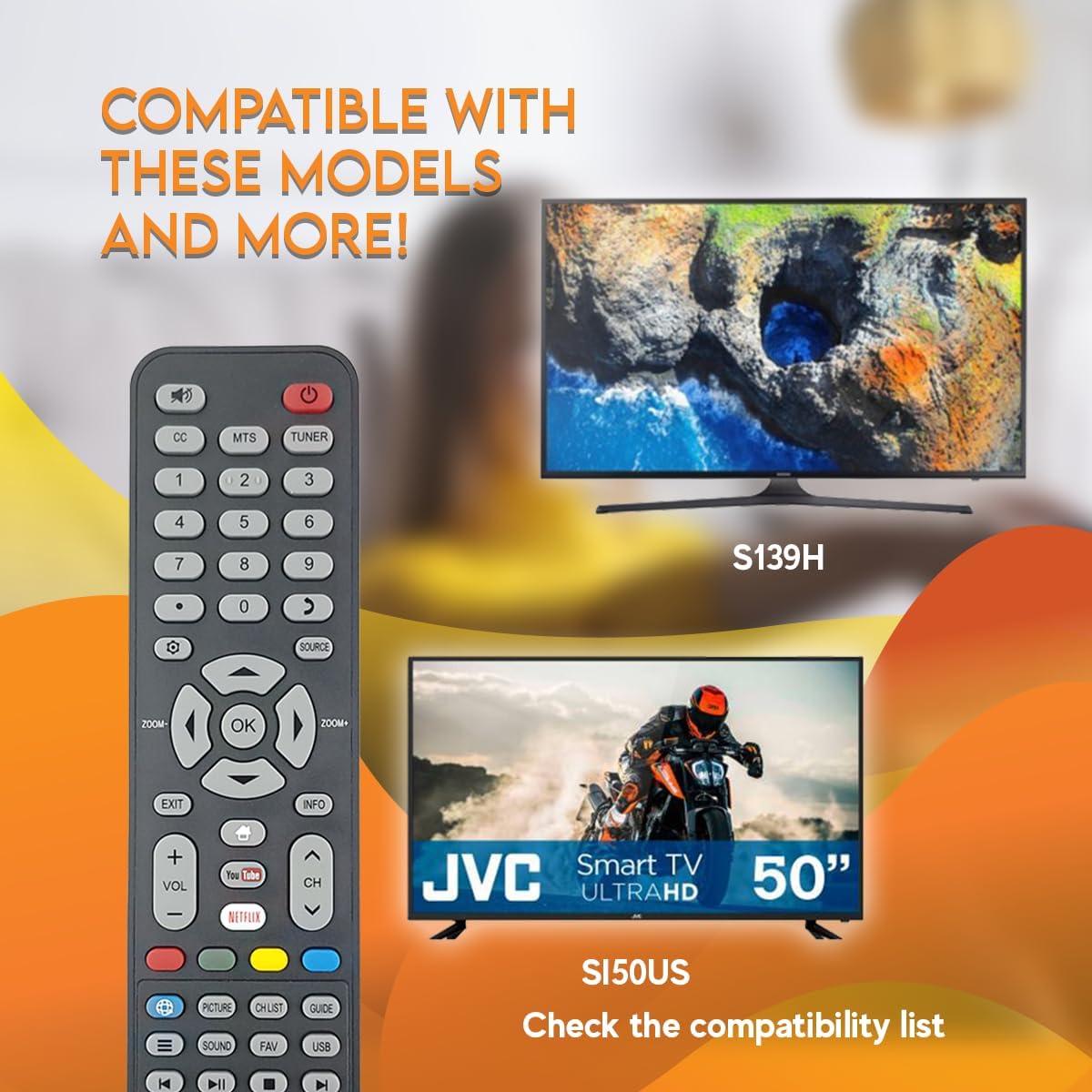
Image 5: The remote control displayed with examples of compatible JVC TV models, such as S139H and SI50US.
5. Kuchengeta
5.1 Kuchenesa
Kuti uchenese remote yako, shandisa jira rakapfava, rakaoma. Patsvina yakasindimara, zvishoma dampIsa jira nemvura kana muchina wekuchenesa usina kunyorova. Dzivisa kushandisa makemikari akaomarara kana zvinhu zvinokwesha, sezvo izvi zvinogona kukuvadza pamusoro pe remote kana zvikamu zvemukati.
5.2 Kutsiviwa kwebhatiri
Replace batteries when the remote's response becomes sluggish or stops working. Always replace both AAA batteries at the same time with new ones. Do not mix old and new batteries, or different types of batteries.
6. Kugadzirisa matambudziko
- Remote isiri kupindura:
- Tarisa kana mabhatiri akaiswa zvakanaka aine polarity chaiyo.
- Tsiva mabhatiri ekare neatsva.
- Ensure there is a clear line of sight between the remote control and the TV's infrared sensor. Obstructions can block the signal.
- Iva nechokwadi chekuti remote yakatarisa zvakananga paTV.
- Mabhatani chaiwo asiri kushanda:
- Clean the remote control, especially around the unresponsive buttons, to remove any dirt or debris that might be causing interference.
- If only certain buttons are not working after checking batteries and line of sight, the remote may be faulty and require replacement.
7. Zvinotsanangurwa
| Feature | Detail |
|---|---|
| Model Number | 06-519W37-TY01X |
| Brand | Ceybo |
| Inowirirana Devices | JVC HD LED Smart Televisions |
| Kubatana Technology | Infrared (IR) |
| Simba Source | 2 x AAA mabhatiri (asina kuisirwa) |
| Special Feature | Ergonomic Design, Quick Access Buttons (Netflix, YouTube) |
8. Warranty uye Tsigiro
Kuti uwane ruzivo rwewarandi kana rutsigiro rwehunyanzvi, ndapota tarisa magwaro akapihwa nekutenga kwako kana kuti bata mutengesi zvakananga. Chengeta humbowo hwekutenga kwako kune chero zvikumbiro zvewarandi.


