1. Nhanganyaya
Thank you for choosing the Sound Town CARPO-M12DS Powered PA/DJ Subwoofer. This 12-inch subwoofer is designed to deliver powerful bass with its 700W continuous and 1400W peak power output, integrated folded horn design, and a 3-inch voice coil. It features a built-in 3-channel mixer, versatile connectivity options including Bluetooth, USB, SD card, XLR, 1/4-inch, and RCA inputs, along with satellite speaker outputs. This manual provides essential information for safe operation, setup, and maintenance of your CARPO-M12DS subwoofer.

Mufananidzo 1.1: Mberi view of the Sound Town CARPO-M12DS Powered PA/DJ Subwoofer. This image shows the main speaker grille and the Sound Town logo at the bottom.
2. Mirayiridzo Yekuchengetedza
Please read and follow all safety instructions before operating this product to prevent electric shock, fire, or injury.
- Kunobva Simba: Connect the unit only to a power supply of the type described in this manual or marked on the unit. Ensure the voltage selector switch (110V/220V) is set correctly for your region before connecting to power.
- Grounding: This product must be grounded. Do not defeat the safety purpose of the polarized or grounding-type plug.
- Kufefetedza Usavhare chero mazaru emhepo. Isa maererano nemirairo yemugadziri.
- Mvura uye Unyoro: Usashandise mudziyo uyu pedyo nemvura kana kuuisa pamvura inodonha kana kupfapfaidza.
- Kupisa: Usaise padhuze nechero zvitubu zvekupisa zvakaita semaradiator, marejita ekupisa, zvitofu, kana zvimwe midziyo (kusanganisira amplifiers) zvinoburitsa kupisa.
- Tambo: Chengetedza tambo yemagetsi kubva pakufambiswa kana kudzvanywa, kunyanya pamapulagi, midziyo yekurerutsira, nenzvimbo yavanobuda kubva mumidziyo.
- Sevhisi: Tumira masevhisi ese kuvashandi vanokwanisa. Kushumira kunodiwa kana mudziyo wakuvadzwa neimwe nzira, senge tambo yemagetsi-yekugovera kana plug yakuvadzwa, mvura yadeuka kana zvinhu zvawira mumidziyo, iyo midziyo yave ichinaya mvura kana hunyoro, haishande zvakajairika. , kana kuti yadonha.
- Kukwidza: Shandisa chete nengoro, stand, tripod, bracket, kana tafura yakataurwa nemugadziri, kana kutengeswa nemidziyo. Kana ngoro ichishandiswa, chenjerera paunenge uchifambisa ngoro/zvishandiso musanganiswa kudzivirira kukuvara kubva kune-tip-over.
- Kuchenesa: Chenesa chete nemucheka wakaoma.
3. Package Zviri mukati
Upon unpacking your Sound Town CARPO-M12DS subwoofer, please ensure all items listed below are present and in good condition:
- Sound Town CARPO-M12DS Powered PA/DJ Subwoofer
- Power Cable
- Mushandisi Chinyorwa (gwaro iri)
If any items are missing or damaged, please contact Sound Town customer support immediately.
4. Chigadzirwa Pamusoroview: Zvidzore uye Zvinobatanidza
The CARPO-M12DS features a comprehensive control panel for managing audio inputs, mixing, and output. Familiarize yourself with the various controls and connection points.
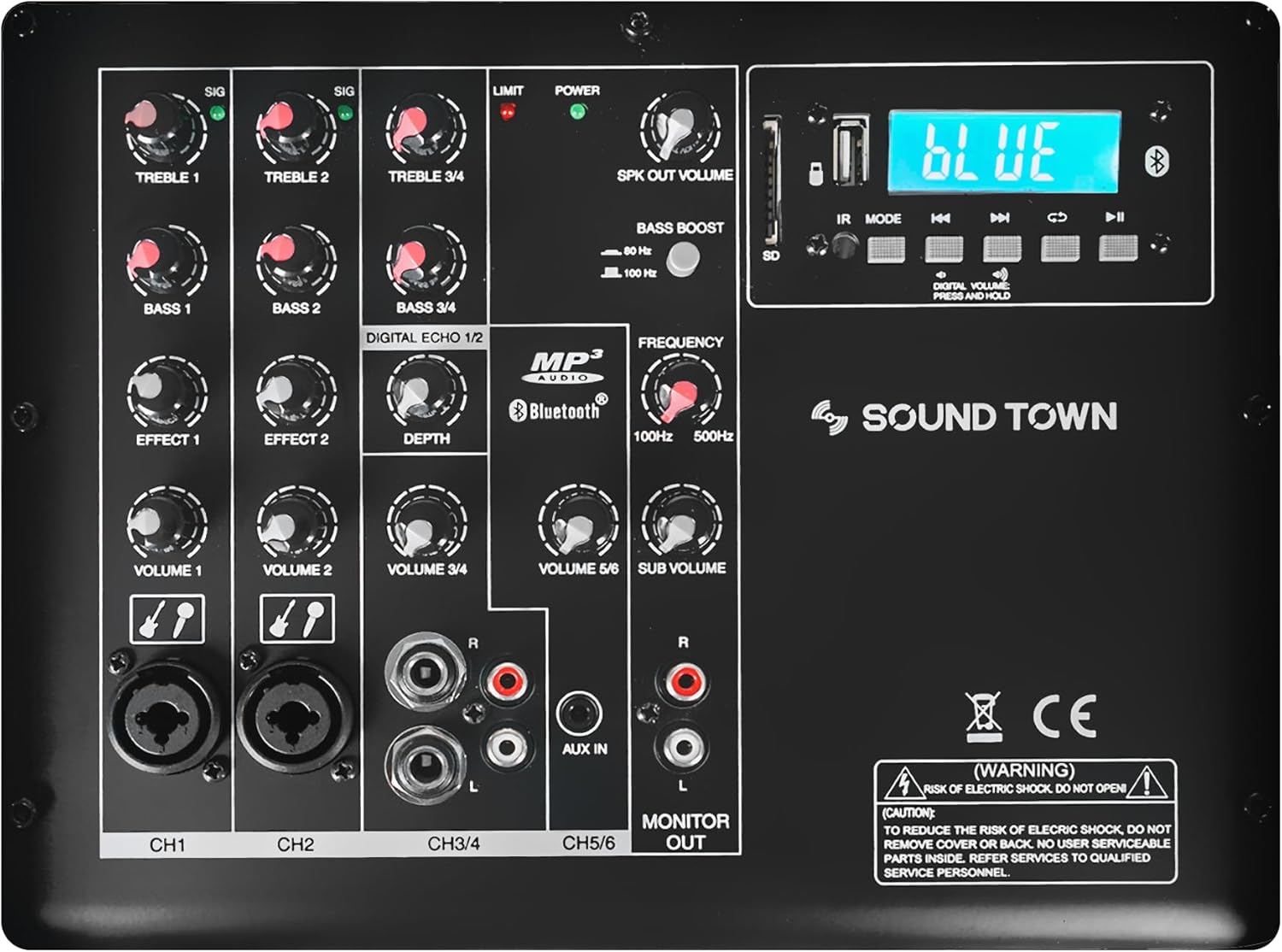
Mufananidzo 4.1: Yakadzama view of the CARPO-M12DS control panel, showing various knobs, inputs, and the digital display.
4.1 Input Channels (CH1, CH2, CH3/4, CH5/6)
- CH1 neCH2: 1/4" & XLR Combo Inputs. These inputs accept both XLR and 1/4-inch TRS/TS connectors for microphones or line-level instruments. Each channel has individual Treble, Bass, Effect (Echo), and Volume controls.
- CH3/4: 2 x 1/4" TRS and RCA Stereo Inputs. Designed for stereo line-level sources like keyboards, DJ controllers, or media players. Features Treble, Bass, and Volume controls.
- CH5/6 (AUX IN): 1/8" AUX Input. For connecting portable audio devices. Shares Volume control with CH3/4.
4.2 Digital Media Player
- Bluetooth/USB/SD Card: Allows for wireless audio streaming via Bluetooth or playback from USB drives and SD cards. Features a digital display and control buttons for playback, mode selection, and volume.
- MP3 Volume: Dedicated volume control for the digital media player.
4.3 Output & System Controls
- SUB VOLUME: Controls the overall output level of the subwoofer.
- FREQUENCY (LPF): Adjustable Low-Pass Filter (100Hz to 500Hz) to control the upper frequency limit of the subwoofer output.
- BASS KUSIMBISA: Enhances low-frequency response.
- SPK OUT VOLUME: Controls the output level for the satellite speakers connected via Speakon.
- ONGORORA: RCA stereo output for connecting to external monitoring systems.
- LIMIT Indicator: Illuminates when the internal limiter is active, preventing signal clipping.
- SIMBA Indicator: Shows the power status of the unit.
4.4 Rear Panel Connections
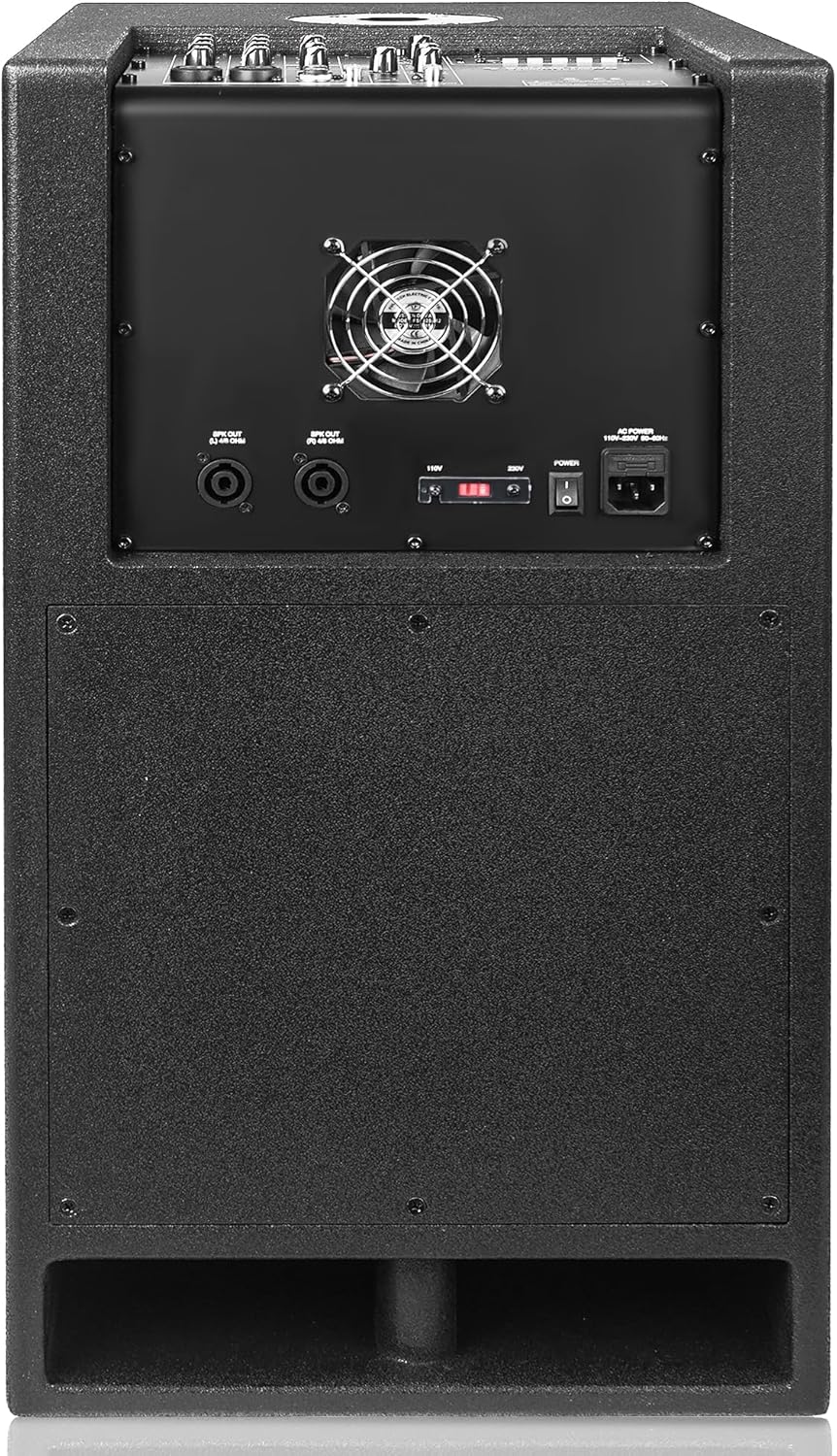
Mufananidzo 4.2: Kumashure view of the CARPO-M12DS, showing power input, voltage selector, and Speakon outputs.
- SPEAKER OUTPUTS (Speakon): Two Speakon outputs for connecting passive satellite speakers (up to 250W continuous per channel).
- SIMBA INPUT: IEC power connector for the included power cable.
- VOLTAGE SELECTOR: Switch to select between 110V and 220V operation. Ensure this is set correctly for your region before connecting power.
- SIMBA Chinja: Inoshandura iyo unit ON / OFF.
5. Setup
Proper setup ensures optimal performance and safety of your CARPO-M12DS subwoofer.
5.1 Kutanga Kuiswa
- Place the subwoofer on a stable, flat surface. The unit is designed for floor standing.
- Ensure adequate ventilation around the unit, especially the rear panel fan.
- Keep the subwoofer away from direct sunlight, heat sources, and moisture.
5.2 Simba Connection
- Verify the VOLTAGE SELECTOR switch on the rear panel is set to the correct voltage yedunhu rako (110V kana 220V).
- Batanidza tambo yemagetsi yakapihwa kune SIMBA INPUT pabhodhi rekumashure wobva waenda kune imwe nzvimbo yekubuditsa AC pasi.
- Do not turn on the unit yet.
5.3 Audio Connections
Connect your audio sources and satellite speakers (if applicable) to the CARPO-M12DS.
- Zvekuisa Connect microphones, instruments, mixers, or media players to the appropriate CH1/2 (XLR/1/4" combo), CH3/4 (1/4" TRS/RCA), or CH5/6 (1/8" AUX) inputs.
- Satellite Speakers: If using passive satellite speakers, connect them to the ZVINOBUDZWA NEMUTAURIRI on the rear panel using Speakon cables. The CARPO-M12DS can power up to two passive speakers at 250W continuous per channel.
- Monitoring: For external monitoring, connect a monitor system to the ONA OUT RCA jacks.
5.4 Mounting Satellite Speakers (Optional)
The CARPO-M12DS includes a 35mm mounting socket on top, designed to accommodate a satellite speaker pole for optimal full-range PA performance. Insert a standard 35mm speaker pole into this socket and mount your satellite speaker.

Mufananidzo 5.1: Pamusoro view of the CARPO-M12DS, highlighting the 35mm mounting socket for a satellite speaker pole.
6. Operating Instructions
Follow these steps to operate your CARPO-M12DS subwoofer.
6.1 Powering On uye Basic Operation
- Ensure all volume controls on the CARPO-M12DS are set to minimum.
- Turn on any connected audio sources (e.g., mixer, instrument).
- Flip the SIMBA switch on the rear panel to the ON position. The POWER indicator on the control panel will illuminate.
- Zvishoma nezvishoma kuwedzera SUB VOLUME and individual channel volumes to your desired listening level.
- If satellite speakers are connected, gradually increase the SPK OUT VOLUME.
6.2 Using the Mixer Controls
- Vhoriyamu: Adjust the individual volume knobs for each channel (Volume 1, Volume 2, Volume 3/4, Volume 5/6) to balance your audio sources.
- EQ (Treble/Bass): Use the Treble and Bass knobs for CH1, CH2, and CH3/4 to fine-tune the high and low frequencies of each input.
- Effect (Echo): Apply echo effects to CH1 and CH2 using the Effect knobs. Adjust the overall echo depth with the dedicated DEPTH knob.
6.3 Digital Media Playback (Bluetooth/USB/SD)
- Sarudzo yeModhi: Press the 'Mode' button on the digital media player to switch between Bluetooth, USB, and SD card modes.
- Bluetooth Pairing: In Bluetooth mode, the display will show 'BLUE'. On your device, search for 'SOUND TOWN' and pair. Once connected, you can stream audio wirelessly.
- Kutamba kwe USB/SD: Insert a USB drive or SD card with audio files into the respective slot. The unit will automatically begin playback. Use the playback controls (play/pause, skip track) on the panel.
- Gadzirisa iyo MP3 Vhoriyamu knob to control the output level of the digital media player.
6.4 Subwoofer Output Adjustment
- SUB VOLUME: Adjust this knob to control the overall loudness of the subwoofer.
- FREQUENCY (LPF): Rotate this knob to set the crossover point for the subwoofer. Frequencies below this setting will be reproduced by the subwoofer. A typical starting point is around 100Hz-120Hz, but adjust to blend smoothly with your main speakers.
- BASS KUSIMBISA: Engage or adjust this feature to add extra punch to the low frequencies. Use sparingly to avoid distortion.
6.5 Kudzima
Before powering off, reduce all volume controls to minimum. Then, flip the SIMBA switch kune OFF chinzvimbo.
7. Kuchengeta
Regular maintenance helps ensure the longevity and optimal performance of your subwoofer.
- Kuchenesa: Shandisa jira rakapfava, rakaoma kuchenesa kunze kwechikwata. Usashandise abrasive cleaners, wax, kana solvents.
- Kufefetedza Periodically check that the cooling fan and ventilation openings are free from dust and debris.
- Cable Connections: Iva nechokwadi chekuti tambo dzese dzakabatana zvakanaka uye hadzina kukuvara.
- Kuchengeta: If storing the unit for an extended period, keep it in a dry, cool place, preferably in its original packaging or a protective cover.
8. Kugadzirisa matambudziko
If you encounter issues with your CARPO-M12DS, refer to the following common problems and solutions.
| Dambudziko | Zvinogona Kukonzera | Solution |
|---|---|---|
| Hapana simba | Power cable disconnected; Power switch off; Incorrect voltage selection; Blown fuse | Check power cable connection; Ensure power switch is ON; Verify voltage selector is correct; Check and replace fuse if necessary (refer to qualified personnel). |
| Hapana ruzha kubva ku subwoofer | SUB VOLUME too low; Input source not connected or muted; LPF set too low; Faulty input cable | Increase SUB VOLUME; Check input source and connections; Adjust LPF to a suitable range (e.g., 100-120Hz); Test with a different cable. |
| No sound from satellite speakers | SPK OUT VOLUME too low; Satellite speakers not connected; Faulty Speakon cable; Satellite speakers are passive and require power. | Increase SPK OUT VOLUME; Check Speakon connections; Test with a different cable; Ensure passive speakers are correctly connected and functional. |
| Inzwi rakakanganiswa | Input signal too high; Volume levels too high; LIMIT indicator constantly on; Faulty speaker or cable | Reduce input gain from source; Lower channel volumes and SUB VOLUME; If LIMIT indicator is on, reduce overall volume; Test with different speakers/cables. |
| Bluetooth haina kubatana | Haisi muBluetooth mode; Mudziyo wakanyanya kure; Wakatobatanidzwa nemumwe mudziyo | Ensure unit is in Bluetooth mode ('BLUE' on display); Move device closer; Disconnect from other devices and try pairing again. |
If the problem persists after trying these solutions, please contact Sound Town customer support.
9. Zvinotsanangurwa
Detailed technical specifications for the Sound Town CARPO-M12DS Powered PA/DJ Subwoofer.
| Feature | Tsanangudzo |
|---|---|
| Model Name | CARPO-M12DS |
| Mutauri Rudzi | Powered Subwoofer |
| Woofer Diameter | 12 inches |
| Mutauri Mukuru Wekubuda Simba | 1400 Watts (Peak) |
| Continuous Power | 700 Watts |
| Satellite Speaker Output Power | Up to 250W continuous per channel |
| Kutenderedza Inzwi Channel Configuration | 2.1 |
| Kubatana Technology | Auxiliary, Bluetooth, RCA, TRS, USB, XLR |
| Wireless Communication Technology | Bluetooth |
| Material | Metal, Wood (Plywood) |
| Color | Nhema |
| Zviyero zveChigadzirwa (D x W x H) | 30.3" x 21.5" x 17.7" |
| Mounting Type | Floor Standing (with 35mm pole mount socket) |
| Simba Source | Corded Electric |
| Kudzora Nzira | Touch (knobs/buttons) |
| UPC | 810062039814 |
10. Warranty uye Tsigiro
The Sound Town CARPO-M12DS subwoofer comes with a limited warranty. For specific warranty terms and conditions, please refer to the warranty card included with your product or contact Sound Town customer service.
For technical support, troubleshooting assistance, or warranty claims, please contact Sound Town directly:
- Mugadziri: Sound Town
- Websaiti: Visit the Sound Town Store on Amazon
Please have your product model number (CARPO-M12DS) and purchase information ready when contacting support.


