1. Nhanganyaya
This manual provides comprehensive instructions for the setup, operation, and maintenance of your Xprinter XP-Q801K Thermal Receipt Printer. This printer is designed for efficient and reliable receipt printing in various business environments, featuring high-speed direct thermal printing and a USB interface for easy connectivity.

Mufananidzo 1: Mberi view of the Xprinter XP-Q801K Thermal Receipt Printer, showing the paper output slot and control buttons.
2. Setup
2.1 Kusunungura
Carefully remove the printer and all accessories from the packaging. Verify that all components are present:
- Xprinter XP-Q801K Thermal Receipt Printer
- Power Adapter
- USB Cable
- Paper Roll (starter)
- Mushandisi Chinyorwa (gwaro iri)
2.2 Kubatanidza Printer
Before connecting, ensure the printer is powered off. Locate the ports on the rear of the printer.
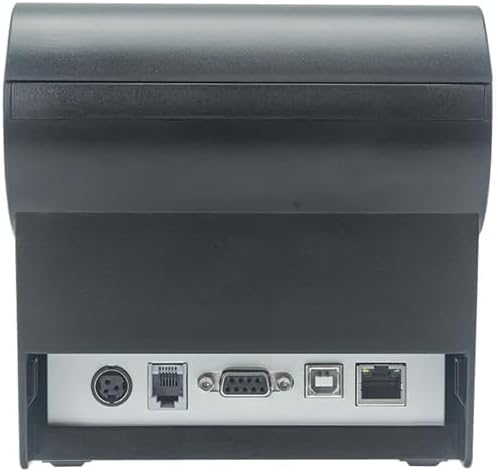
Mufananidzo 2: Kumashure view of the printer, highlighting the power, USB, and other interface ports.
- Batanidza Simba: Insert the power adapter cable into the printer's power input port (DC 24V/2.5A) and plug the adapter into a suitable electrical outlet (AC 100-240V, 50-60Hz).
- Batanidza USB: Connect one end of the provided USB cable to the USB port on the printer and the other end to an available USB port on your computer.
- Cash Drawer (Optional): If using a cash drawer, connect its cable to the cash drawer port (DC 24V/1A) on the printer.
2.3 Loading the Paper Roll
The printer uses 80mm wide thermal paper rolls.
- Open the paper cover by pushing the cover open button (usually located on the side or front).
- Insert the thermal paper roll with the printing surface facing the print head. Ensure the roll is seated correctly in the paper compartment.
- Dhonza bepa diki uchipfuura nemuchina wekucheka.
- Close the paper cover firmly until it clicks into place.
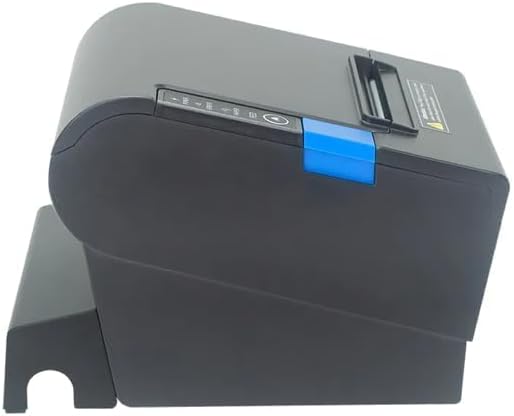
Mufananidzo 3: Rutivi view of the printer, illustrating the paper cover mechanism.
2.4 Kuiswa kwemutyairi
The printer requires a driver to communicate with your computer. Drivers are typically available for Windows, Linux, Android, and Mac operating systems.
- For Windows users, the printer often supports plug-and-play installation or requires a specific Windows driver.
- For Linux, Android, and Mac, SDKs (Software Development Kits) are usually provided for integration.
Tarisa kune mugadziri wacho website or the included driver CD/USB drive for the latest drivers and installation instructions specific to your operating system.
3. Kushandisa Printer
3.1 Kubatidza/Kudzima
Locate the power switch on the side or rear of the printer. Flip the switch to the 'ON' position to power on the printer. The 'POWER' indicator light will illuminate. Flip to 'OFF' to power down.
3.2 Mwenje nemabhatani ezviratidzo
The front panel typically features several indicator lights and buttons:
- SIMBA: Zvinoratidza kuti printer yakabatidzwa.
- ERROR: Illuminates or flashes to indicate an error condition (e.g., paper out, print head overheating, cutter error).
- PEPA: Indicates that the paper roll is low or out.
- FEED Bhatani: Press to manually feed paper. Hold to perform a self-test print (if supported by model).
3.3 Kudhinda Kwepakutanga
Once the printer is connected and drivers are installed, you can print receipts from your POS software or application. Ensure the printer is selected as the default or active printer in your system settings.
The printer supports various print speeds up to 300 mm/s and automatic paper cutting after each print job.
4. Kuchengeta
Regular maintenance ensures optimal performance and extends the life of your printer.
4.1 Kuchenesa Musoro Wekudhinda
The print head should be cleaned regularly, especially if print quality degrades.
- Dzima printa wobvisa waya yemagetsi.
- Vhura chivharo chepepa.
- Shandisa donje swab zvishoma dampened with isopropyl alcohol (ethanol) to gently wipe the thermal elements of the print head.
- Rega musoro wekudhinda uome zvachose usati wavhara chifukidziro uye wabatanidzazve simba.
4.2 Cleaning the Cutter
Paper dust can accumulate around the cutter blade, affecting its performance.
- Dzima printa wobvisa waya yemagetsi.
- Carefully remove any visible paper dust or debris from around the cutter blade using a soft brush or compressed air.
- Do not use liquids on the cutter.
4.3 General Kuchenesa
Pukuta kunze kweprinta nekanyoro, damp jira. Dzivisa kushandisa makemikari ane hasha kana abrasive cleaners.
5. Kugadzirisa matambudziko
Chikamu chino chinotaura nezvematambudziko akajairika aungasangana nawo neprinta yako.
| Dambudziko | Zvinogona Kukonzera | Solution |
|---|---|---|
| Printer haibatidzi. | Tambo yemagetsi haina kubatana; Nzvimbo yekubuditsa magetsi yakanganisa; Chidzimiso chemagetsi chadzimwa. | Ensure power cable is securely connected. Test power outlet. Turn power switch to 'ON'. |
| No printing. | Paper out; Paper loaded incorrectly; Driver not installed or incorrect; USB cable loose; Printer not selected. | Load new paper roll. Re-load paper correctly. Install/reinstall correct driver. Check USB connection. Select printer in software. |
| ERROR light is on/flashing. | Paper out; Paper jam; Print head overheating; Cutter error. | Load paper. Clear paper jam. Allow printer to cool down. Check cutter for obstructions. |
| Kudhinda kwemhando yakashata. | Dirty print head; Low quality paper; Old paper roll. | Clean the print head (see Section 4.1). Use high-quality thermal paper. Replace old paper rolls. |
Kana dambudziko rikaramba riripo mushure mekuyedza mhinduro idzi, ndapota taura nerutsigiro rwevatengi.
6. Zvinotsanangurwa
| Feature | Detail |
|---|---|
| Printing Method | Direct Thermal |
| Pepa Width | 80 mm |
| Print Speed | 230 mm/s, 260 mm/s, 300 mm/s |
| Interface | USB |
| Line Spacing | 3.75 mm (adjustable by commands) |
| Character Size (ANK) | Font A: 1.5 × 3.0 mm (12 × 24 dots) Font B: 1.1 × 2.1 mm (9 × 17 dots) |
| Character Size (Chinese/Traditional Chinese) | 3.0 × 3.0 mm (24 × 24 dots) |
| Barcode Types | UPC-A / UPC-E / JAN13 (EAN13) / JAN8 (EAN8) / CODE39 / ITF / CODABAR / CODE93 / CODE128 |
| 2D Barcode | QR Code / PDF417 |
| NV Flash Memory | 256 KB |
| Input Power | AC 100-240V, 50-60Hz |
| Output Power | DC 24V/2.5A |
| Cash Drawer Output | DC 24V/1A |
| Kurema | 1.0 kg |
| Zviyero (D × W × H) | 194.5 × 145 × 146.4 mm |
| Operating Temperature | 0~45°C |
| Kushanda Humidity | 10 ~ 80% RH |
| Mucheka Hupenyu | 1.5 miriyoni kucheka |
| Dhinda Musoro Hupenyu | 150 km |
| OS Kugarisana | Windows, Linux, Android, Mac |


